Updated firmware for EG800Q?

Our company is currently using a model of the Raspberry PI to rollout a energy advice service which needs a low bandwidth status update. We currently use SIMCOM devices, which works well, both in ECM and RNDIS mode. the module is connected using USB, so all ports are available. We are having a hard time with getting data through the interface (either usb0 or wwan0 depending on the mode). We have had similar issues with EC25 and EC200 (European versions). We are now testing the EG800Q-EU version as the most suitable for the new rollout. However, it is not working as expected (no data through the interface). The firmware is EG800QEULCR01A07M04.

I have also noted that the command AT+COPN stops after this entry:

+COPN: “310530”,“T-Mobile”
+COPN: “310580”,“T-Mobile”

This may be becasue there is hardware handshake, but I need to check if you support XON/XOFF

It does not list any EE, Vodafone networks. This will imply that the device is going to get the worst QoS.

Greate if you have a new version of the firmware which would make ECM / RNDIS work.

Thank you.

Best,
Tom

Just to follow up:

This is the list of network we connect to:
+COPS: (2,“EE”,“EE”,“23430”,7),(0,“”,“”,“23432”,7),(0,“”,“”,“23420”,7),(0,“O2 - UK”,“O2 - UK”,“23410”,7),(0,“vodafone UK”,“voda UK”,“23415”,7),(0-4),(0-2)

Our current IoT network is 50K+, the SIM is Conexa and KPN.

What is your current problem, or can you provide a comparative log?

Hello Herbert, I have captured the list of results of AT+COPN, which does not list any of the UK networks. We wrote some software to chat witht he modem, please ignore the verbosity.

AT+COPN
2025-01-18 12:12:32.440372: Tick
2025-01-18 12:12:42.440465: Tick
2025-01-18 12:12:52.440584: Tick
2025-01-18 12:13:02.440678: Tick
2025-01-18 12:13:12.440784: Tick
ATI
2025-01-18 12:13:22.440897: Tick
2025-01-18 12:13:32.440988: Tick
2025-01-18 12:13:42.441098: Tick
2025-01-18 12:13:52.441201: Tick
2025-01-18 12:14:02.441304: Tick
2025-01-18 12:14:12.441406: Tick
2025-01-18 12:14:22.441501: Tick
2025-01-18 12:14:27.979970: +COPN: “46000”,“CHINA MOBILE”
2025-01-18 12:14:27.980000: +COPN: “46002”,“CHINA MOBILE”
2025-01-18 12:14:27.980002: +COPN: “46004”,“CHINA MOBILE”
2025-01-18 12:14:27.980004: +COPN: “46007”,“CHINA MOBILE”
2025-01-18 12:14:27.980006: +COPN: “46008”,“CHINA MOBILE”
2025-01-18 12:14:27.980007: +COPN: “46003”,“CHN-CT”
2025-01-18 12:14:27.980009: +COPN: “46005”,“CHN-CT”
2025-01-18 12:14:27.980011: +COPN: “46011”,“CHN-CT”
2025-01-18 12:14:27.980013: +COPN: “46001”,“CHN-UNICOM”
2025-01-18 12:14:27.980014: +COPN: “46006”,“CHN-UNICOM”
2025-01-18 12:14:27.980016: +COPN: “311480”,“Verizon Wireless”
2025-01-18 12:14:27.980018: +COPN: “46009”,“CHN-UNICOM”
2025-01-18 12:14:27.980020: +COPN: “46015”,“China Broadnet”
2025-01-18 12:14:27.980021: +COPN: “31000”,“Verizon Wireless”
2025-01-18 12:14:27.980023: +COPN: “31010”,“Verizon Wireless”
2025-01-18 12:14:27.980025: +COPN: “310590”,“Verizon Wireless”
2025-01-18 12:14:27.980027: +COPN: “310890”,“Verizon Wireless”
2025-01-18 12:14:27.980028: +COPN: “311270”,“Verizon Wireless”
2025-01-18 12:14:27.980030: +COPN: “311481”,“Verizon Wireless”
2025-01-18 12:14:27.980032: +COPN: “311770”,“Verizon Wireless”
2025-01-18 12:14:27.980034: +COPN: “31030”,“ATT”
2025-01-18 12:14:27.980035: +COPN: “31040”,“ATT”
2025-01-18 12:14:27.980037: +COPN: “31070”,“ATT”
2025-01-18 12:14:27.980039: +COPN: “31090”,“ATT”
2025-01-18 12:14:27.980040: +COPN: “310150”,“ATT”
2025-01-18 12:14:27.980042: +COPN: “310170”,“ATT”
2025-01-18 12:14:27.980043: +COPN: “310280”,“ATT”
2025-01-18 12:14:27.980045: +COPN: “310380”,“ATT”
2025-01-18 12:14:27.980047: +COPN: “310410”,“ATT”
2025-01-18 12:14:27.980048: +COPN: “310440”,“ATT”
2025-01-18 12:14:27.980050: +COPN: “310560”,“ATT”
2025-01-18 12:14:27.980051: +COPN: “310570”,“ATT”
2025-01-18 12:14:27.980053: +COPN: “310650”,“ATT”
2025-01-18 12:14:27.980055: +COPN: “310670”,“ATT”
2025-01-18 12:14:27.980056: +COPN: “310680”,“ATT”
2025-01-18 12:14:27.980058: +COPN: “310950”,“ATT”
2025-01-18 12:14:27.980059: +COPN: “310980”,“ATT”
2025-01-18 12:14:27.980061: +COPN: “310990”,“ATT”
2025-01-18 12:14:27.980063: +COPN: “31160”,“ATT”
2025-01-18 12:14:27.980064: +COPN: “31170”,“ATT”
2025-01-18 12:14:27.980066: +COPN: “311130”,“ATT”
2025-01-18 12:14:27.980067: +COPN: “311160”,“ATT”
2025-01-18 12:14:27.980069: +COPN: “311170”,“ATT”
2025-01-18 12:14:27.980071: +COPN: “311180”,“ATT”
2025-01-18 12:14:27.980072: +COPN: “311260”,“ATT”
2025-01-18 12:14:27.980074: +COPN: “90118”,“ATT”
2025-01-18 12:14:27.980075: +COPN: “312670”,“ATT-FirstNet”
2025-01-18 12:14:27.980077: +COPN: “313100”,“ATT-FirstNet”
2025-01-18 12:14:27.980079: +COPN: “313130”,“ATT-FirstNet”
2025-01-18 12:14:27.980081: +COPN: “313140”,“ATT-FirstNet”
2025-01-18 12:14:27.980082: +COPN: “310160”,“T-Mobile”
2025-01-18 12:14:27.980084: +COPN: “310170”,“T-Mobile”
2025-01-18 12:14:27.980086: +COPN: “310200”,“T-Mobile”
2025-01-18 12:14:27.980087: +COPN: “310210”,“T-Mobile”
2025-01-18 12:14:27.980089: +COPN: “310220”,“T-Mobile”
2025-01-18 12:14:27.980091: +COPN: “310230”,“T-Mobile”
2025-01-18 12:14:27.980092: +COPN: “310240”,“T-Mobile”
2025-01-18 12:14:27.980094: +COPN: “310250”,“T-Mobile”
2025-01-18 12:14:27.980096: +COPN: “310260”,“T-Mobile”
2025-01-18 12:14:27.980097: +COPN: “310270”,“T-Mobile”
2025-01-18 12:14:27.980099: +COPN: “310310”,“T-Mobile”
2025-01-18 12:14:27.980101: +COPN: “310490”,“T-Mobile”
2025-01-18 12:14:27.980102: +COPN: “310530”,“T-Mobile”
2025-01-18 12:14:27.980104: +COPN: “310580”,“T-Mobile”
2025-01-18 12:14:27.991353: WARNING: Unknown “+COPN: “310660”,“T-Mobile””
2025-01-18 12:14:27.991395: WARNING: Unknown “Quectel”
2025-01-18 12:14:27.991451: WARNING: Unknown “EG800Q-EU”
2025-01-18 12:14:27.991480: WARNING: Unknown “Revision: EG800QEULCR01A07M04”
2025-01-18 12:14:27.991489: WARNING: Unknown “OK”
2025-01-18 12:14:32.441618: Tick
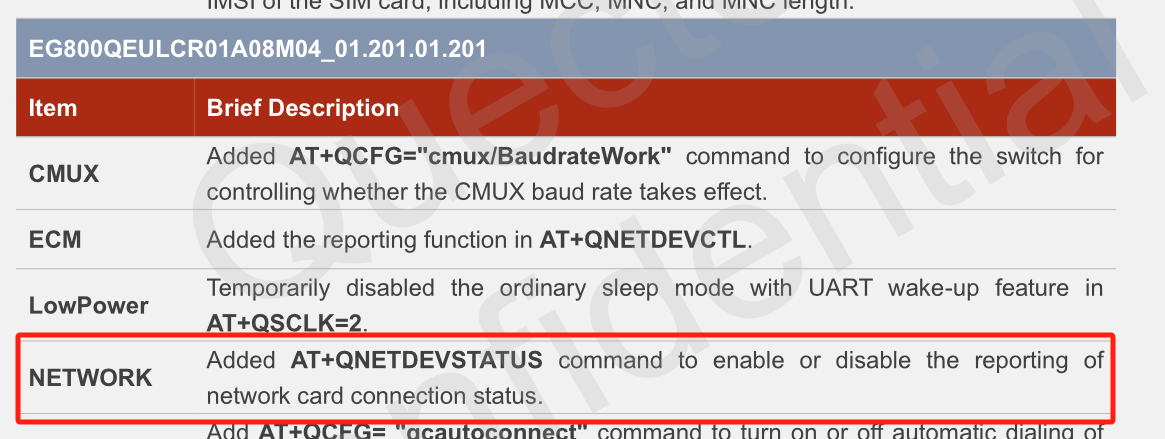
I am missing some comands, in particular “AT+QNETDEVSTATUS=?” returns ERROR

Please check the EG800QEULCR01A11M04_01.201.01.201.

FYI:
2025-01-19 16:42:06: M: model = EG800Q-EU
2025-01-19 16:42:06: M: vendor = Quectel
2025-01-19 16:42:06: M: firmware = EG800QEULCR01A07M04
Noted that the kernel needs to be re-compiled due to the EG800 is not in the driver.

I have sent you the EG800QEULCR01A11M04_01.201.01.201. Did you try it?

Thank you. I will do today. Noted that the new firmware also supports “usbnet”,0

Not supported.
It only support usbnet mode 1 for ECM and 3 for RNDIS.

Thank you for the quick followup.

Due to regulations, I have had to wait five hours before posting a reply.

I am having problems flashing the module using QFlash 7.3. It just times out on the DIAG port. Windows 10, running as Admin. Can;t see the module listed in the documentation either.

I have since downloaded QFirehose.1.4.17 from github, using repository nippynetworks/qfirehose. Compiling this on a Raspberry (thanks for using cmake and tools), which gives me the following. Note that the command fails anyway. It seems to me that the module I am using is somewhat suspect, so our co. may need to develop our own module.

$ sudo ./QFirehose -p /dev/ttyUSB0 -f ~/EG800QEULCR01A11M04_01.201.01.201.zip -n
[000.000]: Version: QFirehose_Linux_Android_V1.4.17
[000.000]: Builded: Jan 20 2025 16:21:55
[000.015]: firehose_zip_name:EG800QEULCR01A11M04_01.201.01.201
[000.016]: main firehose_unzip_full_dir:/tmp/EG800QEULCR01A11M04_01.201.01.201
[000.016]: find_firehose_mbn Length Date Time Name


    0  2024-11-07 11:48   EG800QEULCR01A11M04_01.201.01.201/
    0  2024-10-22 09:23   EG800QEULCR01A11M04_01.201.01.201/agentboot_uart/
44500  2024-10-22 09:17   EG800QEULCR01A1

[000.016]: qusb_read_speed_atime speed: 480, st_atime: 20250120_16:20:13
[000.016]: P: /dev/bus/usb/001/006 idVendor=2c7c idProduct=6007
[000.016]: C: /dev/bus/usb/001/006 bNumInterfaces: 6
[000.016]: I: If#= 0 Alt= 0 #EPs= 2 Cls=ff Sub=00 Prot=00
[000.016]: E: Ad=01 Atr=02 MxPS= 512 Ivl=0ms
[000.016]: E: Ad=81 Atr=02 MxPS= 512 Ivl=0ms
[000.016]: I: If#= 1 Alt= 0 #EPs= 3 Cls=ff Sub=00 Prot=00
[000.017]: E: Ad=82 Atr=03 MxPS= 16 Ivl=9ms
[000.017]: E: Ad=83 Atr=02 MxPS= 512 Ivl=0ms
[000.017]: E: Ad=02 Atr=02 MxPS= 512 Ivl=0ms
[000.017]: I: If#= 2 Alt= 0 #EPs= 3 Cls=ff Sub=00 Prot=00
[000.017]: E: Ad=84 Atr=03 MxPS= 16 Ivl=9ms
[000.017]: E: Ad=85 Atr=02 MxPS= 512 Ivl=0ms
[000.017]: E: Ad=03 Atr=02 MxPS= 512 Ivl=0ms
[000.017]: I: If#= 3 Alt= 0 #EPs= 3 Cls=ff Sub=00 Prot=00
[000.017]: E: Ad=86 Atr=03 MxPS= 16 Ivl=9ms
[000.017]: E: Ad=87 Atr=02 MxPS= 512 Ivl=0ms
[000.017]: E: Ad=04 Atr=02 MxPS= 512 Ivl=0ms
[000.017]: I: If#= 4 Alt= 0 #EPs= 1 Cls=02 Sub=06 Prot=00
[000.017]: I: If#= 5 Alt= 0 #EPs= 0 Cls=0a Sub=00 Prot=00
[000.017]: I: If#= 5 Alt= 1 #EPs= 2 Cls=0a Sub=00 Prot=00
[000.017]: tmp=/sys/bus/usb/devices/usb1/../driver, driver=../../../../bus/platform/drivers/dwc_otg
[000.017]: qusb_noblock_open port_name = /dev/ttyUSB0
[000.018]: /home/orsis/src/QFirehouse.1.4.17/qfirehose/qfirehose.c detect_and_judge_module_version 251 fail
[001.617]: switch to ‘Emergency download mode’
[003.259]: P: /dev/bus/usb/001/006 idVendor=2c7c idProduct=6007

The QFirehose do not support the EG800Q. Please try the QDownload.

Quectel_QDownloadProj_Linux_User_Guide_V1.0.pdf (303.9 KB)
downloadProj_V2.0.zip (18.4 MB)

I have a similar problem with empty list of operator names (+COPN) . EG800Q-EU revision EG800QEULCR01A04M04. Please could You send me the latest firmware for the module?

Hi, Sir,

I will check and reply by email. Much appreciation.