EC200U-CN AWS IoT TLS Handshake Failed - Error 579 / QMTOPEN 0,5 - A13M08

Hi Quectel Support,

I am trying to connect an EC200U-CN module to AWS IoT Core using MQTT over TLS on port 8883.

I have verified that LTE connectivity, PDP context, DNS resolution, and TCP connectivity to the AWS endpoint are working. However, the TLS handshake fails with error 579, and consequently MQTT QMTOPEN returns 0,5.

Authentication: AWS IoT Core X.509 certificate-based mutual TLS (mTLS). I am using Amazon Root CA 1 for server verification, an AWS IoT X.509 device/client certificate, and its corresponding RSA private key.

Module / Network Details

Module       : Quectel EC200U-CN
Firmware     : EC200UCNAAR03A13M08
Host MCU     : ESP32
SIM          : Airtel India
APN          : airtelgprs.com
AWS Region   : ap-south-1
AWS IoT Port : 8883
MQTT Version : MQTT 3.1.1

1. LTE/PDP Connection – Working

The PDP context is active and the modem receives an IP address:

AT+QIACT?

+QIACT: 1,1,1,"10.xx.xx.xx"
OK

2. AWS TCP Port 8883 – Working

I tested a raw TCP connection to the same AWS IoT endpoint:

AT+QIOPEN=1,0,"TCP","xxxxxxxxxxxx-ats.iot.ap-south-1.amazonaws.com",8883,0,0

OK
+QIOPEN: 0,0

Therefore, the AWS endpoint and port 8883 are reachable from the modem.

3. Modem Time – Synchronized

I synchronized the modem using NTP:

AT+QNTP=1,"pool.ntp.org"
OK

+QNTP: 0,"2026/08/03,09:30:18+22"

AT+CCLK?
+CCLK: "26/08/03,09:30:22+22"
OK

4. AWS Certificates – Present in UFS

AT+QFLST="*"

+QFLST: "UFS:AmazonRootCA1.pem",1188
+QFLST: "UFS:deviceCert.pem",1220
+QFLST: "UFS:privateKey.pem",1679
OK

I have also generated and tested with a new AWS IoT device certificate/private-key pair, but the result is the same.

5. TLS Configuration

I am using SSL context 2:

AT+QSSLCFG="cacert",2,"UFS:AmazonRootCA1.pem"
AT+QSSLCFG="clientcert",2,"UFS:deviceCert.pem"
AT+QSSLCFG="clientkey",2,"UFS:privateKey.pem"
AT+QSSLCFG="seclevel",2,2
AT+QSSLCFG="sslversion",2,3
AT+QSSLCFG="ciphersuite",2,0xFFFF
AT+QSSLCFG="sni",2,1
AT+QSSLCFG="ignorelocaltime",2,0

All of these commands return:

OK

I have also tested sslversion=4 and ignorelocaltime=1, but the result does not change.

6. Direct TLS Test – Failing

To determine whether this was an MQTT issue or TLS issue, I tested the TLS connection directly using QSSLOPEN:

AT+QSSLOPEN=1,2,0,"xxxxxxxxxxxx-ats.iot.ap-south-1.amazonaws.com",8883,0

OK
+QSSLOPEN: 0,579

Then:

AT+QIGETERROR

+QIGETERROR: 579,ssl handshake failed
OK

Therefore, the failure appears to occur during the TLS handshake itself, before MQTT CONNECT.

7. MQTT Test

MQTT is configured as:

AT+QMTCFG="pdpcid",0,1
AT+QMTCFG="version",0,4
AT+QMTCFG="recv/mode",0,0,1
AT+QMTCFG="ssl",0,1,2

Then:

AT+QMTOPEN=0,"xxxxxxxxxxxx-ats.iot.ap-south-1.amazonaws.com",8883

OK
+QMTOPEN: 0,5

So the MQTT failure seems consistent with the TLS handshake failure above.

8. Cipher Suites Tested

AT+QSSLCFG=? shows that this firmware supports multiple TLS cipher suites.

I individually tested:

0xC02F
0xC030
0xC027
0xC028
0xFFFF

All of them still result in:

+QSSLOPEN: 0,579
+QIGETERROR: 579,ssl handshake failed

Summary

LTE registration              : PASS
PDP / IP                      : PASS
DNS                           : PASS
AWS TCP port 8883             : PASS
NTP / modem time              : PASS
Certificate files in UFS      : PASS
TLS handshake (QSSLOPEN)      : FAIL - Error 579
MQTT open (QMTOPEN)           : FAIL - Result 5

The main issue appears to be:

TCP connection succeeds
       ↓
TLS handshake starts
       ↓
+QSSLOPEN: 0,579
       ↓
ssl handshake failed

Questions

Could you please help clarify the following?

  1. Does firmware EC200UCNAAR03A13M08 fully support AWS IoT Core MQTT mutual TLS on port 8883?

  2. Is there any known TLS interoperability issue with this firmware and AWS IoT -ats endpoints?

  3. Is any additional QSSLCFG configuration required for AWS IoT Core?

  4. What sslversion and cipher suite are recommended for AWS IoT Core on EC200U-CN?

  5. Is there a way to obtain more detailed TLS handshake/debug information for error 579?

  6. Is there a newer/recommended EC200U-CN firmware for AWS IoT Core TLS support?

  7. If a firmware upgrade is required, could you please provide the correct firmware package and upgrade procedure for EC200U-CN?

I can provide the complete AT-command log if required.

Thanks.
pls refer to the doc and try again

Hi,

Thank you for sharing the AWS IoT application note.

I followed the configuration/connection procedure from the document, but the issue is still present on my EC200U-CN.

Module: EC200U-CN
Firmware: EC200UCNAAR03A13M08

Hardware Setup:
We are using the EC200U-CN on our custom hardware/PCB, not a Quectel EVB. The modem is controlled by an external ESP32 through UART. We have brought out the required UART RX, UART TX, and PWRKEY signals from the EC200U and connected them to the ESP32. AT-command communication between the ESP32 and EC200U is working correctly.

The module successfully registers on the LTE network, activates the PDP context, resolves/pings the AWS IoT endpoint, and can establish a raw TCP connection to AWS port 8883. The failure occurs specifically when attempting the TLS handshake/MQTT SSL connection.

Network connectivity to AWS is working:

AT+QPING=1,"xxxxxxxxxxxx-ats.iot.ap-south-1.amazonaws.com"

+QPING: 0,"3.109.7.243",64,58,255
+QPING: 0,"3.109.7.243",64,62,255
+QPING: 0,"3.109.7.243",64,58,255
+QPING: 0,4,4,0,58,62,59

I noticed that the application note uses RAM: for the certificate files. On my firmware, the RAM filesystem commands return ERROR:

AT+QFLST="RAM:*"
ERROR

AT+QFLDS="RAM"
ERROR

UFS: works correctly:

AT+QFLST="UFS:*"

+QFLST: "UFS:AmazonRootCA1.pem",1188
+QFLST: "UFS:deviceCert.pem",1220
+QFLST: "UFS:privateKey.pem",1679
OK

Therefore I used the UFS paths in the same TLS configuration:

AT+QMTCFG="recv/mode",0,0,1
AT+QMTCFG="ssl",0,1,2

AT+QSSLCFG="cacert",2,"UFS:AmazonRootCA1.pem"
AT+QSSLCFG="clientcert",2,"UFS:deviceCert.pem"
AT+QSSLCFG="clientkey",2,"UFS:privateKey.pem"
AT+QSSLCFG="seclevel",2,2
AT+QSSLCFG="sslversion",2,4
AT+QSSLCFG="ciphersuite",2,0xFFFF
AT+QSSLCFG="ignorelocaltime",2,1

All configuration commands return OK.

However:

AT+QMTOPEN=0,"xxxxxxxxxxxx-ats.iot.ap-south-1.amazonaws.com",8883
OK

+QMTOPEN: 0,5

I also performed an independent SSL test previously:

AT+QSSLOPEN=1,2,0,"xxxxxxxxxxxx-ats.iot.ap-south-1.amazonaws.com",8883,0
OK

+QSSLOPEN: 0,579

AT+QIGETERROR
+QIGETERROR: 579,ssl handshake failed

Raw TCP connectivity to the same AWS endpoint on port 8883 succeeds.

Therefore the failure appears to be specifically during the TLS handshake.

Could you please confirm:

1. Does EC200UCNAAR03A13M08 support AWS IoT Core X.509 mutual TLS on port 8883?

2. Why are the RAM: filesystem commands from the supplied application note unsupported on this firmware?

3. Is there a newer/recommended EC200U-CN firmware for AWS IoT Core TLS/mTLS? If yes, please provide the correct firmware version/package or advise how to obtain it.

4. Is there any additional SSL diagnostic command/log that can identify the exact reason for error 579?

Thank you.

I have sent the latest firmware to your email, pls check and try again

Hi,

Thank you. I received the latest EC200UCNAAR03A17M08 firmware and QFlash V7.3.

I have connected the native USB interface of our EC200U-CN custom board to the Windows PC.

The module is detected as:

USB\VID_2C7C&PID_0901

and Windows detects the parent device as USB Composite Device.

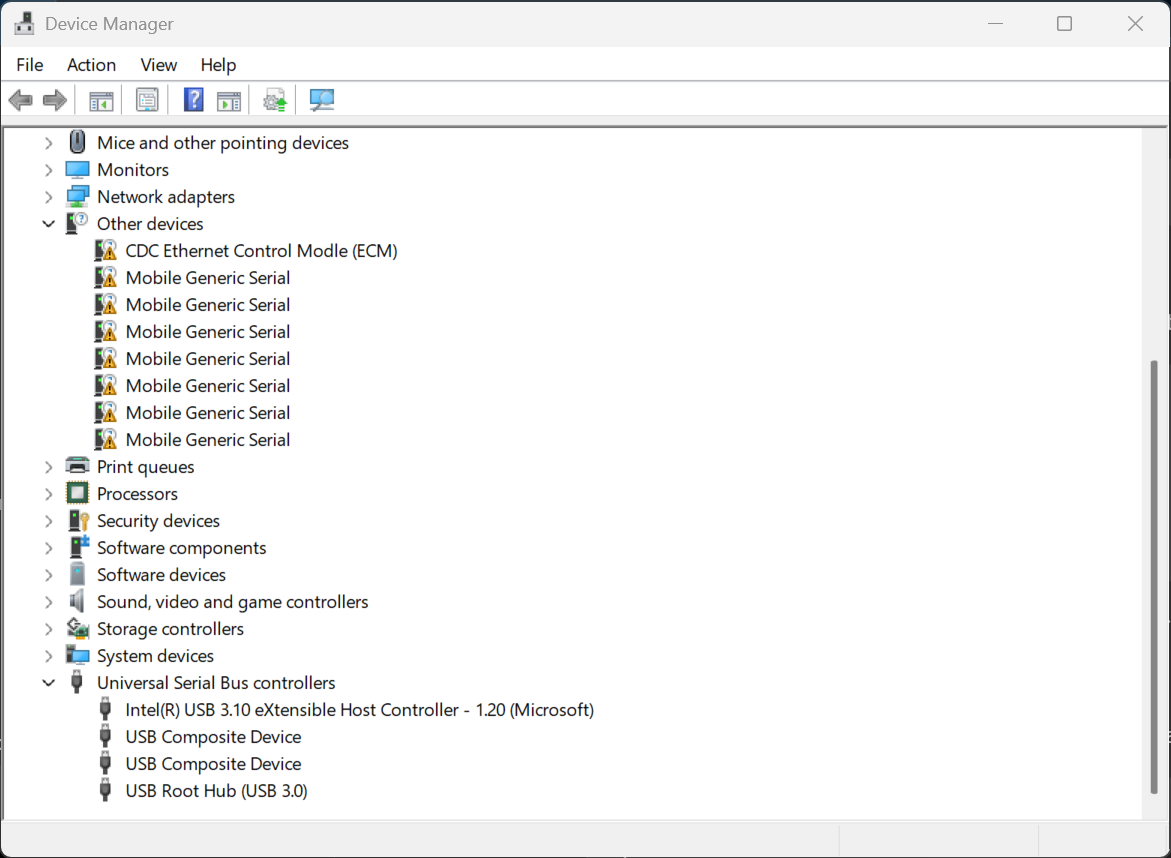
However, the child interfaces are shown under Other devices as:

CDC Ethernet Control Model (ECM)
Mobile Generic Serial
...

with yellow warning icons, and no Quectel USB AT Port (COM) is created.

Could you please provide the correct Windows USB driver package for EC200U-CN / VID_2C7C PID_0901, so that I can install the USB AT/DM ports and proceed with the A17M08 firmware upgrade using QFlash V7.3?

Thank you.

(post deleted by author)

Hi,

Thank you. I have now connected the EC200U-CN native USB interface and successfully entered the firmware download mode using USB_BOOT.

In download mode, Windows detects a COM port with the following hardware ID:

USB\VID_0525&PID_A4A7&REV_0000
USB\VID_0525&PID_A4A7

However, Windows is currently binding this interface to the Microsoft generic USB serial driver:

Device Name     : USB Serial Device (COM9)
Driver Provider : Microsoft
Driver Version  : 10.0.26100.8972

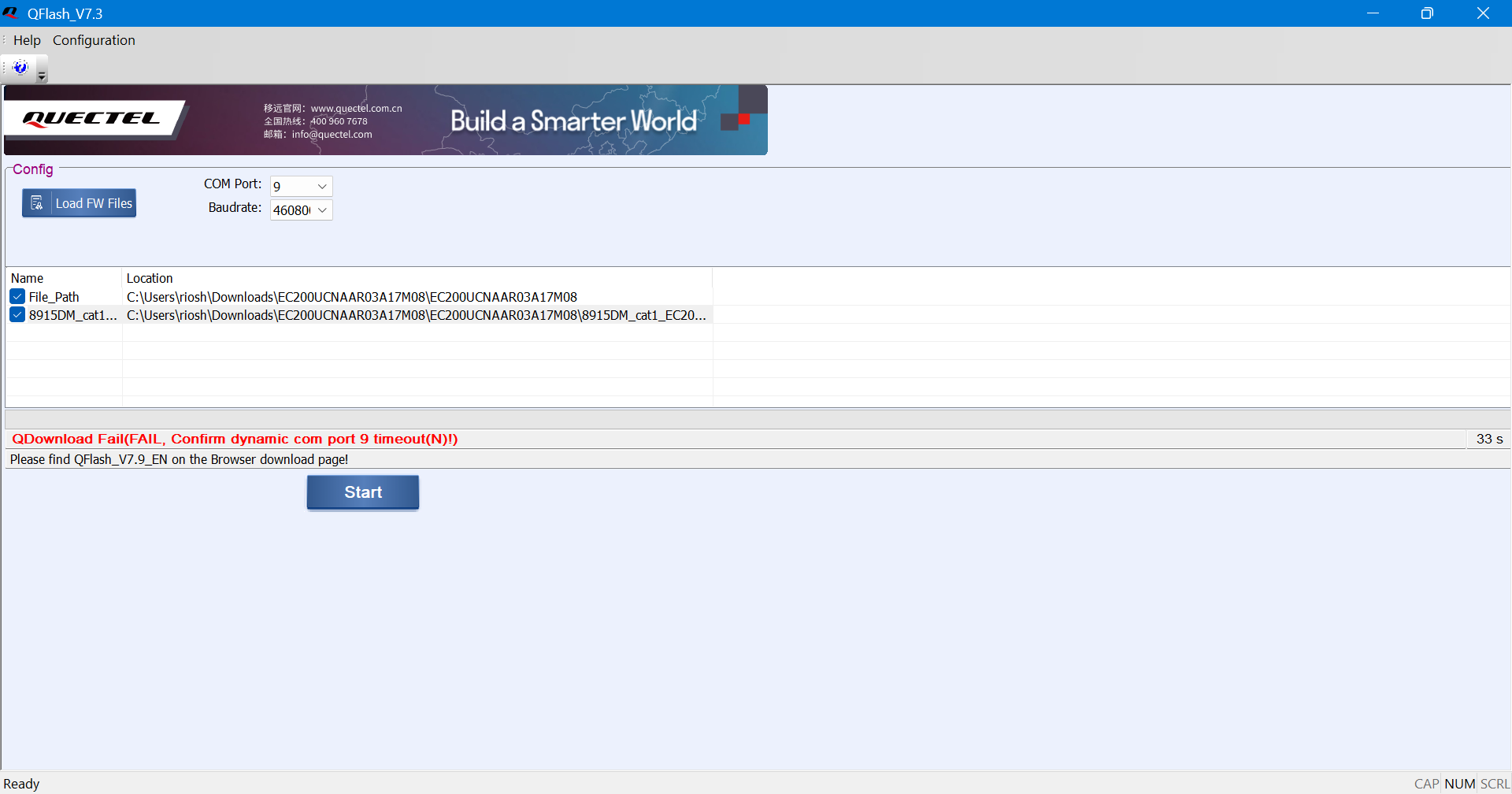
When I try the firmware upgrade with QFlash V7.3, it fails with:

QDownload Fail
(FAIL, Confirm dynamic com port 9 timeout(N)!)

It appears that the EC200U download interface is entering download mode correctly, but the required SPRD U2S Diag / UNISOC download driver is not installed/bound in Windows.

Could you please provide the official Windows driver package for the EC200U-CN SPRD U2S Diag interface (USB\VID_0525&PID_A4A7)?

Also, QFlash V7.3 displays a message recommending QFlash V7.9. Please confirm whether I should continue using the V7.3 package you provided or use QFlash V7.9 for flashing EC200UCNAAR03A17M08.

Thank you.

I have sent you the latest USB driver. Please try again.

Hi Quectel Support,

Thank you for providing the latest USB driver.

I was able to install the driver, enter the firmware download mode, and successfully upgrade the EC200U-CN firmware.

Firmware status

Before the upgrade:

EC200UCNAAR03A13M08

After the upgrade:

EC200UCNAAR03A17M08

I have confirmed the new firmware using:

AT+QGMR

EC200UCNAAR03A17M08

and:

ATI

Quectel
EC200U
Revision: EC200UCNAAR03A17M08
OK

So the module is now running the latest firmware you provided.

AWS IoT test after firmware upgrade

I repeated the AWS IoT test manually using AT commands, without the ESP32 application logic, to make sure the issue is not caused by our application code.

The following are working successfully:

  • AT communication

  • SIM initialization

  • LTE registration

  • PDP activation

  • DNS resolution

  • AWS endpoint reachability

  • AWS port 8883 connectivity

  • Certificate files in UFS

  • TLS configuration commands

Current signal:

AT+CSQ

+CSQ: 22,99

OK

AWS endpoint:

a7t6qe56nuogw-ats.iot.ap-south-1.amazonaws.com

PDP context is active and the AWS endpoint can be reached.

The certificate files are present:

UFS:AmazonRootCA1.pem
UFS:deviceCert.pem
UFS:privateKey.pem

The SSL context is configured as follows:

AT+QSSLCFG="cacert",2,"UFS:AmazonRootCA1.pem"
AT+QSSLCFG="clientcert",2,"UFS:deviceCert.pem"
AT+QSSLCFG="clientkey",2,"UFS:privateKey.pem"
AT+QSSLCFG="seclevel",2,2
AT+QSSLCFG="sslversion",2,3
AT+QSSLCFG="ciphersuite",2,0xFFFF
AT+QSSLCFG="sni",2,1
AT+QSSLCFG="ignorelocaltime",2,1

I also verified the configuration using the individual QSSLCFG query commands, and the modem reports the expected values.

However, the direct TLS connection still fails:

AT+QSSLOPEN=1,2,0,"a7t6qe56nuogw-ats.iot.ap-south-1.amazonaws.com",8883,0

OK

+QSSLOPEN: 0,579

Then:

AT+QIGETERROR

+QIGETERROR: 579,ssl handshake failed

OK

The same failure occurs after upgrading from:

EC200UCNAAR03A13M08

to:

EC200UCNAAR03A17M08

Current test summary

EC200U-CN firmware A13M08       : Previous firmware
EC200U-CN firmware A17M08       : Current firmware

LTE registration                : PASS
PDP / IP                        : PASS
DNS resolution                  : PASS
AWS endpoint reachability       : PASS
AWS TCP port 8883               : PASS
Certificate files               : PASS
TLS configuration               : PASS
QSSLOPEN TLS handshake          : FAIL - 579
QIGETERROR                      : 579, ssl handshake failed
MQTT QMTOPEN                    : FAIL - 0,5

Since the same TLS handshake failure is reproducible with the new A17M08 firmware and also occurs when using manual AT commands, it appears that the issue is not related to our ESP32 application code.

Could you please advise:

  1. Is EC200UCNAAR03A17M08 confirmed to support AWS IoT Core X.509 mutual TLS on port 8883?

  2. Is there any known TLS interoperability issue between A17M08 and AWS IoT Core -ats.iot endpoints?

  3. Is there a recommended QSSLCFG configuration specifically for AWS IoT Core?

  4. Is sslversion=3 or sslversion=4 recommended for this firmware?

  5. Which cipher suite should be used for AWS IoT Core?

  6. Is there any additional TLS debug/log command that can provide the actual handshake failure reason behind error 579?

  7. Is there any additional firmware/configuration required for AWS IoT Core mTLS?

I have attached the complete logs from the latest A17M08 firmware for your analysis, including both the ESP32 application test and the manual AT-command (AT commands through a serial terminal) test.

The manual AT-command test reproduces the same +QSSLOPEN: 0,579 / 579, ssl handshake failed error independently of the ESP32 application code.

Thank you.

EC200U_A17M08_AWS_IoT_TLS_Handshake_Failure_Manual_AT_Logs.zip (1.1 KB)

EC200U_A17M08_AWS_IoT_TLS_Handshake_Failure_AT_Logs.zip (1.8 KB)