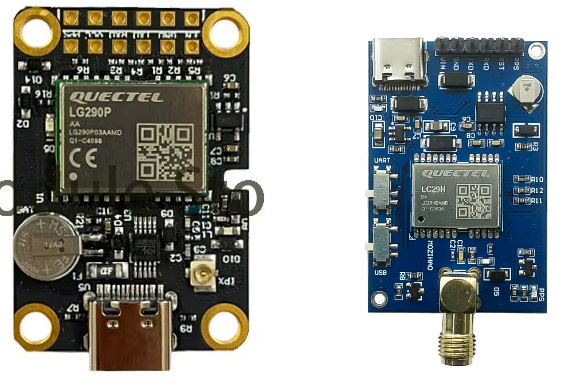
Hello
I’m new to the community, I hope I don’t arrive too suddenly.
I plan to soon acquire an EVB kit to make an RTK rover. I have a few questions, and don’t want to make any mistakes.
I see in the topics that I have read that users use a Bluetooth module to connect their GNSS board to a smartphone. I would like to know if it is possible to connect the EVK directly via USB to the smartphone, or if this Bluetooth module is an obligation.
Another question, if the EVK is configured via dedicated software, does this setting remain stored in the module if I disconnect the power supply, or should we take an additional flash memory module?
I bought two Quectel GPS modules (LC29HEA and LG290P) and they both work connected directly to the mobile phone. Be careful with the various cables and adapters (micro-usb-mini-usb-usc-c) used because they do not always work correctly.
The story of the Bluetooth connection (in my case) is only because having the cell phone “attached” to the surveyor’s pole is very inconvenient.
Thank you very much for your quick response. I understand the problem with the USB cable, some cables and adapters are only intended for power supply, others are not standard. I have a usb-c to usb-c cable, type 3.1. 240w and 480 bps/s… it may be a little big for such use, but we’ll see at reception ^^
I’m coming back to this message, because I think it may be useful. In fact, you can use this module directly via USB, but you need an OTG adapter. For the moment I have only managed to make it work with a USB to USB-C adapter, I have not yet found a USB-C to USB-C adapter that supports OTG.
Do you mean, that connection USB-C <-> USB-C with Android device does not work, but USB-C <-> USB A OTG <-> USB-C does?
I have tried to connect the LC29H(DA) board to android devices using USB-C cables, but the board doesn’t light up whatsoever. I thought for a second that it can be an issue with not enough power supplied by a mobile device, but giving the board external power doesn’t change anything regarding detection by Android device.
Other external devices like keyboards & audio interfaces are detected just fine with the USB-C cable, but the LC29H(DA) board doesn’t even light up.
It turns out that the USB-C connector on this board (image in first post) is wired incorrectly and doesn’t receive power from a USB-C → USB-C connection. A USB-C → USB-A → USB-C on the other hand works correctly and the device gets powered & detected by Android devices.
But! Is there some driver required to use the sent data as Mock Location device on Android?
I have tried github com/freshollie/UsbGps4Droid & GPS Connector and both do not get me any readouts from the device. (BAUD 115200)
I have a LG290P card under blue evk similar to the model on the right published in the first message, but also a TAU951 evk which works the same way. For both I have to use an OTG of this kind to make it work, a standard usb-c cable does not allow to manage power and data transfer. I did this following a request to my supplier for the Allystar EVB, and the method works for both. So my connection chain is Smartphone=>OTG adapter=>USB cable=>GNSS module.
In other words, you need a wired power supply to force the power supply because the card is not designed for it, despite the presence of a dedicated chip. Strange design choice because using an external power supply module of the CP2104 type connected to the UART pin it works (tried on the Allystar chip and not on Quectel however).