Sending data from Quectel EG800Q-EU to Google Sheets

Previously, I was using a Simcom SIM800 with an intermediate server. Since the SIM800L was already outdated, and with the 2G shutdown approaching, I decided to upgrade to the Quectel EG800Q-EU module. Here, I ran into a problem: following the Quectel documentation and examples, I can send data (which successfully reaches the Google Script and gets properly added to the Google Sheet), but no matter what I try, at best I receive the response: "OK+QHTTPOST: 701" with this module.

I have rewritten my Google Script multiple times, switched from GET to POST, tried all possible AT command variations, and still nothing works. Here is my list of AT commands:

EG800QEUUARTReceiver2(1000, “AT+QICSGP=1,1,"internet…lt","","",1\r\n”); EG800QEUUARTReceiver2(1000, “AT+QIACT=1\r”);
EG800QEUUARTReceiver2(1000, “AT+QHTTPCFG="contextid",1\r\n”);
EG800QEUUARTReceiver2(1000, “AT+QHTTPCFG="responseheader",0\r\n”);
EG800QEUUARTReceiver2(1000, “AT+QHTTPURL=112,15\r\n”);
EG800QEUUARTReceiver2(1000, “https://script.google.com/macros/s/AKfycbxV9........../exec”);
EG800QEUUARTReceiver2(30000, “AT+QHTTPPOST=37,80,80\r\n”);
EG800QEUUARTReceiver2(30000, “[59880E9510A01240A41B1FE00290401FDF3]”); //answer 701
EG800QEUUARTReceiver2(1000, “AT+QHTTPREAD=100\r\n”); //answer Error

The EG800QEUUARTReceiver2() function works as follows: this command reads the response for the specified time period in milliseconds when a command is sent.

Could you provide the complete AT log and output?

Hi Saulius,

The 701-error returned by the EG800Q-EU means “HTTP(S) unknown error”.
This usually occurs when an HTTPS session fails during SSL/TLS handshake or response processing, even though the data itself is successfully delivered to the server (which explains why your Google Sheet is updated).

Your request uses an https:// URL (Google Script), but no SSL context is configured.
Without proper SSL settings, the module may send the POST data successfully but fail when handling the secure server response, resulting in error 701.

Google Apps Script typically responds with an HTTP 302 redirect to another secure domain.
If SSL is not correctly configured, the module may fail while handling this redirect.

AT+QHTTPREAD can only be executed after a successful POST indicated by:

+QHTTPPOST: 0,<http_response_code>,<content_length>

Since the module returns 701 instead of 0, the HTTP session is considered failed, and AT+QHTTPREAD will return ERROR.

Recommended solution

Please configure SSL parameters before sending the HTTP request. For testing purposes, you can disable certificate verification:

AT+QHTTPCFG=“sslctxid”,1
AT+QSSLCFG=“seclevel”,1,0
AT+QSSLCFG=“sslversion”,1,4
AT+QSSLCFG=“ciphersuite”,1,0xFFFF
AT+QSSLCFG=“ignorelocaltime”,1,1

Then proceed with your existing HTTP command sequence.

Hope this helps!

Have a great day!

Best Regards,
Ananthan

EG800QEUUARTReceiver2(100, “AT\r\n”);
EG800QEUUARTReceiver2(1000, “AT+QICSGP=1,1,"internet…lt","","",1\r\n”);
EG800QEUUARTReceiver2(1000, “AT+QIACT=1\r\n”);
EG800QEUUARTReceiver2(1000, “AT+QSSLCFG="sslversion",1,4\r\n”);
EG800QEUUARTReceiver2(1000, “AT+QSSLCFG="seclevel",1,0\r\n”);
EG800QEUUARTReceiver2(1000, “AT+QHTTPCFG="contextid",1\r\n”);
EG800QEUUARTReceiver2(1000, “AT+QHTTPCFG="sslctxid",1\r\n”);
EG800QEUUARTReceiver2(1000, “AT+QHTTPURL=23,80\r\n”);
EG800QEUUARTReceiver2(1000, “https://httpbin.org/get”);
EG800QEUUARTReceiver2(15000, “AT+QHTTPGET=80\r\n”);

This code, without using SNI, returns the correct response after the function EG800QEUUARTReceiver2(15000, "AT+QHTTPGET=80\r\n");, i.e.

“AT+QHTTPGET=80 OK+QHTTPGET: 0,200,315”

EG800QEUUARTReceiver2(100, “AT\r\n”);
EG800QEUUARTReceiver2(1000, “AT+QICSGP=1,1,"internet…lt","","",1\r\n”);
EG800QEUUARTReceiver2(1000, “AT+QIACT=1\r\n”);
EG800QEUUARTReceiver2(1000, “AT+QIACT?\r\n”);
EG800QEUUARTReceiver2(1000, “AT+QSSLCFG="sslversion",1,4\r\n”); //Try All (without ciphersuite)
EG800QEUUARTReceiver2(1000, “AT+QSSLCFG="seclevel",1,0\r\n”);
EG800QEUUARTReceiver2(1000, “AT+QSSLCFG="ignorelocaltime",1,1\r\n”);
EG800QEUUARTReceiver2(1000, “AT+QSSLCFG="sni",1,1\r\n”);
EG800QEUUARTReceiver2(1000, “AT+QHTTPCFG="contextid",1\r\n”);
EG800QEUUARTReceiver2(1000, “AT+QHTTPCFG="sslctxid",1\r\n”);
EG800QEUUARTReceiver2(1000, “AT+QHTTPURL=57,80\r\n”);
EG800QEUUARTReceiver2(1000, “https://webhook.site/1f52d39d-0bfb-4717-a40e-cd140face154”); //57 symbols
EG800QEUUARTReceiver2(15000, “AT+QHTTPGET=80\r\n”);

The second code, already using SNI but without ciphersuite, returns:

“AT+QHTTPGET=80 OK+QHTTPGET: 701”,

EG800QEUUARTReceiver2(100, “AT\r\n”);
EG800QEUUARTReceiver2(1000, “AT+QICSGP=1,1,"internet…lt","","",1\r\n”);
EG800QEUUARTReceiver2(1000, “AT+QIACT=1\r\n”);
EG800QEUUARTReceiver2(1000, “AT+QIACT?\r\n”);
EG800QEUUARTReceiver2(1000, “AT+QSSLCFG="sslversion",1,4\r\n”);
EG800QEUUARTReceiver2(1000, “AT+QSSLCFG="seclevel",1,0\r\n”);
EG800QEUUARTReceiver2(1000, “AT+QSSLCFG="ciphersuite",1,0xFFFF\r\n”);
EG800QEUUARTReceiver2(1000, “AT+QSSLCFG="ignorelocaltime",1,1\r\n”);
EG800QEUUARTReceiver2(1000, “AT+QSSLCFG="sni",1,1\r\n”);
EG800QEUUARTReceiver2(1000, “AT+QHTTPCFG="contextid",1\r\n”);
EG800QEUUARTReceiver2(1000, “AT+QHTTPCFG="sslctxid",1\r\n”);
EG800QEUUARTReceiver2(1000, “AT+QHTTPURL=153,80\r\n”);
EG800QEUUARTReceiver2(15000, “https://script.google.com/macros/s/AKfy............exec
data=59880E9510A01240A41B1FE00290401FDF3”);
EG800QEUUARTReceiver2(25000, “AT+QHTTPGET=80\r\n”);

and the third one returns exactly the same:
"AT+QHTTPGET=80 OK+QHTTPGET: 701".

All lines are executed with OK responses; the addresses are sent only after receiving "CONNECT".
My current firmware version is EG800QEULCR01A11M04_A0.300.A0.300.
Also an observation: if I send data to the same Google Script (example 3) without SNI, i.e.
EG800QEUUARTReceiver2(1000, "AT+QSSLCFG=\"sni\",1,0\r\n");,
the Google Script receives the data, but in this case I do not get any response at all, only:
"AT+QHTTPGET=80 OK".
No matter how long I wait, the response is simply never returned

Hi Sualius,

Thanks for logs.

The 701 error and the behavior you observe when SNI is disabled indicate that the module is failing during the SSL/TLS handshake or while processing the HTTPS response.

Analysis:

script.google.com requires SNI to select the correct SSL certificate.
When SNI is disabled, the data may reach the script, but the TLS negotiation cannot be completed, so no response is returned.

Please keep:

AT+QSSLCFG=“sni”,1,1

Google Scripts typically return an HTTP 302 redirect. mIf the SSL handshake with the redirected domain fails, the module may return 701.

To observe this, enable response headers:

AT+QHTTPCFG=“responseheader”,1

Get more details on the failure. After receiving 701, please run:

AT+QIGETERROR

This will provide more specific information about the SSL/TLS failure.

Recommended SSL settings for testing:

AT+QSSLCFG=“sslversion”,1,4
AT+QSSLCFG=“ciphersuite”,1,0xFFFF
AT+QSSLCFG=“ignorelocaltime”,1,1
AT+QSSLCFG=“seclevel”,1,0

Thanks!
Have a great day!

Best Regards,
Ananthan

After receiving the

701 error message

when I send the

AT+QIGETERROR

command, I get the response

AT+QIGETERROR: 0, operate successfully OK

And same with enabled response header:

AT+QHTTPCFG=“responseheader”,1

Now my command sequence looks like that:

EG800QEUUARTReceiver2(100, “AT\r\n”);
EG800QEUUARTReceiver2(1000, “AT+QICSGP=1,1,"internet…lt","","",1\r\n”);
EG800QEUUARTReceiver2(1000, “AT+QIACT=1\r\n”);
EG800QEUUARTReceiver2(1000, “AT+QIACT?\r\n”);
EG800QEUUARTReceiver2(1000, “AT+QHTTPCFG="responseheader",1\r\n”);
EG800QEUUARTReceiver2(1000, “AT+QSSLCFG="sslversion",1,4\r\n”);
EG800QEUUARTReceiver2(1000, “AT+QSSLCFG="seclevel",1,0\r\n”);
EG800QEUUARTReceiver2(1000, “AT+QSSLCFG="ciphersuite",1,0xFFFF\r\n”);
EG800QEUUARTReceiver2(1000, “AT+QSSLCFG="ignorelocaltime",1,1\r\n”);
EG800QEUUARTReceiver2(1000, “AT+QSSLCFG="sni",1,1\r\n”);
EG800QEUUARTReceiver2(1000, “AT+QHTTPCFG="contextid",1\r\n”);
EG800QEUUARTReceiver2(1000, “AT+QHTTPCFG="sslctxid",1\r\n”);
EG800QEUUARTReceiver2(1000, “AT+QHTTPURL=153,80\r\n”);
EG800QEUUARTReceiver2(15000, “https://script.google.com/macros/s/AK......exec?data=59880E9510A01240A41B1FE00290401FDF3”);
EG800QEUUARTReceiver2(25000, “AT+QHTTPGET=80\r\n”);
EG800QEUUARTReceiver2(1000, “AT+QIGETERROR\r\n”);

And still after AT+QHTTPGET=80 i receive same 701 error and after

AT+QIGETERROR
AT+QIGETERROR: 0, operate successfully OK

However, the data is still not being transmitted to the Google script. Maybe this is firmware bug?

Hi Saulius,

It indicates that the TCP/SSL connection was successfully established and the request was sent, but the HTTP layer failed when parsing or handling the server’s response immediately afterward.

Based on your logs, Google Apps Script does not return data directly from script.google.com.
Instead, it responds with an HTTP 302 redirect to another domain (for example script.googleusercontent.com).

The module sends the request successfully but fails during the second SSL handshake required after the redirect or cannot follow the redirect correctly.

When SNI is disabled and the script still receives data, it confirms the request is transmitted.
However, without SNI, the module cannot validate the server certificate, so the HTTP engine either hangs or fails to return a response URC, resulting in the “no response” behavior you observed.

AT+QHTTPURL=<URL_length> is extremely strict.

If the actual URL string differs by even one character (including ?, parameters, or hidden \r\n), the module may Wait for more data, or fail to process the URL correctly

Please manually count the exact number of characters in the full URL string and ensure no hidden CR/LF characters are included.

Send the same request to a simple HTTPS service (e.g. webhook.site) that does not issue redirects.
If this works, the issue is specific to HTTPS redirection handling.

Force a specific TLS version
Instead of:

AT+QSSLCFG=“sslversion”,1,4

try:

AT+QSSLCFG=“sslversion”,1,3

Some servers behave unpredictably when “all versions” are enabled.

Is this a firmware bug?

This is not a functional bug in the AT commands. I would say, It is a protocol limitation in how this firmware handles cross-domain HTTPS redirection, especially with modern Google TLS infrastructure. Plus, the firmware version you’re using is already the latest one available.

I will further dig deep into this issue and will advise if there are any alternative solution.

Thanks!
Have a great day!

Best Regards,
Ananthan

I don’t want to offend anyone, but all the answers sound like they were generated by artificial intelligence, since I first searched for information specifically using ChatGPT, Grok, and DeepSeek. And they offered me exactly the same variants. I tried everything: TLS 1.0, TLS 1.1, TLS 1.2, or all of them automatically (AT+QSSLCFG=“sslversion”,1,1; AT+QSSLCFG=“sslversion”,1,2; etc.), as well as different cipher suites individually, which Google supports (Restrict TLS cipher suites  |  Assured Workloads  |  Google Cloud Documentation) and, of course, which the EG800Q module supports, namely: 0xc009, 0xc00a, 0xc013, 0xc02f, 0xc014, 0xc013, 0x002f, 0x000a, 0x0035, not counting 0xffff (AT+QSSLCFG=“ciphersuite”,1,0xffff").

I tried directly using script.googleusercontent.com instead of script.google.com. The result is the same: 701. I tried the examples from the Quectel HTTPS documentation, which also produced no result. I tested ping functions to google.com. I changed the SIM card to another one with a different operator, etc. Only when I no longer knew what else to do did I turn to this forum, hoping to get at least some information that would allow me to determine the cause.

I even connected a logic analyzer, hoping that maybe my functions were not returning a response, but this method also showed exactly the same thing: no matter what I do, the module itself always returns error 701 when SNI is used (after AT+QHTTPGET). And if (AT+QIGETERROR) is used afterward, it always returns 0, which means “successfully,” but that is not actually the case. Therefore, I suspect that the problem is in the module firmware, since I tested SNI not only with Google Script but also with other websites that support SNI, and with all of them the result is the same: error 701.

Thanks for the detailed explanation, Saulius.

Just to address your comment directly, there’s really nothing surprising about seeing similar answers from AI platforms. That’s because they are. All roads lead back to the same place… publicly available Quectel documentation. Whether it’s Google, ChatGPT, Grok, DeepSeek, or a late-night engineer with too much coffee, everyone ends up reading the same AT command manuals and HTTPS guides we published. AI didn’t invent those answers, it just reads faster than we do :slightly_smiling_face:.

As I already mentioned in my earlier reply, the firmware you are using is already the latest version, so this is not a case where an update was overlooked.

You’ve clearly done extensive testing. Given all that, repeatedly retrying configuration variants is unlikely to reveal anything new. At this stage, the only way to determine whether this is a firmware limitation or an edge-case bug in SNI handling is by analyzing internal module logs.

To move forward, could you please capture the module logs using the tool I’ve sent to your email? We can’t share this tool publicly on the forum, which is why it wasn’t posted earlier.

Without these logs, we’d only be speculating, and you’ve already proven that speculation and guesswork won’t help here. Once we have the logs, we can provide a concrete, technical answer.

Appreciate your cooperation and the effort you’ve already put into isolating the issue.

Best Regards,
Ananthan


module do not recognize such command as “AT+QRFSTAT”

Regarding the content – I have sent the EPAT program log. The communication has moved to email. So far, there is no solution.

Hi Saulius,

The log you shared is invalid, as the debug information appears to be missing. I am in the process of obtaining the comdb.txt file internally and will share it with you once it is available.

Thank you for your patience.

Best Regards,
Ananthan

Hi Saulius,

The required database file and the steps to capture the log have been shared with you via email. Please check and proceed accordingly.

Best Regards,
Ananthan

Regarding the content – So far, there is no solution.

Hi Saulius,

Good day. As mentioned in our email conversation, the analysis may take some time as most of my colleagues have just returned to work after a long holiday. We appreciate your patience, as the issue has been submitted internally for further analysis.

Best Regards,
Ananthan

Any news about this issue?

Hi Saulius,

As per our latest email conversation dated 9/1/2026, the preliminary analysis has been sent to you.


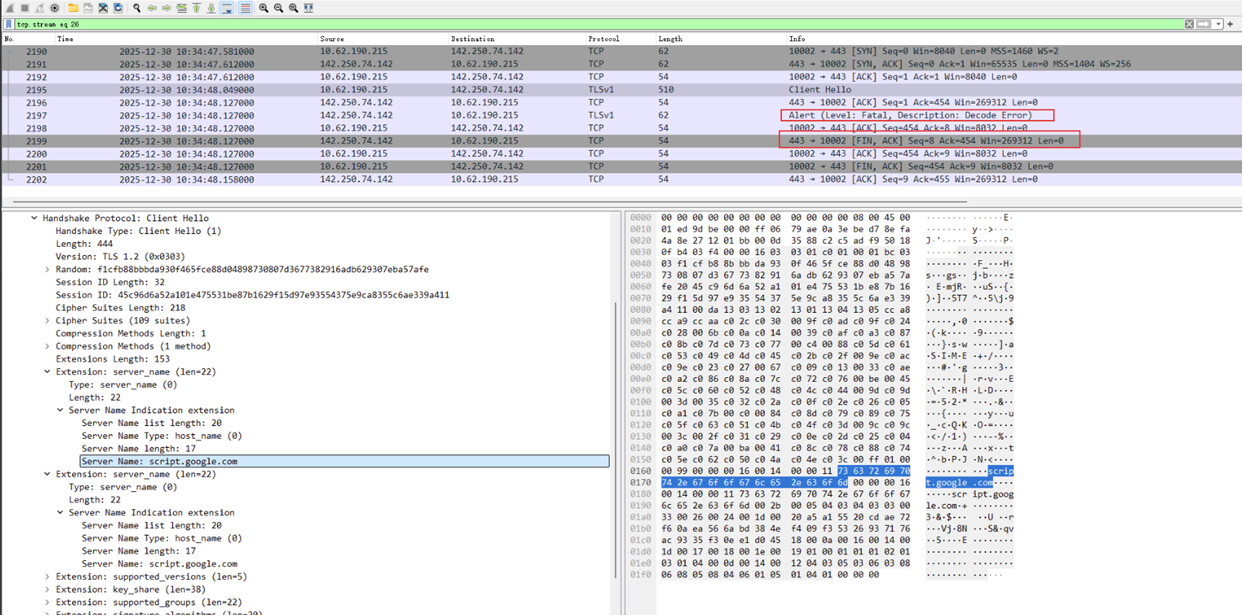
Based on the analysis from our R&D team and the packet capture you shared, the HTTPS handshake does not proceed as expected. After the Client Hello (with SNI set to script.google.com), the HTTP server does not return a Server Hello, but instead responds with a FIN packet, causing the connection to be closed prematurely.

This behaviour typically indicates a server-side rejection during the TLS handshake phase.

Could you please help to confirm whether the EG800Q module has the correct root certificate installed that matches the Server Name (SNI) being used? A certificate mismatch or missing CA may cause the server to terminate the connection before completing the handshake.

Once this is confirmed, we can continue the analysis from there.

You may need to look for .pem/.crt files in your module.

Thanks!

Best Regards,
Ananthan

I may be misunderstanding something here, as I’m not a professional in this area. Could you please advise how I can check which root CA certificates (.pem/.crt) are installed on the EG800Q module? I couldn’t find a way to list or inspect them using AT commands.

Hi Saulius,

Sure. On the EG800Q, root CA certificates are not pre-installed like on a PC or browser. Instead, they must be manually uploaded by the user into the module’s internal flash file system, called UFS. The module will only use certificates that are explicitly uploaded and assigned.

Below are the steps to check this on the module:

You can list all files currently stored on the module using the file management command:

AT+QFLST=“*”

The response will show entries such as:

+QFLST: “UFS:filename.pem”,<file_size>

If you do not see any .pem or .crt files in the list, then no root CA certificates have been uploaded to the module yet.

Please feel free to share the output of AT+QFLST=“*” and the SSL configuration, and we can continue the analysis from there.

Thank you!

Best Regards,
Ananthan