RTK LC29H DA - how to run rtklib LINUX

Hello ive got problem with setting up RTK using RTKLIB and LC29H DA

LC29H DA is connected to RPI using serial0

before starting rtkrcv im sending these msg to LC29HDA to set ip up

Commands before starting RTKLIB
    "$PAIR002*38\r\n",
    "$PAIR050,1000*12\r\n",  // PAIR_COMMON_SET_FIX_RATE - 1Hz
    "$PAIR432,1*22\r\n",  //  PAIR_RTCM_SET_OUTPUT_MODE - Enable output RTCM3 with message type MSM7
    "$PAIR434,1*24\r\n",  // PAIR_RTCM_SET_OUTPUT_ANT_PNT - ENABLE
    "$PAIR436,1*26\r\n",   // PAIR_RTCM_SET_OUTPUT_EPHEMERIS - ENABLE
    "$PAIR062,2,0*3C\r\n",
  "$PAIR062,3,0*3D\r\n",
  "$PAIR062,5,0*3B\r\n"
    "$PAIR062,-1*0E\r\n"

on RPI im setting up RTKLIB
rtkrcv -o rtkrcv.conf -s

my config file is:

rtkrcv.conf

inpstr1-type =serial # (0:off,1:serial,2:file,3:tcpsvr,4:tcpcli,7:ntripcli,8:ftp,9:http)
inpstr2-type =ntripcli # (0:off,1:serial,2:file,3:tcpsvr,4:tcpcli,7:ntripcli,8:ftp,9:http)
inpstr3-type =off # (0:off,1:serial,2:file,3:tcpsvr,4:tcpcli,7:ntripcli,8:ftp,9:http)
inpstr1-path =serial0:115200:8:n:1:off
inpstr2-path =THEREISNTRIPCONNECTIONDATA

outstr1-type =3 # (0:off,1:serial,2:file,3:tcpsvr,4:tcpcli,6:ntripsvr)
outstr2-type =off # (0:off,1:serial,2:file,3:tcpsvr,4:tcpcli,6:ntripsvr)
outstr1-path =:2333
outstr2-path =
outstr1-format =llh # (0:llh,1:xyz,2:enu,3:nmea)
outstr2-format =llh # (0:llh,1:xyz,2:enu,3:nmea)
logstr1-type =tcpsvr # (0:off,1:serial,2:file,3:tcpsvr,4:tcpcli,6:ntripsvr)
logstr2-type =tcpsvr # (0:off,1:serial,2:file,3:tcpsvr,4:tcpcli,6:ntripsvr)
logstr3-type =off # (0:off,1:serial,2:file,3:tcpsvr,4:tcpcli,6:ntripsvr)
logstr1-path =:2334
logstr2-path =:2335
logstr3-path =

and now when i start it there is no output on outstr1
but using stream command i see that NTRIP is connected and im receving data from serial0 (LC29HDA)
when i run RTKPLOT on windows and connect to logstr1 (to LC29H DA) serial output i see my location but without corrections (like it should since i am connecting only to lc29h da)

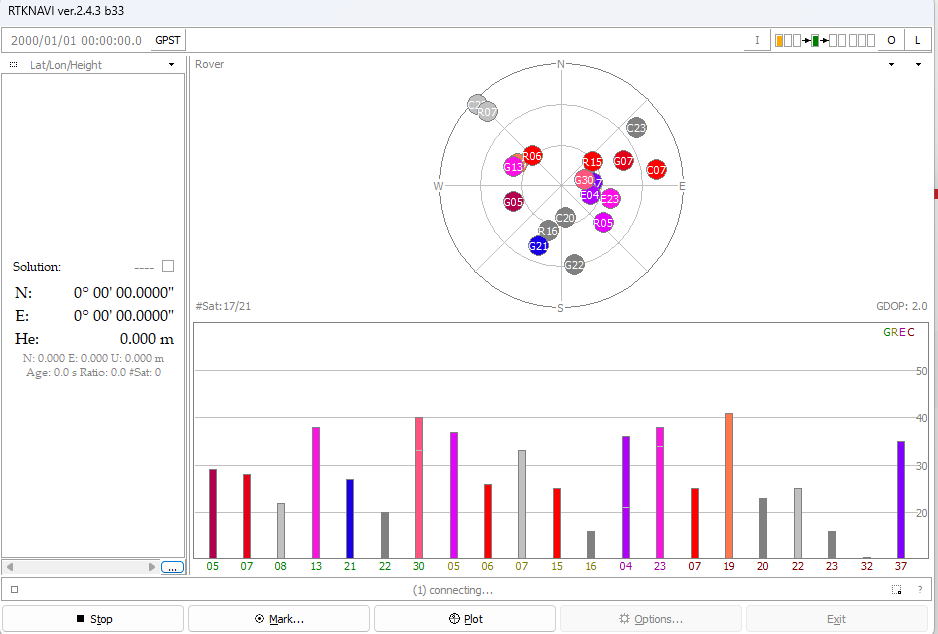
i tried the same on RTKNAVI and what i see there is there is always date 2000/01/01 its not updating but i see on forum that everyone else got it updated.

whats is wrong with my configuraion?
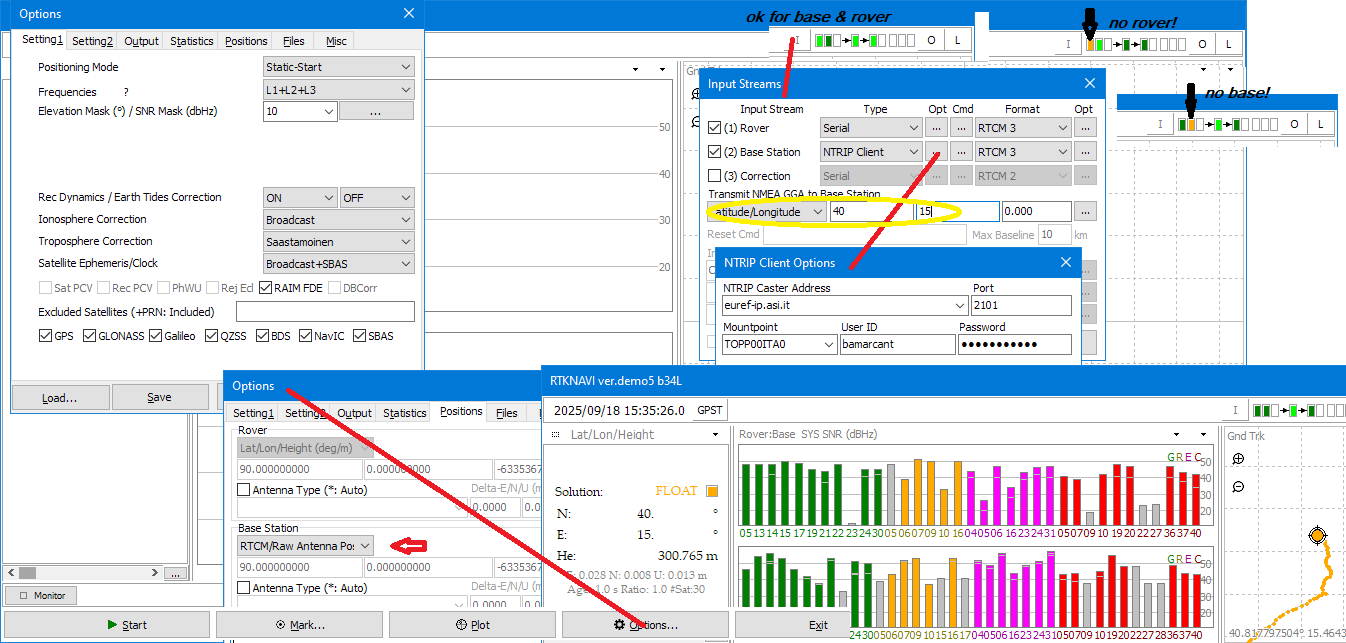
…need to put module in base_mode

$PAIR382,1*2E → Test command for lock system sleep enabled
$PAIR003*39 → power off GNSS system
$PQTMCFGRCVRMODE,W,2*29   # set receiver to base mode
$PAIR511*3F   Save current navigation data from RTC RAM to flash
$PAIR513*3D  save file system
$PQTMSAVEPAR*5A
$PAIR023*3B   reboot  module

now can change but use only as per (only rtcm for rtklib)

"$PAIR432,1*22\r\n",  //  PAIR_RTCM_SET_OUTPUT_MODE - Enable output RTCM3 with message type MSM7
    "$PAIR434,1*24\r\n",  // PAIR_RTCM_SET_OUTPUT_ANT_PNT - ENABLE
    "$PAIR436,1*26\r\n",   // PAIR_RTCM_SET_OUTPUT_EPHEMERIS - ENABLE

but di U fixed position 1005? if not disable it
$PAIR434,0*25

1 Like

should it be rover?

no since its rover(maybe I am wrong?), but trying without that and it didnt help too

only base consent rtcm output…

1 Like

PAIR023 and PQTMCFGRCVRMODE why i cant find that instructions in any document?

i dont get it. i thought that i should enable RTCM output on DA module using PAIR432
now on serial i will receive RTCM data that i pass to RTKLIB
corrections source is my ntrip which im connecting successfully.
now rtklib does some magic to output corrected data.

BUT
i found in application note and when reading hte forum that DA module also can receive RTCM data.
now how should process look like?

im getting corrections from ntrip and sending it to serial to DA module and GPS CALUCALTIONS are made on DA module or GPS DA send RTCM data to RTKLIB same as NRIP corrections data and RTLLIB made GPS CALCULATIONS

LC29H DA → RTKLIB → GPS RTK FIX DATA
NTRIP CORRECTIONS →

or

NTRIP CORRECTIONS → LC29H DA → GPS RTK FIX DATA

…didn’t understand much…
however use $PQTMVERNO*58\r\n
and post the output
for manuals look at the posts on LC29HEA
what can I say is that if the module is an original LC29HDA
it is self equipped with an rtk engine and only needs rtcm input from an ntrip etc.
So for rtk use str2str instead for send corrections to the gnss module e.g.
./str2str -in ntrip://user:password@euref-ip.asi.it:2101/MATE00ITA0 -out serial://ttyS1:115200:8:n:1:off

Ok starting from 0.

When I restore defaults and reboot LC29H DA
im starting rtkrcv (linux) with input from serial and redirecting rover logs to tcpserver at :2334
there is no data because in rtkrcv.conf input-fromat is RTCM3 so i need to enable it using cmds

im sending $PAIR432,1*22 and now
on windows machine (connected to tcpclient:2334) im running rtknavi to visualize data

https://forums.quectel.com/uploads/default/original/3X/e/5/e597cb01a26ec41046b34ed2bb4b343f246ca4ae.png

but i see no time here

even when i connect to nrtip there is no time?

i cant upload more than 1 link so you need to change URL to
/uploads/default/original/3X/3/2/32a749bc670b855ae33c95affbe8df5e097904c7.png
/uploads/default/original/3X/9/f/9f3fa484b0aa0363f6f4f308bca66143fb951e70.png

when i tried to
./str2str -in ntrip://user:password@euref-ip.asi.it:2101/MATE00ITA0 -out serial://ttyS1:115200:8:n:1:off

directly to LC29H da module
with output from LC29HDA module redirected to TCP :2334 when str2str is running no output on RTKNAVI
/uploads/default/original/3X/1/8/189e8631b2963be474330c872c1fc8193a392bc9.jpeg
when stopped there is data

/uploads/default/original/3X/c/5/c56c3d5b6486f38bdff9ae9da0aafea616e5a90b.jpeg

but the correction can be also done on RTKLIB? directing data from LC29H DA and NTRIP TO RTKLIB

Other questions:

Why you tell me to set receiver to base mode
$PQTMCFGRCVRMODE,W,2*29

i want lc29h da to be rover and use corrections from NTRIP
so why should it be set as base?

im wondering where is PQTMCFGRCVRMODE desribed?
can you send me something?

the output is
$PQTMVERNO,LC29HDANR11A01S_RSA,2023/03/02,12:43:39*21

RTCM message types that im receiving from LC29HDA

MESSAGE TYPES

1042
1077
1087
1097
1117
1127

Ok, but I’ll proceed with one thing at a time…
If you want to use rtklib, it only operates with rtcm3 in the case of the quectel module…
In order to correctly output rtcm it needs to operate at 1Hz in base mode (dnt worry it can accept rtcm input like a rover)!
You need to find a compatible ntrip caster for corrections in rtcm msm 4 or 7.
Under linux I never tried directly but in q_mode with rtklibexplorer…
I can tell you that you need to set up the rover (even if lc29h is in base!) and a base (ntrip) etc
if there is compatibility between the satellites of the same constellation, i.e. between rover and base
you will see the sbas ,float, fix solutions advance…
/str2str -in ntrip://user:password is only an example, need a custom caster with username ad passw
and do not need if U use rtknavi.

thank you for your patience
i tried set it in base mode like you said

i have set

$PAIR382,12E → Test command for lock system sleep enabled
$PAIR003
39 → power off GNSS system
$PQTMCFGRCVRMODE,W,229 # set receiver to base mode
$PAIR511
3F Save current navigation data from RTC RAM to flash
$PAIR5133D save file system
$PQTMSAVEPAR
5A
$PAIR0233B reboot module
"$PAIR432,1
22\r\n", // PAIR_RTCM_SET_OUTPUT_MODE - Enable output RTCM3 with message type MSM7
“$PAIR436,1*26\r\n”, // PAIR_RTCM_SET_OUTPUT_EPHEMERIS - ENABLE

but still doesnt work but i tried to run output solition directly on rtklib linux not rtklib on windows (source: logs of rover from rtklib linux) and it worked.

i think i should try it at the begining.
why commands that are not in datasheet works on that module?

thank you have a nice day!

Hi, few years ago I followed @rtklibexplorer and build a working Qt app linux version…but the mcu was too weak for…
then compiled an armhf version of str2str still working on a lite opi_board.
Here a post on rtkrcv (but not for me).
Here the latest official manual:

and the other PAIR command manual

Ask @Jasper for the latest firmware on your board.

p.s.
after

"$PAIR432,1*22\r\n",  //  PAIR_RTCM_SET_OUTPUT_MODE - Enable output RTCM3 with message type MSM7
   
    "$PAIR436,1*26\r\n",   // PAIR_RTCM_SET_OUTPUT_EPHEMERIS - ENABLE

must save & reboot
Regards

hello can i please new soft as @bamarcant said?

my version

$PQTMVERNO,LC29HDANR11A01S_RSA,2023/03/02,12:43:39*21

Hi @j4n3k

I have sent the latest firmware to you through email. PLease check it.

Best regards.