I accidentally executed AT+QCFG=“usbcfg”,0x2C7C,0x0800,0,0,0,0,0,0,0
I can’t use the module via usb now,
I don’t know how to recover, or there is no hardware reset pin.
Very pity to hear that.
If you want to recover, you can try to login in the modem via debug uart.
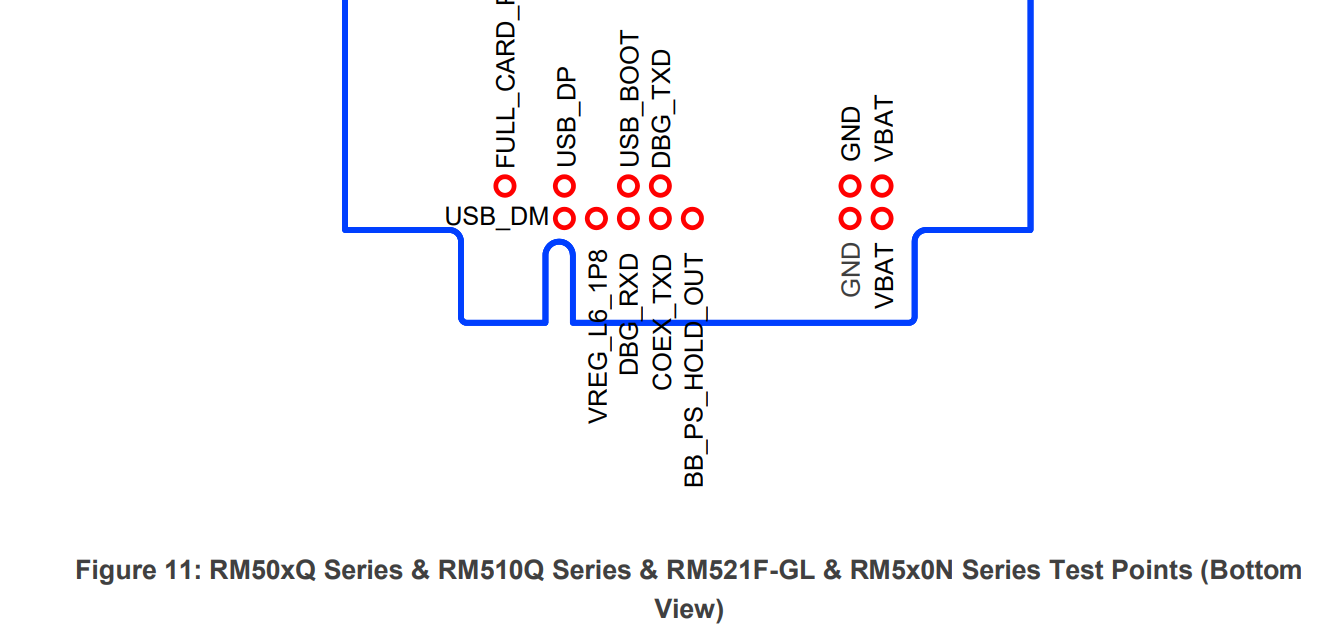
DBG_TXD and DBG_RXD.
1 Like
I am debugging, do I need to power the module? Do I need to connect a ground wire?
Yes. You need the GND also.
And it is 1.8V power domain.
If you login in the modem. You can send the AT command over the /dev/smd11 inside the module.
The username is “root”.
For the password, you might see the quectel-ID if you enter the username root. Tell Quectel the quectel-ID and then let Quectel tell you the passwd, and you can login in the modem with the debug port.
Is the 1.8V power supply connected to VREG_L6_1P8?
No. You do not need care about the other pins.
Th RX and TX is 1.8V TTL power domain.
If you had a firmware you could flash that would automatically set commands at first boot that would solve this problem. Maybe that Arixolink firmware that’s already out on the Internet would fix it. You could enter EDL by creating continuity between 2 test points then flash it. It automatically enables phy on first boot and then you can use their web interface to set the commands.
Or…could attempt to modify sysfs.ubi and have the system send those commands at first boot.