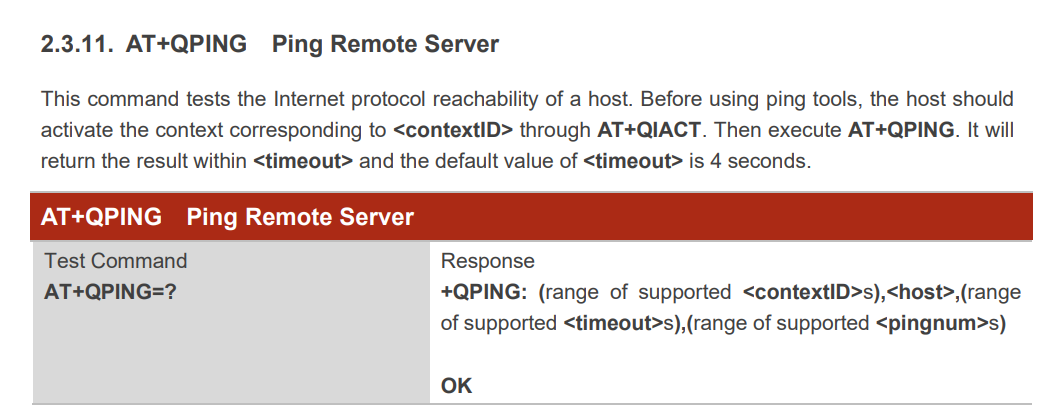
I just received an RM520N-GL device, and I would like to send some PING request, using AT+QPING commands.
When doing this, it’s not working, even if I’m registered to the network in LTE or 5G NSA, with an IP address. Is there a new FW to try ?
BR,
Mathieu F.
Here are some AT commands outputs:
AT+CGCONTRDP
+CGCONTRDP: 1,5,"internet","192.169.0.7",,"8.8.8.8","4.4.4.4"
OK

AT+QPING=1,"8.8.8.8"
OK

+QPING: 558

ATI9
Quectel
RM520N-GL
Revision: RM520NGLAAR01A08M4G
OK
Dear @Mathieu
Please query your current firmware via ATI
From the description of AT command, please sue AT+QIACT to activate the context firstly, then try again.
AT+QICSGP=1
+QICSGP: 1,"internet","","",0
OK

AT+QIACT?
+QIACT: 1,1,1,"192.169.0.2"
OK

AT+CGCONTRDP
+CGCONTRDP: 1,5,"internet","192.169.0.2",,"8.8.8.8","4.4.4.4"
OK

AT+QPING=1,"8.8.8.8"
OK

+QPING: 558
So I´m trying to activate it and I have AT+CGACT=1,1
+CME ERROR: unknown error and I also have AT+CGACT?
+CGACT: 1,0.
I have two quectel, this happen in one quectel and in the other one I have AT+CGACT?
+CGACT: 0,1
+CGACT: 1,0
And when I try to activate both conexts I get:
AT+CGACT=1,1
+CME ERROR: pdn type and APN duplicate used
I’m currently unable to activate the PDP context because the Quectel modem isn’t receiving any signal. Is there a way to work under low-signal conditions? My antenna doesn’t seem to be working as expected, and I’m not sure what else I can try.
Thank you for taking the time to answer all my questions. I’ve made a few modifications to my antenna, and it’s now working. However, I’m experiencing some connection issues.
When I attempt to ping, I encounter errors with the modem. Could you provide guidance on how to address this?
Looking forward to your advice, here is my quectel terminal:
I have the BC660K module, and it seems that Quectel-CM is not available for this model. Additionally, I can’t find the QMI tool you mentioned. I am not using any specific tool, just the module’s serial terminal. Is there any tool I could use to properly configure my Quectel module and ensure it doesn’t experience these disconnections?
Dear @Ariadna_Daniela_Medi
From the log, you had got the IP address, it seems you had make a data call.
If have external dail up, QPING will show error due to it is internal dail up.
Please check if you had other dail up.
Hii @silvia
I was wondering if by “dial-up” you are referring to the PDP contexts that are currently active. Does it have something to do with this?
I noticed that I have two PDP contexts: one is activated, and the other one is not. However, I cannot deactivate, activate, or erase any of them. Here is the output: