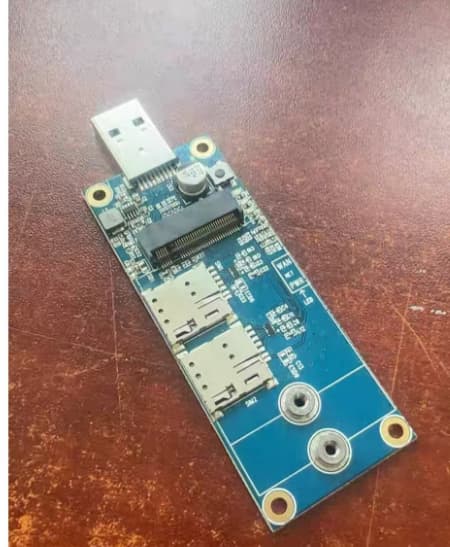
Hello, and I apologize if this is the wrong place to ask this or if I missed it.
I’m just learning how to flash firmware on these modules, I’m actually just learning OpenWRT as well but thats a different issue lol.
I bought a couple of white label 5G routers from China and I got them all with RM520N-GL modules. I have one that is super solid and stays connected all the time with no real drops (I use these in a mobile environment). I started looking around to see the process in upgrading the firmware on all the modules but I’m not sure the easiest way. Can I just put them into an empty M.2 slot on my motherboard on my Windows PC and update the firmware that way? Or, is there a external device I could purchase that would allow me to slot it and do the upgrade?
If anyone could point me in the correct direction I would really appreciate it. Thanks!
You can buy a special M.2 EVB, so that you can connect the module to the Windows system and upgrade the module.
If you compiled OpenWrt yourself, you can also upgrade the module directly on the OpenWrt system. You can compile a QFirehose tool and run QFirehose in OpenWrt to upgrade RM520NGL.
I have no idea yet on how to compile OpenWRT… Still working that out.
I did try to figure out how to update it from OpenWRT but I was unable to load the program needed to flash the firmware. Since I feel like the learning process is going to take me a while I was looking to update the firmware quicker than what I would learn the other processes.
Quectel would recommend you to use the QFirehose to upgrade in OpenWrt. If you cannot compile the QFirehose and put the executable binaries and the firmware in the OpenWrt, you can still try the DFOTA for the RM520N but you need to request for the DFOTA package.
For M.2 EVB, the EVB I know is for Quectel internal use.
Let me ask you this… Is there a reasonably priced OpenWRT routerthat you could think of that would do the job? Something that already has Qfirehose installed?
I understand this question isn’t your thing but I’m at a loss and am open to any suggestions.
Is your OpenWrt the one you bought for commercial use? Then you cannot compile any software yourself.
In fact, even a Raspberry Pi 4B can run OpenWrt. QFirehose customers can compile it themselves. If you have already purchased a commercial router, you cannot upgrade the module directly on OpenWrt.
When you ask if its a commercially available router, do you mean something like a Linksys or Netgear? The routers I have are white label from China (closer to engineering samples) they are not commercially available.
Sorry for all the questions, I’m taking all this in and learning as I go.
Please just send the source code of the QFirehose to the one who provide you the Router or the firmware of the router. They should be able to compile the QFirehose.