Hello All,
As instructed by the Quectel support I attempted a firmware update of a RM502Q-GL module to firmware version RM502QGLAAR11A02M4G_01.001.01.001.
I used the QFirehose tool “QFirehose_Linux_and_Android_V1.4.21.zip”.
Both files were provided by a member of Quectel technical support team.
I made sure to stop and disable the ModemManager service and removed the “qcserial.ko” kernel module before starting the update.
I followed all the instructions by Quectel and I used the official firmware and tool provided by them, however the firmware update failed.
It looks like a classic on these modems…
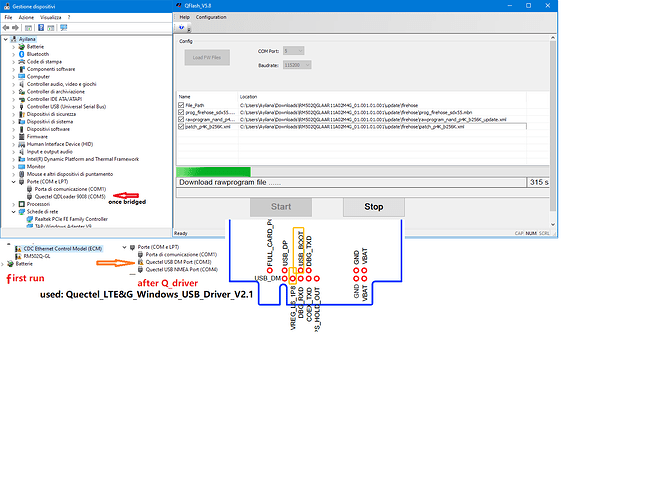
Open the windows d_manager and check the com ports
notice if the modem com_port is updated after 14/15 seconds, if it is in loop_cicle (bootloops) it is a problem to try a flash also for forced_boot…
I remember uninstalled all the quectel drivers and installed qualcomm qdloader, used qfil qpst and reduced module in 900E (soft_bricked),done because owned a second hand relative cheap module.Hence stable and not more in boot_loop, after I tried to put it in qdl by grounding pin 65 before power_up and once d_manager turn into qdl 9008, used qflash 4.18 at 460800 baud but xqcn was lost, module resurrected but into ftm_mode…
Hello, Charlene.
The official procedure ,when I asked(support@quectel.com), was told to send the modem in assistance at local FAE team…
I hope now that moderators can lead and instruct you for a solution.
Regards
Marco
This was my original firmware:
AT+QGMR
RM502QGLAAR05A03M4G_01.002.01.002
One of your colleagues provided the firmware version: RM502QGLAAR11A02M4G_01.001.01.001 and the tool “QFirehose_Linux_and_Android_V1.4.21.zip” and I attempted the update (Yes, I disabled the ModemManager service and removed the “qcserial.ko” kernel module before starting the update, rebooted and made sure they stayed disabled and removed).
Unfortunately the module is bricked because of the update. It boot loops every 15 seconds.
Your colleague wrote that “from the log, it may be means this firmware version may be not compatible owing to different baseline.”.
Hello @silvia ,
Unfortunately my employer is asking directly now: Could you please clarify if there is a procedure to unbrick the modem?
If yes, please send me the details at your earliest convenience.
As alerady explained to your colleague, we are dealing with a fairly large modem base (a few thousands modules, AFAIK) deployed in medical devices. I am studying an “off grid” procedure to address some security issues which are unrelated to the modem.
My employer is considering switching platform entirely if we cannot come up with a solution.
To be clear: if the update procedure is not reliable and if there is no recovery procedure they will be considering other market solutions as these are critical medical devices that cannot be taken offline just because a modem update went wrong.
Please let me know what are the steps if this is even possible.
Dear @Clorden
We are not sure where you buy these module, R05 firmware is very old.
You can follow the steps as @bamarcant mentioned before to try again.
Or enter emergency download and try to upgrade again.
Hi @silvia
Thanks for replying.
The modules are already present in the devices. I am not sure how old they are (besides we are under NDA, so I could not tell the details in any case).
Can you explain the “emergency download” you are mentioning?
Is there a software I need?
Should I try with the old R05 firmware version or R11 ?
My device already shows already a 9008 COM port. Does it mean that it is already in “emergency download” mode? =>Yes, it is in emergency download mode.
Should I use the Windows QFlash tool only (and not the Linux tool)?
=>You can use Qflash to upgrade, use the emergency download port.
After shortening the two pins, will the modem stop rebooting every 15 seconds?
=>If short circuit, generally,it will not reboot, but I am not sure what behavior on your side, please try.
Actually, for your module, after flash R11, it had entered reboot loop, I am not sure if it can use R11. But no matter R05 and R11, they are not maintained now. This project is EOL on our side, if still use this moduel to develop, I am not whether you can get support or not.
Please confirm whether you still need R05 firmware.
RM502QGLAAR05A03M4G
this is the firmware version i have . please provide me the latest firmware and the tool to flash. if you can also give the instructions it will be appreciated.
my device is RM502Q-GL