RM255C Stuck at CFUN=5 After Firmware Upgrade via QFlash

Hello,

I am currently working with the RM255C module and encountered an issue after performing a firmware upgrade.

Firmware Upgrade Details:

  • Tool: QFlash_v8.0_EN

  • COM Port: Quectel USB DM Port

  • Baudrate: 460800

  • Loaded file: update\prog_firehose_sdx35.elf

The firmware upgrade process completed, and the module now reports:

AT+QGMR
RM255CGLAAR01A03M2G_A0.302.A0.302
OK

The original firmware version was:
RM255CGLAAR01A02M4G_01.001.01.001

Commands Executed:
AT+QNVFW=“/nv/item_files/modem/nr5g/RRC/redcap_fallback_enabled”,00
OK

AT+CFUN=1,1
OK

AT+CFUN=1
+CME ERROR: 0

Issue:
The module remains stuck at CFUN=5 and does not transition to CFUN=1.

Could you please help me with a solution:

  • What might be causing the module to remain in CFUN=5?

  • Whether additional NV configurations or steps are required after this firmware upgrade?

  • If there is a recommended recovery or reinitialization procedure?

Thank you.

Dear @AJano
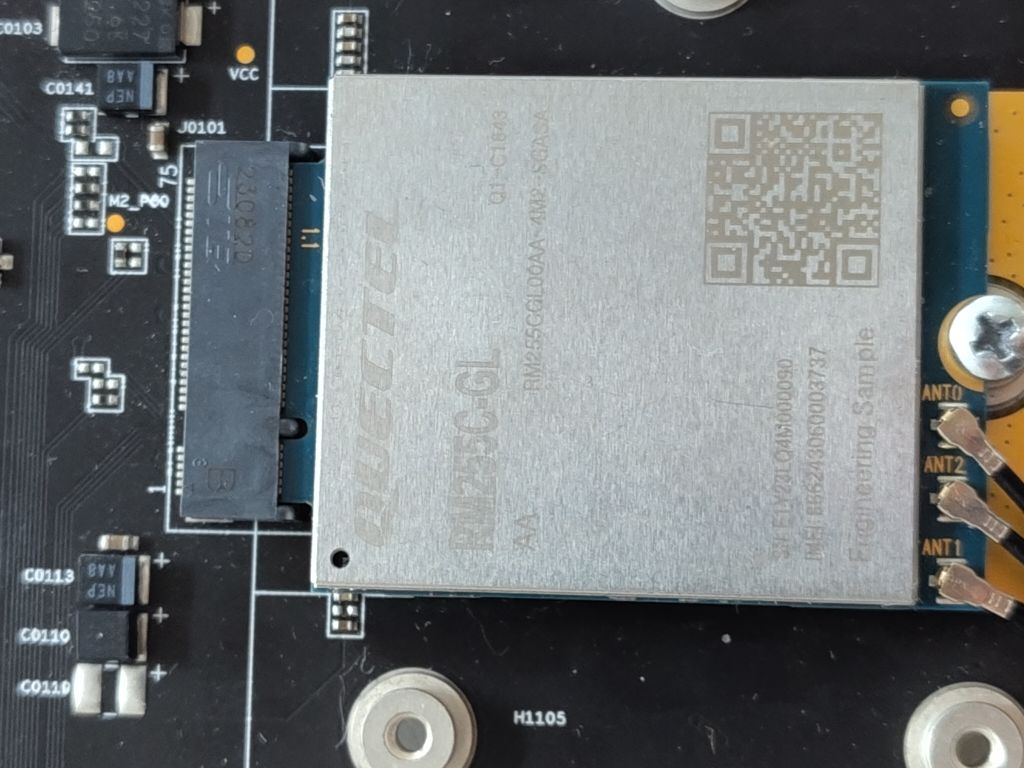
Please take a picture of your module.

Please find the picture of my module:

Dear @AJano
I have sent a firmware to you, please flash again.
Your module is engineer sample.

Dear @silvia ,

I have not received the firmware in my email. Can you please send it again?

Dear @AJano
I have sent to your email again, please check.

Hello @silvia ,

I reflashed the module again using QFlash, but the issue persists. After the reflash and reboot, the module still reports AT+CFUN? as +CFUN: 5, and attempting to set AT+CFUN=1 does not change the state and reports error.

Since the behavior remains the same even after reflashing, could this indicate that the issue is related to the NV/calibration data rather than the firmware image itself? Is there a way to verify whether the NV data is corrupted or to restore it?

Dear @AJano
As checked internally, your module is too old, it can match with new version.
I have sent an older firmware to you, please try again.

Hello @silvia ,

I flashed the module again, and I encountered the same issue, even with the new firmware. Here are the some of the module reports:

ATI
Quectel
RM255C-GL
Revision: RM255CGLAAR01A02M4G

OK

AT+CGMR
RM255CGLAAR01A02M4G

OK

AT+CFUN?
+CFUN: 5

OK

AT+QRFTESTMODE?
+QRFTESTMODE: 1

OK

AT+CFUN=1
+CME ERROR: 0

From these results, the module remains in CFUN=5 state with RF test mode still enabled (QRFTESTMODE=1). Additionally, attempting to set CFUN=1 fails with CME ERROR: 0.

Could you please advise if there is a way to restore the module to normal functional mode?
Thank you!

Dear @AJano
Do you try to disable RF test mode via AT+QRFTESTMODE=0?