RG520N Linux driver

I am using RG520N-EU module. To communicate, i have added option driver and added the VID & PID into the option_ids.

VID= 0x2C7C
PID=0x0801

But the device is not detecting. I was following UMTS LTE 5G Linux USB Driver User Guide. Is there anything I missed?

With lsusb can you see the VID and PID?
If you cannot see the VID and PID with lsusb it means something wrong with the hardware side.

I have resent the LINUX driver to you. Please try again.

1 Like

Hi Bean.Wang-Q

yes, i am not able to see VID and PID with the lsusb command when I have connecetd through USB type c interface. The EVB i am using is RTA001EV-EVB and I have turned on the module by pressing PWRKEY and the D0202 is lighted up.

But the module is detecting through UART Main interface.

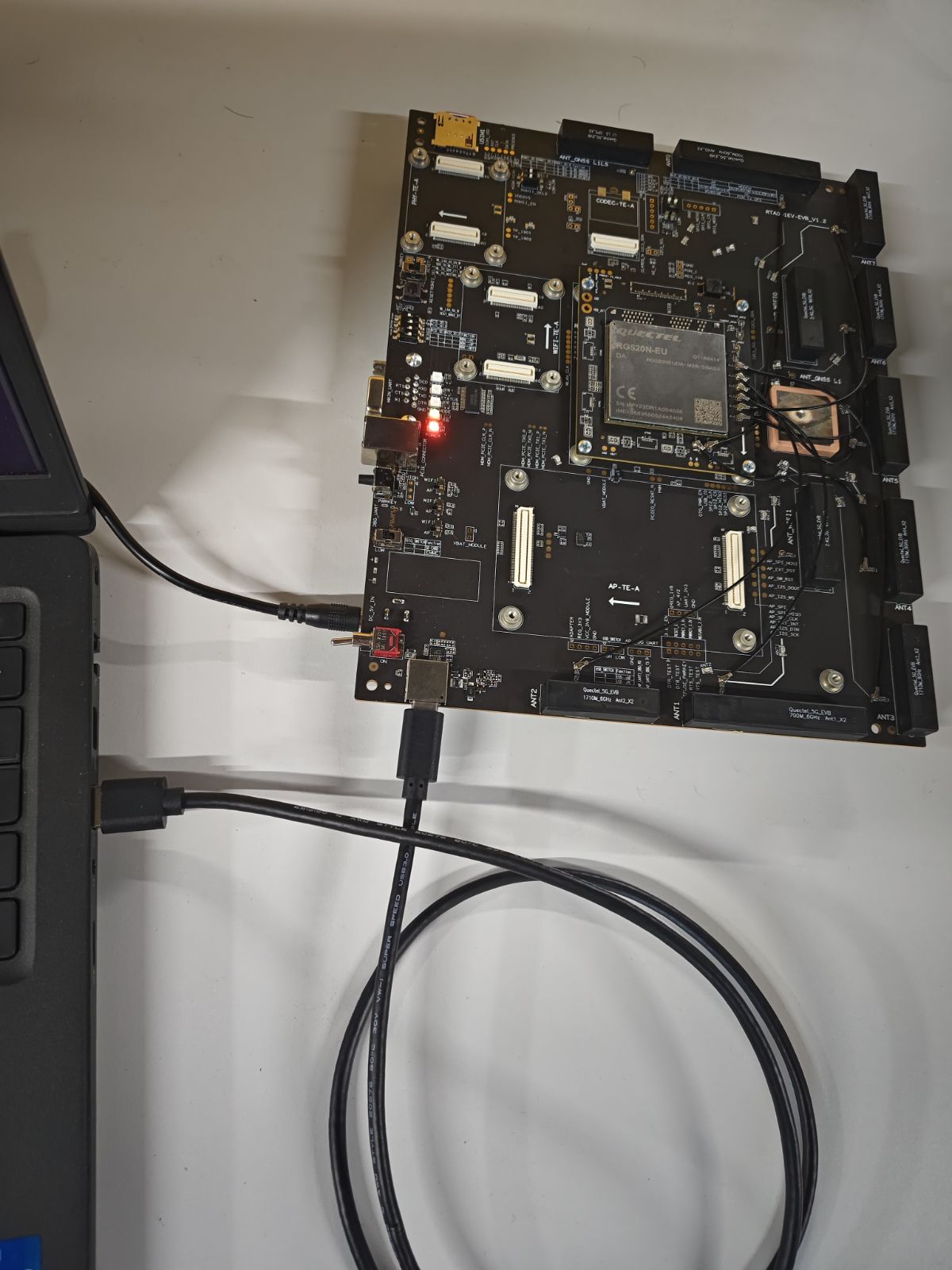
Please show us how you connect it with the Linux host. Can you show a photo?
`

But the module is detecting through UART Main interface.

`
I think maybe it is using the wrong interface.

What is the EVB like? Seems not from Quectel…

Sure.

The EVB comes under 5G Module series. It is using RG520N module

What you used is already the USB port.
But it seems the RG520N not power on.

Or maybe you can try another USB-C cable?

HI..

What user manual says is

Press the S0202 (PWRKEY) for at least 500 ms and the module will be powered on and D0202
(operation status indicator of the module) will light up.

The D0202 LED(yellow) is ON actually, sorry for the low quality image.

Also, I tried with another USB cable too. But the issue still persists.

If you login in the modem via the debug uart, can you make sure the modem boot up?

Thanks. I have connected the modem through debug UART port, and the error messages are given below:

ImageName=dtbo
BootLinux: failed to get dtbo image
Best match DTB tags 509/05010008/0x00000305/20000/2002F/1003B/0/0/(of0
Using pmic info 0x2002F/0x1003B/0x0/0x0 for device 0x2002F/0x1003B/0x0
Memory Base Address: 0x80000000
Failed to get Boot Device Base address, Buffer Too Small
Failed to get Boot Device: Buffer Too Small
Unable to get Panel Config, Not Found
Offlining Memory Not Supported
Cmdline: noinitrd ro rootwait console=ttyMSM0,115200,n8 androidboot.hx
BootConfig:

RAM Partitions
*Add Base: 0x0000000080000000 Available Length: 0x0000000020000000 *
*Add Base: 0x00000000A0000000 Available Length: 0x0000000020000000 *
Failed to get MinPasrSize, Status = Unsupported
Unable to get splash buffer info, Not Found
Variable not exist, skip update pll codes
Update Device Tree total time: 12 ms

Also,
[FAILED] Failed to start pcie Service.
[FAILED] Failed to start pcie-diag Service.

I’m not sure whether this is causing the issue. Anyway, I am able to access the login menu

  *Starting QTI Post Boot Service...*

[ OK ] Started Quectel AB Update Service.
[ OK ] Started QTI Post Boot Service.

QTI Linux reference nogplv3 distro targeting performance builds. LE.U0

sdxlemur login:

If you can login in the modem via debug uart. You can try send AT command over /dev/smd11 or /dev/smd9.
Maybe the modem is in PCIe EP mode.

If we press the USB_BOOT button, and then power up the module, can see the 05c6 9008 with lsusb?

Can you share the login id and password for debug UART interface? I couldn’t find any documentation regarding that. But wwan0 interface for connecting internet, can’t be accessed through that, right?

The 05c6 9008 is also not detecting through the type C USB interface, after press USB_BOOT and then power up the module.
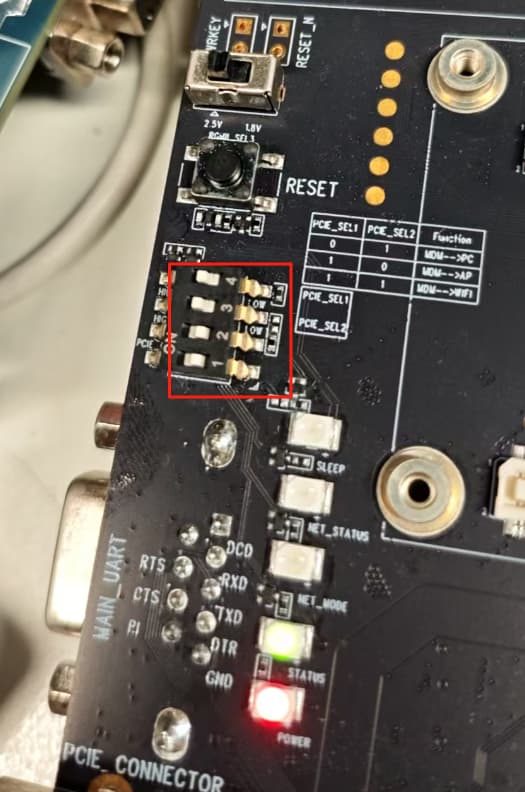
Please check the

The username is root, but for the password it need more check.

Okay.Thanks

I have kept the S1601 as that(0011). But I am still not able to get 05c6 9008 with lsusb.

Or maybe you can try another TE-A module. As I think, maybe there is something wrong with the EVB 、Module、USB Cable.

yeah thanks a lot.
Sorry actually. the module was not pressed into the EVB correctly. It is working fine now properly.