RG255C-GL - connecting to Vodafone Australia 5G network

G’day Quectel Team,

I have a RG255C-GL in a Mikrotik LTAP Mini and whilst it works fine on LTE, I’m struggling to get it to connect on 5G.

The following frequencies and channel widths are available. I know it’s a Redcap module but surely it should work with some of these (noting channel widths are less than 20mhz which is the Redcap maximum).

Vodafone 700mhz: * Vodafone 2x15 MHz bandwidth 733-748 MHz paired with 788-803 MHz
Coverage: Australia-wide

Vodafone 850mhz: * Vodafone 2x10 MHz bandwidth 825-835 MHz paired with 870-880 MHz as well as Vodafone 2x5 MHz bandwidth 825-830 MHz paired with 870-875 MHz

Vodafone 2100mhz: Vodafone2x20 MHz bandwidth 1960-1980 MHz paired with 2150-2170 MHz

I look forward to your advice on the matter

Dear @judgiesa85
Please share your current firmware.

For the network, please list which band the network support.

The bands are already listed in the initial post above, by frequency. In the order they’ve been listed, that would be band n28, band n5 and n1 that Vodafone makes available for 5G in Australia, that meet the 20mhz or less channel width for the RG255C-GL, as mentioned above.

The firmware current firmware is RG255CGLABR01A04M4G.

Dear @judgiesa85
Please share the response of these AT command:
AT+QNWPREFCFG=“mode_pref”
AT+QMBNCFG=“LIST”
AT+QNWPREFCFG=“ue_capability_band”

None of those commands work in Routeros using ATChat. They all return “error”

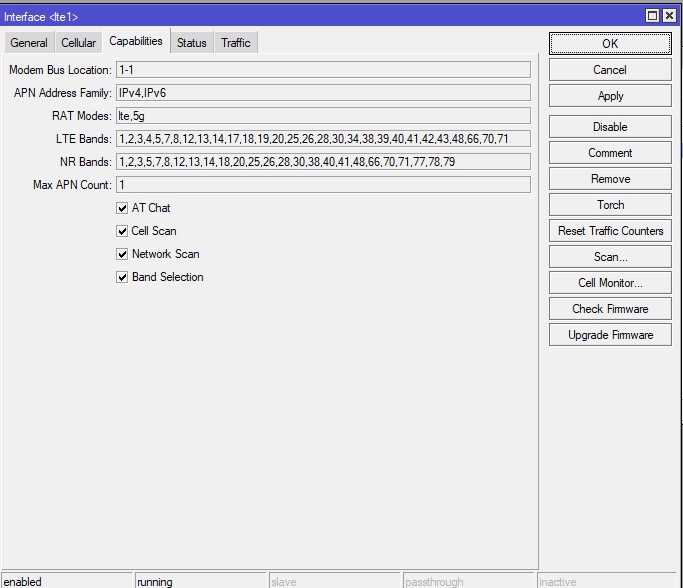
However I’ve attached a screenshot of what modem capabilities RouterOS see’s.

You need to use proper quotation marks and not copy/paste unformatted strings from the forum.
So, try again AT+QNWPREFCFG="mode_pref" etc.
Please do not use images if you need to provide text-only results.

Yes, i used quotations as specified before painting my reply. As I said “ERROR” was returned from the modem. Therefore the screenshot was provided as the most expedient way to make the data available for Silvia from Quectel.

Dear @judgiesa85
Actually, I need the response of AT commands to check.

You may need to escape some characters when you use this tool, ask Mikrotik for help.

Alright, I’ll try that. Standby for results.

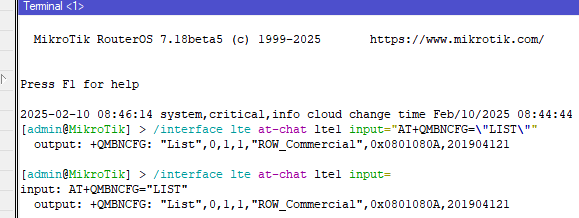
correct syntax is /interface lte at-chat lte1 input="AT+QMBNCFG=\"LIST\""
but better input only /interface lte at-chat lte1 input=
press & add at_command …

Okay, Good news. Two of the commands worked. I appreciate the help so far from you both, here are the results for each command:

Number 1: AT+QNWPREFCFG=“mode_pref”
output: +QNWPREFCFG: “mode_pref”,AUTO
OK

Number 2: input: AT+QMBNCFG=“LIST”
output: ERROR
***** I cannot get this command to work, no idea why. The other two worked fine. I’ve Googled this command and it seems when it does fail (on other Quectel modems), it’s because there is no data to report. Qflash AT+QMBNCFG="LIST" FAIL for BG96 - #4 by momuno. @bamarcant , that’s what I tried, character for character. It fails. ******

Number 3: AT+QNWPREFCFG=“ue_capability_band”
output: +QNWPREFCFG: “lte_band”,1:2:3:4:5:7:8:12:13:14:17:18:19:20:25:26:28:30:3
4:38:39:40:41:42:43:48:66:70:71
+QNWPREFCFG: “nr5g_band”,1:2:3:5:7:8:12:13:14:18:20:25:26:28:30:38:40:41
:48:66:70:71:77:78:79
OK
Thoughts on that second command and how we might get it to function?

Hi Silvia,

In relation to the latest message:

output: RG255CGLABR01A04M4G_A0.003.A0.003
OK

Dear @judgiesa85
I have sent the latest firmware to your email.
Please use the latest firmware to check:
AT+QMBNCFG=“LIST”

G’day Silvia,

I’ve conduced the firmware update, and the results of the previous commands are as below:

(1) input: AT+QNWPREFCFG=“mode_pref”
output: +QNWPREFCFG: “mode_pref”,AUTO
OK
(2) input: AT+QMBNCFG=“LIST”
output: +QMBNCFG: “List”,0,1,1,“Swiss-Comm”,0x0A010411,202307141

      +QMBNCFG: "List",1,0,0,"FirstNet",0x0A015300,202411221                  

      +QMBNCFG: "List",2,0,0,"Dish_US_Commercial",0x0A015900,202307141        

      +QMBNCFG: "List",3,0,0,"Commercial-USCC",0x0A011803,202307141           

      +QMBNCFG: "List",4,0,0,"Rogers_Canada",0x0A014800,202307141             

      +QMBNCFG: "List",5,0,0,"Telus_Canada",0x0A014900,202307141              

      +QMBNCFG: "List",6,0,0,"Commercial-Sprint",0x0A010204,202307141         

      +QMBNCFG: "List",7,0,0,"Commercial-TMO",0x0A01050F,202408221            

      +QMBNCFG: "List",8,0,0,"VoLTE-ATT",0x0A010335,202411221                 

      +QMBNCFG: "List",9,0,0,"CDMAless_Private-Verizon",0x0A01FD28,202411221  

      +QMBNCFG: "List",10,0,0,"CDMAless-Verizon",0x0A010126,202411221         

      +QMBNCFG: "List",11,0,0,"STC_SA_Commercial",0x0A014A00,202307141        

      +QMBNCFG: "List",12,0,0,"Commercial-LGU",0x0A012608,202307141           

      +QMBNCFG: "List",13,0,0,"Commercial-KT",0x0A01280B,202307141            

      +QMBNCFG: "List",14,0,0,"Commercial-SKT",0x0A01270A,202307141           

      +QMBNCFG: "List",15,0,0,"TEF_Spain_Commercial",0x0A010C00,202307141     

      +QMBNCFG: "List",16,0,0,"TEF_Germany_Commercial",0x0A010CC0,202307141   

      +QMBNCFG: "List",17,0,0,"Commercial-DT-VOLTE",0x0A011F1F,202307141      

      +QMBNCFG: "List",18,0,0,"Optus_Australia_Commercial",0x0A014400,20230714

1
+QMBNCFG: “List”,19,0,0,“Telstra_Australia_Commercial”,0x0A010F00,202404
251
+QMBNCFG: “List”,20,0,0,“Commercial-Reliance”,0x0A011B0C,202307141

      +QMBNCFG: "List",21,0,0,"Commercial-SBM",0x0A011C0B,202307141           

      +QMBNCFG: "List",22,0,0,"Commercial-KDDI",0x0A010709,202307141          

      +QMBNCFG: "List",23,0,0,"Commercial-DCM",0x0A010D0D,202307141           

      +QMBNCFG: "List",24,0,0,"VoLTE-CU",0x0A011561,202404251                 

      +QMBNCFG: "List",25,0,0,"VoLTE_OPNMKT_CT",0x0A0113E0,202404251          

      +QMBNCFG: "List",26,0,0,"Volte_OpenMkt-Commercial-CMCC",0x0A012010,20241

0171
+QMBNCFG: “List”,27,0,0,“ROW_Commercial”,0x0A010809,202408281

      OK                                      

(3) input: AT+QNWPREFCFG=“ue_capability_band”
output: +QNWPREFCFG: “lte_band”,1:2:3:4:5:7:8:12:13:14:17:18:19:20:25:26:28:30:3
4:38:39:40:41:42:43:48:66:70:71
+QNWPREFCFG: “nr5g_band”,1:2:3:5:7:8:12:13:14:18:20:25:26:28:30:38:40:41
:48:66:70:71:77:78:79
OK

I have bought a Telstra Data Only Sim, and have confirmed the RG255C-GL will not connect to 5G on Telstra either.

Dear @judgiesa85
Please try the AT commands below:
AT+QMBNCFG=“Deactivate”
AT+QMBNCFG=“Autosel”,0
AT+QMBNCFG=“Select”,“ROW_Commercial”

1 Like

G’day Silvia,

First two commands worked fine. The third is throwing “ERROR”

Okay, got the third command to work and rebooted. Still no 5G

Dear @judgiesa85
Do you have USB port on your device? We need log to analyze.