Quectel RTOS | One VS Code Extension for UniKnect, UniRTOS, and QuecPython Development
Embedded developers are often familiar with this situation: working on MCU firmware, cellular module OpenCPU applications, and Python prototypes at the same time means installing three separate toolchains. Flashing tools, serial terminals, and debugging windows all run independently. Switching to another product often requires reconfiguring the development environment and getting used to different panel layouts and workflows.
Quectel RTOS is a developer-friendly VS Code extension introduced by Quectel to simplify embedded development. It brings three development toolchains—UniKnect, UniRTOS, and QuecPython—into a single interface, covering everything from SDK installation and target configuration to compilation, flashing, and debugging within one editor.
01 One Extension, Three Development Workflows
Install Quectel RTOS once, and you can switch between three development workflows directly from the SOLUTION selector at the top of the panel, without installing another extension or reloading the VS Code window.
When switching solutions, resources used by the previous solution are released. Users can also choose whether to preserve their selected solution after restarting. All three toolchains share a consistent interface and workflow, with no flickering or layout resets during switching.
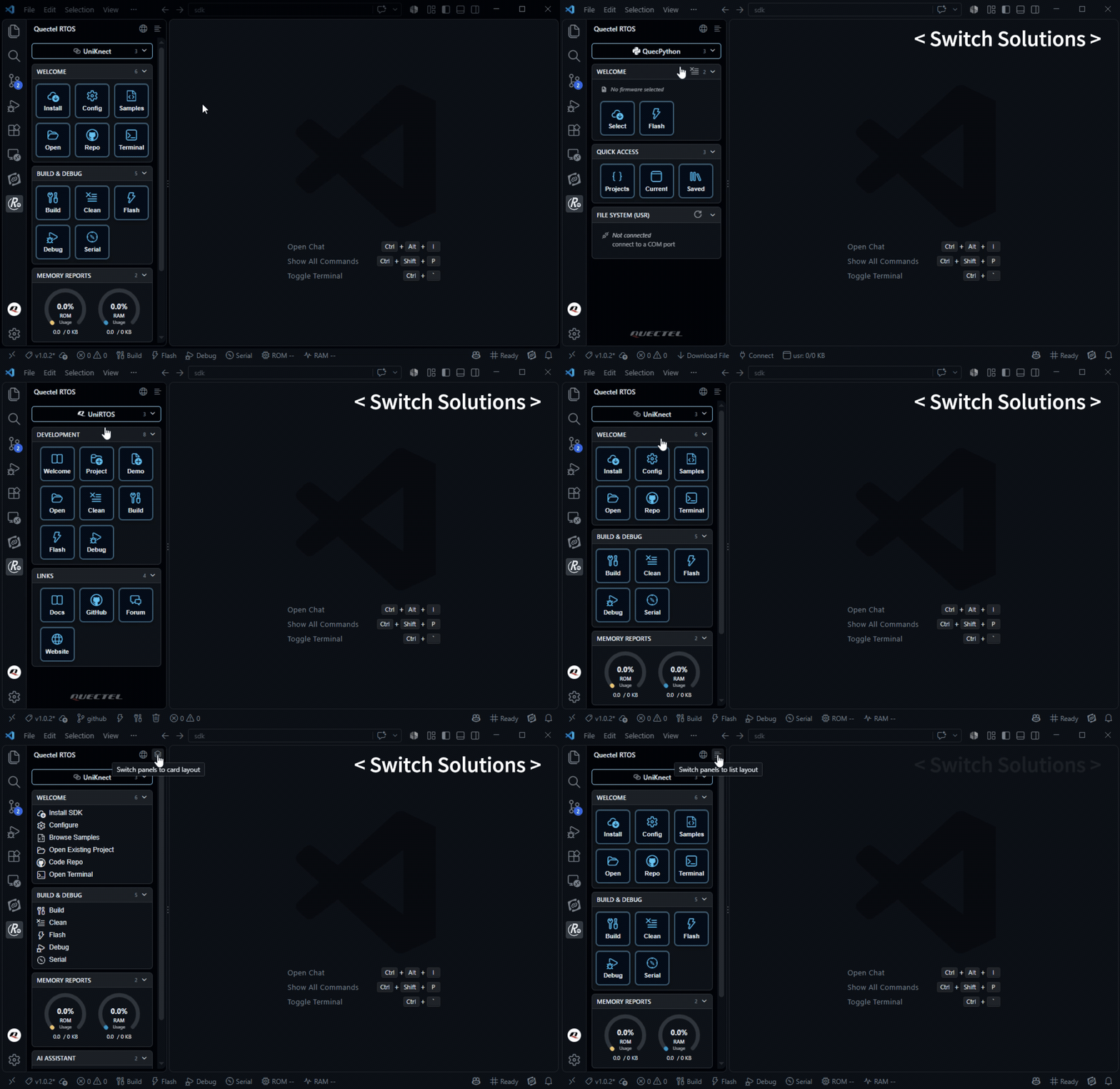
The extension automatically adapts to the VS Code display language and also allows users to switch manually between Chinese and English with one click.
Common development tasks are organized into a streamlined sequence of buttons:
Install SDK → Configure → Build → Flash → Debug
Some tools are automatically downloaded when first needed and can be used offline afterward.
-
UniKnect: MCU firmware development based on the UniKnect SDK. Supports Windows and Linux.
-
UniRTOS: OpenCPU development for cellular modules, using Quectel flashing tools. Supports Windows.
-
QuecPython: MicroPython development on cellular modules. Supports Windows.
02 UniKnect: A Unified Workflow for MCU Firmware Development
UniKnect is designed for MCU firmware development, supporting compilation, ST-Link flashing, and debugging through the UniKnect SDK, with an integrated serial console.
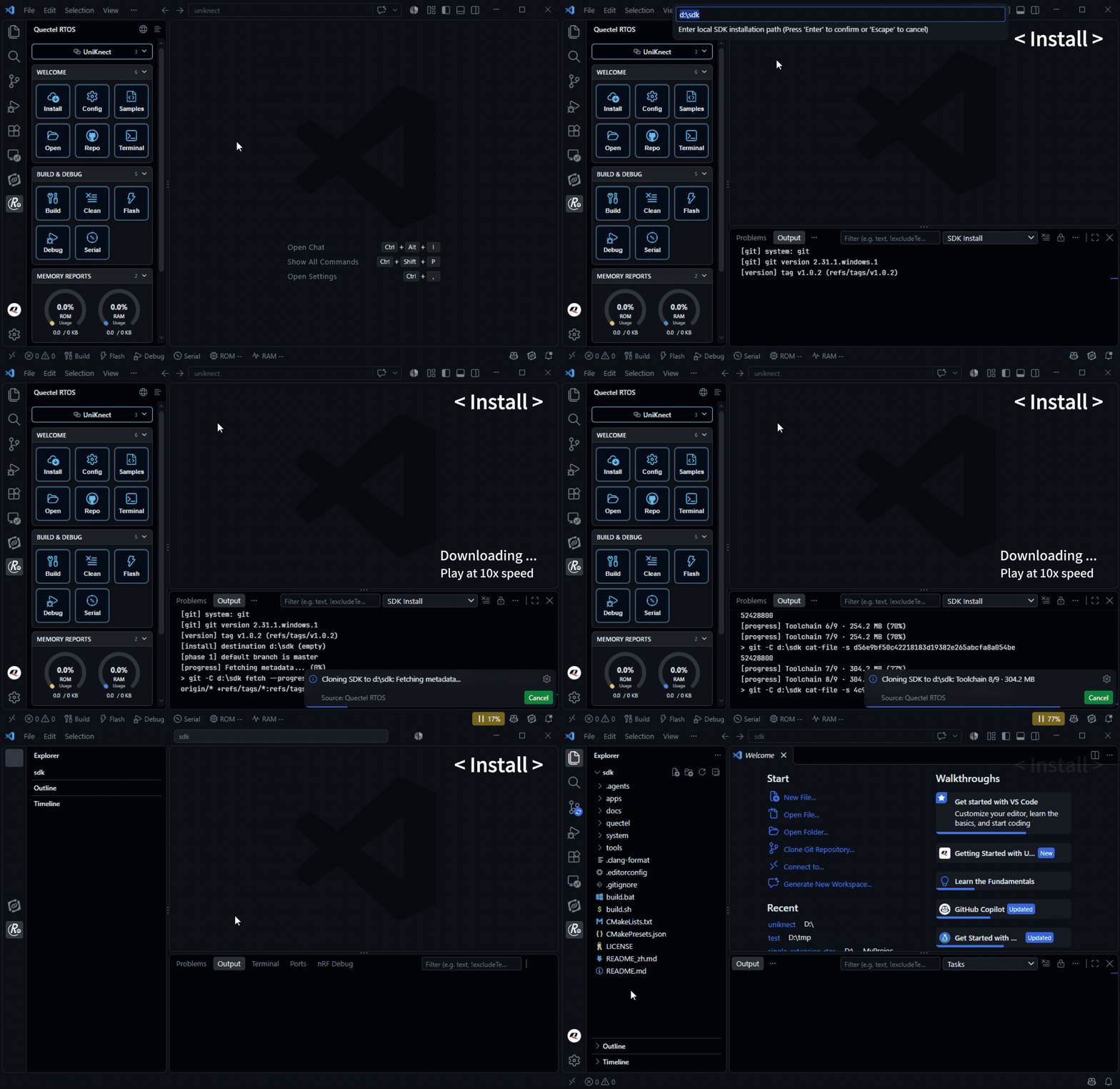
End-to-End Workflow: The panel provides a complete sequence of actions:
Install SDK (with update support) → Configure Target → Samples → Build / Clean / Flash / Debug
All steps can be completed through the graphical interface.
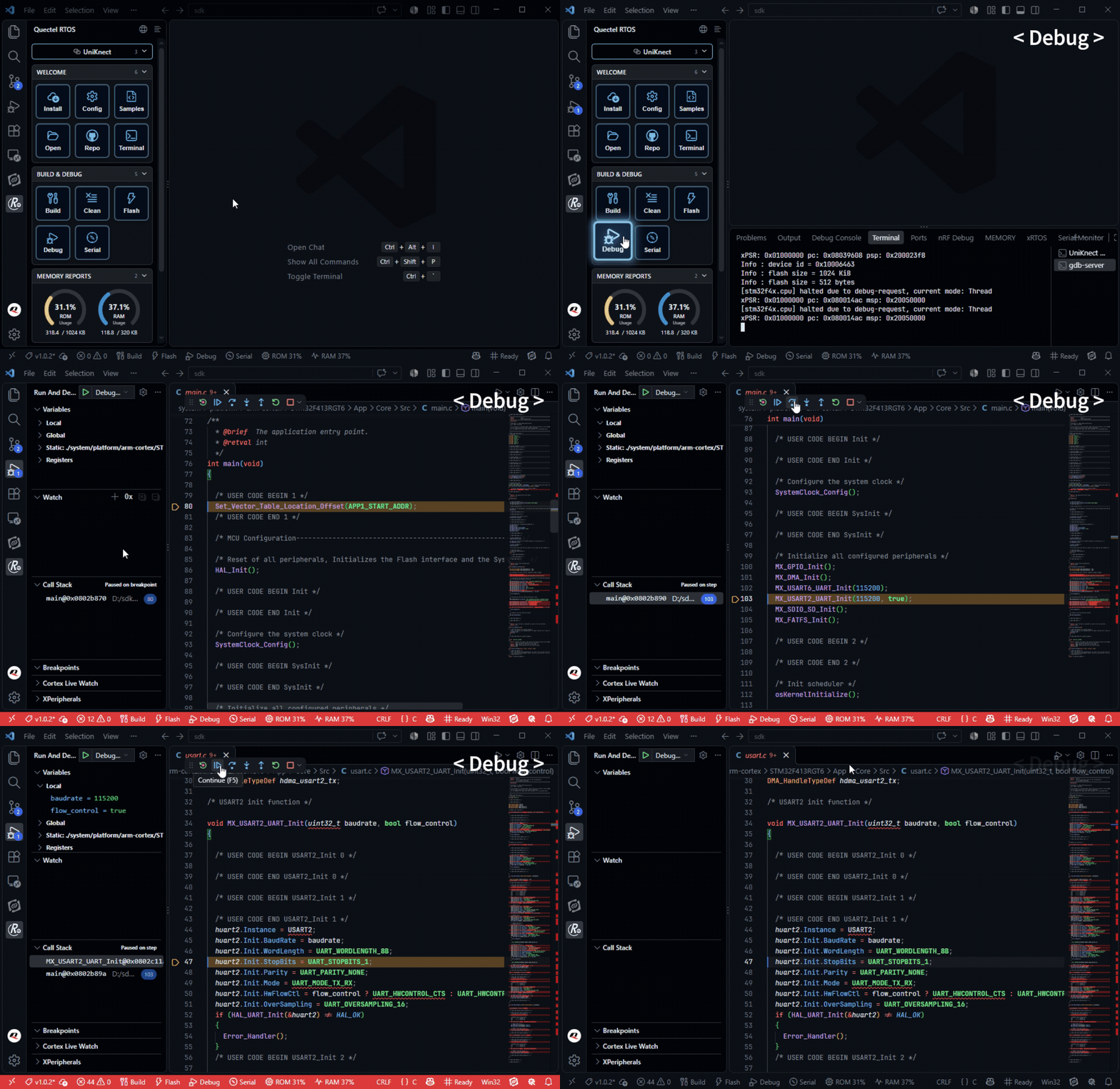
One-Click Debugging: Launch a cortex-debug session with one click, supporting breakpoints, step-by-step execution, variable inspection, Watch expressions, and call stacks. The extension automatically checks and installs the required ST-Link drivers.
Serial Console: The integrated serial panel provides serial port configuration, a CLI command builder, and real-time logs of device responses. Developers can debug firmware without opening a separate third-party serial terminal.
ROM/RAM Dashboard: Memory usage statistics are automatically refreshed after each build and displayed in the status bar, making it easier to identify firmware size issues immediately.
The panel also includes an AI assistant integration. Developers can launch GitHub Copilot Chat with one click or connect to any OpenAI-compatible service. Serial logs can be directly referenced as context for AI-assisted troubleshooting.
03 UniRTOS: Guided OpenCPU Development and Firmware Flashing
UniRTOS is designed for OpenCPU development on cellular modules. Its Commands view provides a complete set of tools for project creation, compilation, cleaning, flashing, and debugging.

Project Creation: Start from the Welcome guide, create a project from scratch using New Project, create one from an example using New Project From Demo, or open an existing project.
Build and Flash: Use Clean to remove build artifacts, Build to compile with the UniRTOS toolchain, Flash to program the module through FlashToolCLI, and Debug to launch a debugging session.
Guided Environment Setup: The Welcome page provides step-by-step instructions for installing the toolchain, Python, Git, Quectel drivers, and UniRTOS CLI, helping developers configure their environment systematically.
Traditionally, OpenCPU development often required developers to assemble toolchains and flashing scripts manually, making environment setup heavily dependent on individual experience.
With the guided workflow, new engineers can get firmware running on a module from their first day. Environment setup becomes a repeatable, step-by-step process rather than a task requiring extensive prior experience.
04 QuecPython: Run Python Prototypes on Cellular Modules Without a C Development Environment
QuecPython is designed for MicroPython development on cellular modules.
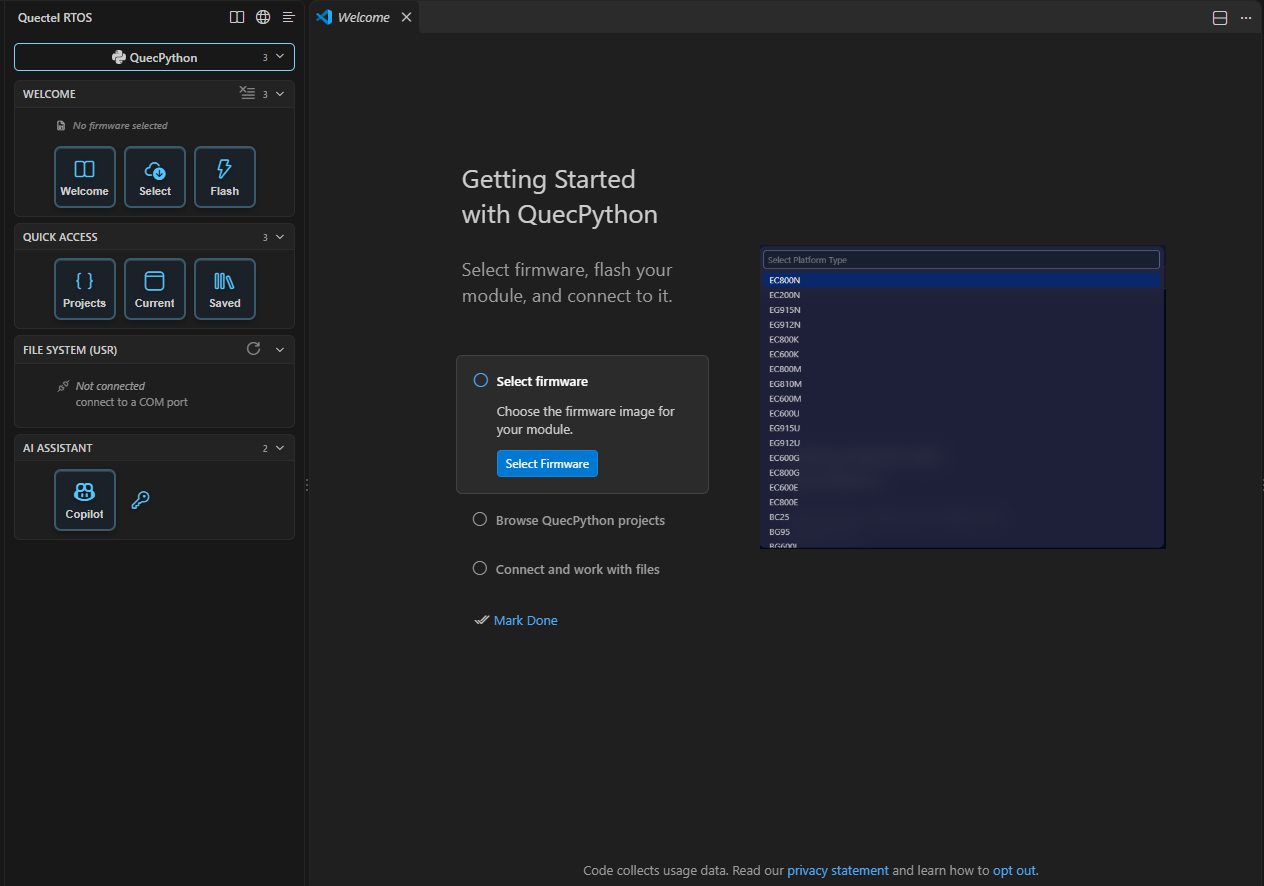
Firmware Management: The status bar clearly displays the currently selected firmware image. Developers can select an image and flash it to the module with one click.
File Transfer: The device file system is presented in a card-based interface. Right-click actions allow developers to run scripts, export files, and delete files or directories.
Interactive REPL: Once connected to the module, developers can access an interactive REPL and execute commands immediately.
Built-In Type Hints: QuecPython module .pyi stub files are included with the extension, allowing Pylance to recognize imports such as import machine and provide code intelligence.
For IoT prototype development, QuecPython eliminates the need to set up a C development environment. Python scripts can run directly on the module, potentially reducing prototype validation time from hours to minutes.
05 Get Started: Extension Download and Documentation
Search for Quectel RTOS in the VS Code Extensions Marketplace to install the extension directly.
A single extension provides access to all three toolchains: UniKnect, UniRTOS, and QuecPython.
For environments with restricted network access, the extension also supports offline installation using a VSIX package.
Get the Extension
-
Search for Quectel RTOS in the VS Code Extensions Marketplace.
-
Extension Marketplace: Quectel RTOS - Visual Studio Marketplace