Hi friends, I have a QUECTEL RM520N-EU module mounted on this device (UK 5G SIM Router Outdoor CPE WLAN Mobile Modem Dual SIM) but in 5g it does not connect anywhere way! Only in 4g! I have a strong and clean 5g signal in my area and I connect to it with a smartphone or another router without any problem…The module has 5 connections for external antennas and the device in the description only has 3 antennas which are connected respectively to pins 0-1-4 while connections 2-3 are disconnected (by the way, why does it have 5 pins? the others usually have 4!? Could someone explain to me the connection diagram for these 5 pins?). I also tried connecting external antennas to all 5 connectors on the module but nothing changes! I also updated the module to the latest firmware. I don’t know what to do anymore…I’m in Italy, is it possible that the module is incompatible with Italian frequencies? Can you help me? Thank you all…
Dear @Goblin_60
Please share your ccurrent firmware.
And share the response of AT commands below:
AT+QNWPREFCFG=“mode_pref”
AT+QMBNCFG=“List”
AT+QNWPREFCFG=“nr5g_band”
AT+QNWPREFCFG=“rat_acq_order”
For antanna4, please check as below:
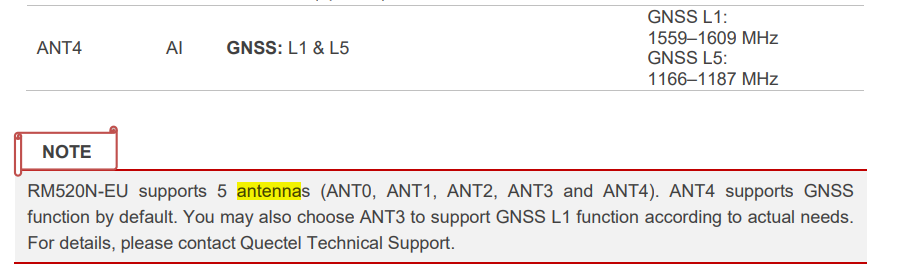
Hi…thank you very much for your reply and sorry for my late reply. How can I issue these commands? Is there a procedure? Can I send them directly within OpenWrt or is there a more specific method? I apologize but I’m not an expert in At commands…Thanks for your help.
My current firmware is RM520NEUDAR03A06M4G_01.200.01.200.
Dear @Goblin_60
Sorry, I am not familar with OpenWrt.
You can find the USB port and try to send AT command via it.
Or you can contact with other expert about OpenWrt.
Hello @silvia
I requested firmware on other thread, however my speed degraded on module.
Please find below info
at+cversion
VERSION: RM520NEUDAR03A06M4G
Apr 4 2024 06:08:50
Authors: Quectel
at+qnwprefcfg=“mode_pref”
+QNWPREFCFG: “mode_pref”,AUTO
at+qmbncfg=“list”
+QMBNCFG: “List”,0,1,1,“ROW_Commercial”,0x0A010809,202401151
+QMBNCFG: “List”,1,0,0,“FirstNet”,0x0A015300,202206171
+QMBNCFG: “List”,2,0,0,“Rogers_Canada”,0x0A014800,202303141
+QMBNCFG: “List”,3,0,0,“Bell_Canada”,0x0A014700,202111051
+QMBNCFG: “List”,4,0,0,“Telus_Canada”,0x0A014900,202112271
+QMBNCFG: “List”,5,0,0,“Commercial-Sprint”,0x0A010204,202111051
+QMBNCFG: “List”,6,0,0,“Commercial-TMO”,0x0A01050F,202402061
+QMBNCFG: “List”,7,0,0,“VoLTE-ATT”,0x0A010335,202206171
+QMBNCFG: “List”,8,0,0,“CDMAless-Verizon”,0x0A010126,202304251
+QMBNCFG: “List”,9,0,0,“Telia_Sweden”,0x0A012400,202111051
+QMBNCFG: “List”,10,0,0,“TIM_Italy_Commercial”,0x0A012B00,202111051
+QMBNCFG: “List”,11,0,0,“France-Commercial-Orange”,0x0A010B21,202401081
+QMBNCFG: “List”,12,0,0,“Commercial-DT-VOLTE”,0x0A011F1F,202403221
+QMBNCFG: “List”,13,0,0,“Germany-VoLTE-Vodafone”,0x0A010449,202401201
+QMBNCFG: “List”,14,0,0,“UK-VoLTE-Vodafone”,0x0A010426,202401201
+QMBNCFG: “List”,15,0,0,“Commercial-EE”,0x0A01220B,202403131
+QMBNCFG: “List”,16,0,0,“Optus_Australia_Commercial”,0x0A014400,202111051
+QMBNCFG: “List”,17,0,0,“Telstra_Australia_Commercial”,0x0A010F00,202311071
+QMBNCFG: “List”,18,0,0,“Commercial-LGU”,0x0A012608,202111051
+QMBNCFG: “List”,19,0,0,“Commercial-KT”,0x0A01280B,202308031
+QMBNCFG: “List”,20,0,0,“Commercial-SKT”,0x0A01270A,202111051
+QMBNCFG: “List”,21,0,0,“Commercial-Reliance”,0x0A011B0C,202210211
+QMBNCFG: “List”,22,0,0,“Commercial-SBM”,0x0A011C0B,202401231
+QMBNCFG: “List”,23,0,0,“Commercial-KDDI”,0x0A010709,202401191
+QMBNCFG: “List”,24,0,0,“Commercial-DCM”,0x0A010D0D,202312201
+QMBNCFG: “List”,25,0,0,“VoLTE-CU”,0x0A011561,202310181
+QMBNCFG: “List”,26,0,0,“VoLTE_OPNMKT_CT”,0x0A0113E0,202312141
+QMBNCFG: “List”,27,0,0,“Volte_OpenMkt-Commercial-CMCC”,0x0A012010,202209221
at+qnwprefcfg=“nr5g_band”
+QNWPREFCFG: “nr5g_band”,1:3:5:7:8:20:28:38:40:41:71:75:76:77:78
at+qnwprefcfg=“rat_acq_order”
+QNWPREFCFG: “rat_acq_order”,NR5G:LTE:WCDMA
at+qcainfo
+QCAINFO: “PCC”,1548,100,“LTE BAND 3”,1,285,-94,-15,-56,-1
+QCAINFO: “SCC”,6300,50,“LTE BAND 20”,1,285,-91,-18,-63,2,0,-,-
+QCAINFO: “SCC”,125,75,“LTE BAND 1”,1,285,-91,-12,-69,0,0,-,-
+QCAINFO: “SCC”,643320,12,“NR5G BAND 78”,767
at+qeng=“servingcell”
+QENG: “servingcell”,“NOCONN”
+QENG: “LTE”,“FDD”,419,03,A65101,285,1548,3,5,5,AC21,-89,-17,-51,10,5,-,-
+QENG: “NR5G-NSA”,419,03,767,-88,6,-10,643320,78,12,1
OK
at+qeng=“neighbourcell”
+QENG: “neighbourcell intra”,“LTE”,1548,360,-17,-94,-67,-,-,-,-,-,-
+QENG: “neighbourcell intra”,“LTE”,1548,241,-19,-97,-67,-,-,-,-,-,-
+QENG: “neighbourcell intra”,“LTE”,1548,285,-16,-93,-55,-,-,-,-,-,-
+QENG: “neighbourcell intra”,“LTE”,1548,166,-16,-93,-67,-,-,-,-,-,-
+QENG: “neighbourcell intra”,“LTE”,1548,399,-19,-98,-68,-,-,-,-,-,-
+QENG: “neighbourcell intra”,“LTE”,1548,173,-16,-97,-69,-,-,-,-,-,-
+QENG: “neighbourcell intra”,“LTE”,1548,163,-20,-98,-69,-,-,-,-,-,-
+QENG: “neighbourcell inter”,“LTE”,38752,285,-10,-91,-72,-,-,-,-,-
+QENG: “neighbourcell inter”,“LTE”,38752,287,-12,-95,-72,-,-,-,-,-
+QENG: “neighbourcell inter”,“LTE”,38752,163,-18,-100,-72,-,-,-,-,-
+QENG: “neighbourcell inter”,“LTE”,38752,286,-17,-99,-72,-,-,-,-,-
+QENG: “neighbourcell inter”,“LTE”,3647,285,-13,-85,-63,-,-,-,-,-
+QENG: “neighbourcell inter”,“LTE”,3647,166,-20,-94,-63,-,-,-,-,-
+QENG: “neighbourcell inter”,“LTE”,3647,399,-13,-86,-63,-,-,-,-,-
+QENG: “neighbourcell inter”,“LTE”,3647,360,-17,-90,-63,-,-,-,-,-
+QENG: “neighbourcell inter”,“LTE”,3647,323,-20,-95,-64,-,-,-,-,-
+QENG: “neighbourcell inter”,“LTE”,3647,286,-19,-92,-63,-,-,-,-,-
+QENG: “neighbourcell inter”,“LTE”,125,285,-11,-90,-70,-,-,-,-,-
+QENG: “neighbourcell inter”,“LTE”,125,287,-15,-96,-70,-,-,-,-,-
I don’t know what operator did, but my download speed reduced from 300 mbps to 40 mbps and they are just saying put your sim in phone and check. On iphone 13 pro max, speed is around 350 mbps with same sim.
Please kindly help me
Dear @meloserj
I have sent the firmware to your email, please check and test again.
Do you check the band combination on the iphone? Is it same with device?
I received the firmware file and I will update tonight dear @silvia
Usually on phones, more CA is happening rather than RM520, due to different combinations scheme. My issue is I am not sure if operator has changed some configuration on tower or my module got problem. As the issue started on 8-May, is there any command that I can extract log with AT commands and share with your team for checking?
Thanks a lot for your usual support 
Dear @meloserj
No AT command, do you have USB port? If yes, it can use tool to capture log for analysis.
Hi @silvia
Yes I have USB port, but seems issue resolved from operator side. I made lots of calls to them.
Thanks a lot for your kind support