Remote Desktop Access on QuecPI Debian: Wayland and X11 Considerations
Overview
Some users may encounter issues when attempting to use remote desktop applications such as AnyDesk on QuecPI Debian images.
This article explains the reason behind the issue and provides an alternative solution for remote access.
Environment
-
Hardware: QuecPI Series SBC
-
Operating System: Debian Linux
-
Desktop Environment: GNOME
-
Display Server: Wayland
Issue Description
After installing AnyDesk on QuecPI Debian, remote connections may fail to display the desktop correctly, or the remote session may show a blank screen.
Some users attempt to switch from Wayland to X11 (Xorg) because AnyDesk traditionally relies on X11 for screen capture and remote desktop functionality. However, this approach is not supported on the current QuecPI Debian platform.
Root Cause
QuecPI Debian images use GNOME running on Wayland as the default and supported display server.
X11 (Xorg) is not supported on the current platform. Therefore, switching the desktop session from Wayland to X11 is not a supported configuration.
This behavior is also aligned with the long-term direction of the GNOME project, where Wayland has become the primary display protocol and X11 support is gradually being phased out.
As a result, applications that depend on X11-specific functionality may not operate correctly.
Recommended Solution
For remote desktop access, it is recommended to use remote access software that supports Wayland environments.
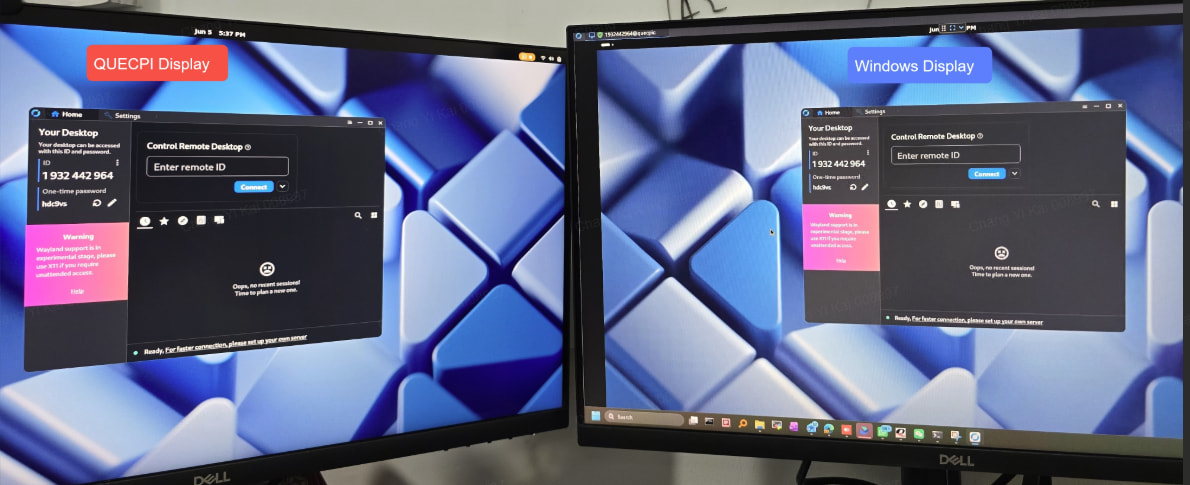
During internal validation, RustDesk was successfully installed and operated on QuecPI Debian, allowing remote desktop access without requiring X11.
Installation Example
-
Download the ARM64 package from the RustDesk release page.
-
Install the package on QuecPI Debian.
-
Launch RustDesk and obtain the device ID.
-
Connect from a remote PC using the RustDesk client.

Validation Result
RustDesk has been verified internally on QuecPI Debian running GNOME under Wayland and is able to provide remote desktop functionality successfully.
Conclusion
If remote desktop access is required on QuecPI Debian:
-
Use the default GNOME Wayland environment.
-
Do not attempt to switch to X11, as X11 is not supported.
-
Use a Wayland-compatible remote desktop solution such as RustDesk.
This approach provides the best compatibility with the current QuecPI software architecture.