Proper workflow for RTK Survey-In on LC29HEA: Automated vs. Manual coordinate injection?

Hi Quectel Support and Community,

I am currently working with the LC29HEA module to set up a local RTK Base Station. I have a few questions regarding the logical workflow to follow after a Survey-In process to ensure the base is operating correctly.

1. Survey-In Result persistence: After sending $PQTMCFGSVIN,W,1,300,2,0,0,0*23, the Survey-In starts and eventually reaches status 2 (Success) in $PQTMSVINSTATUS. However, when I query the configuration with $PQTMCFGSVIN,R, the coordinates often return as 0.0000,0.0000,0.0000.

  • Does the LC29HEA automatically “transfer” the Survey-In results to the Fixed Position registers?
  • Or must I manually parse the X, Y, Z from the status message and re-inject them using $PQTMCFGSVIN,W,2,...?

2. Viewing the “Finalized” Coordinates: Is there a specific command to see the reference coordinates currently being used by the RTK engine to generate RTCM messages, other than the fluctuating values in the $PQTMSVINSTATUS message?

3. Professional Command Sequence: What is the recommended “Pro” sequence of commands for a field deployment where I don’t have a PC? My current plan is:

  1. $PQTMCFGSVIN,W,1,300,2.0,0,0,0*3F (Start Survey-In)
  2. Monitor $PQTMSVINSTATUS until status is 2.
  3. (Optional?) Re-inject coordinates in Mode 2 (Fixed).
  4. $PQTMSAVEPAR (To save to Flash).

Is this correct, or am I missing a step to ensure the RTCM output (1005, 1074, etc.) starts immediately with the calculated position?

Module Info:

  • Model: LC29HEA
  • Firmware: [22:47:15.340 Uart Tx:0015 B] $PQTMVERNO58[22:47:15.370 Uart Rx:0055 B] $PQTMVERNO,LC29HEANR11A03S_RSA,2023/10/31,16:52:142B

Thanks for your help!
Hi @Walid_Hamidi

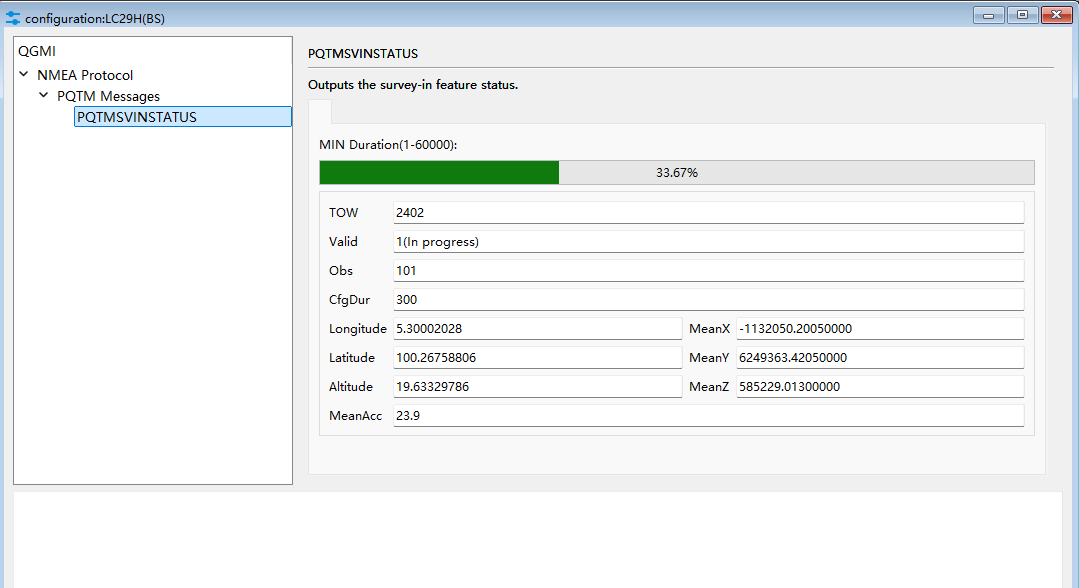
After sending $PQTMCFGSVIN,W,1,300,2,0,0,0*23 you can check QGNSS to see survey in status.
It will show the referencing coordinate.

Here is the proper step in configuring the base station for deployment

$PQTMRESTOREPAR13 // Can ignore if you have configured the previous command
$PQTMCFGSVIN,R
26
$PQTMCFGSVIN,W,1,43200,15.0,0,0,0*0D // Survey-in mode for 12 hours
$PAIR432,1 22
$PQTMSAVEPAR
5A
Reset Module // You can just press the reset button

After the survey in is completed, there is no need to re-inject the ECEF coordinates manually.

If you have the ECEF coordinates and the base station is stationary in a fixed position during the previous survey-in, you can also manually key in the ECEF position from the last survey -in

$PQTMCFGSVIN,W,2,0,0,[ECEF X],[ECEF Y],[ECEF Z]

Best regards,

I confirm that the fixed position does not remain after restarting the module in survey-in.
For a permanent fix need to manually input ecef data as per
$PQTMCFGSVIN,W,2,0,0,[ECEF X],[ECEF Y],[ECEF Z]*<Checksum>
or the module (_HEA) output only rtcm msm4 or 7 without rtcm 1005.
I did so
$PAIR382,1*2E → Test command for lock system sleep enabled
$PAIR003*39 → power off GNSS system
$PQTMCFGRCVRMODE,W,2*29 # set receiver to base mode
$PAIR023*3B reboot module
$PQTMCFGSVIN,W,1,300,2,0,0,0*23
Look at $PQTMCFGSVIN,OK*70 & Get confirm of command sent $PQTMCFGSVIN,R*26
Enable the Survey-In observation results
$PQTMCFGMSGRATE,W,PQTMSVINSTATUS,1,1*58
$PQTMSVINSTATUS,1,202548000,1,12,297,300,… …
$PQTMSVINSTATUS,1,202551000,2,12,300,300,x…,y…,z…,… done
set latest (300) ecef value in $PQTMCFGSVIN,W,2,0,0,...
Disable the Survey-In observation results $PQTMCFGMSGRATE,W,PQTMSVINSTATUS,0,1*59
$PAIR434,1*24 ==> set RTCM3.x output with message type 1005
$PAIR432,1*22 ==> set RTCM3.x output with type MSM7
$PAIR436,1*26 ==> set RTCM3.x output with satellite ephemeris
save & reboot

@YongHuang
Thank you for your answer. I would like to share my current progress with you.
[21:15:05.873 Uart Tx:0020 B] $PQTMRESTOREPAR13
[21:15:05.888 Uart Rx:0023 B] $PQTMRESTOREPAR,OK
3B

[21:16:00.613 Uart Tx:0025 B] $PQTMCFGRCVRMODE,W,229
[21:16:00.628 Uart Rx:0024 B] $PQTMCFGRCVRMODE,OK
64

[21:16:50.485 Uart Tx:0017 B] $PQTMSAVEPAR5A
[21:16:50.501 Uart Rx:0026 B] Ø­ŸfT$PQTMSAVEPAR,OK
72

I power-cycled the module.

[21:18:27.002 Uart Tx:0033 B] $PQTMCFGSVIN,W,1,300,2,0,0,023
[21:18:27.017 Uart Rx:0020 B] $PQTMCFGSVIN,OK
70

After waiting 5 mn

[21:23:50.037 Uart Tx:0019 B] $PQTMCFGSVIN,R26
[21:23:50.053 Uart Rx:0051 B] $PQTMCFGSVIN,OK,1,300,2.0,0.0000,0.0000,0.0000
40 ( Normally, I should be able to see the coordinates obtained at this point, right?

Have I made any mistakes in the steps taken so far?"

@bamarcant , Thank you for your help. Your insights are very relevant, and I truly appreciate your efforts.

$PQTMCFGSVIN,R26
PQTMCFGSVIN,OK,1,300,2.0,0.0000,0.0000,0.0000,0.0
42
$PQTMCFGMSGRATE,W,PQTMSVINSTATUS,1,1*58
$PQTMSVINSTATUS,1,202551000,2,12,300,300,…
Regards