Hello,
I am working with a Quectel 5G module and require clarification regarding several AT command operations.
- Requesting accurate AT commands:
Please provide the exact and complete AT command syntax to correctly read the following parameters:
- Physical Cell ID (PCID)
- Frequency / EARFCN / NR-ARFCN
- Additional NR cell information
Also, kindly confirm which AT command port (e.g.,/dev/ttyUSB2,/dev/ttyUSB3,/dev/ttyUSB4) must be used for these queries.
- Issue with QNWCFG and QNWLOCK:
When I executed the vendor-suggested command:
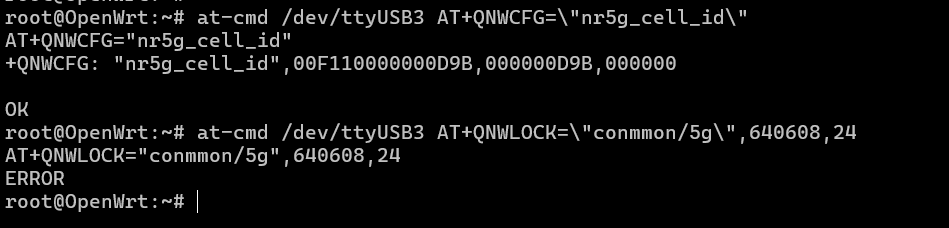
at-cmd /dev/ttyUSB3 AT+QNWCFG=\"nr5g_cell_id\"
I received inconsistent or random output, so I need the correct method to obtain the NR cell ID.Additionally, when running the locking command:
at-cmd /dev/ttyUSB3 AT+QNWLOCK=\"common/5g\",640608,24
the module returned ERROR.
Please explain why this error occurs and provide the exact AT command format required to lock a specific:
- PCID
- Frequency
- ARFCN
for binding the device to a specific 5G base station.
- Tailscale VPN requirement:
I need Tailscale VPN support integrated into the CPE for remote access.
Please provide:
- The Tailscale VPN plugin for this firmware, or
- Instructions/references for installing Tailscale (including all dependencies) on this device.
From the above my quectel modem is,
Quectel-RM520N-GL
revesion:RM520NGLAAR03A04M4G
Thank you. I look forward to your detailed guidance.