Modem Quectel RM520N-GL: Ethernet PDU support with WaveShare 5G M.2 TO Gigabit ETH support

Hi.

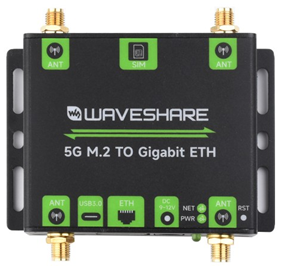
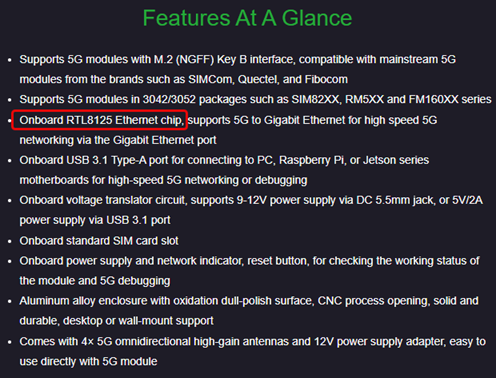
Testing the Modem Quectel RM520N-GL with WaveShare 5G M.2 TO Gigabit ETH board which also include the chipset RTL8125 for the Ethernet part.
I did some test, but without success:

ATI
Quectel
RM520N-GL
Revision: RM520NGLAAR05A01M4G

AT+QCFG="data_interface",1,0     //NIC switched to pcie mode
AT+QCFG="pcie/mode",1            //Switch pcie to RC mode
AT+QETH="eth_driver","r8125"     //Switch the NIC driver to realtake 8125

AT+CFUN=1,1                      // Restart module

AT+QICSGP=1,4,"ethernet","","",0
OK
AT+CGACT=1,1
+CME ERROR: 100

Checking the Wireshark trace, the UE is registering, but, when requesting the PDU Session Establishment for DNN=ethernet, the PDU Session Type is ‘IPv4’ and not ‘Ethernet’(as expected):
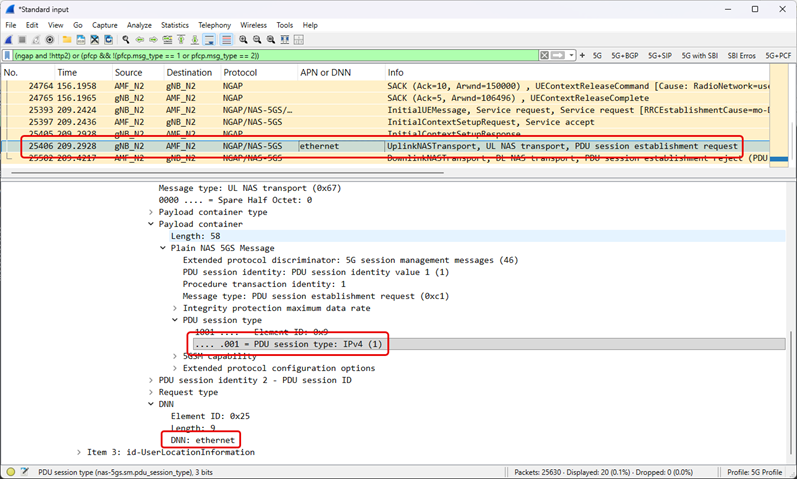
I did some research and it looks the Modem Quectel RM520N-GL is not capable to request a PDU Session with type "Ethernet’ and should be the core capable for doing this “conversion” (from IP to Ethernet PDU Type).

Did someone experience the same scenario? If confirmed, any updated firmware where this behavior is corrected?

Br. Stefano

Eth_PDU_nok.zip (4.7 KB)
Actually the command ‘AT+QICSGP’ is failing:

AT+QICSGP=1,4,"ethernet","","",0
ERROR

Instead has been tested following combination (AT+QWDSCFG and AT+QMAP=“mpdn_rule”):

AT+QCFG="usbnet"
+QCFG: "usbnet",3

OK
AT+QMAP="ETH_PDU"
+QMAP: "ETH_PDU","enable"

OK
AT+QNWCFG="eth_cfg"
+QNWCFG: "eth_cfg",1

OK
AT+QWDSCFG="profile"
+QWDSCFG: "profile",1,"IP","ethernet",0,0
+QWDSCFG: "profile",2,"IPV4V6","ims",0,0
+QWDSCFG: "profile",3,"IPV4V6","sos",0,0
+QWDSCFG: "profile",4,"Ethernet","ethernet",65535,65535

OK
AT+QMAP="mpdn_rule"
+QMAP: "MPDN_rule",0,1,0,1,1
+QMAP: "MPDN_rule",1,4,0,0,0
+QMAP: "MPDN_rule",2,0,0,0,0
+QMAP: "MPDN_rule",3,0,0,0,0

OK
AT+CGACT=1,1
+CME ERROR: 100

How to proceed?

@silvia, any comment on this post? Can you confirm (or deny) the modem behavior described above?

Dear @sbertuola
Do you want to test 5G LAN?
If yes, your current firmware didn’t support this.

Not 5G LAN, but Ethernet PDU Session.

I got finally it working with following sequence of ET commands:

AT+QCFG="pcie/mode",1
AT+QETH="eth_driver","r8125"
AT+QMAP="ETH_PDU","enable"
AT+QNWCFG="eth_cfg",1
AT+CGDCONT=4,"IP","ethernet"

After last command, the AT+CGDCONT=? and AT+QWDSCFG=“profile” should look like something like:

AT+CGDCONT?
+CGDCONT: 1,"IP","ethernet","0.0.0.0",0,0,0,0,,,,,,,,,,"",,,,0
+CGDCONT: 2,"IPV4V6","ims","0.0.0.0.0.0.0.0.0.0.0.0.0.0.0.0",0,0,0,0,,,,,,,,,,"",,,,0
+CGDCONT: 3,"IPV4V6","sos","0.0.0.0.0.0.0.0.0.0.0.0.0.0.0.0",0,0,0,1,,,,,,,,,,"",,,,0
+CGDCONT: 4,"IP","ethernet","0.0.0.0",0,0,0,0,,,,,,,,,,"",,,,0

AT+QWDSCFG="profile"
+QWDSCFG: "profile",1,"IP","ethernet",0,0
+QWDSCFG: "profile",2,"IPV4V6","ims",0,0
+QWDSCFG: "profile",3,"IPV4V6","sos",0,0
+QWDSCFG: "profile",4,"IP","ethernet",65535,65535

Following AT command to convert the profile ‘4’ to Ethernet type:

AT+QWDSCFG="profile",4,"Ethernet","ethernet"

AT+QWDSCFG="profile"
+QWDSCFG: "profile",1,"IP","ethernet",0,0
+QWDSCFG: "profile",2,"IPV4V6","ims",0,0
+QWDSCFG: "profile",3,"IPV4V6","sos",0,0
+QWDSCFG: "profile",4,"Ethernet","ethernet",65535,65535

Restart the module to apply the configuration: AT+CFUN=1,1

At this point , the output of the command AT+CGDCONT=? is giving error, but it is ok.

AT+QMAP="mpdn_rule",1,4,0,0,1

AT+QMAP="mpdn_rule"
+QMAP: "MPDN_rule",0,1,0,1,1
+QMAP: "MPDN_rule",1,4,0,0,1
+QMAP: "MPDN_rule",2,0,0,0,0
+QMAP: "MPDN_rule",3,0,0,0,0

Now, to establish the PDU Ethernet Session, the command is AT+QMAP=“connect”,1,1

Also attached a Wireshark trace of the test. Ethernet_PDU_Session_Establishment_ok.zip (4.1 KB)

The previous setup worked once, that it stopped. Here another command to be added:

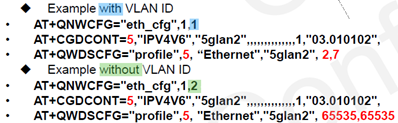
AT+QNWCFG="eth_cfg",1,2

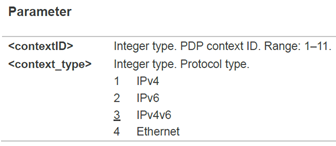
Based on the description below, it looks this AT command define id the UE is going to use VLAN (tagging the related traffic for the APN/DNN) or not:

Now I have ‘stable’ Ethernet PDU Session established and traffic flowing.