I’m using the LC29H(DA) module to measure some static points with high precision. I just need to save coordinates like longitude, latitude, and altitude to a simple text file. For RTK corrections, I’m using the manufacturer’s QGNSS software on a Windows PC.
I know that this application isn’t specifically designed for this purpose, but I’m looking for a way to log the data displayed in the Data window, specifically longitude, latitude, altitude (MSL), altitude (EPH), date, time, and quality indicator.
Right now, the only way I can save this data is by manually copying and pasting it into a text file, which isn’t very practical. Does QGNSS provide any built-in tools to save this data directly to a file, or is there an alternative way to extract these values automatically?
Hi @filrat
You can use the QGNSS tool to record logs. QGNSS will automatically store the logs in the “logFile” folder under the QNGSS tool, where you can see the saved logs. You can then use EXCEL to generate statistics for all positioning data.
Hi @george.gao,
I can now see this files, but in QGNSS.log, I only find rows like: [2025-03-03 13:29:22.415] [QGNSS2] [debug] "Send $GNGGA,122407.000,5227.833339,N,01656.491627,E,4,39,0.41,79.108,M,40.620,M,5.0,0067*6F\r\n\n"
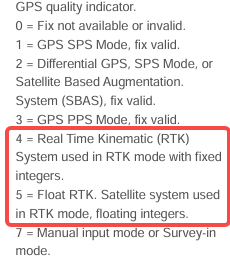
From what I understand, 122407.000 is probably the time, 5227.833339,N is the latitude, 01656.491627,E is the longitude, and 79.108 is the altitude (MSL). However, this data is in a different format than what is displayed in the Data window. I’m also not sure about the rest of the values in this row, and I need altitude (EPH) and the quality indicator (to filter points with only fixed RTK).
Could you explain how I should filter QGNSS.log to extract the data I need?
altitude (EPH) and the quality indicator (to filter points with only fixed RTK).
For EPH data, it is extracted from GGA with the sum of Altitude (MSL) and Geoid separation (the difference
between the earth ellipsoid surface and the mean-sea-level (geoid)
As reference from your log you can reference as below