Where could I find the last firmware version for RM500QGLABR13A03M4G?
I have sent the latest firmware to your email,pls check
Good morning,
I received your email but I’m unable to open it because It is protected by the following message:
You have received a secure link to:
RM500QGLABR13A03M4G_01.203.01.203.zip
To open this secure link, you must enter the email address with which this item was shared.
I tried to contact you via private message but I did not receive a response
Excuse me and thank you very much!
Dear @Carlos_CM
I have sent to your email, please check.
Hi, I need the latest firmware for RM500Q-GL too. Can anybody share with me? (dwutom-sk@yahoo.com)
thank you in advance
I’ve got the version RM500QGLABR13A03M4G_01.203.01.203, installed it over 02.200.02.200 and the speed is three times the previous speed. But unfortunately, the eth_at stopped working, the port 1555 is closed independently if AT+QETH=“eth_at”,“enable” is enabled. I observed this same on 01.201.01.201 version and because of that I tried with 02.200.02.2000. Does anybody know how to cope with that i.e. how to run ath_at on 01.203.01.203?
Dear @Ksylko
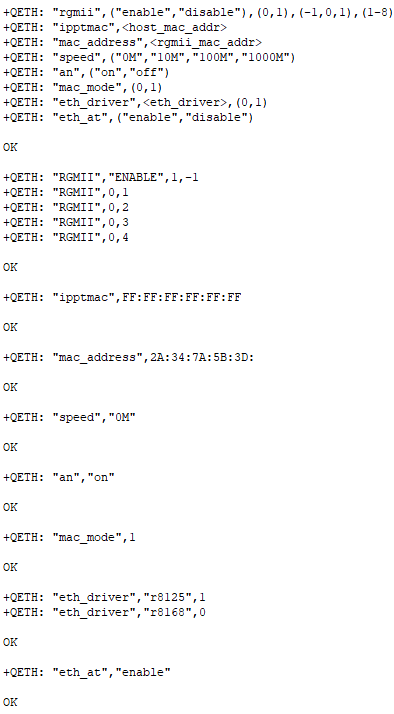
You can check AT+QETH=? and confirm whether it support this.
2.200.02.200 and 01.203.01.203 are different, it is not recommended to upgrade between them.
+QETH: “rgmii”,(“enable”,“disable”),(0,1),(-1,0,1),(1-8)
+QETH: “ipptmac”,<host_mac_addr>
+QETH: “mac_address”,<rgmii_mac_addr>
+QETH: “speed”,(“0M”,“10M”,“100M”,“1000M”)
+QETH: “an”,(“on”,“off”)
+QETH: “mac_mode”,(0,1)
+QETH: “eth_driver”,<eth_driver>,(0,1)
+QETH: “eth_at”,(“enable”,“disable”)
additionally
AT+QETH: “eth_at”
gives status
+QETH: “eth_at”,“enable”
Originally I had 01.201.01.201 and experienced problem as it was described i.e. AT commands were not working via ethernet.
So, I thouught, that I’ll check with another firmware, the only one I found was 02.200.02.200 and with this version I was able to connect with telnet and execute at commands as well.
The only drawback is on 02.200.02.200 connection was slower…
After upgrade to 01.202.01.202 I checked all the settings carefully and everything seem to be enabled, besides the ethernet ports. I checked all open ports on 01.201.01.201 and on 01.202.01.202 and the only open port is 53. And on this port telnet is not working. Even ping to the address 192.168.225.1 has replays all the time without any problems.
Conclusion:
- Because ports are closed, I suppose that in the newer firmware versions using at commands through ethernet is blocked? (safety reasons?)
Dear @Ksylko
Please check the response of AT+QETH=“rgmii” .
If disable, please enable this and try again.
It was enabled,
As I mentioned, I have full connection functionality when it comes to LTE or 5G connection. The only problem is I cant use AT commands through ethernet, even if AT+QETH=“eth_at” is enabled
I’ve just read in Internet, that it is possible that internal firewall of a card’s linux is not upgrading correctly after enabling eth_at and this way blocks all the connection on the ports beside DNS port 53.
For me this seem to be the most reasonable answer, why I experience that problem on the newer firmware versions and not experienced it on the old one.
Dear @Ksylko
Please try this AT command:AT+QETH=“rgmii”,“enable”,0
Hi,
I tried this settings and it changed nothing, when int comes to the availability of the port 1555 (it is still closed)
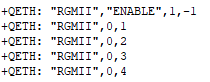
at+qeth=“rgmii”+QETH: “RGMII”,“ENABLE”,0,-1
+QETH: “RGMII”,0,1
+QETH: “RGMII”,0,2
+QETH: “RGMII”,0,3
+QETH: “RGMII”,0,4
Dear @Ksylko
Did your RGMII voltage is 1.8V?
If yes, please use this AT command as below:
AT+QETH=“rgmii”,“ENABLE”,0,0,1
Dear @silvia,
I bought https://pl.aliexpress.com/item/1005009990728513.html?spm=a2g0o.order_list.order_list_main.34.107e1c24wECGMv&gatewayAdapt=glo2pol
and I don’t know if the RGMII voltage is 1,8V or not.
And it seem to me unreasonable to change voltage if almost everything works OK. The only problem is that I can’t use AT commands through ethernet and this is because the card itself has all the Ethernet ports closed.
It seem to me that such irrelevant advises can’t help. You probably don’t understand my case (everything i.e. communication AT through Ethernet, worked without any problem on downgraded firmware and stopped to work after upgrading the firmware to the current one). I can live in with that, so if you don’t have relevant advises, please write me that and we will finish this case. 
Dear @Ksylko
As checked internally, for security reasons, this function has been disabled.
I expected so. It should be written somewhere, by the way. I believe that I wasn’t the only one searching for information about that.
Thank you anyway for your good will.