Hi,
I’m using a L76-L and trying to debug an issue while using Galileo.
If I enable multi-GNSS (say GPS,GLO,GAL), only GPS/GLO sats show up as being ‘used’, Galileo items never show as used.
To debug, I disabled all GNSSs except Galileo with $PMTK353,0,0,1,0,0, and let it run for a few hours.
It sees 8 or so satelites, but none of them are flagged as used. position and time are still being reported to the module is definantly using Galileo, but it just doesn’t report that it’s using it.
Note by ‘used’ I mean listed in $GNGSA
Firmware is:
$PMTK705,MT3333_AXN5.1.9_MODULE_STD_F1_P1,0007,Quectel-L76L,1.0*08
$PQVERNO,R,L76LNR03A01S,2020/03/02,00:49*28
Is this a known issue, is there newer firmware for the L76L available?
Hi Dave,
I will send you the latest L76-L firmware via message.
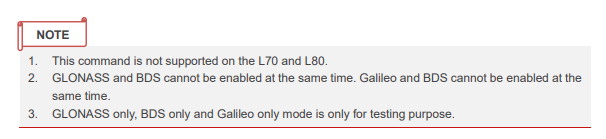
Please note that GNSS search mode has limitation below.
Best regards.
Thanks, One question in the release notes which state:
Supported Galileo satellites system. “GPS + GLONASS + Galileo” multi-GNSS can be enabled by PMTK command $PMTK353,1,1,1,1,0*2B.
However the GNSS Protocol Specification document states the arguments to $PMTK353 are:
<GPS_Enable>
<GLONASS_Enable>
<Galileo_Enabled>
<Res> Numeric - Always “0”.
<BDS_Enable>
Is the 4th argument no longer reserved?
Hi Dave,
The 4th parameter is QZSS, and it is enabled by default.
Best regards.
Any thoughs on the issue of Galileo not showing as ‘used’? Is this a known firmware issue?
Hi @dave4444
Are you having any problems?
Please use the “$PQVERNO,R*3F” command to check the version of the module and let me know.
Please provide your specific operations and instructions.
$PQVERNO and use case is provided in original post.
Hi @dave4444
Can you provide your email address? I will send you the latest version via email.
Please also provide your test log.
Hello, still seeing this issue. How can we get this addressed?
Our customers are still seeing this issue. Anything we can do here?
Hi @dave4444
There are several reasons why Galileo satellites might not appear in your $GNGSA messages even when they are being tracked.
1. The 12-Satellite Reporting Limit
A critical hardware constraint of the L76-L is that the standard GSA message only supports a maximum of 12 satellites .
- The Issue: In multi-GNSS mode (GPS + GLONASS + Galileo), if the module is already using 12 satellites from the GPS and GLONASS constellations for its position fix, the Galileo satellites will be excluded from the GSA message.
- Verification: Check the
<NumSatUsed> field in your GGA or GNS messages. If this number is greater than 12, the GSA message is likely truncating the list, and Galileo satellites (which are often prioritized lower than GPS in the output list) are being left out of the report even though they are actively contributing to the fix.
2. Check for Multiple GSA Sentences (System ID)
The L76-L uses the NMEA V4.10 protocol. In this version, when multiple constellations are used, the module outputs separate GSA sentences for each constellation, all using the GN Talker ID.
- How to Identify: Look at the last data field (before the checksum) of each
$GNGSA sentence. This is the .
- 1: GPS satellites
- 2: GLONASS satellites
- 3: Galileo satellites
- The Solution: Ensure your parser is not just looking at the first
$GNGSA message it receives. You must look for the sentence ending in ,3*<Checksum> to find the “used” Galileo satellites.
3. Talker ID Changes in Galileo-Only Mode
When you switch the module to Galileo-only mode using $PMTK353,0,0,1,0,0 , the NMEA Talker ID behavior may change depending on your fix status:
- Position Fixed: In NMEA V4.10, the Talker ID for a standalone Galileo fix should be GA (e.g., $GAGSA ).
- Position Unfixed: If the module has not yet achieved a valid fix, the Talker ID for L76-L is forced to GP (e.g., $GPGSA ).
- Action: If you are searching specifically for
$GNGSA, you will miss the Galileo satellites if the module is outputting them under the $GAGSA or $GPGSA identifiers.
4. Navigation Mode and Testing Constraints
- Testing Purpose: The sources note that “Galileo only” mode is intended primarily for testing purposes. For standard applications, it is recommended to use Galileo in combination with GPS or GLONASS to ensure full protocol reporting and stability.
- BDS Conflict: Ensure you do not have BDS enabled. The L76-L cannot enable Galileo and BDS at the same time.
Summary Checklist for Debugging
- Check for multiple GSA lines: Are you receiving more than one GSA sentence per cycle? Look for the one with System ID 3 at the end.
- Verify Talker ID: Search your log for $GAGSA or $GAGNS while in your Galileo-only test.
- Check Satellite IDs: Galileo satellites in NMEA use the numbering range 1–36.
- Check Total Count: If your GGA message shows 15 satellites used but GSA only shows 12, the Galileo satellites are simply being cut off from the GSA report due to the 12-slot limit.
Best regards,
Thank you Mohamad for the excellent explanation. We’ve tracked this down to an interperation issue with gpsd 3.23.. Upgrading to gpsd 3.25 or later resolves the issue.