It shows CH340 serial port, not the Quectel DM port

I got the LTE&5G_Windows_USB_Driver, and I installed the driver in C:\Program FIles (x86)\Quectel

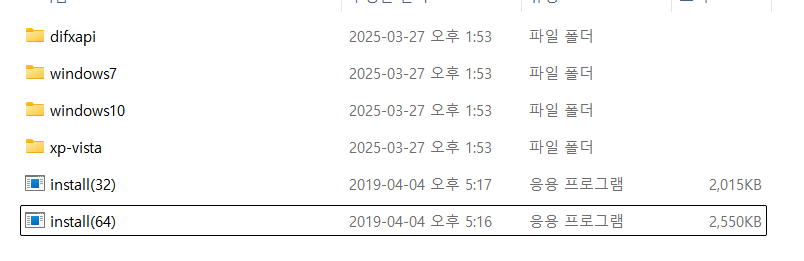
In this location, there is DriverInstaller folder, and in it, there are some folders such as windows7 and windows10, and the install(32),install(64) exe files.

I think the installation for the driver is not fully completed, so I run the install(64).
However, the program doesn’t work, it blinks once and disappears.

But now, in the Device Manager, it shows USB-SERIAL CH340(COM8), for the Zk601 IoT.

How Can I properly install the driver..?

Hi @Adam2

Sorry, are you using the Quectel’s module as you mentioned Zk601 Iot, what’s this means?

Thanks

Thanks for replying, @Puck-Q

I’m not really sure that the module is “ZK601MG”, because I cannot find exact one in quectel’s website.

If you search “ZK601MG” or “T-Pannel” in google, you can find some documents about the IoT module which I use.

Sorry for providing unclear information, and pretty Thanks for your help.

Ignore about the IoT Device information,

I installed the driver, and I get some folders and files as below.

Should I run the install(64).exe for complete installation for driver?

Thanks @Puck-Q

Hi @Adam2

Please write the module and the version you are using, then we can suggest you the right usb driver, or you can download here Quectel | Global IoT solutions provider include the user guide.

Thanks

Sorry for the confusion, @Puck-Q .

I’m not sure that I have accurate information about the module,
since I received the complete product of IoT.

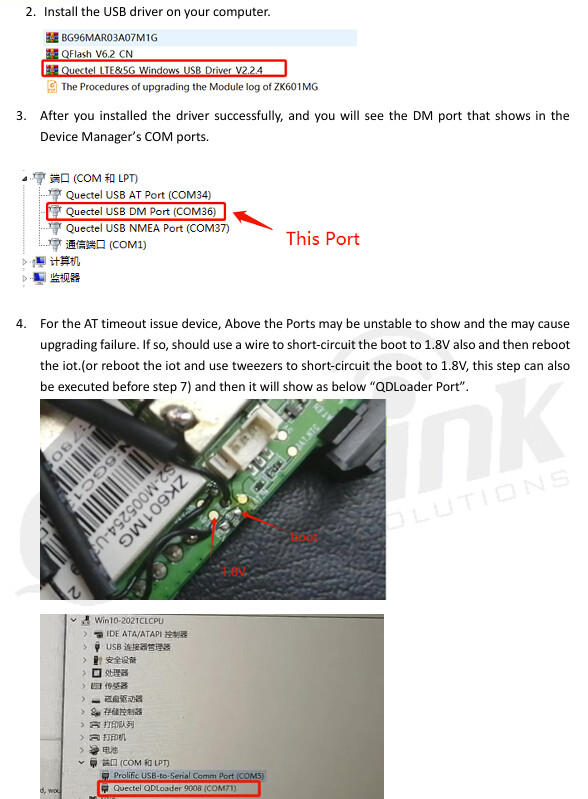
I attached some screenshots for your reference

I read this document for updating firmware, and received typical driver files.

Thanks.

Hi @Adam2

Sorry ZK60* is not from Quectel. If it is a complete machine, you need to contact the supplier of the complete machine. Quectel is only the supplier of the module.
Thanks