Issue while setup and configure FGH100M-ZIO WiFI HaLow Board

Hello !!
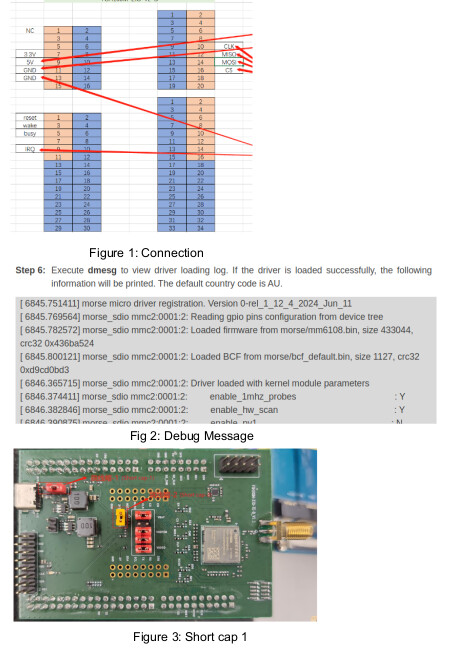
I am working with the FGH100M-ZIO-TE-B_V1.1 WiFi HaLow Module . I have connected the WiFi HaLow module to Jetson Orin Nano development board through SPI communication protocol, to set it as Access Point(AP). The connection between them is shown in Figure 1.

For setting it as AP, I have configured the device tree of Orin Nano for SPI and loaded the morse.ko and dot11ah.ko using insmod.

But when I loaded morse.ko, it is showing registration information only.

“Morse Micro Dot11ah driver registration. Version 0-rel_1_12_4_2024_Jun_11
[ 91.185487] morse micro driver registration. Version 0-rel_1_12_4_2024_Jun_11”

And it is not printing other information and creating dev/morse_io node as shown in Figure 2:

First of all, I need to check whether the device is turned on perfectly. Is there any status LEDs on the FGH100M-ZIO board? As of now, no LED’s are turned ON.

I am providing supply from the Jetson Nano board to FGH100M-ZIO through 5V and GND pins,. Also the shorcap1 connected to the right only. The short cap 1 is shown in Figure 3

Thanks,

After enabling the CONFIG_MORSE_SPI flag, the driver attempts to use the SPI interface. Now the error showing is:

Morse Micro Dot11ah driver registration. Version 0-rel_1_12_4_2024_Jun_11
[ 121.011463] morse micro driver registration. Version 0-rel_1_12_4_2024_Jun_11
[ 121.014669] morse_spi spi1.0: failed initialise SPI: -71
[ 121.014690] morse_spi_probe failed. The driver has not been loaded!
[ 121.014693] morse_spi: probe of spi1.0 failed with error -71

The error may be because the FGH100M chip is not detected. How can I verify whether the FGH100M-ZIO-TE-B is powered ON?

Thanks

There is no such LED. It is RF Wi-Fi and so it cannot work seperately.
We can check the state of the RESET、WAKE pin、VBAT of the FGH100M.

1 Like

Thanks. I have checked VBAT, VDDFEM and VDDIO. The voltages on those pins are 3.38V. So the module would be working. In the FGH100M Hardware Design Manual, it is shown that we can switch to SPI mode by controlling SDIO_DATA3 and SDIO_CMD. So would I have to do any additional settings other than loading its driver, to operate FGH100M in spi mode?

Also is there any role for WAKE and RESET pins at starting?

There is no special settings. Maybe you can check the status of the wakeup_in and reset. It should be high level.

1 Like

Okay, Thanks. I drive wakeup and reset pin to high level. Also, I found that fgh100m kernel is successfully detecting the device tree. I debugged that from the kernel:

[ 486.939798] spi=00000000ad341f49 name=mm610x-spi bus=1 cs=0

But I am having the following error:
[ 486.939802] morse_spi spi1.0: morse_spi_set_func_address_base failed (errno=-61)
[ 486.939808] morse_spi spi1.0: morse_spi_get_func failed
[ 486.939811] morse_spi spi1.0: morse_spi_mem_read failed (errno=-95)
[ 486.939813] morse_spi spi1.0: morse_spi_reg32_read failed (errno=-95)
[ 486.939816] morse_spi spi1.0: morse_chip_cfg_detect_and_init: Failed to access HW (errno:-5)
[ 486.939819] morse_spi spi1.0: morse_chip_cfg_detect_and_init failed: -5
[ 486.939839] morse_spi_probe failed. The driver has not been loaded!
[ 486.939842] morse_spi: probe of spi1.0 failed with error -5

  1. Have you changed the dts?
  2. As I guess the fw not match with the FGH100M you used.

Thanks,

  1. Yes, The dts overlay which I am using on Jetson Orin Nano(Jetpack 6.2.1) for the morse driver is given below.
/dts-v1/;
/plugin/;

/ {
	overlay-name = "My Jetson Overlay Example";
	jetson-header-name= "Jetson 40pin Header";
	compatible = "nvidia,p3768-0000+p3767-0005";

	fragment@0 {
target-path = "/bus@0/spi@3230000/spi@0";
__overlay__ {
		status = "disabled";
};
};
	fragment@1 {
target = <&pinmux>;
		__overlay__ {
		pinctrl-names = "default";
		pinctrl-0 = <&jetson_io_pinmux>;
		jetson_io_pinmux: exp-header-pinmux {
			hdr40-pin13 {
				nvidia,pins= "spi3_sck_py0";
				nvidia,function = "spi3";
				nvidia,tristate= <0x0>;
				nvidia,enable-input = <0x1>;
			};
			hdr40-pin16 {
				 nvidia,pins= "spi3_cs1_py4";
                                nvidia,function = "spi3";
                                nvidia,tristate= <0x0>;
                                nvidia,enable-input = <0x1>;
			};
			hdr40-pin18 {
				 nvidia,pins= "spi3_cs0_py3";
                                nvidia,function = "spi3";
                                nvidia,tristate= <0x0>;
                                nvidia,enable-input = <0x1>;
			};
			hdr40-pin22 {
				 nvidia,pins= "spi3_miso_py1";
                                nvidia,function = "spi3";
                                nvidia,tristate= <0x0>;
                                nvidia,enable-input = <0x1>;
			};
			hdr40-pin37 {
				 nvidia,pins= "spi3_mosi_py2";
                                nvidia,function = "spi3";
                                nvidia,tristate= <0x0>;
                                nvidia,enable-input = <0x1>;
			};
};
};
};

	fragment@2 {
		target-path = "/bus@0/spi@3230000";
		__overlay__ {
			status = "okay";
					#address-cells = <1>;
			#size-cells = <0>;
			mm6108:mm6108@0 {
				compatible = "morse,mm610x-spi";
				reg=<0>;
				spi-max-frequency=<50000000>;
			//	spi-irq-gpios = <&gpio 125 0x0>;
			//	reset-gpios = <&gpio 54  0x0>;
			//	power-gpios = <&gpio 166 0x0>,<&gpio 126 0x0>; // WAKE or RESET			

status = "okay";
			};
		};
	};
};

2.The FGH100M-ZIO-TE-B WiFi HaLow module has FGH100MABMD chip. The driver, I am using is Version 0-rel_1_12_4_2024_Jun_11.

From the log, I think the spi response is not receiving. Is there any way to debug that?

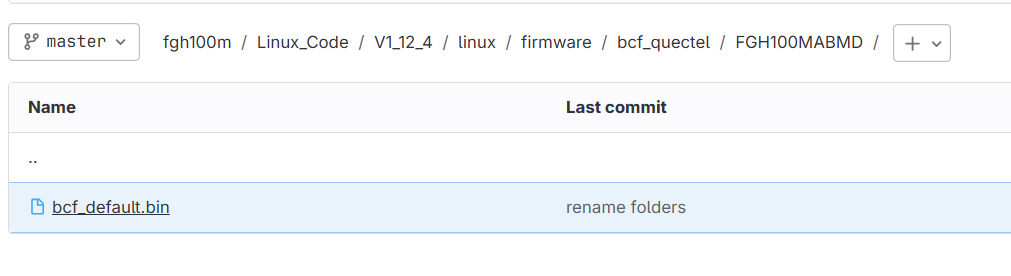
Please check the md5 of the bcf_default.bin and the mm6108.bin.

Yeah I checked those:
image
But these binaries are loading only after morse_chip_cfg_detect_and_init() right?

Inside morse_chip_cfg_detect_and_init(), it is searching R1 response using morse_spi_find_response(). When I debugged there, it is failing on

if (*cp != 0x00) {
MORSE_SPI_DBG(mors, “%s: SPI response error\n”, func);
if (resp)
*resp = NULL;
return -EPROTO;
}

Thanks,

@Bean.Wang-Q, Can you check whether the kernel is supported for this chip? I doubt it since no response is coming.

Maybe you can try the 1_14_1.
The Linux host support it as long as it support the SPI interface.

Why did you remove the spi-irq-gpios?

Hi @Bean.Wang-Q ,
I thought I could include spi-irq-gpios later in device-tree. Actually the kernel loaded the firmware to the device and created /dev/morse_io interface, at two times. Ofcourse the spi-irq issue was there.

But Later on, the device come back to previous error. So I think I have to debug from hardware.

As you described, it should be the connection is not stable.

1 Like

Hi @Bean.Wang-Q,
The kernel is inserting now suceessfully. It was the grounding issue.

254.039021] Morse Micro Dot11ah driver registration. Version 0-rel_1_12_4_2024_Jun_11
[ 256.537770] morse micro driver registration. Version 0-rel_1_12_4_2024_Jun_11
[ 256.539877] morse_spi spi1.0: Reading gpio pins configuration from device tree
[ 256.540447] uaccess char driver major number is 489
[ 256.540615] morse_io: Device node ‘/dev/morse_io’ created successfully
[ 256.541945] morse_spi spi1.0: Loaded firmware from morse/mm6108.bin, size 433044, crc32 0x436ba524
[ 256.542187] morse_spi spi1.0: Loaded BCF from morse/bcf_default.bin, size 1127, crc32 0xd9cd0bd3
[ 257.260730] irq: IRQ278: trimming hierarchy from :bus@0:pmc@c360000
[ 257.260864] ieee80211 phy1: Selected rate control algorithm ‘minstrel_ht’
[ 257.275372] morse_spi spi1.0: Driver loaded with kernel module parameters
[ 257.275385] morse_spi spi1.0: enable_1mhz_probes : Y
[ 257.275388] morse_spi spi1.0: enable_hw_scan : Y
[ 257.275391] morse_spi spi1.0: enable_pv1 : N
[ 257.275392] morse_spi spi1.0: enable_page_slicing : N
[ 257.275394] morse_spi spi1.0: log_modparams_on_boot : Y
[ 257.275395] morse_spi spi1.0: enable_mcast_at_op_bw : N
[ 257.275396] morse_spi spi1.0: enable_mcast_whitelist : Y
[ 257.275399] morse_spi spi1.0: ocs_type : 1
[ 257.275401] morse_spi spi1.0: enable_auto_mpsw : Y
[ 257.275402] morse_spi spi1.0: duty_cycle_probe_retry_threshold : 2500
[ 257.275404] morse_spi spi1.0: duty_cycle_mode : 0
[ 257.275405] morse_spi spi1.0: enable_auto_duty_cycle : Y
[ 257.275407] morse_spi spi1.0: dhcpc_lease_update_script : /morse/scripts/dhcpc_update.sh
[ 257.275409] morse_spi spi1.0: enable_ibss_probe_filtering : Y
[ 257.275410] morse_spi spi1.0: enable_dhcpc_offload : N
[ 257.275411] morse_spi spi1.0: enable_arp_offload : N
[ 257.275413] morse_spi spi1.0: enable_bcn_change_seq_monitor : 0
[ 257.275414] morse_spi spi1.0: enable_cac : 0
[ 257.275415] morse_spi spi1.0: max_mc_frames : 10
[ 257.275417] morse_spi spi1.0: tx_max_power_mbm : 2200
[ 257.275419] morse_spi spi1.0: enable_twt : Y
[ 257.275420] morse_spi spi1.0: enable_mac80211_connection_monitor : N
[ 257.275421] morse_spi spi1.0: enable_airtime_fairness : N
[ 257.275423] morse_spi spi1.0: enable_raw : Y
[ 257.275424] morse_spi spi1.0: max_aggregation_count : 0
[ 257.275425] morse_spi spi1.0: max_rate_tries : 1
[ 257.275427] morse_spi spi1.0: max_rates : 3
[ 257.275428] morse_spi spi1.0: enable_watchdog_reset : N
[ 257.275429] morse_spi spi1.0: watchdog_interval_secs : 30
[ 257.275430] morse_spi spi1.0: enable_watchdog : Y
[ 257.275432] morse_spi spi1.0: country : AU
[ 257.275433] morse_spi spi1.0: enable_cts_to_self : N
[ 257.275434] morse_spi spi1.0: enable_rts_8mhz : N
[ 257.275435] morse_spi spi1.0: enable_trav_pilot : Y
[ 257.275436] morse_spi spi1.0: enable_sgi_rc : Y
[ 257.275438] morse_spi spi1.0: enable_mbssid_ie : N
[ 257.275439] morse_spi spi1.0: virtual_sta_max : 0
[ 257.275440] morse_spi spi1.0: thin_lmac : 0
[ 257.275441] morse_spi spi1.0: enable_dynamic_ps_offload : Y
[ 257.275442] morse_spi spi1.0: enable_ps : 2
[ 257.275443] morse_spi spi1.0: enable_subbands : 2
[ 257.275445] morse_spi spi1.0: enable_survey : Y
[ 257.275446] morse_spi spi1.0: mcs10_mode : 0
[ 257.275447] morse_spi spi1.0: mcs_mask : 1023
[ 257.275448] morse_spi spi1.0: no_hwcrypt : 0
[ 257.275449] morse_spi spi1.0: enable_ext_xtal_init : N
[ 257.275451] morse_spi spi1.0: enable_otp_check : 1
[ 257.275453] morse_spi spi1.0: bcf :
[ 257.275454] morse_spi spi1.0: serial : default
[ 257.275455] morse_spi spi1.0: debug_mask : 8
[ 257.275457] morse_spi spi1.0: tx_status_lifetime_ms : 15000
[ 257.275458] morse_spi spi1.0: tx_queued_lifetime_ms : 1000
[ 257.275459] morse_spi spi1.0: max_txq_len : 32
[ 257.275460] morse_spi spi1.0: default_cmd_timeout_ms : 600
[ 257.275462] morse_spi spi1.0: enable_short_bcn_as_dtim_override : -1
[ 257.275463] morse_spi spi1.0: fw_bin_file :
[ 257.275464] morse_spi spi1.0: sdio_reset_time : 400
[ 257.275466] morse_spi spi1.0: macaddr_suffix : 00:00:00
[ 257.275467] morse_spi spi1.0: macaddr_octet : 255
[ 257.275469] morse_spi spi1.0: max_total_vendor_ie_bytes : 514
[ 257.275470] morse_spi spi1.0: coredump_include : 1
[ 257.275472] morse_spi spi1.0: coredump_method : 1
[ 257.275473] morse_spi spi1.0: enable_coredump : Y
[ 257.275474] morse_spi spi1.0: spi_use_edge_irq : N
[ 257.275475] morse_spi spi1.0: spi_clock_speed : 50000000
[ 257.275477] morse_spi spi1.0: enable_mm_vendor_ie : Y
[ 257.275567] irq: IRQ279: trimming hierarchy from :bus@0:pmc@c360000

Haha. Great.
It still failed on my RaspberryPi CM4.