Hi I am using FCM360W , i can set the SSID and Password through the SoftAP WEB CFG, but the when the module resets it looses the SSID and PAssword agian , its not saving, how to save the ssid and password set through WEBCFG. Is there any APi for that.
Hi Kanchan,
I believe you are using AT solution for this module and establish the Web Config via commands AT+QWEBCFG? In the current AT command solution, the SoftAP WebCfg provisioning method does not support saving the SSID and password automatically. That said, there are two workarounds available depending on your setup:
Method 1: Use AT+QSTAAPINFODEF directly
If the module typically connects to the same WiFi hotspot, we’d recommend bypassing the WebCfg provisioning flow and instead sending AT+QSTAAPINFODEF=<SSID>,<password> directly from your MCU. This command both connects to the hotspot and saves the credentials, so the module will automatically reconnect to this same SSID/password pair on every subsequent boot without needing to be reprovisioned.
A few related commands for managing this:
AT+QSTAAPINFORMV— clears the currently saved hotspot information.AT+QWEBCFG,AT+QSTAAPINFO, orAT+QSTAAPINFODEF— can be used at any time to reconfigure the WiFi connection. Issuing any of these will cause the module to automatically disconnect from the currently saved hotspot before connecting to the newly specified one.
Method 2: Capture credentials via UART0 debug log and forward via MCU
Since the FCM360W operates as a peripheral in your AT command setup, your host MCU can monitor the UART0 debug log output during WebCfg provisioning. When a user submits WiFi credentials through the WebCfg web page, the SSID and password are printed in the debug log, as shown below:
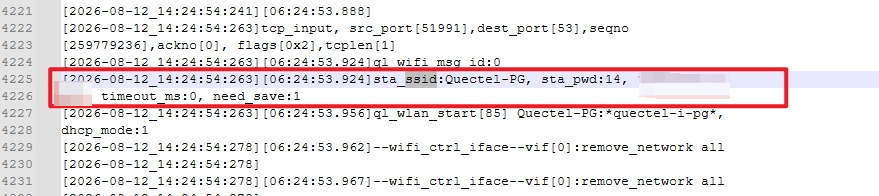
Your MCU firmware can parse this log to extract the SSID and password, store them locally, and then issue AT+QSTAAPINFOor AT+QSTAAPINFODEFto reconnect the module to the WiFi network automatically, based on your MCU-side program logic.