How to fix +CME ERROR: 58 on Quectel EC200U while sending data via GSM

Hello everyone,

I am working with a Quectel EC200U GSM/LTE module to send data to my server using AT commands. The SIM is active, network is registered, and I can check signal strength (AT+CSQ), SIM status (AT+CPIN?), and network registration (AT+CREG?). All these return OK.

However, when I try to activate GPRS context or use HTTP commands, I keep getting:

+CME ERROR: 58

For example:

AT+CGDCONT=1,"IP","airtelgprs"
AT+CGATT=1
AT+QIACT=1
AT+QHTTPCFG="contextid",1
AT+QHTTPCFG="url","http://example.com/upload.php?param=123"
AT+QHTTPGET=60

At this point, the module responds with +CME ERROR: 58.

Hi,

+CME ERROR: 58 usually means “operation not allowed / PDP context not activated” on the Quectel side.
Confirm the correct APN with your operator. (“airtelgprs,com” or “airtelgprs” for Airtel in India).
Even if you have SMS/voice, data service may not be active on your line. Verify by inserting the SIM card into a phone and enabling mobile data.

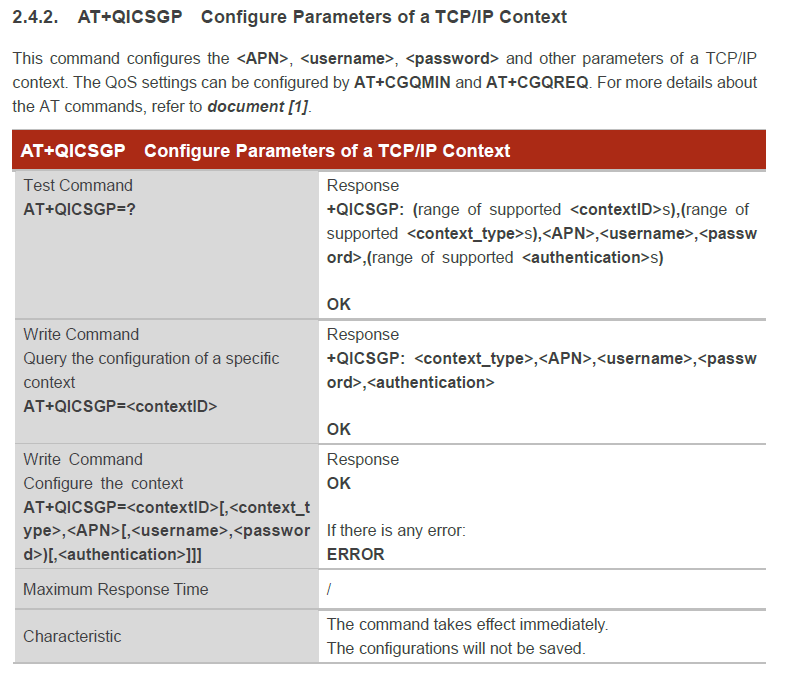
It might be better to use the QICSGP + QIACT method, which is typical for the EC200U’s TCP/IP stack.
AT+CGDCONT: 3GPP standard PDP definition (core register side).
AT+QICSGP: Profile to which Quectel will bind for its internal TCP/IP stack (HTTP/TCP, etc., commands work with this).
AT+QIACT: Activates the profile defined with QICSGP.
If left as CGDCONT, the QHTTP/TCP side will not see QIACT, so it will typically result in a +CME ERROR: 58.

It’s also important not to proceed to HTTP without seeing an IP address.
When the PDP context (i.e., internet connection) is opened, the module obtains an IP address from the network.
The AT+QIACT=1 command performs this step.
If successful, the module responds as follows:

OK
+QIACT: 1,1,1,“10.123.45.67”

Here, “10.123.45.67” is the IP address assigned to your modem.
If you don’t see an IP address in this line (for example, +QIACT: 1,1,1,“0.0.0.0” or not at all), it means the internet session isn’t established. In this case, HTTP commands (AT+QHTTPURL, AT+QHTTPGET) won’t work, and you’ll get a +CME ERROR: 58.

Therefore, you should first check with AT+QIACT? to see if the IP address has been received. If there’s no IP address, you should correct the APN, auth type, or SIM data service.

Can you try these commands?

AT
ATE0
AT+CFUN=1,1 // clean start (reset)
-- (wait 5–10 seconds) --

AT+CPIN?
AT+CSQ
AT+CGATT? // should be 1
AT+CREG?
AT+CEREG?
AT+QNWINFO

AT+CGDCONT=1,"IP","airtelgprs.com" // "airtelgprs" if needed // 3GPP PDP definition (standard way)

AT+QICSGP=1,0,"airtelgprs,com","","",1 // auth=0 (for most lines) 
AT+QIDNSCFG=1,"8.8.8.8","1.1.1.1" // optional DNS

AT+QIACT=1 // PDP activation (obtain IP)
AT+QIACT? // You should see IP: +QIACT: 1,1,1,"10.x.x.x"

AT+QPING=1,"8.8.8.8" // (Optional ping)

AT+QHTTPCFG="contextid",1 // HTTP GET (with domain)
AT+QHTTPCFG="requestheader",1
AT+QHTTPURL=39.80 // I will send you a 39 character long URL soon, wait in 80 seconds
http://example,com/upload.php?param=123
AT+QHTTPGET=80
AT+QHTTPREAD=80

AT+QHTTPURL=36.80 //  If DNS is a possible problem, try with IP
http://93,184.216.34/upload.php?param=123
AT+QHTTPGET=80
AT+QHTTPREAD=80
AT+QIDEACT=1

I used “.” instead of “.” in some sample web addresses. The forum sometimes detects spam. Could you pay attention to this?

Quectel_EC200U&EG915U_Series_TCP(IP)_Application_Note_V1.1.pdf (462.7 KB)

To start the GSM Module why we need to short H9 and USB pin

9/5/2025 17:27:34.159 [TX] - AT

9/5/2025 17:27:34.169 [RX] -
OK

9/5/2025 17:27:37.303 [TX] - AT+CPIN ?< CR>

9/5/2025 17:27:37.314 [RX] -
+CPIN: READY

OK

9/5/2025 17:27:40.372 [TX] - AT+CSQ

9/5/2025 17:27:40.383 [RX] -
+CSQ: 31,99

OK

9/5/2025 17:27:43.929 [TX] - AT+CREG ?< CR>

9/5/2025 17:27:43.939 [RX] -
+CREG: 0,1

OK

9/5/2025 17:27:47.152 [TX] - AT+CGDCONT=1,“IP”, “airtelgprs”

9/5/2025 17:27:47.163 [RX] -
OK

9/5/2025 17:27:50.354 [TX] - AT+QICSGP=1,1,“airtelgprs”,“”,“”,1

9/5/2025 17:27:50.364 [RX] -
OK

9/5/2025 17:27:54.120 [TX] - AT+QIACT=1

9/5/2025 17:27:54.133 [RX] -
OK

9/5/2025 17:27:57.627 [TX] - AT+QIACT ?< CR>

9/5/2025 17:27:57.638 [RX] -
+QIACT: 1,1,1,“100.68.252.84”

OK

9/5/2025 17:28:00.917 [TX] - AT+QHTTPCFG=“contextid”,1

9/5/2025 17:28:00.927 [RX] -
OK

9/5/2025 17:28:04.039 [TX] - AT+QHTTPCFG=“requestheader”,1

9/5/2025 17:28:04.050 [RX] -
OK

9/5/2025 17:28:07.696 [TX] - AT+QHTTPURL=25,60

9/5/2025 17:28:07.706 [RX] -
CONNECT

9/5/2025 17:28:10.714 [TX] - http://api.thingspeak.com/data

9/5/2025 17:28:10.741 [RX] -
OK

9/5/2025 17:28:17.215 [TX] - AT+QHTTPPOST=42,60

9/5/2025 17:28:17.813 [RX] -
CONNECT

9/5/2025 17:28:20.865 [TX] - api_key=W5WWY7QVTH1NL85M&field1=25.3&field2=60.5

9/5/2025 17:28:20.895 [RX] -
OK

+QHTTPPOST: 0,400,122

9/5/2025 17:28:25.656 [TX] - AT+QHTTPGET=60

9/5/2025 17:28:25.666 [RX] -
ERROR

9/5/2025 17:28:28.507 [TX] - AT+QIDEACT=1

9/5/2025 17:28:28.517 [RX] -
OK
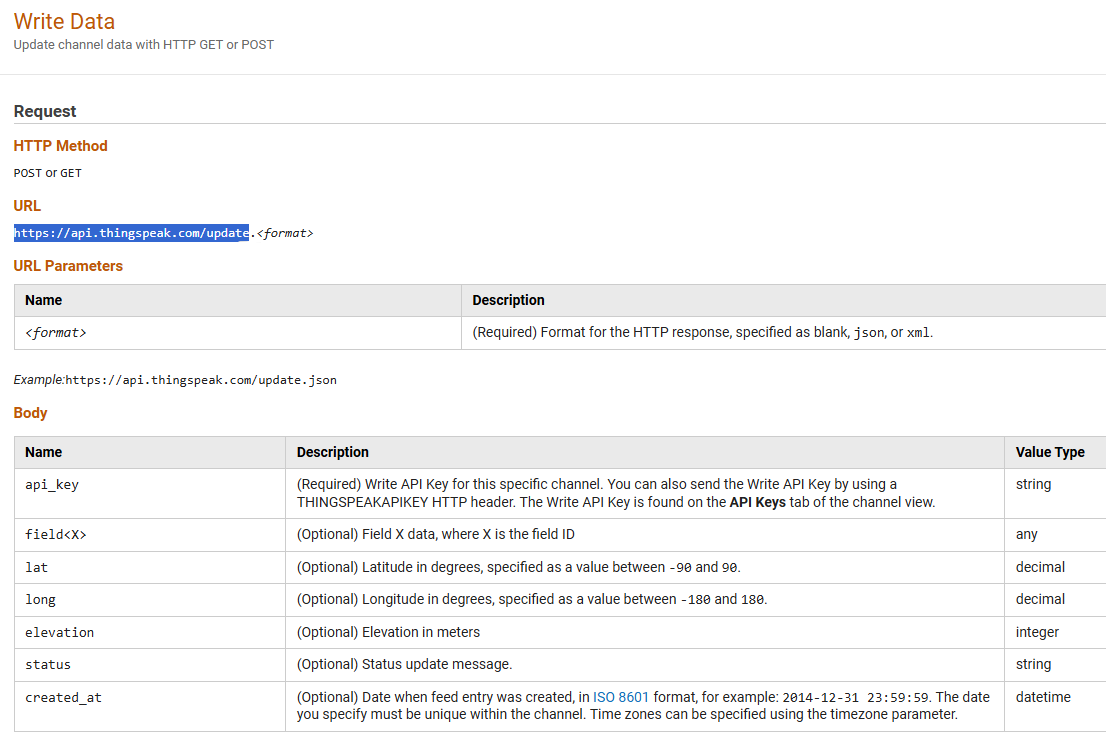
http:// api. thingspeak. com/data - The endpoint for writing data to ThingSpeak should be /update.

Also, the URL length is incorrect.
You entered AT+QHTTPURL=25.60 and sent a 30-byte URL. The first parameter in the QHTTPURL is the byte length of the incoming URL (must be entered exactly correctly).

The POST body length is incorrect.
You sent the body:

api_key=W5WWY7QVTH1NL85M&field1=25.3&field2=60.5

Its length is 48 bytes. You specified AT+QHTTPPOST=42.60 → it’s a partial send, and the server returns 400.

There’s also an error in the auth parameter.
AT+QICSGP=1,1,“airtelgprs”,“”,“”,1 → if the user/password is empty, it’s more correct to use auth 0: …,0
AT+QICSGP=1,1,“airtelgprs”,“”,“”,0

AT+QHTTPURL=32,80
CONNECT
http://api.thingspeak.com/update
// Module: OK

// POST body (length: 48)
AT+QHTTPPOST=48,60
CONNECT
api_key=W5WWY7QVTH1NL85M&field1=25.3&field2=60.5
// Module: OK
// +QHTTPPOST: 0.200,<len> // You should see 200
// If you get 400, look at the length numbers again.
// To read the response:
AT+QHTTPREAD=60