Dear @Nazz_Ren
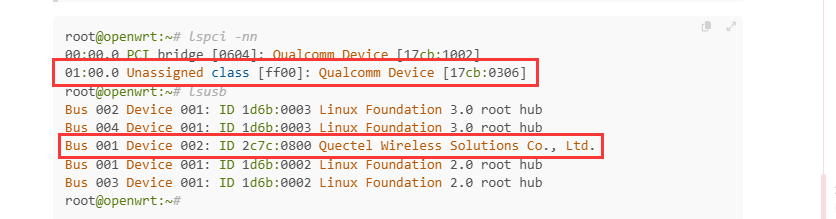
You can use lspci -nn to show PID&VID, then we can check.
root@openwrt:~# lspci -nn
00:00.0 PCI bridge [0604]: Qualcomm Device [17cb:1002]
01:00.0 Unassigned class [ff00]: Qualcomm Device [17cb:0306]
root@openwrt:~# lsusb
Bus 002 Device 001: ID 1d6b:0003 Linux Foundation 3.0 root hub
Bus 004 Device 001: ID 1d6b:0003 Linux Foundation 3.0 root hub
Bus 001 Device 002: ID 2c7c:0800 Quectel Wireless Solutions Co., Ltd.
Bus 001 Device 001: ID 1d6b:0002 Linux Foundation 2.0 root hub
Bus 003 Device 001: ID 1d6b:0002 Linux Foundation 2.0 root hub
root@openwrt:~#
Dear @Nazz_Ren
There have RG501Q.
Thanks, it’s working now, but I’m encountering a kernel log loop error.
[
  52.487138] pcieport 0000:00:00.0:   device [17cb:1002] error status/mask=00000001/0000e000
[   52.496857] pcieport 0000:00:00.0:    [ 0] RxErr                  (First)
[   52.505017] pcieport 0000:00:00.0: AER: Multiple Corrected error message received from 0000:00:00.0
[   52.511962] pcieport 0000:00:00.0: PCIe Bus Error: severity=Corrected, type=Physical Layer, (Receiver ID)
[   52.520820] pcieport 0000:00:00.0:   device [17cb:1002] error status/mask=00000001/0000e000
[   52.530539] pcieport 0000:00:00.0:    [ 0] RxErr                  (First)
[   52.538697] pcieport 0000:00:00.0: AER: Multiple Corrected error message received from 0000:00:00.0
[   52.545646] pcieport 0000:00:00.0: PCIe Bus Error: severity=Corrected, type=Physical Layer, (Receiver ID)
[   52.554500] pcieport 0000:00:00.0:   device [17cb:1002] error status/mask=00000001/0000e000
[   52.564218] pcieport 0000:00:00.0:    [ 0] RxErr                  (First)
[   52.572376] pcieport 0000:00:00.0: AER: Multiple Corrected error message received from 0000:00:00.0
[   52.579327] pcieport 0000:00:00.0: PCIe Bus Error: severity=Corrected, type=Physical Layer, (Receiver ID)
[   52.588181] pcieport 0000:00:00.0:   device [17cb:1002] error status/mask=00000001/0000e000
[   52.597900] pcieport 0000:00:00.0:    [ 0] RxErr                  (First)
Dear @Nazz_Ren
We are not familiar with kernal, do you install corresponding driver?