Hi,
For Halow, we used the source from the MorseMicro Repo (GitHub - MorseMicro/morse-feed at mm/openwrt-23.05 ). We successfully made the driver work.
**The issue was that the configured SSID was not broadcasting. ****
Herewith, I attach the logs for your reference, and the below are the configuration files we used
root@OpenWrt:~# iwinfo
wlan0     ESSID: "MorseMicro"
          Access Point: BC:2A:33:96:B1:43
          Mode: Master  Channel: 7 (866.500 MHz)  HT Mode: unknown
          Center Channel 1: 7 2: unknown
          Tx-Power: 0 dBm  Link Quality: unknown/70
          Signal: unknown  Noise: -110 dBm
          Bit Rate: unknown
          Encryption: WPA3 SAE (CCMP)
          Type: dot11ah  HW Mode(s): 802.11ah
          Hardware: embedded [Morse Micro SPI-MM601X]
          TX power offset: none
          Frequency offset: none
          Supports VAPs: yes  PHY name: phy7
root@OpenWrt:~# cat /etc/config/wireless

config wifi-device 'radio0'
        option type 'morse'
        option path 'platform/11009000.spi/spi_master/spi1/spi1.0'
        option band 's1g'
        option hwmode '11ah'
        option reconf '0'
        option channel '7'
        option country 'IN'
        option bcf 'bcf_default.bin'

config wifi-iface 'default_radio0'
        option mode 'ap'
        option wds '1'
        option device 'radio0'
        option network 'lan'
        option ssid 'MorseMicro'
        option encryption 'sae'
        option key '12345678'
For_Quectel.txt (7.1 KB)
Also I have suspect in the power parameters
root@OpenWrt:/# iwinfo wlan0 txpowerlist
0 dBm ( 1 mW)
Is the hostapd_s1g running?ps | grep hostapd
Hi @Bean.Wang-Q ,
I am using bcf_default. bin is that fine. Also, power was 0 dBm. Can you please check?
We are able to scan other 80211ah SSID, but ours is not broadcasting.
Please use the
morsectrl -i wlan0 stats
morsectrl -i wlan0 channel
HI @Bean.Wang-Q ,
There is no such option available. Even though I resolved the issue using a different BCF file.
bcf_fgh100mjaamd.bin
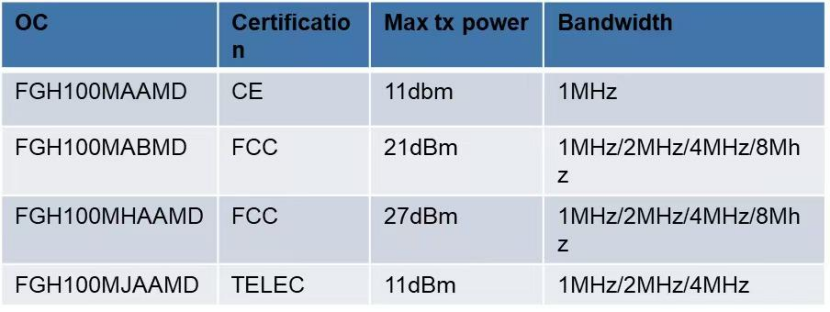
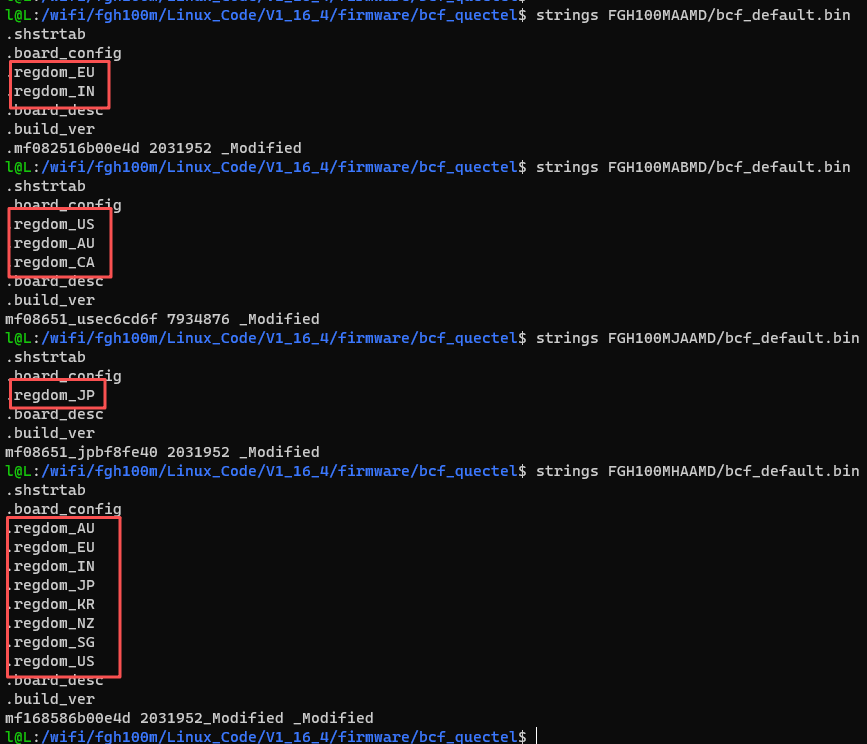
I want to know whether this file will support all the regions, because we use our product globally.
I tried a different BCF file, and it was showing the error.
[10950.944877] morse_io: Device node ‘/dev/morse_io’ created successfully
[10950.952182] morse_spi spi1.0: Loaded firmware from morse/mm6108.bin, size 430512, crc32 0xb25c264b
[10950.961420] morse_spi spi1.0: Loaded BCF from morse/bcf_fgh100mjaamd.bin, size 858, crc32 0xb0da770a
[10951.515558] morse_spi spi1.0: Country code AU not found in BCF
[10952.065336] morse_spi spi1.0: Country code AU not found in BCF
[10952.617360] morse_spi spi1.0: Country code AU not found in BCF
[10952.623248] morse_spi spi1.0: morse_firmware_init failed: -1
[10952.629015] morse_spi_probe failed. The driver has not been loaded!
[10952.635274] morse_spi: probe of spi1.0 failed with error -1
1 Like
Hi @Bean.Wang-Q ,
Thanks for the update. After changing the correct bcf file, the SSID is broadcasting.
However, I also found other issues in STA mode.
root@OpenWrt:/# [ 7338.111867] br-lan: port 5(wlan0) entered blocking state[ 7338.117184] br-lan: port 5(wlan0) entered disabled state[ 7338.122708] device wlan0 entered promiscuous mode[ 7340.298609] br-lan: port 5(wlan0) entered disabled state[ 7340.304186] device wlan0 left promiscuous mode[ 7340.308710] br-lan: port 5(wlan0) entered disabled state[ 7340.363439] br-lan: port 5(wlan0) entered blocking state[ 7340.368795] br-lan: port 5(wlan0) entered disabled state[ 7340.374286] device wlan0 entered promiscuous mode[ 7340.379569] wlan0: authenticate with 0c:bf:74:1f:fb:e5[ 7340.568565] wlan0: send auth to 0c:bf:74:1f:fb:e5 (try 1/3)[ 7340.585369] wlan0: authenticate with 0c:bf:74:1f:fb:e5[ 7340.590534] wlan0: send auth to 0c:bf:74:1f:fb:e5 (try 1/3)[ 7340.645289] wlan0: authenticated[ 7340.657810] wlan0: associate with 0c:bf:74:1f:fb:e5 (try 1/3)[ 7340.674748] wlan0: RX AssocResp from 0c:bf:74:1f:fb:e5 (capab=0x11 status=0 aid=1)[ 7340.690499] wlan0: associated[ 7341.068112] IPv6: ADDRCONF(NETDEV_CHANGE): wlan0: link becomes ready[ 7341.074588] br-lan: port 5(wlan0) entered blocking state[ 7341.079921] br-lan: port 5(wlan0) entered forwarding state[ 7341.357786] invalid GPIO -2[ 7341.360590] invalid GPIO -2[ 7342.308009] invalid GPIO -2[ 7342.310810] invalid GPIO -2[ 7342.584480] invalid GPIO -2[ 7342.587283] invalid GPIO -2[ 7342.590085] invalid GPIO -2[ 7343.187887] invalid GPIO -2[ 7343.190683] invalid GPIO -2[ 7343.403409] invalid GPIO -2[ 7343.406213] invalid GPIO -2[ 7343.409013] invalid GPIO -2[ 7358.328001] invalid GPIO -2[ 7358.330798] invalid GPIO -2[ 7358.348647] invalid GPIO -2[ 7358.351445] invalid GPIO -2[ 7384.778759] invalid GPIO -2[ 7384.781562] invalid GPIO -2[ 7385.172416] invalid GPIO -2[ 7385.175219] invalid GPIO -2[ 7385.178024] invalid GPIO -2[ 7385.217826] invalid GPIO -2[ 7385.220617] invalid GPIO -2[ 7385.377055] invalid GPIO -2[ 7385.379870] invalid GPIO -2[ 7385.382654] invalid GPIO -2[ 7385.467383] invalid GPIO -2[ 7385.470187] invalid GPIO -2[ 7385.683116] invalid GPIO -2[ 7385.685918] invalid GPIO -2[ 7385.688718] invalid GPIO -2[ 7385.898689] invalid GPIO -2[ 7385.901479] invalid GPIO -2[ 7386.092655] invalid GPIO -2[ 7386.095455] invalid GPIO -2[ 7386.098257] invalid GPIO -2[ 7386.217780] invalid GPIO -2
The invalid GPIO-2 is flooding in STA mode, but in AP mode, it was coming 5 times. Herewith, i attached a snippet of our DTS.
&spi2 {
    pinctrl-names = “default”;
    pinctrl-0 = <&spi2_flash_pins>;
    status = “okay”;
    mm6108: mm6108@0  {
            compatible = "morse,mm610x-spi";
            reg = <0>;
            spi-max-frequency = <50000000>;
            spi-irq-gpios = <&pio 30 0>;
            reset-gpios = <&pio 8 0>;
            power-gpios = <0>;
            status = "okay";
    };
};
Glad to hear that the AP is working.
Sankar_Ganesh:
invalid GPIO
I think you didn’t set the power-gpios, it should be
&spi2 {
    pinctrl-names = “default”;
    pinctrl-0 = <&spi2_flash_pins>;
    status = “okay”;
    mm6108: mm6108@0  {
            compatible = "morse,mm610x-spi";
            reg = <0>;
            spi-max-frequency = <50000000>;
            spi-irq-gpios = <&pio 30 0>;
            reset-gpios = <&pio 8 0>;
     //       power-gpios = <0>;
            status = "okay";
    };
};
1 Like
Hi @Bean.Wang-Q ,
[  124.919675] morse_spi spi1.0: Morse SPI device removed
[  124.924822] Failed to acquire reset gpio. Skipping reset.
[  125.003683] kmodloader: loading kernel modules from /etc/modules.d/morse*
[  125.015697] morse micro driver registration. Version 0-rel_1_14_1_2024_Dec_05
As it says, the Linux host cannot recognize the SPI device.
Yes, it supports even after the above error the SSID broadcasting. We heard from our Chinese vendor that reset and irq gpios are necessary.
Also i want to know why in STA mode the “gpio error flooding”
Please check if the GPIO pins here are being reused.
        spi-irq-gpios = <&pio 30 0>;
        reset-gpios = <&pio 8 0>;
Bean.Wang-Q:
Hi @Bean.Wang-Q ,
It depends on wich bcf we tried.
Hi @Bean.Wang-Q ,
Can you create a e-service ticket? It need Quectel R&D to provide it.
Thanks @Bean.Wang-Q ,
Will create a ticket for that.