Hello,
After a lot of modifications to get the LC29HEA to work directly with my Pixhawk 2.4.8 and Ardurover, I’d like to have an export of the settings so I have a valid solution before making any changes. I’ve ordered so many things that I’m not really sure anymore. Thank you in advance.
Hi Bouzig,
Unfortunately, we do not have such command. One solution is to use PQTMSAVEPAR to save your current settings. Another solution is that many commands have “get” function, you can check your settings by using “get”.
BR,
June
Good morning June_Zhu,
Too bad, this would have provided a functional turnkey configuration for Ardupilot.
THANKS
Here is:
but be aware I posted some e.g do not stop engine before cold start and note msm7 did not saved…
need an i2c imu compatible with ardu_sw; see also loiter issue…
hope it helps.
will someone be kind to give any idea of the command lines in text - I have have tried a lot and still not getting GPS on ardupilot .
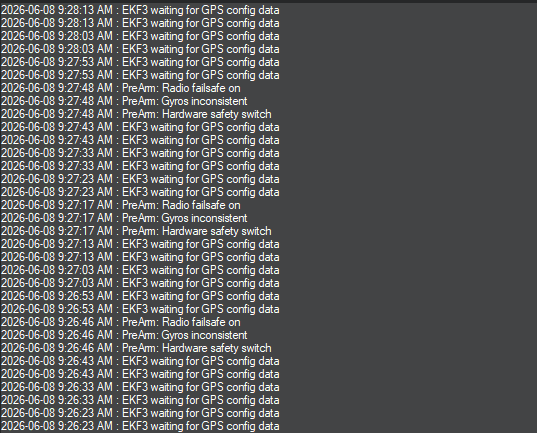
This is what I have done so far
-
managed to connect my LC29HEA to my QGNSS v2.4
-
configure my Ardupilot
what commands do I need to run the
1.update rate to (5Hz) on my LC26HEA
2.Baudrate to 460800
Any help will be appreciated - I am asking this be cause I have tried a lot of command lines from different thread and want to narrow it down .
how can I get my QGNSS message statistic to show what
- Update rate (Hz) the LC29HEA is running.
- Baud rate( 460800 ) the LC29HEA is running.
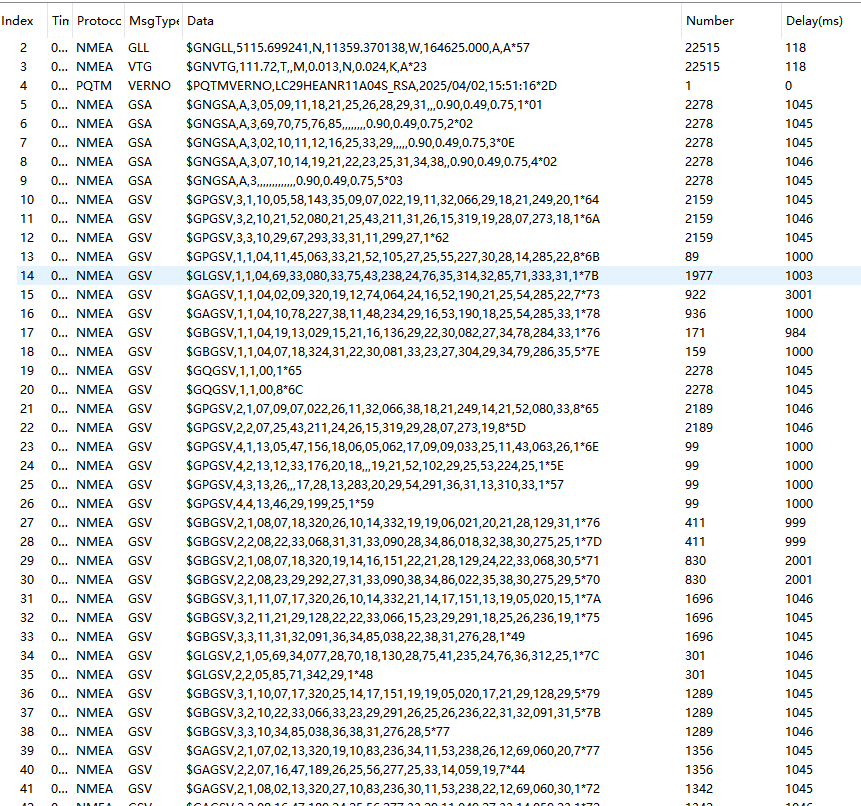
or have some basic documentation on how do set up rover mode on the LC29HEA
Current problems people are having is no clear documentation on how to set the LC29HEA update rate from 1Hz to 5Hz ( I hear 7 is the best Stable) .
What I have noticed is I am running command lines from 2024 and have no clue to confirm if it saved to the module and more over verify whatever command took
It will be nice to have a quick way to confirm your command saved and verify it .
All I am trying to do is to :
1.update rate to (5Hz) on my LC26HEA
2.Baudrate to 460800
What commands do I need to run it , save it and verify it .
This LC26HEA is a game changer to the RTK world for hobbist and far more supperior over traditional gps with up 2- 5 meter .
Definately better option to $450 RTK module from other manufactures .
Hi @Maskpro
Verification via Commands
If you want to query the module directly to confirm its internal settings, you can send the following commands via the “Com Tool” tab in the Console:
- To Check Update Rate:
- Command:
$PQTMCFGFIXRATE,R*71. * Expected Response:$PQTMCFGFIXRATE,OK,100*0B(A value of100indicates a 100 ms interval, which is 10 Hz ).* To Check Baud Rate: - Command:
$PAIR865,0,0*31. * Expected Response:$PAIR865,460800*22(Confirms the UART port is set to 460800 bps ).
- Command:
For Setting the fix rate:
- Use the
$PAIR050,<Time>,*Checksum - Example:
$PAIR050,1000*12
Also please take note as below:
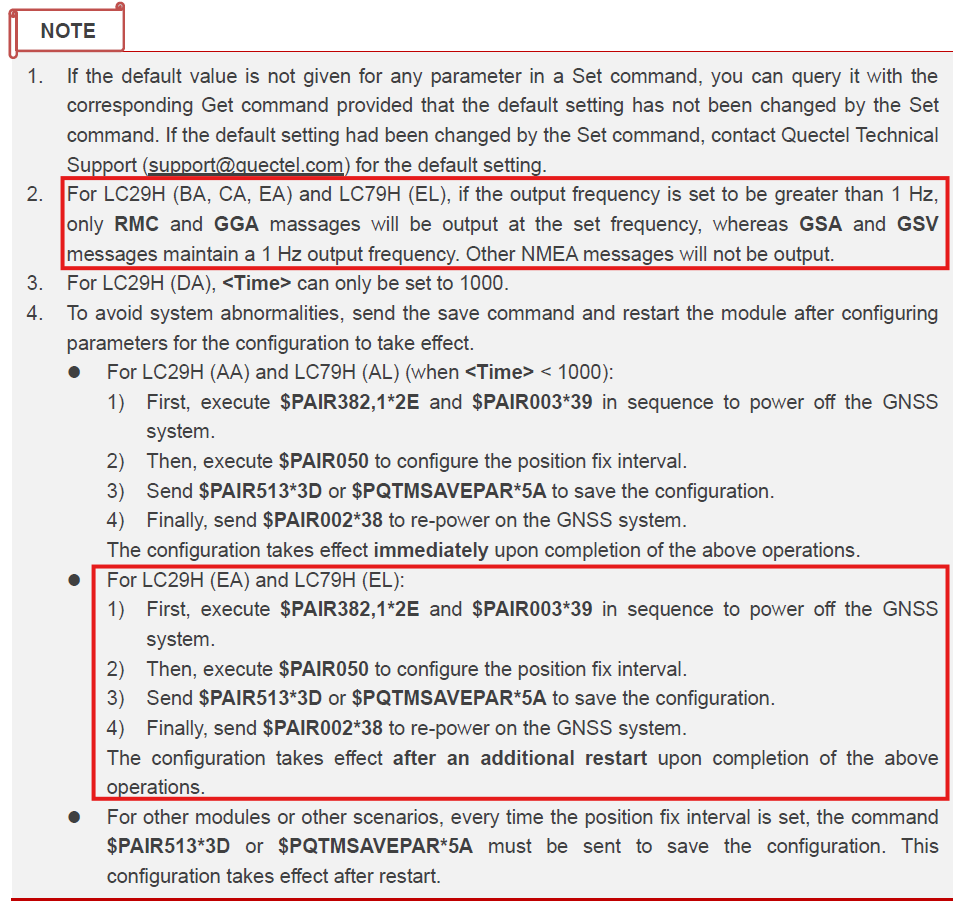
For setting the baud rate:
- Use the
$PAIR864,<PortType>,<PortIndex>,<Baudrate>*<Checksum> - Example: $PAIR864,0,0,115200*1B
Also please take note as below:
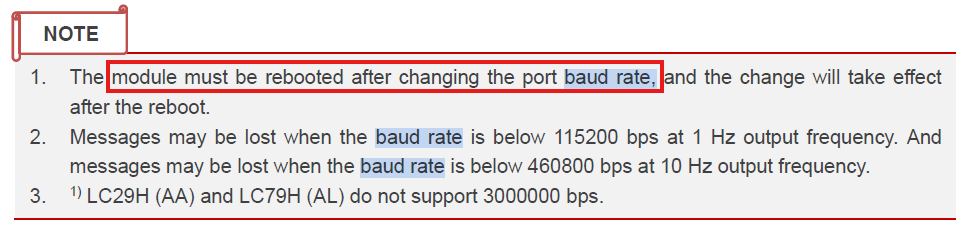
You also can refer to GNSS protocol specification as here: Quectel_LC29H&LC79H_Series_GNSS_Protocol_Specification_V1.5 | Quectel
Thanks for the explaination - buttom line is my setup for Ardupilot requires GSA and GSV to communicate, when I bump the update rate to anything more that 1Hz- I lose that funcationalily.
This give me a clear pictute the LC29HEA will not work with ardupilot unless you have an firmware to fix this issue .
That being said what chipset will be able to achieve my needs of GSA and GSV at 5 to 10 Hz ?
HI @Maskpro as per documentation, unfortunately the answer is no. Best regards.