I am trying to enable the HDT sentence on my LG580P. I need it to output heading to a device, ideally over USB. What is the exact command to send to change the setting in QGNSS v2?
Then I need to enable the (NMEA) HDT message with another command, this one I am not sure on. Ideally at the highest output frequency available, 10Hz or 20Hz if possible.
Then save the configuration with this: (same linke above) /#pqtmsavepar
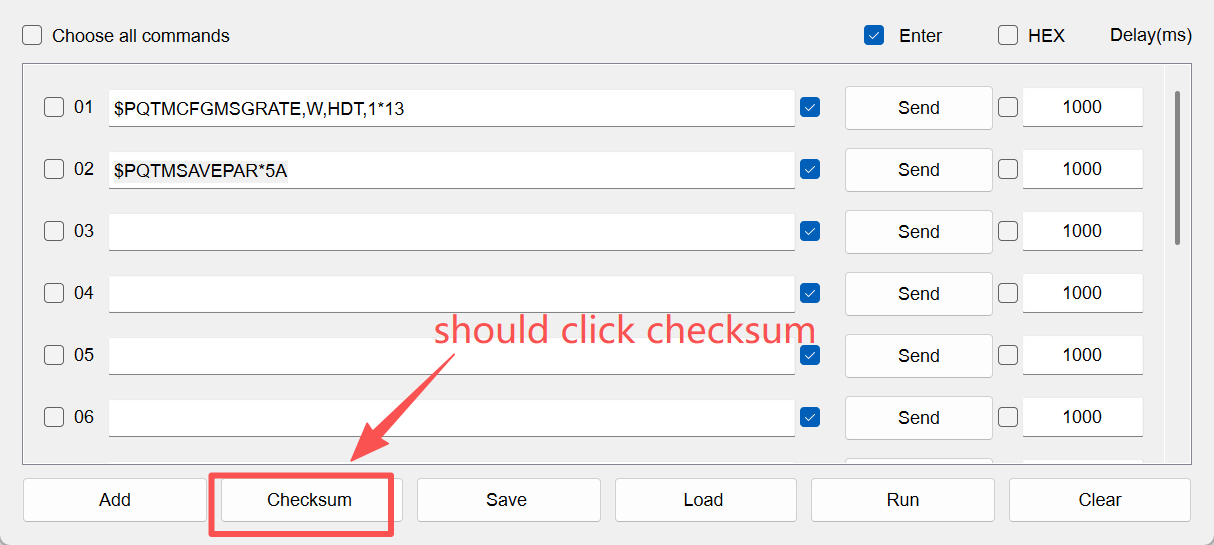
PS: I don’t understand how to get the QGNSS software to auto create the correct checksum for the commands.
Q:I am trying to enable the HDT sentence on my LG580P. I need it to output heading to a device, ideally over USB. What is the exact command to send to change the setting in QGNSS v2?
A:Please LG290P&LGx80P Series GNSS Protocol Specification. I have sent Relative technology document to you through email, please check it.
step1:$PQTMCFGMSGRATE,W,HDT,113
step2:$PQTMSAVEPAR5A
step3:reset module
Q:Then I need to enable the (NMEA) HDT message with another command, this one I am not sure on. Ideally at the highest output frequency available, 10Hz or 20Hz if possible.
A:The module is set to default output at 10Hz, with a maximum of 20Hz. This command configures HDT to output once for each positioning, so after the setting, it will output at 10Hz.
I missed the “*” before the 13 in the checksum. I still don’t know how to get the QGNSS 2.2 software to automatically create the checksum.
OK, it is outputting HDT sentences but they are all empty, no heading. Can I get it to output them with just a 3D fix, I can’t easily receive RTCM3 messages from a fixed base because this will be installed on a boat.