Hello Quectel team,
Does the EG916Q-GL support downloading GNSS predictions while driving and using them for a fast fix after a day parked, with the main supplies off and only GNSS_VBCKP powered?
Could you confirm:
-
Supported assistance methods and firmware requirements.
-
Whether assistance data survives this power-off state.
-
The recommended commands and download source.
-
Whether the service is free for commercial use.
Thank you.
Hi @ThodorisDimaresis
-
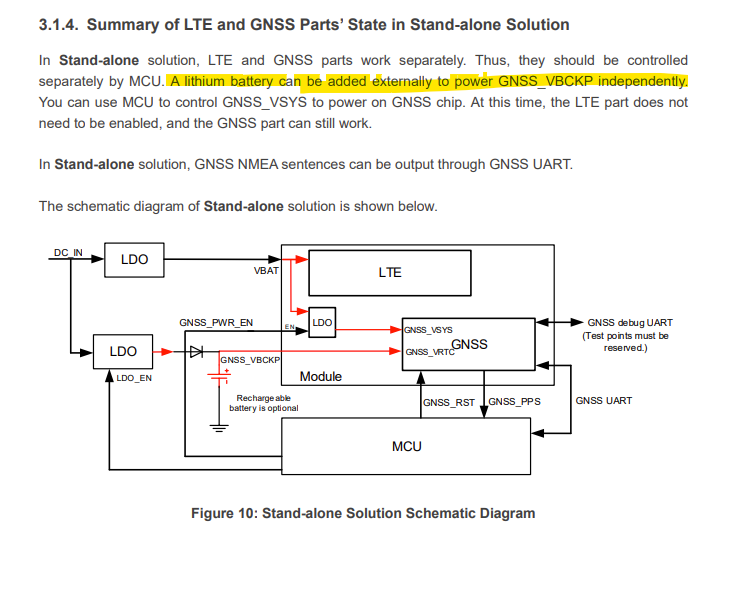
You can use GNSS only by powering the GNSS_VBCKP itself. please refer to the note below from the HW documentation:
-
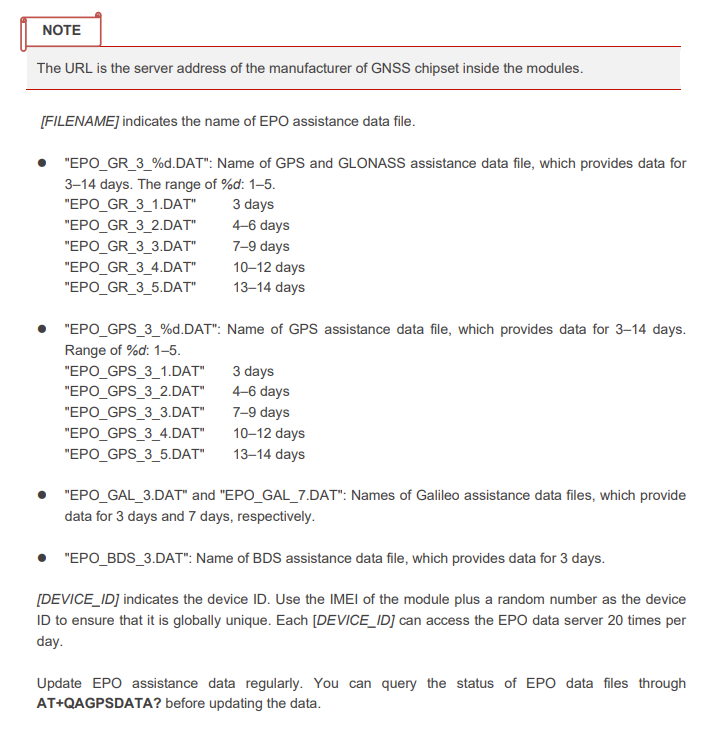
For the EPO assistance, the assistance data obtained from the EPO assistance web server needs to be updated before it expires. Before using this feature, ensure that valid EPO assistance data is available. You must download the
latest EPO binary file, which contains the data from the EPO assistance web server, from the following
URL:
http://elpo.airoha.com/\[FILENAME\]?vendor=QUECTEL&project=vSfK9CYTCe1iK7GyDf4FzFriVgcgsbN GjA1luetT-z8&device_id=[DEVICE_ID]
-
This assistance data may survive the power off state.
-
Recommended command
The operation procedures of EPO assistance technology are as follows:
Step 1: Enable GNSS feature via AT+QGPS.
Step 2: Enable EPO assistance through AT+QAGPS=1 because this feature is disabled by default.
Step 3: Query and confirm the validity of the EPO data file via AT+QAGPSDATA?.
 If the data is valid, the current data will be used.
If the data is invalid, perform Step 4–Step 7.
Step 4: Download the EPO assistance data file to the modules according to the URL address listed
above.
Step 5: Send reference location to GNSS engine via AT+QAGPSLOC.
Step 6: Inject the correct EPO time into the GNSS engine via AT+QAGPSTIME.
Step 7: Inject a valid EPO data file into the GNSS engine via AT+QAGPSDATA.
-
The service is free and commercial use.
For further reference, you can refer to the official released GNSS document in the link below: