Eg25-g SMS Read

What does AT+CNMI? return? Ya we will check with this and let you know shortly.

We had an another doubt, We have connected EG25-g Modem connected to Imx8mp Board which has Speaker and Mic Connected,
root@imx8mp-lpddr4-evk:~# busybox microcom /dev/ttyUSB2
at
OK
ATD 09480723253
OK
ATD9480723253;
OK

NO CARRIER

RING

NO CARRIER

RING

RING
ATH
OK

RING
ATA
RING

OK

NO CARRIER

RING

RING

RING

“We are not able to listen any ringing sound from the speakers connected. and if we receive the call we are not able to communicate”?
Wither this modem able to check with pulsaudio ? is there any specific setting need to be done ?

AT+CMUT?
+CMUT: 0
OK
AT+CMUT=1
OK

ERROR

Please guide us with this.
Sorry, I can’t help you with audio. It’s not a feature I’ve used with a modem, so I have no experience to draw on.

Seems that you need an exetrnal CodoC.

Ya I have external codec connected over IMX8mp Board.

+QDAI: (1-12),(0,1),(0,1),(0-5),(0-2),(0,1),(1),(1-16)

OK

+QDAI: 3,0,0,4,0,0,1,1

OK
root@imx8mp-lpddr4-evk:~# aplay -l
**** List of PLAYBACK Hardware Devices ****
card 0: btscoaudio [bt-sco-audio], device 0: 30c20000.sai-bt-sco-pcm-wb bt-sco-pcm-wb-0 [30c20000.sai-bt-sco-pcm-wb bt-sco-pcm-wb-0]
Subdevices: 0/1
Subdevice #0: subdevice #0
card 1: soundtlv320aic3 [sound-tlv320aic310x], device 0: 30c30000.sai-tlv320aic3x-hifi tlv320aic3x-hifi-0 [30c30000.sai-tlv320aic3x-hifi tlv320aic3x-hifi-0]
Subdevices: 0/1
Subdevice #0: subdevice #0
card 3: imxaudioxcvr [imx-audio-xcvr], device 0: XCVR PCM snd-soc-dummy-dai-0 [XCVR PCM snd-soc-dummy-dai-0]
Subdevices: 0/1
Subdevice #0: subdevice #0
card 4: audiohdmi [audio-hdmi], device 0: i.MX HDMI i2s-hifi-0 [i.MX HDMI i2s-hifi-0]
Subdevices: 0/1
Subdevice #0: subdevice #0
root@imx8mp-lpddr4-evk:~#

Card 1 tlve320aic is our codec on Board.

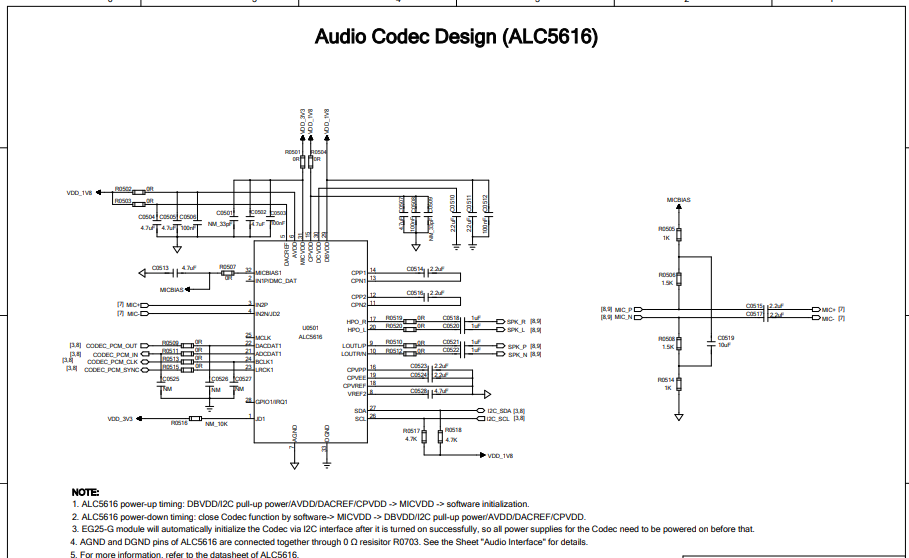
I mean that there should be CodeC connected with the EG25G but not on the IMX.

Please check the reference desgin.

+CNMI: 2,1,2,1,0

output.

That setting should not interfere with incoming SMS storage. It isn’t the cause of your problems there.

I’m currently out of ideas as to why you cannot send or receive SMSs.

I’m now wondering if you need IMS for SMS on the network and access technology you’re roaming on.

Please report the results of the following AT commands:

AT+CGDCONT?
AT+QCFG="ims"
AT+QCFG="ims/ut"
AT$QCPDPIMSCFGE?

root@imx8mp-lpddr4-evk:~# busybox microcom /dev/ttyUSB2

OK
AT+CGDCONT?

+CGDCONT: 1,“IPV4V6”,“”,“0.0.0.0.0.0.0.0.0.0.0.0.0.0.0.0”,0,0,0,0
+CGDCONT: 2,“IPV4V6”,“ims”,“0.0.0.0.0.0.0.0.0.0.0.0.0.0.0.0”,0,0,0,0
+CGDCONT: 3,“IP”,“internet.swir”,“0.0.0.0”,0,0,0,0
+CGDCONT: 4,“IP”,“jio.net”,“0.0.0.0”,0,0,0,0

OK
AT+QCFG=“ims”

+QCFG: “ims”,0,0

OK
AT+QCFG=“ims/ut”

ERROR
AT$QCPDPIMSCFGE?

$QCPDPIMSCFGE: 1 , 0 , 0 , 0
$QCPDPIMSCFGE: 2 , 1 , 0 , 0
$QCPDPIMSCFGE: 3 , 1 , 0 , 0
$QCPDPIMSCFGE: 4 , 0 , 0 , 0

OK

You have the IMS APN set in context 2 already. Maybe SMS will work if you try to activate it using:

AT+QCFG="ims",1
AT$QCPDPIMSCFGE=2,1

Then power-cycle the modem.  Good luck.

please send latest software of quectel cm for imx8 linux 6.1.55