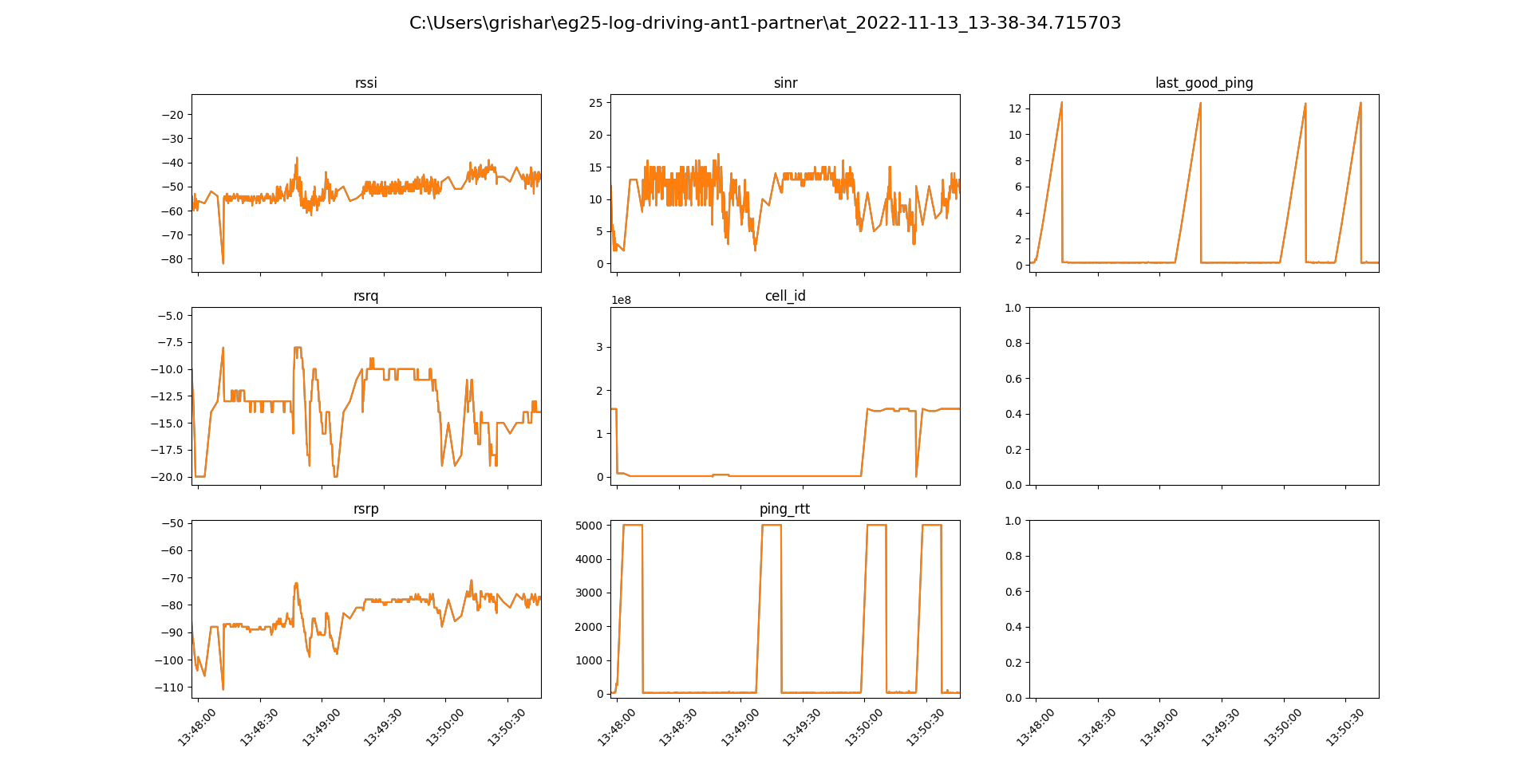
We’re using a EG25-G PCIe modem as a network adaptor for our Linux embedded PC. We encountered frequent and random disconnects (all packets are completely dropped while ) for 5-15 seconds. To verify the issue’s not on the Linux side of things I’ve set up a EG25-G module and a Windows PC connected via USB. (The PC does not use the EG25-G as a network adapter.)
I continiously send AT+QPINGs to the modem to make it ping Google DNS and query service quality data with AT+QENG=“servingcell”.
It works, the ping RTT is stable and in double digits, but every other minute or two AT+QPING fails with code 569, i. e. there’s a complete loss of connectivity, for about 10 seconds. This sometimes happens near cell switching events but not necessarily. The RF parameters are all reasonable (in fact, the only way to trigger a disconnect manually is to disconnect the antenna entirely, otherwise it’s random).
This happens both when the module is stationary and in movement in a car. Tried with 2 different service providers.
Below is a plot that shows how these disconnect events look:
Hi @maximus
I have sent you the latest firmware, can you update the latest firmware and try it? In addition, please help to change the SIM card of different operators, which has not happened in my test so far. Is there only one module with this problem?
We are using the EG25-G modem (Firmware: EG25GGBR07A08M2G_30.204.30.204) in a drone communication setup. The modem is connected via USB to a Raspberry Pi 4B (air end), and we have another EG25-G modem on the ground end connected to a laptop.
SSH to the Raspberry Pi works fine initially, and we use it to access video and telemetry. However, after a few flights (random, not consistent), SSH access fails, even though:
The modem still responds to ping from the ground end.
The Raspberry Pi stays powered and active.
errors appear as connection refused after we do the SSH
The only fix is reflashing the modem firmware, after which it works again — temporarily.
We are using static IPs and the network provider confirms they are public.
Is this a issue with the current firmware (30.204.30.204)??
What are the recommended steps to ensure stable long-term TCP access (SSH) without needing firmware refresh?
Any help or suggestions would be greatly appreciated.
Hi @arsalan_gilani ,
I am using the EC200N module connected to cm4 module via UART and I tried to setup the ppp connection and brows the internet. It goes well but, It always disconnect from the network and reconnects to it. So there is no proper stable connection.I followed the below procedure to setupt ppp connection. You can refer and suggest me for stable internet connection.
sudo nano /etc/ppp/peers/quectel
/dev/ttyAMA0 115200
connect ‘/usr/sbin/chat -s -v -f /etc/chatscripts/quectel-chat’
noauth
defaultroute
replacedefaultroute
usepeerdns
persist
maxfail 5
holdoff 10
lcp-echo-interval 15
lcp-echo-failure 4
ipcp-max-configure 30
ipcp-max-failure 10
ipcp-accept-local
ipcp-accept-remote
nodetach
debug
logfile /var/log/ppp-quectel.log
sudo nano /etc/systemd/system/quectel-ppp.service
[Unit]
Description=Quectel EC200U PPP Connection Service
After=network.target
After=sys-devices-platform-serial8250-tty-ttyAMA0.device
Wants=sys-devices-platform-serial8250-tty-ttyAMA0.device