Hello, struggle with lower than other modems upload want to try to set tx power to max value for LTE band3, how to do it?
Does modem has power-savings? (if yes how disable)
Could you show example of commands?
I guess something wrong with syntax that sarcfg? reports
AT+QCFG="sarcfg"?"
output: +QCFG: “sarcfg”,,,<max_power>,<row_grads>
OK
Band should be the last option, right?
working variant
/interface lte at-chat lte1 input=“AT+QCFG="sarcfg","LTE",300,10,3” wait=yes
Dear @kostyasha ,
Good Day!
Thank You for reaching out to us.
1.Does modem has power-savings? (if yes how disable).Could you show example of commands?
The modem EG18 does have Sleep mode,you may use the AT command AT+QSCL:
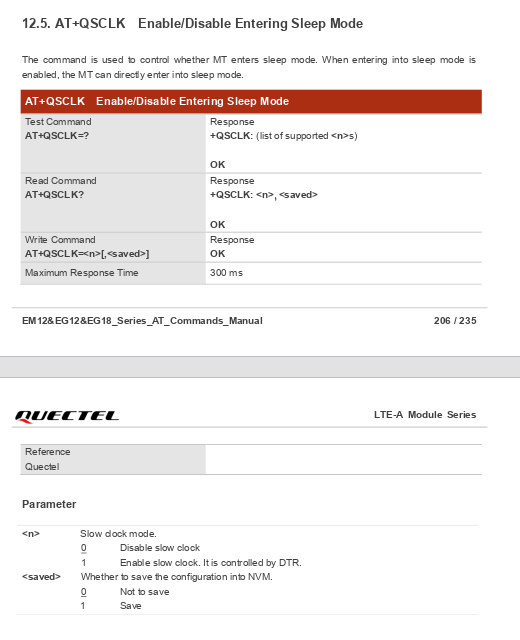
2.AT+QCFG=“sarcfg”?" ,Band should be the last option, right?.
yes, correct, by right it should show the band as the last parameter as below.
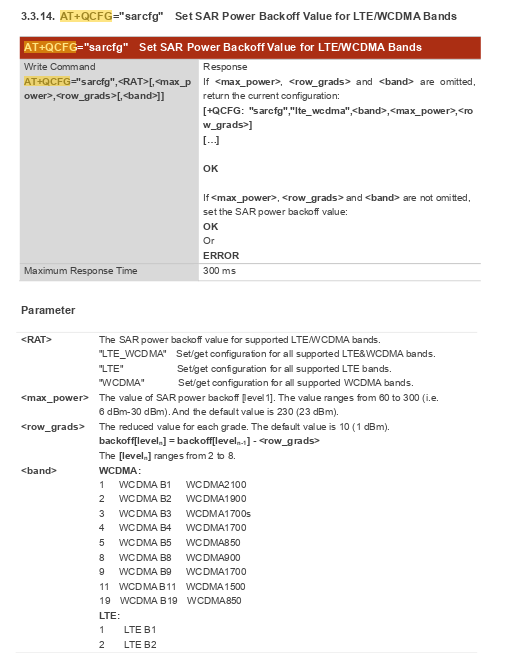
May i have a few information from your side:
a) What is the current firmware version on the module,therefore i can confirm with the internal team(Execute AT+QGMR)
Thank You and Have a Great Day!
i have EG18EAPAR01A13M4G_01.300.01.300 used in LTE18 LHG (can i read release notes somewhere btw for this version?)
Release notes for previous versions has:
Added AT+QCFG="rf_maxpower" to set maximum TX power of LTE/WCDMA band. R01A10 01. _ 001.01.001
But, the value is named rf/max_power right? - what is the difference with sarcfg?
I have 6km to LTE, just want to be sure that i configured everything that i can for the best upload (tx).
Dear @kostyasha ,
Good Day,
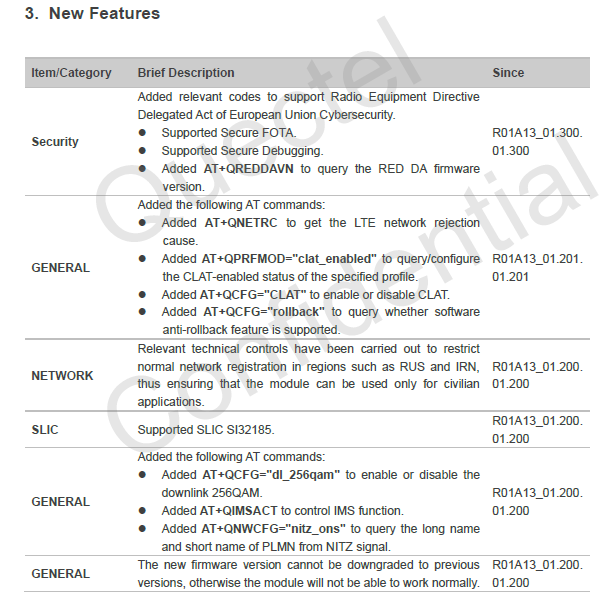
- Here is release notes updates information of EG18EAPAR01A13M4G_01.300.01.300 for your perusal:
There does not appear to be significant improvement in the power activity for EG18EAPAR01A13M4G_01.300.01.300 RN.
- But, the value is named
rf/max_powerright? - what is the difference with sarcfg?
I have 6km to LTE, just want to be sure that i configured everything that i can for the best upload (tx).
This inforf/max_power, i may need to check with internal team, as from my current documentation i can only view the AT+QCFG=“sarcfg”.Will get back to you will appropriate data.
*But hey, i may suggest the following method to set Tx to Max:
• Command: AT+QCFG=“sarcfg”,“LTE”,300,10,3.
• Breakdown of Parameters:
-“LTE”: Specifies you are targeting LTE bands.
- 300: Sets the <max_power> to 30 dBm, which is the maximum value allowed in the range of 60 to 300 (6 dBm–30 dBm).
- 10: The <row_grads>, or reduced value for each grade (default is 1 dBm).
- 3: The identifier for LTE Band 3.
• Note: This command requires a module reboot to take effect.
Thank You and Happy Holidays!
Thanks, i already set to 300, just want to be sure that rf/max_power is not limiting each other
Good afternoon, that’s very interesting for me too since I have to deal with a BTS 19km far from my external router.
I got this as a result of the above mentioned command:
AT+QSAR?
+QSAR: 0
Does this mean that at the moment I dont’ have any tx power limit set and the max power is already achieved, or does this mean that there is a default, lower than max power of 30db set?
Thanks
1 Like