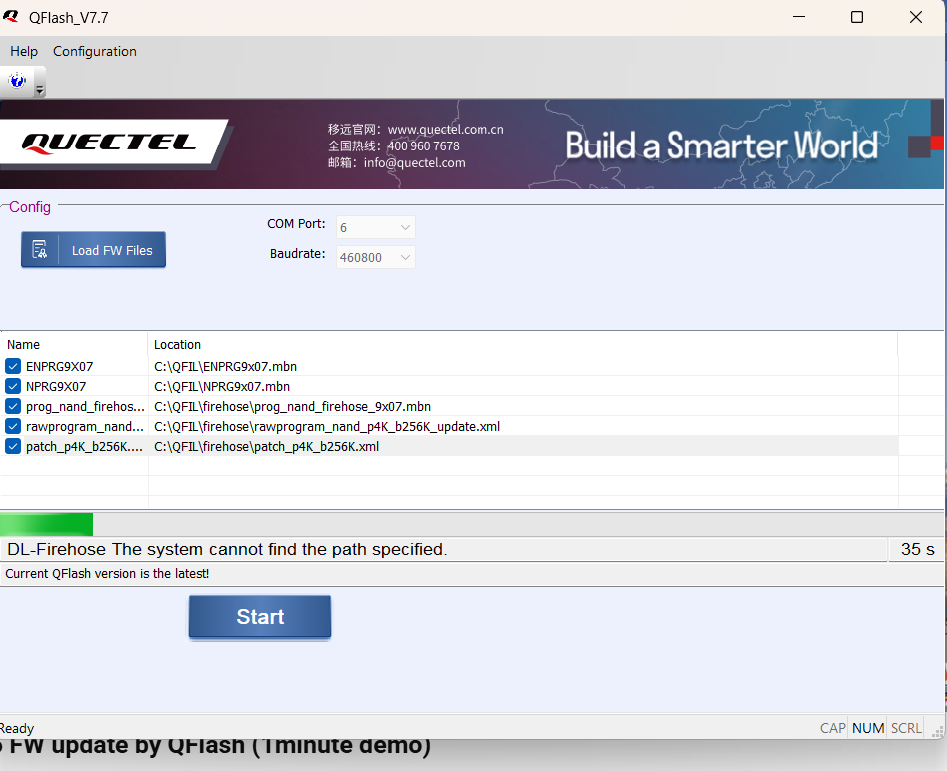
I am currently trying to update my EC25-A MINI PCIE Firmware version and i recieved the firmware zip from quactel support but when i try to use QFlash to get the firmware on the device using PCIE to USB adapter i am met with this error shown in the picture attached.
I have all drivers and can issue AT commands through that port so i know it is able to see it.
Properly goes into EDL mode when needed. Not sure the issue if anyone can help.
Dear @Ethan_Matei ,
Thank you for reaching out.
The message “DL-Firehose: The system cannot find the path specified.” indicates QFlash cannot locate one or more required flashing files on the PC (typically due to an incomplete/incorrect extraction or files being moved from the original package structure), and it is not related to AT port communication.
Please do the following:
-
Re-extract the full firmware ZIP using 7-Zip/WinRAR to a short path (e.g., C:\EC25A_FW) and do not move or rename any files/folders.
-
In QFlash, reload the firmware files from the newly extracted folder and verify the referenced files exist (e.g., the firehose folder and the rawprogram_.xml / patch_.xml and all image files referenced by the rawprogram XML).
-
When the module enters EDL, select the Qualcomm HS-USB QDLoader 9008 (COMxx) port in QFlash (this may be different from the AT COM port), then start the download.
-
Run QFlash as Administrator.
After re-extracting the full package and flashing via the correct 9008 port, this issue should be resolved.
Best regards,
Aghelan