Hi everyone,
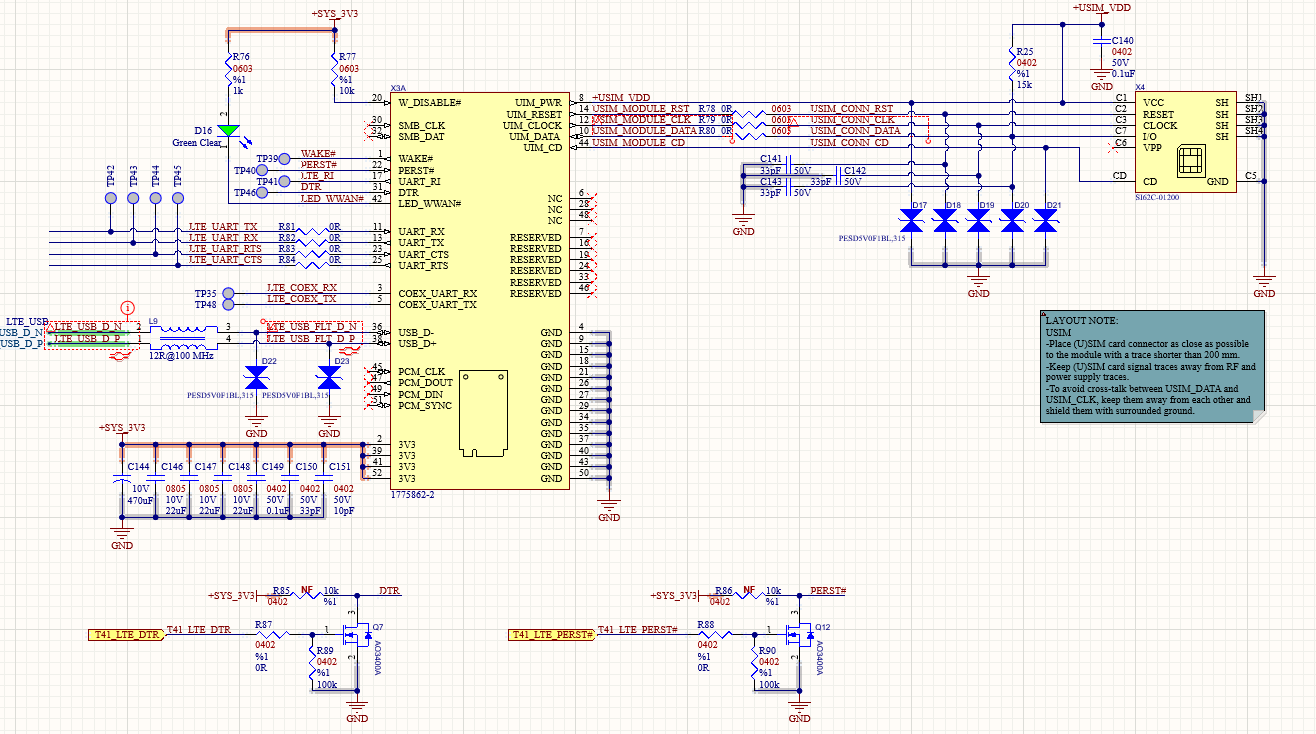
I am working on a custom IoT board using the Quectel EC25-EUX mPCIe module. We are currently facing a SIM card detection issue and would appreciate some technical insight.
During the power-up sequence with a SIM card inserted, we observe the following behavior on the USIM_VDD line:
- It rises to 1.8V.
- It then switches to 3.0V.
- Finally, it drops to 0V and stays there.
The module fails to detect the SIM card. It appears the LTE module attempts to handshake with the SIM, but after failing to receive a valid response, it shuts down the interface to save power or prevent errors.
What we have checked:
- Physical connections of the SIM slot.
- The power-up sequence matches the Quectel Hardware Design guide.
- We suspect a communication timeout or a hardware mismatch in our schematic.
Requested Help: Could you please review our attached SIM interface schematic? Are there specific decoupling capacitor values or ESD protection placements (like GND plane issues) that could be causing this handshake failure?
Any advice on AT commands (e.g., AT+CPIN? or AT+QSIMDET) to debug the physical status would also be helpful.
Regards
Dear @batuhanky ,
Thank you for reaching out.
What you are observing on USIM_VDD is a typical symptom of the SIM interface failing its initial negotiation. The module enables the SIM supply, attempts the ATR/communication on the SIM I/O/CLK/RST lines, and if the response is invalid it will shut the SIM interface down, which is why you end up at 0 V.
Looking at your schematic, the main concern is the way the USIM lines are being protected and loaded. If the SIM I/O/CLK/RST lines are too heavily clamped, have excessive capacitance, or have poor return path/grounding around the ESD devices, the edge rates and signal integrity can degrade enough to cause ATR failure. The SIM interface is very sensitive to capacitance and ringing, especially on CLK and I/O.
For a stable SIM bring-up on EC25-EUX, please check these points on your board:
- USIM_VDD decoupling placement and routing
Place the SIM VDD decoupling capacitor as close as possible to the SIM socket VCC pin, and keep the VDD trace short and wide with a solid ground reference. If the return path is long or the capacitor is far away, the VDD rail can dip during ATR and the module may shut it down.
- ESD protection selection and placement
Make sure the ESD devices used on USIM_CLK/USIM_DATA/USIM_RST are low-capacitance parts intended for SIM/SDIO-type lines. High-capacitance ESD arrays often cause exactly the “VDD up → negotiation attempt → VDD off” behavior. The ESD diodes should be placed close to the SIM socket side, with a very short, low-inductance connection to a solid ground plane (no thin ground traces). If the ground connection is weak, the clamp action creates ringing instead of protecting, and the handshake fails.
- Signal integrity on CLK and I/O
Keep USIM_CLK and USIM_DATA short, avoid running them parallel to noisy nets, and avoid stubs. If you have series resistors, values in the tens of ohms are normally used for damping, but do not add large RC loading. Also ensure the SIM socket connector and the ESD devices are not adding excessive capacitance.
- SIM presence detect wiring
If your SIM socket has a card-detect switch, confirm that the detect pin is correctly wired and has the expected pull-up/pull-down. A wrong polarity or floating detect pin can cause the module to treat the SIM as absent or unstable during boot.
- Verify the SIM voltage selection and SIM type
Your VDD toggling between 1.8 V and 3.0 V can happen during negotiation depending on SIM capability. Confirm the SIM you test supports the voltage level you expect and that the socket wiring matches the SIM pinout (VCC/IO/CLK/RST/GND).
For debugging on the module side, do the following in order:
- Check SIM presence and PIN status
AT+CPIN?
If the SIM interface is working, you should see READY (or SIM PIN if PIN is enabled). If it returns “NOT INSERTED”, it is a physical/interface level problem.
- Check whether the module detects SIM insertion events
If your firmware supports SIM hot-plug detection control, check and configure SIM detection, then re-test insertion/removal behavior. If you share your firmware version (ATI and AT+QGMR), we can confirm the exact SIM detection command set available on your build.
Best Regards,
Aghelan