EC25-E and GPS driver for Android (MiniPCIe connection)

Hi everyone, I need help. I have such a device Jewelled JLD039_3G_V1.2, CPU Amlogiс AML8726-M8 4x ARM Cortex-A9 (32bit), Android 4.4. The EC25-E modem is installed in the miniPCIe connector on the board.
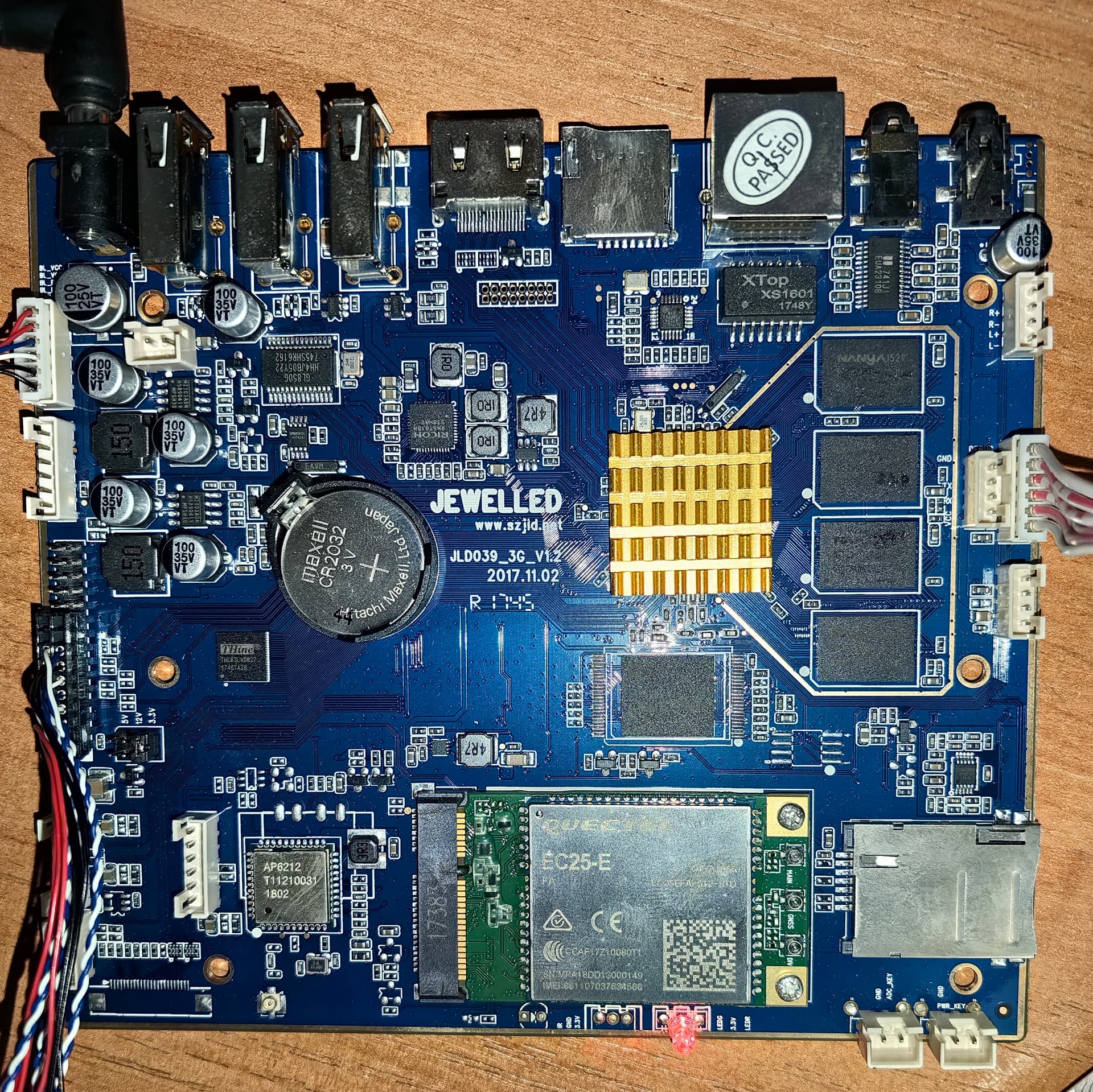

I downloaded the drivers Quectel_Android_GPS_Driver_V2.2.2_beta, and replaced files according to instructions:
Add the following GNSS driver files, gps_cfg.inf and gps.default.so,to Android system:

  1. For Android versions prior to Android 8.0
  • For 32-bit Android system
    gps_cfg.inf → /system/etc
    gps.default.so → /system/lib/hw

But the device still does not see satellites.

‘logcat –s gps_ql –v time’ I get the following information:

If NMEA_PORT_PATH=rild-nmea
04-02 09:35:05.640 D/gps_ql (439): Error connecting rild-nmea (Connection refused)
04-02 09:35:05.640 D/gps_ql (439): fail to open GPS channel !

If NMEA_PORT_PATH=/dev/tty01
04-02 09:12:32.250 D/gps_ql (437): GPS channel </dev/tty01> not exist. errno: 2 (No such file or directory)

If NMEA_PORT_PATH=/dev/ttyUSB0:
04-02 10:24:25.790 D/gps_ql (438): GPS channel </dev/ttyUSB0> not exist. errno: 13 (Permission denied)

When I launch GPSTest.app, for example If NMEA_PORT_PATH=/dev/ttyUSB0:

04-02 10:24:24.010 D/gps_ql (438): ql_gps_set_position_mode(mode=0, recurrence=0, min_interval=1000, preferred_accuracy=0, preferred_time=0)
04-02 10:24:24.010 D/gps_ql (438): ql_gps_start()
04-02 10:24:24.010 D/gps_ql (438): ql_gps_start: gps_state is 3!
04-02 10:24:24.010 D/gps_ql (438): ql_gps_start: called
04-02 10:24:24.010 D/gps_ql (438): ql_gps_state_start[234]–enter!
04-02 10:24:24.790 D/gps_ql (438): GPS channel </dev/ttyUSB0> not exist. errno: 13 (Permission denied)
04-02 10:24:25.790 D/gps_ql (438): GPS channel </dev/ttyUSB0> not exist. errno: 13 (Permission denied)
04-02 10:24:26.790 D/gps_ql (438): GPS channel </dev/ttyUSB0> not exist. errno: 13 (Permission denied)
04-02 10:24:27.790 D/gps_ql (438): GPS channel </dev/ttyUSB0> not exist. errno: 13 (Permission denied)
04-02 10:24:28.790 D/gps_ql (438): GPS channel </dev/ttyUSB0> not exist. errno: 13 (Permission denied)
04-02 10:24:29.560 D/gps_ql (438): ql_gps_stop()
04-02 10:24:29.560 D/gps_ql (438): ql_gps_stop: called
04-02 10:24:29.560 D/gps_ql (438): ql_gps_state_stop[240]–enter!
04-02 10:24:29.570 D/gps_ql (438): report_gps_state enter
04-02 10:24:29.570 D/gps_ql (438): reportStatus GPS_STATUS_SESSION_END
04-02 10:24:29.570 D/gps_ql (438): report_gps_state leave
04-02 10:24:29.570 D/gps_ql (438): report_gps_state enter
04-02 10:24:29.570 D/gps_ql (438): reportStatus to GPS_STATUS_ENGINE_OFF
04-02 10:24:29.570 D/gps_ql (438): report_gps_state leave

Please tell me what I’m doing wrong? What parameters I need to write in the file gps_cfg.inf ? Thank you!

P.S. I checked the modem via USB adapter on PC by Qnavigator_V1.5 - it is configured, sees satellites and catches mobile network.

More data:
root@k100_6212:/ # getprop | grep phone
[gsm.current.phone-type]: [1]
[hw.nophone]: [false]
root@k100_6212:/ # getprop | grep ril
[gsm.version.ril-impl]: [Quectel_Android_RIL_SR01A40V45]
[init.svc.ril-daemon]: [running]
root@k100_6212:/ # getprop | grep gps
[gps.enable]: [false]
root@k100_6212:/ # getprop | grep gnss
1|root@k100_6212:/ #

As I understand it, the device does not see the GPS driver. The RIL driver was already installed on the device.
[gsm.version.baseband]: [EC25EFAR02A09M4G]

Hi byzmiter

Is there 4 ttyUSB?
The /dev/ttyUSB1 is the nmea port.
Maybe you can set it to /dev/ttyUSB1 first.
And make sure it have the correct access permisstion.
chmod 777 /dev/ttyUSB1

Hi, Bean.Wang-Q
Thank you for responding
Information on my USB ports:

root@k100_6212:/ # lsusb
Bus 001 Device 002: ID 05e3:0608
Bus 001 Device 001: ID 1d6b:0002
Bus 002 Device 001: ID 1d6b:0002
Bus 001 Device 003: ID 046d:c31c
Bus 001 Device 004: ID 2c7c:0125
root@k100_6212:/ # dmesg | grep tty
<5>[ 0.000000@0] Kernel command line: init=/init console=ttyS4,115200n8 no_console_suspend logo=osd1,loaded,panel,debug storage=2 androidboot.firstboot=0
<6>[ 0.000000@0] console [ttyS4] enabled
<5>[ 0.387604@0] start uart_ao_ttyS0:(irq = 122)
<5>[ 0.387963@0] start uart_a_ttyS1:(irq = 58)
<5>[ 0.388318@0] start uart_b_ttyS2:(irq = 107)
<5>[ 0.388580@0] start uart_d_ttyS4:(irq = 126)
<7>[ 1.512623@0] config uart_d_ttyS4:: Character length 8bits/char
<6>[ 1.527142@0] Changing uart_d_ttyS4: baud from 0 to 115200
<7>[ 3.980744@1] config uart_d_ttyS4:: Character length 8bits/char
<7>[ 4.386834@2] config uart_d_ttyS4:: Character length 8bits/char
<6>[ 13.089965@0] usb 1-1.4: GSM modem (1-port) converter now attached to ttyUSB0
<6>[ 13.107778@0] usb 1-1.4: GSM modem (1-port) converter now attached to ttyUSB1
<6>[ 13.119385@0] usb 1-1.4: GSM modem (1-port) converter now attached to ttyUSB2
<6>[ 13.137983@0] usb 1-1.4: GSM modem (1-port) converter now attached to ttyUSB3
<6>[ 13.147645@0] usb 1-1.4: GSM modem (1-port) converter now attached to ttyUSB4
root@k100_6212:/ # ls /dev/ttyUSB*
/dev/ttyUSB0
/dev/ttyUSB1
/dev/ttyUSB2
/dev/ttyUSB3
/dev/ttyUSB4

Unfortunately the command ‘chmod 777 /dev/ttyUSB1’ is not processed:

u0_a70@k100_6212:/ $ chmod 777 /dev/ttyUSB1
Unable to chmod /dev/ttyUSB1: Operation not permitted
u0_a70@k100_6212:/ $ su
root@k100_6212:/ # chmod 777 /dev/ttyUSB1
root@k100_6212:/ #

What else can I do? Thank you

Sorry, the command ‘chmod 777 /dev/ttyUSB1’ worked.
root@k100_6212:/ # ls -l /dev/ttyUSB*
crw-r----- radio radio 188, 0 2025-04-04 14:34 ttyUSB0
crwxrwxrwx radio radio 188, 1 2025-04-04 14:34 ttyUSB1
crw-r----- radio radio 188, 2 2025-04-04 15:22 ttyUSB2
crw-r----- radio radio 188, 3 2025-04-04 14:35 ttyUSB3
crw-r----- radio radio 188, 4 2025-04-04 14:34 ttyUSB4

But nothing changed:
root@k100_6212:/ # logcat -s gps_ql
--------- beginning of /dev/log/system
--------- beginning of /dev/log/main
D/gps_ql ( 438): GPS channel </dev/ttyUSB1> not exist. errno: 13 (Permission denied)

Do you have the source code of the Android 4.4?
You can add the code in the uevent.rc or initial script add give the /dev/ttyUSB1 the access permission.

Unfortunately no. The board manufacturer did not provide the firmware.

I set 666 rights (chmod 666 /dev/ttyUSB1) and finally connected to the port.
crw-rw-rw- radio radio 188, 1 2025-04-05 11:58 ttyUSB1

Now I have the following data:
root@k100_6212:/ # logcat -s gps_ql
--------- beginning of /dev/log/system
--------- beginning of /dev/log/main
D/gps_ql ( 438): GPS channel </dev/ttyUSB1> not exist. errno: 13 (Permission denied)
D/gps_ql ( 438): ql_gps_set_position_mode(mode=0, recurrence=0, min_interval=1000, preferred_accuracy=0, preferred_time=0)
D/gps_ql ( 438): ql_gps_start()
D/gps_ql ( 438): ql_gps_start: gps_state is 3!
D/gps_ql ( 438): ql_gps_start: called
D/gps_ql ( 438): ql_gps_state_start[240]–enter!
D/gps_ql ( 438): deal_cmd[206]–enter and cmd is 1!
D/gps_ql ( 438): deal_cmd[228]–exit!
D/gps_ql ( 438): ql_gps_state_start[242]-- after enter!
D/gps_ql ( 438): ql_gps_start: after called
D/gps_ql ( 438): GPS channel </dev/ttyUSB1> not exist. errno: 13 (Permission denied)
D/gps_ql ( 438): ql_gps_stop()
D/gps_ql ( 438): ql_gps_stop: called
D/gps_ql ( 438): ql_gps_state_stop[247]–enter!
D/gps_ql ( 438): deal_cmd[206]–enter and cmd is 2!
D/gps_ql ( 438): deal_cmd[228]–exit!
D/gps_ql ( 438): report_gps_state enter
D/gps_ql ( 438): reportStatus GPS_STATUS_SESSION_END
D/gps_ql ( 438): report_gps_state leave
D/gps_ql ( 438): report_gps_state enter
D/gps_ql ( 438): reportStatus to GPS_STATUS_ENGINE_OFF
D/gps_ql ( 438): report_gps_state leave
D/gps_ql ( 438): GPS channel </dev/ttyUSB1> not exist. errno: 13 (Permission denied)
D/gps_ql ( 438): open GPS channel </dev/ttyUSB1> successful!
D/gps_ql ( 438): ql_gps_set_position_mode(mode=0, recurrence=0, min_interval=1000, preferred_accuracy=0, preferred_time=0)
D/gps_ql ( 438): ql_gps_start()
D/gps_ql ( 438): ql_gps_start: gps_state is 3!
D/gps_ql ( 438): ql_gps_start: called
D/gps_ql ( 438): ql_gps_state_start[240]–enter!
D/gps_ql ( 438): deal_cmd[206]–enter and cmd is 1!
D/gps_ql ( 438): deal_cmd[228]–exit!
D/gps_ql ( 438): ql_gps_state_start[242]-- after enter!
D/gps_ql ( 438): ql_gps_start: after called
D/gps_ql ( 438): ql_gps_stop()
D/gps_ql ( 438): ql_gps_stop: called
D/gps_ql ( 438): ql_gps_state_stop[247]–enter!
D/gps_ql ( 438): deal_cmd[206]–enter and cmd is 2!
D/gps_ql ( 438): deal_cmd[228]–exit!
D/gps_ql ( 438): report_gps_state enter
D/gps_ql ( 438): reportStatus GPS_STATUS_SESSION_END
D/gps_ql ( 438): report_gps_state leave
D/gps_ql ( 438): report_gps_state enter
D/gps_ql ( 438): reportStatus to GPS_STATUS_ENGINE_OFF
D/gps_ql ( 438): report_gps_state leave

But GPS Test still does not see satellites.
And another nuance, when I reboot the device, the rights to ttyUSB1 are reset to default:
crw-r----- radio radio 188, 1 2025-04-05 12:58 ttyUSB1

You need send the AT+QGPS=1 via /dev/ttyUSB2 to enable the GPS.

Please tell me how I can send an AT command via the terminal on Android?

If you are using the Quectel RIL. You can add the AT+QGPS=1 in the ql-ril.conf


#LTE_SignalStrength=-1
#LTE_Is_Report_SignalStrength=1
At_Cmds_For_Customer_Initialize=AT+QGPS=1
#Icc_Constants=EF_ICCID
#support_CDMPhone=1
#URC_delay_mseconds=2000

Thank you, everything worked out, but not quite as you said. Editing ql-ril.conf did not give any result. I had to look for a way to enable GPS via the terminal. In addition, I also had to give ‘666’ rights to the ttyUSB2 port. As a result, the commands in the terminal look like this:
chmod 666 /dev/ttyUSB1
chmod 666 /dev/ttyUSB2
echo -ne “at+qgps=1\r” > /dev/ttyUSB2

The only question left is how to add all this to Android startup, since when rebooting, all rights are lost by default.

Please check whether you are using the Quectel RIL. If you are using the Quectel RIL you can add the command in the ql-ril.conf.

Or maybe you can try the AT command
AT+QGPSCFG="autogps",1
to enable the GPS by default. It will take effect after reboot.

I don’t know if I’m using Quectel RIL, but when I query it in the terminal I get this information:
root@k100_6212:/ # getprop | grep ril
[gsm.version.ril-impl]: [Quectel_Android_RIL_SR01A40V45]
[init.svc.ril-daemon]: [running]

As I understand it, RIL drivers are installed, but the configuration file ql-ril.conf was missing in /system/etc and I had to add it. But as I wrote above, this did not change anything, and I had to enable GPS manually in the terminal with the command ‘echo -ne “at+qgps=1\r” > /dev/ttyUSB2’, which I found in one of the topics on this forum.

If you cannot modify compile the Android source code, we cannot guarantee it would work.

You can try

AT+QGPSCFG="autogps",1
echo -ne "AT+QGPSCFG=\"autogps\",1\r" > /dev/ttyUSB2