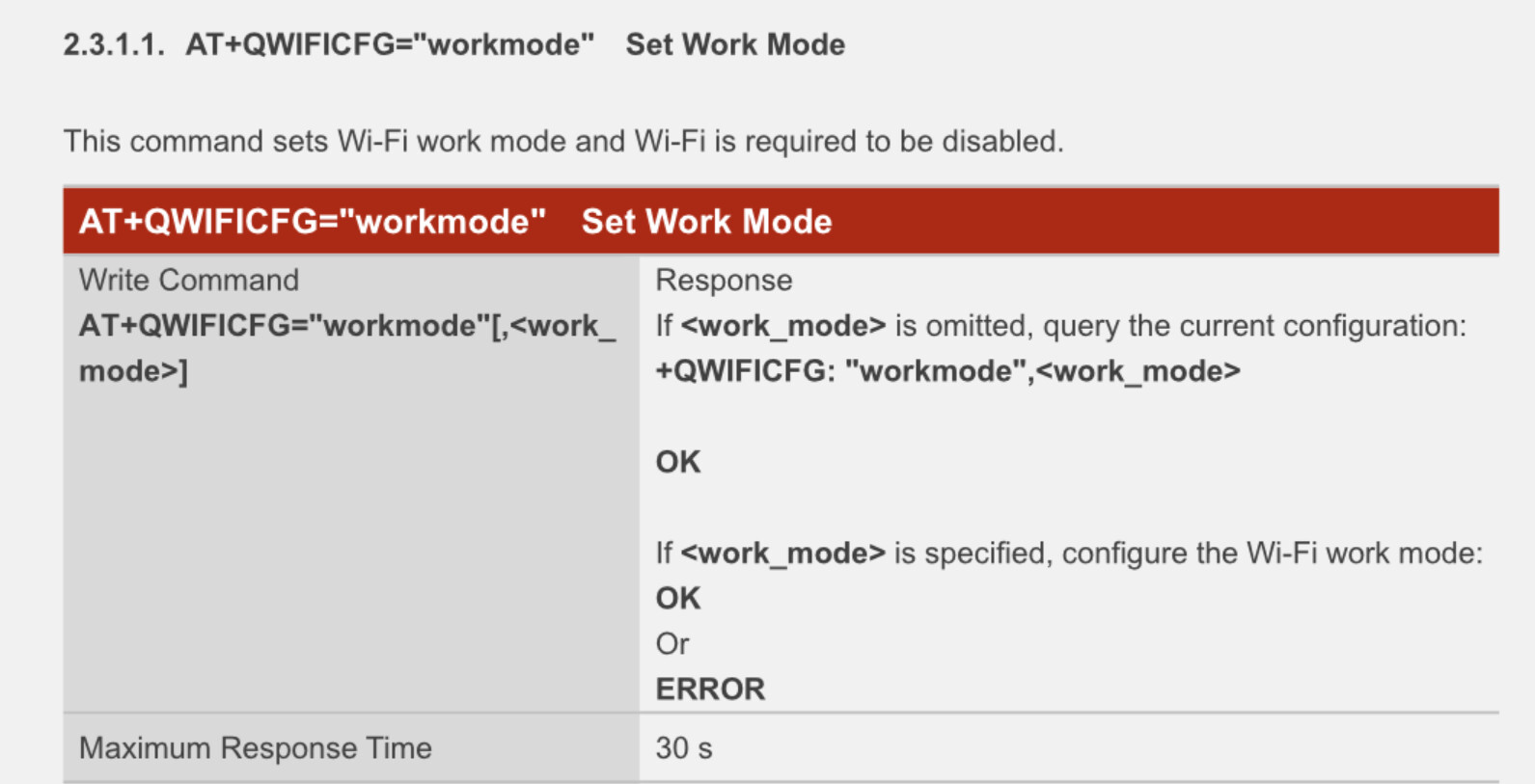
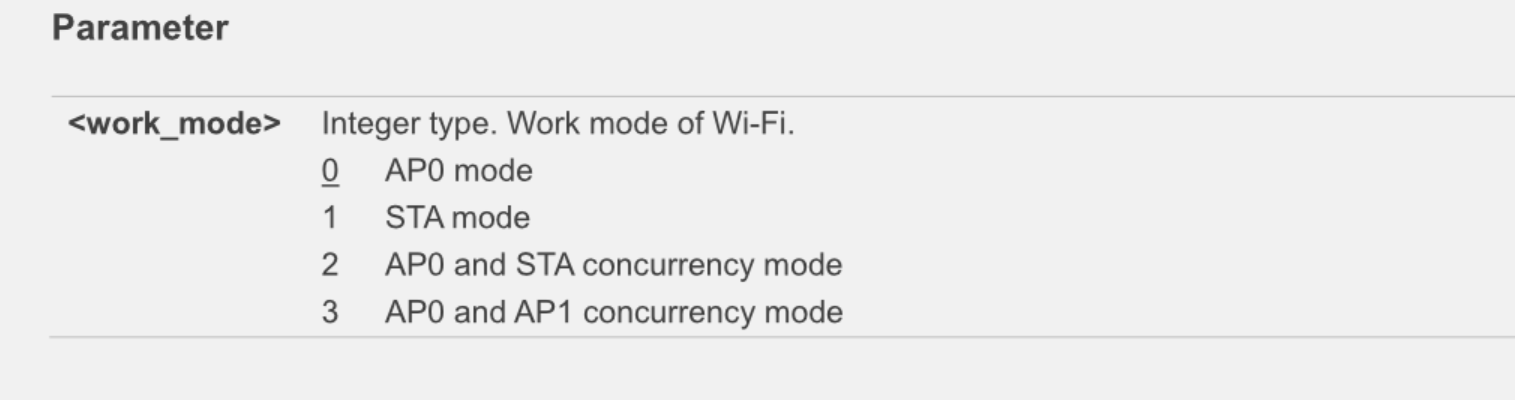
I am using an EC25+FC20 board.
- The EC25 module is currently connected to the LTE network.
- Enable the FC20 module and connect it to an external AP.
In this case, is there a way to disable the EC25 module or prevent it from being connected to the LTE network?
In conclusion, I want to disable EC25 when Wifi is enabled.
Is the EC25 OpenLinux version?
It seems that you want the FC20 works in STA mode.
No, I used only at-commands.
You are right.
I don’t want LTE to be connected unnecessarily in STA mode.
If it is not Quectel Open, even the modem can connect with AP, and there is no celluar,So what else is the Quectel module used for?
I think there’s a misunderstanding to me.
- It is connected to LTE through EC25.
- At this time, connect to the Internet in FC20’s STA mode.
- If the Internet connection is possible in the STA mode of FC20, I would like to disconnect the LTE network or disable of EC25.
I want to use only AT-commands.
Please check the Guide I just sent.
root# busybox microcom /dev/ttyUSB2
AT+QWIFI?
+QWIFI: 1

OK
AT+QWIFI=0
OK


+QWIFIND: 0,"04:e8:b9:30:4f:71"
AT+QWIFICFG="workmode",1
OK
AT+QWIFICFG="ssid",2,U+NetBFCBHS
OK
AT+QWIFICFG="auth",2,3,1,"32E90064!"
OK
AT+QWIFICFG="auth",2,3,1,"32E9004164!"
OK
AT+QWIFI=1
OK
AT+QWIFICFG="stainfo"
OK


+QWIFICFG: "stastatus",1,"U+NetBFCBHS"

AT+QWIFICFG="stainfo"
OK
AT+QWIFICFG="stastatus"
+QWIFICFG: "stastatus",1,"U+NetBFCBHS","64:e5:99:cc:d5:4c",9,-39

OK
root#
root# ifconfig
lo        Link encap:Local Loopback
          inet addr:127.0.0.1  Mask:255.0.0.0
          inet6 addr: ::1/128 Scope:Host
          UP LOOPBACK RUNNING  MTU:65536  Metric:1
          RX packets:420 errors:0 dropped:0 overruns:0 frame:0
          TX packets:420 errors:0 dropped:0 overruns:0 carrier:0
          collisions:0 txqueuelen:1000
          RX bytes:28726 (28.0 KiB)  TX bytes:28726 (28.0 KiB)

usb0      Link encap:Ethernet  HWaddr CE:4A:F2:47:14:AE
          UP BROADCAST MULTICAST  MTU:1500  Metric:1
          RX packets:0 errors:0 dropped:0 overruns:0 frame:0
          TX packets:0 errors:0 dropped:0 overruns:0 carrier:0
          collisions:0 txqueuelen:1000
          RX bytes:0 (0.0 B)  TX bytes:0 (0.0 B)

usb1      Link encap:Ethernet  HWaddr B6:8E:8A:DD:FD:60
          inet addr:192.168.0.49  Bcast:192.168.0.255  Mask:255.255.255.0
          inet6 addr: fe80::8db7:9e4d:3158:fbe9/64 Scope:Link
          UP BROADCAST RUNNING MULTICAST  MTU:1500  Metric:1
          RX packets:193 errors:0 dropped:0 overruns:0 frame:0
          TX packets:68 errors:0 dropped:0 overruns:0 carrier:0
          collisions:0 txqueuelen:1000
          RX bytes:17974 (17.5 KiB)  TX bytes:8296 (8.1 KiB)
As shown in the log above, there seems to be no problem with STA mode setting.
However, I have a connection to my router, but I don’t think I’m getting the IP right.
I think I assigned my router to 192.168.0.8, but when I check it with ifconfig, it’s 192.168.0.49.
I can’t ping my router (192.168.0.1) either.
What’s the problem?
Please, Reply for this issue.