EC200U-EU C4-P01 EVB can not get the EID

HW: EC200U-EU C4-P01 EVB
eSIM chip: SIM-S-IO3-MFF2-2-LP,
eSIM chip

When execute the AT command AT+QESIM=“eid”, got the APDU status error

AT+QESIM=“eid”
+QESIM: “eid”,8500000A,“”

OK

The firmware version is as the following:
AT+CPIN?
+CPIN: READY

OK
AT+QDSIM=1
OK
AT+QINISTAT
+QINISTAT: 7

OK
AT+QGMR
EC200UEUAAR03A15M08_01.200.01.200

OK
AT+QCCID
+QCCID: 8944477400009681302F

OK

Dear @felix ,

Thank you for reaching out.

AT+QESIM=“eid” returning +QESIM: eid,8500000A, with an empty EID means the module did not obtain a valid EID response from the eSIM via the APDU exchange, so the EID cannot be read successfully in the current setup.

To identify the cause, please share the outputs below:

  1. Confirm SIM selection
  • AT+QDSIM?
  • AT+QCCID
    This helps confirm which SIM path is currently active when you run the EID command.
  1. Confirm eSIM command support on this firmware
  • AT+QESIM=?(orAT+QESIM? if supported)
  1. Enable verbose error and retry
  • AT+CMEE=2
  • AT+QESIM=“eid”

Also, please confirm the EVB eSIM selection and hardware settings (jumpers/switches) and that the eSIM chip is correctly connected on the intended interface. EID read failures with APDU status typically indicate an issue with eSIM selection, interface wiring, or eSIM access initialization.

Best Regards,
Aghelan

Dear @aghelan_loga ,

According to your reply, I do the following test:
1)
AT+QDSIM?
+QDSIM: 1

OK
AT+QCCID
+QCCID: 8944477400009681302F

OK
2)
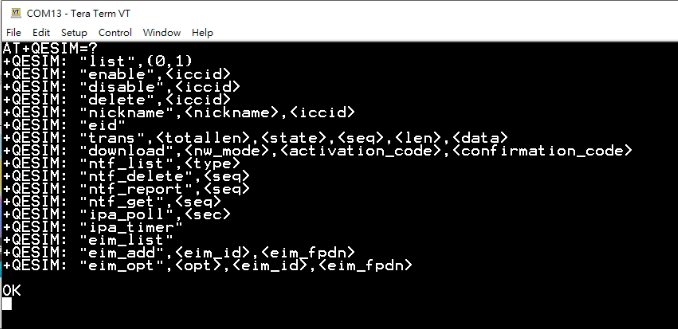
AT+QESIM=?
+QESIM: “list”,(0,1)
+QESIM: “enable”,
+QESIM: “disable”,
+QESIM: “delete”,
+QESIM: “nickname”,,
+QESIM: “eid”
+QESIM: “trans”,,,,,
+QESIM: “download”,<nw_mode>,<activation_code>,<confirmation_code>
+QESIM: “ntf_list”,
+QESIM: “ntf_delete”,
+QESIM: “ntf_report”,
+QESIM: “ntf_get”,
+QESIM: “ipa_poll”,
+QESIM: “ipa_timer”
+QESIM: “eim_list”
+QESIM: “eim_add”,<eim_id>,<eim_fpdn>
+QESIM: “eim_opt”,,<eim_id>,<eim_fpdn>

OK

AT+CMEE=2
OK
AT+QESIM=“eid”
+QESIM: “eid”,8500000A,“”

OK
4)
The jumpers/switches are on the out of the box default positions, and I can ping the google DNS, so I think the eSIM chip should be normal on this module.

AT+QDSIM?
+QDSIM: 1

OK
AT+QIACT=1
OK
AT+QIACT?
+QIACT: 1,1,1,“10.213.77.29”

OK
AT+QPING=1,“8.8.8.8”
OK

+QPING: 0,“8.8.8.8”,64,134,255

+QPING: 0,“8.8.8.8”,64,41,255

+QPING: 0,“8.8.8.8”,64,39,255

+QPING: 0,“8.8.8.8”,64,40,255

+QPING: 0,4,4,0,39,134,51
5)
I also asked 1Global eID issue, they said I should asked for Quectel.
" this matter should be addressed directly with the manufacturer of the device, rather than with us."
Dear @felix,

Thank you for the detailed verification.

Your results confirm that the module is registered and data is working, the firmware supports the QESIM command set, and AT+QESIM=“eid” still returns status 8500000A with an empty EID even with CMEE enabled.

This indicates the module is not able to complete EID retrieval through the eSIM APDU access path in the current setup. Since the cellular data path is working, the issue is isolated to the eSIM/EID access path rather than network registration. Possible causes include eSIM selection or interface routing on the EVB, eSIM chip connection or power/reset, or firmware and eSIM compatibility.

Please provide the following so we can pinpoint the root cause:

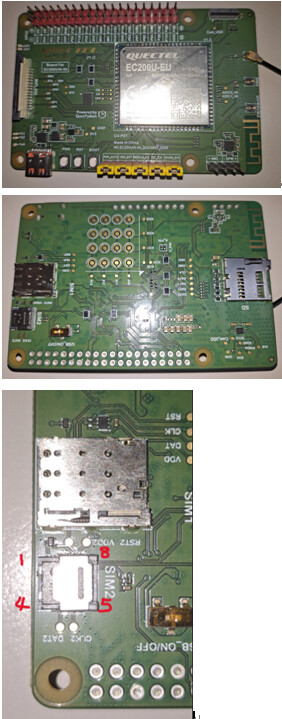
  1. A clear photo of the EVB jumper and switch positions, and confirmation that the MFF2 eSIM part is correctly mounted and oriented.
  2. The full ATI output and confirmation whether this is the official factory firmware for the EVB.
  3. If possible, test with another known-good eSIM on the same EVB, or test the same eSIM on another EC200U-EU EVB. This will quickly isolate whether the issue follows the eSIM device or the EVB/module side.

After we have the EVB configuration photo and the cross-check result, we can advise the exact next action, such as hardware selection correction or a firmware update recommendation.

Best Regards,
Aghelan

Hi @aghelan_loga ,

  1. The photos of the EVB,

ATI
Quectel
EC200U
Revision: EC200UEUAAR03A15M08

OK
3) I have only one EC200U-EU EVB, so I change to use another 1Global eSIM chip for test.

AT+QDSIM?
+QDSIM: 1

OK
AT+QCCID
+QCCID: 8944477400009681310F

OK
AT+CMEE=2
OK
AT+QESIM=“eid”
+QESIM: “eid”,8500000A,“”

OK

Dear @felix ,

Thank you for the EVB photos, ATI output, and for re-testing with another 1Global eSIM. Since the symptom is identical on two different eSIMs, a single bad chip is unlikely.

Your logs confirm QESIM supports the eid operation on this firmware, but the EID read still returns 8500000A with an empty value. This indicates the module is not able to complete the eSIM APDU transaction required to fetch the EID in the current setup. Network and ping results are not related to EID retrieval.

To isolate whether the module is accessing the correct eSIM interface, please do the following and share the full outputs:

  1. Remove any physical SIM cards from SIM1 and SIM2, reboot, then run:
    AT+QDSIM?
    AT+QCCID
    AT+QESIM=“eid”

  2. Share the current eSIM status and any notification/state:
    AT+QINISTAT
    AT+QESIM?

  3. Run the eSIM list operation exactly as supported by your AT+QESIM=? output and share the response:
    AT+QESIM=“list”,0
    AT+QESIM=“list”,1

If EID still fails after the steps above, then the issue is isolated to eSIM access on this EVB/firmware combination. At that point we will advise either the required EVB eSIM selection setting or the recommended firmware action based on your outputs.

Best Regards,
Aghelan

Hi @aghelan_loga ,

  1. remove 1Global eSIM chip
    AT+QDSIM?
    +QDSIM: 1

OK
AT+QCCID
+CME ERROR: 13
AT+QESIM=“eid”
+QESIM: “eid”,85000005,“”

OK
2) without eSiM chip
AT+QINISTAT
+QINISTAT: 0

OK
AT+QESIM?
+CME ERROR: 53
AT+QESIM=?
+QESIM: “list”,(0,1)
+QESIM: “enable”,
+QESIM: “disable”,
+QESIM: “delete”,
+QESIM: “nickname”,,
+QESIM: “eid”
+QESIM: “trans”,,,,,
+QESIM: “download”,<nw_mode>,<activation_code>,<confirmation_code>
+QESIM: “ntf_list”,
+QESIM: “ntf_delete”,
+QESIM: “ntf_report”,
+QESIM: “ntf_get”,
+QESIM: “ipa_poll”,
+QESIM: “ipa_timer”
+QESIM: “eim_list”
+QESIM: “eim_add”,<eim_id>,<eim_fpdn>
+QESIM: “eim_opt”,,<eim_id>,<eim_fpdn>

OK
3) without eSIM chip
AT+QESIM=“list”,0
+QESIM: “list”,85000005

OK
AT+QESIM=“list”,1
+QESIM: “list”,85000005

OK
4) insert eSIM chip back
AT+QDSIM?
+QDSIM: 1

OK
AT+QCCID
+QCCID: 8944477400009681302F

OK
AT+QESIM=“eid”
+QESIM: “eid”,8500000A,“”

OK
AT+QESIM=“list”,0
+QESIM: “list”,8500000A

OK
AT+QESIM=“list”,1
+QESIM: “list”,8500000A

OK

Dear @felix,

Thank you for running the isolation tests. Your results are consistent and they narrow the issue clearly.

When the eSIM chip is removed:

  • QCCID returns CME ERROR: 13 and QESIM eid/list returns 85000005. This is expected because no UICC/eUICC is present, so ICCID and eSIM APDU operations cannot be completed.

When the eSIM chip is inserted back:

  • QCCID is readable again, but QESIM eid and QESIM list return 8500000A with an empty value. This indicates the eSIM is detected on the SIM path, but the APDU exchange required for eUICC services (EID read and profile list) is not completing successfully. This is an eSIM access/initialization or routing issue, not related to network/PDP.

Please do the checks below and share the full outputs:

A) Enable eSIM service and re-initialize

  1. AT+QESIM=enable
  2. Power off the EVB completely, then power on again (do not only reset)
  3. AT+QINISTAT
  4. AT+QESIM=eid
  5. AT+QESIM=list,0
  6. AT+QESIM=list,1

B) Confirm EVB routing
Please confirm no physical SIM is inserted in SIM1/SIM2 while testing eSIM, and confirm the EVB switch/jumper is set to route the eSIM (MFF2) interface to the module. The module may still read an ICCID from an unintended path, while eUICC APDU operations fail.

C) Hardware contact check
Please re-seat the MFF2 eSIM (or re-check soldering/orientation if soldered) and ensure pad contact is good. eUICC APDU operations are more sensitive to contact issues than basic presence detection.

If it still returns 8500000A after enable plus a full power cycle and confirmed routing, please share a short power-on log up to the first QESIM eid attempt (include QINISTAT). Then we can advise on the next steps accordingly.

Best regards,
Aghelan

HI @aghelan_loga ,
A)
AT+QESIM=“enable”,“8944477400009681302F”
+QESIM: “enable”,8500017F

OK

*** unplug USB and plug USB again, eSIM chip still inserted

AT+QINISTAT
+QINISTAT: 7

OK
AT+QESIM=“eid”
+QESIM: “eid”,8500000A,“”

OK
AT+QESIM=“list”,0
+QESIM: “list”,8500000A

OK
AT+QESIM=“list”,1
+QESIM: “list”,8500000A

OK

without eSIM chip inserted, it shows,

AT+QESIM=“enable”,“8944477400009681302F”
+QESIM: “enable”,85000005

OK

*** power cycle,

AT+QINISTAT
+QINISTAT: 0

OK
AT+QESIM=“eid”
+QESIM: “eid”,85000005,“”

OK
AT+QESIM=“list”,0
+QESIM: “list”,85000005

OK
AT+QESIM=“list”,1
+QESIM: “list”,85000005

OK

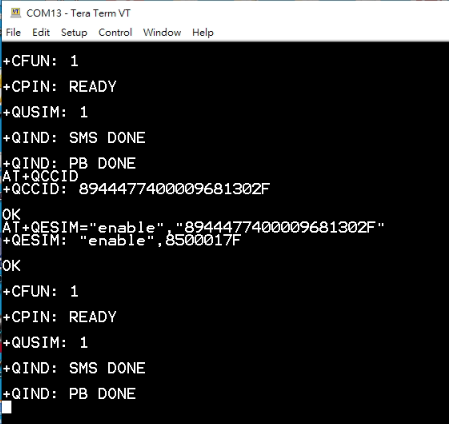
C) eSIM chip inserted, boot log

+CFUN: 1

+CPIN: READY

+QUSIM: 1

+QIND: SMS DONE

+QIND: PB DONE

AT+QESIM=“enable”,“8944477400009681302F”
+QESIM: “enable”,8500017F

OK
AT+QINISTAT
+QINISTAT: 7

OK
AT+QESIM=“eid”
+QESIM: “eid”,8500000A,“”

OK

D) Can you try to get the 1Global eSIM chip on your side, maybe it will be more efficient to find the root cause.

Dear @felix ,

Thank you for the detailed follow-up logs.

Your results show the eSIM path is detected (QINISTAT: 7 and QCCID is readable), but eUICC APDU operations still fail (eid and list return 8500000A). This indicates an eSIM APDU access issue (routing/contact/power/interface/compatibility), not a network or PDP issue.

Regarding the enable operation: based on your AT+QESIM=? output, enable is listed without parameters. The format you used with an ICCID is not accepted by the module (8500017F), so the eSIM service may not be getting enabled as intended.

Please try the following conclusive check:

  1. Insert the eSIM, remove any physical SIMs, then run:
    AT+QESIM=enable
  2. Perform a real power cycle of the EVB (remove VBAT/main power, not only USB), then run:
    AT+QINISTAT
    AT+QESIM=eid
    AT+QESIM=list,0

If it still returns 8500000A after the correct enable and a real power cycle, the resolution is to correct the EVB eSIM routing/SIM mux selection or address an MFF2 interface contact/electrical issue or use an eSIM-supported firmware build verified for this EVB and eSIM part.

Regarding 1Global eSim, their guidance is expected because EID/APDU access depends on the module firmware + EVB routing. Since you reproduced the same behavior with two different 1Global eSIMs, a single defective chip is unlikely. We do not need a separate 1Global-side action to proceed; the next step is to confirm correct enable usage and a true VBAT power cycle, then we can conclude whether this is EVB routing/contact or firmware-to-eSIM compatibility.

Please share the EVB revision marking (silkscreen) and confirm SIM1/SIM2 are empty during the test, and we will advise the exact next action.

Best regards,
Aghelan

Hi @aghelan_loga ,

The post before has been delete some tokens on the tail, the AT+QESIM=“enable” command should be with ICCID parameter.

AT+QESIM=“enable”
+CME ERROR: 53
2)
I don’t see any other power supply / battery except USB cable, so what you mean remove VBAT/main power?
3)
I know you want to enable eSIM setting, and full power off then power on to check get eID. But it seems need eSIM chip inserted to enable?

silkscreen on PCB:
ec200U/A-XX_20230807_0026
module sn:
MPN25CK0N000719

Hi @aghelan_loga ,

Does EC200U-EU support which type eSIM, SGP.02(M2M) or SGP.22(Consumer)? From 1Global datasheet, it seems SGP.02 v3.2 eSIM, can you help to verify it?

Dear @felix,

Thanks for the clarification and the screenshot. You are right: on your firmware, the enable operation requires an ICCID parameter, so AT+QESIM=“enable” without ICCID returning CME ERROR: 53 is expected.

  1. Correct enable usage
    Please run enable using the ICCID that you read from AT+QCCID:
    AT+QCCID
    AT+QESIM=“enable”,“”
    If this still returns 8500017F, please paste the full command you sent and the exact ICCID value (mask the middle digits if needed). That code typically indicates the request is not accepted by the eSIM service in the current state (often because the eUICC service is not ready, routing is wrong, or the eUICC is not responding to APDU properly).

  2. What I mean by full power cycle on your EVB
    If your board has only USB power, a full power cycle means physically unplug the USB cable so the module loses power completely, wait ~10 seconds, then plug it back in. This is different from a software reset and ensures the eUICC interface is re-initialized from a true cold start.

  3. Does the eSIM need to be inserted to enable
    Yes. The enable operation targets the eUICC identified by the ICCID, so the eSIM must be inserted and electrically reachable when you run enable.

  4. SGP.02 or SGP.22 support
    For EC200U eSIM features, the intended use is IoT/M2M eUICC (SGP.02). SGP.22 is the consumer eSIM model (phone ecosystem) and is generally not applicable to AT-command based IoT modules.

So, if your 1Global part is an SGP.02 eUICC (as their datasheet indicates), it is the correct category for this module. The remaining problem is not the SGP.02 vs SGP.22 type by itself, but that the module still cannot complete the eUICC APDU operations (EID/list), which points to eUICC access on the EVB (routing/contact/power/IO) or a firmware-to-eUICC compatibility issue.

Next step
Please do this exact sequence and share full outputs:

  1. Ensure SIM1/SIM2 sockets are empty (no physical SIM inserted) and the eSIM is inserted.
  2. AT+QCCID
  3. AT+QESIM=“enable”,“”
  4. Unplug USB (full power off), wait 10 seconds, plug in again
  5. AT+QINISTAT
  6. AT+QESIM=“eid”
  7. AT+QESIM=“list”,0

With those results, we can conclude whether this is EVB eSIM routing/contact (most common) or firmware/eUICC compatibility for this specific EC200U-EU build and EVB revision (ec200U/A-XX_20230807_0026).

Best regards,
Aghelan

Hi @aghelan_loga ,

still fail to run enable command,
“8500017F Failed to enable profile: undefined error”

*** power cycle, then

AT+QINISTAT
+QINISTAT: 7

OK
AT+QESIM=“eid”
+QESIM: “eid”,8500000A,“”

OK
AT+QESIM=“list”,0
+QESIM: “list”,8500000A

OK

Dear @felix ,

Thanks for the update and the screenshot.

At this point the behavior is consistent, and it is not a command-format or reset issue:

  • QINISTAT is 7, so the module detects a SIM interface is present
  • QESIM eid and QESIM list still return 8500000A, so the module cannot complete any eUICC APDU transaction
  • QESIM enable with the ICCID returns 8500017F, which means the eUICC service cannot enable the profile in the current state because the APDU path to the eSIM is not working

So the root cause is one of these three, in this order of likelihood:

  1. EVB SIM routing or SIM mux is not actually routing the module to the MFF2 eSIM interface
  2. MFF2 contact or electrical interface issue on VCC/CLK/RST/IO (APDU fails even though presence and ICCID may still be readable)
  3. firmware-to-eUICC compatibility for this EC200U-EU build and your 1Global SGP.02 eSIM

To make this conclusive with one short check, please do only this and share the outputs:

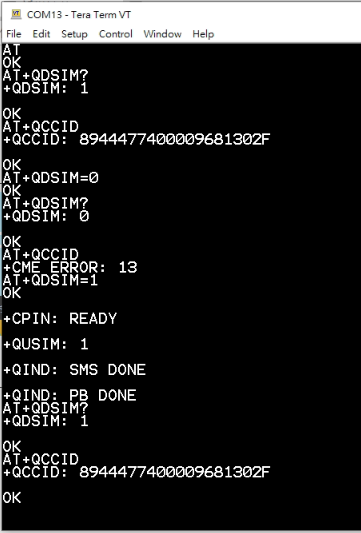
  1. Remove any physical SIM from SIM1 and SIM2
  2. Run AT+QDSIM? and AT+QCCID
  3. Switch the SIM path and re-check ICCID:
  • AT+QDSIM=0, then AT+QDSIM? and AT+QCCID
  • AT+QDSIM=1, then AT+QDSIM? and AT+QCCID

Expected result: AT+QCCID must change (or one side must give an error) when you switch.
If AT+QCCID does not change, the EVB routing is not selecting the eSIM interface correctly, and that is the fix to apply on the EVB side.

If AT+QCCID switching is confirmed to work correctly and you still get 8500000A and 8500017F, then we can treat this as a compatibility case. In that case, please provide AT+QGMR (full line). With your EVB silkscreen ec200U/A-XX_20230807_0026 and module SN MPN25CK0N000719, we will arrange an eSIM-verified EC200U-EU firmware package for you through mail and advise the safe upgrade procedure.

About SGP.02 vs SGP.22: EC200U eSIM is intended for SGP.02 (M2M/IoT) eUICC. Your 1Global SGP.02 v3.2 category is the correct type for this module, so the remaining issue is the APDU access or firmware compatibility, not the SGP type selection.

Bset Regards,
Aghelan

Hi @aghelan_loga ,
1)


2)
AT+QGMR
EC200UEUAAR03A15M08_01.200.01.200

OK

Dear @felix ,

Thank you for reaching out.
Kindly check your mail inbox.

Best Regards,
Aghelan