Does RM530N-GL work with T-Mobile in the USA?

I have had this RM530N-GL modem for more than a month, and spent more hours trying to get it to connect to my T-Mobile provider (with my T-Mobile SIM card) than I care to count.

Same SIM works fine with a Sierra Wireless modem, but no matter what I do, I cannot connect to T-Mobile. The most meaningful of errors is “CME Error 30,” which means No Network Service, and I don’t know what that means.

But it sort of connects to an AT&T cell in roaming mode, but it is always just “searching” when I force it to T-Mobile.

So it has finally occurred to me to ask if ANYONE in the USA has actually gotten an RM530N-GL with a T-Mobile SIM card to connect to T-Mobile? Anyone? It is starting to seem like T-Mobile is just blocking or banning Quectel RM530N-GL, which, if that is true, should become public knowledge. I’m not saying that is what is happening, I just don’t know. Tech support here is trying to help, but no progress so far. Appreciate any feedback.

Thanks…

1 Like

Dear @jzb
Please check mbn file and APN on your side.
At+QMBNCFG=“list”
AT+QICSGP?
AT+CGDCONT?

I’ve already answered this, but here we go again:

At+QMBNCFG=“list”

+QMBNCFG: “List”,0,1,1,“Commercial-TMO”,0x0A01050F,202402061
+QMBNCFG: “List”,1,0,0,“ROW_Commercial”,0x0A010809,202401041
+QMBNCFG: “List”,2,0,0,“Rogers_Canada”,0x0A014800,202111051
+QMBNCFG: “List”,3,0,0,“Bell_Canada”,0x0A014700,202111051
+QMBNCFG: “List”,4,0,0,“Telus_Canada”,0x0A014900,202112271
+QMBNCFG: “List”,5,0,0,“Commercial-Sprint”,0x0A010204,202111051
+QMBNCFG: “List”,6,0,0,“VoLTE-ATT”,0x0A010335,202305161
+QMBNCFG: “List”,7,0,0,“CDMAless-Verizon”,0x0A010126,202209281
+QMBNCFG: “List”,8,0,0,“Telia_Sweden”,0x0A012400,202303301
+QMBNCFG: “List”,9,0,0,“TIM_Italy_Commercial”,0x0A012B00,202111051
+QMBNCFG: “List”,10,0,0,“France-Commercial-Orange”,0x0A010B21,202403141
+QMBNCFG: “List”,11,0,0,“Commercial-DT-VOLTE”,0x0A011F1F,202403221
+QMBNCFG: “List”,12,0,0,“Germany-VoLTE-Vodafone”,0x0A010449,202111051
+QMBNCFG: “List”,13,0,0,“UK-VoLTE-Vodafone”,0x0A010426,202111051
+QMBNCFG: “List”,14,0,0,“Commercial-EE”,0x0A01220B,202303301
+QMBNCFG: “List”,15,0,0,“Optus_Australia_Commercial”,0x0A014400,202111051
+QMBNCFG: “List”,16,0,0,“Telstra_Australia_Commercial”,0x0A010F00,202304251
+QMBNCFG: “List”,17,0,0,“Commercial-LGU”,0x0A012608,202111051
+QMBNCFG: “List”,18,0,0,“Commercial-KT”,0x0A01280B,202111051
+QMBNCFG: “List”,19,0,0,“Commercial-SKT”,0x0A01270A,202111051
+QMBNCFG: “List”,20,0,0,“Commercial-Reliance”,0x0A011B0C,202210211
+QMBNCFG: “List”,21,0,0,“Commercial-SBM”,0x0A011C0B,202111051
+QMBNCFG: “List”,22,0,0,“Commercial-KDDI”,0x0A010709,202111051
+QMBNCFG: “List”,23,0,0,“Commercial-DCM”,0x0A010D0D,202301051
+QMBNCFG: “List”,24,0,0,“VoLTE-CU”,0x0A011561,202310181
+QMBNCFG: “List”,25,0,0,“VoLTE_OPNMKT_CT”,0x0A0113E0,202310241
+QMBNCFG: “List”,26,0,0,“Volte_OpenMkt-Commercial-CMCC”,0x0A012010,202307241

Notice that there is no “T-Mobile”!!!

Quectel claimed support for T-Mobile. Is this a lie?

AT+QICSGP? gives an error as I’ve already mentioned in the other thread.

AT+CGDCONT?

+CGDCONT: 1,“IP”,“T-Mobile”,“0.0.0.0”,0,0,0,0,“”,0

And I notice you completely ignored the part where I can connect to AT&T roaming with a T-Mobile SIM, though no data (probably voice only, probably emergency).

Please take this seriously and tell me why I can’t connect to T-Mobile, give me my money back, or I will have to assume that Quectel does not support T-Mobile in the USA.

LOL. This is T-Mobile:

I would disable MBN autoselection and configure the 1st profile as shown here:

at+cgact=0,1

OK
at+cgact=1,1

+CME ERROR: 30
at+cgdcont?

+CGDCONT: 1,“IPV4V6”,“T-Mobile”,“0.0.0.0.0.0.0.0.0.0.0.0.0.0.0.0”,0,0,0,0,“”,0
+CGDCONT: 2,“IPV4V6”,“ims”,“0.0.0.0.0.0.0.0.0.0.0.0.0.0.0.0”,0,0,0,0,“”,1
+CGDCONT: 3,“IPV4V6”,“sos”,“0.0.0.0.0.0.0.0.0.0.0.0.0.0.0.0”,0,0,0,1,“”,1
+CGDCONT: 4,“IPV4V6”,“tmus”,“0.0.0.0.0.0.0.0.0.0.0.0.0.0.0.0”,0,0,0,0,“”,0
+CGDCONT: 5,“IPV4V6”,“h2g2”,“0.0.0.0.0.0.0.0.0.0.0.0.0.0.0.0”,0,0,0,0,“”,0
+CGDCONT: 6,“IPV4V6”,“other-T-Mobile”,“0.0.0.0.0.0.0.0.0.0.0.0.0.0.0.0”,0,0,0,0,“”,0

OK
at+cgact=1,1

+CME ERROR: 30

The above is after a factory reset operation.

at+cgatt=1

+CME ERROR: 30

This RM530N-GL sure loves the CME 30 error. That’s all I ever get.

And yeah, I get that Commercial-TMO is T-Mobile, but since the string isn’t an exact match, how do I know what it will do?

BTW, I got it running (sort of) in PCIE mode on the waveshare PCIE Hat+ now, and I did install the Quectel pcie_mhi driver and modprobe’d all the related mhi and wwan modules, and /dev/mhi_* (all five of them) are present in /dev/* (including mhi_QMI0), but now there is no /dev/cdc-wdm0. Should there be one? My mmcli can’t find any modems, and qmicli complains about a “unexpected port subsystem” and “unexpected transport type found”.

And I still can’t get attached to the stupid T-Mobile cell tower.

So I ask again, is there something physically wrong with my unit, or is it just a configuration problem?

And I just love all the undocumented AT commands you guys are throwing out there…

Shouldn’t this just work? I am an embedded systems engineer of 30+ years, and my current project involves building a cell data router (just not with a Quectel product, and with this experience, I’m not likely to recommend Quectel), and with all your help and everything, I am no closer to a data connection to T-Mobile that I was in January when I bought this contraption.

Am I the first person in the universe to try to connect to a T-Mobile cell tower from RPi5 on a Waveshare Hat+ (both USB and PCIE, and neither actually connect), in the USA?

I think you should hire me for all the debugging I’ve done so far… :slight_smile: . Then at least I’ll get paid for this…are you guys related to Microsoft? This is very similar to how they debug Windows also :wink: .

Is there a sequence of AT commands you can put together that should just make this connect? Or indicate a problem along the way? I doubt that it is a signal issue, unless Sierra Wireless has a better antenna, and I doubt that its a SIM issue, since the same SIM works fine there. And I did see a AT+COPS? come back as connected to AT&T in roaming mode (though the T-Mobile signal was stronger) just no data on AT&T obviously.

I have $350 dollars and over 100 hours invested in this, and I’m going to get something out of this. I’d prefer a working Quectel RM530N-GL, that’s my first choice, but not my only choice. Make me happy, one way or another…

One more thing: I am now running RM530N-GL in PCIE mode. The /dev/mhi_* files are there, etc. I am trying to run the quectel-CM tool v1.6.7 that I compile from your github page, and it discovers my modem as

HARDWARE_PCIE

which is correct, and then sets profile->software_interface as SOFTWARE_QMI, which is also likely correct, but it doesn’t support that software_interface:


unsupported software_interface 1

is the error that quectel-CM throws. So, is this a bug, am I not supposed to use quectel-CM with a HARDWARE_PCIE modem, or what? Note that the waveshare-CM-tools from waveshare which appear to be a clone of quectel-CM do support SOFTWARE_QMI, although that is version 1.6.5.1 while the quectel-CM is version 1.6.7. So did Quectel drop support recently for SOFTWARE_QMI for some reason? Or did waveshare patch in SOFTWARE_QMI support on their own (and I still can’t find their source tree for waveshare-CM-tools, though I’ll take that up with them). My logs look okay, though there is no setup of NSS, otherwise things are in “successfully moved to start state…” etc.

@jzb
Am curious,what your hardware setup is for hosting the RM530N-GL
Do you have your Waveshare hat on like a rasberry PI#?
I know exactly! what you are saying about the hours,you put in chashing these things too! They can,and WILL wear you out in time.. Been there,done that!
Do you have any spare hardware,such as a decent machine you could install Debian 13 Trixie on,by chance just to prove your modem will work.
I have had an RM520N-GL working very stable inside of Debian Trixie for two months now,using everything Debian natively. No chasing packages,yada,yada,been there done that." The RM530n-GL should use the same mhi driver almost certain,native in Debain.
If you like PM me ,ill send you link to the PCIe adapter i am using. $30 ALI
You are in deep enough on the hardware you have already bought,
Good Luck!

Dear @jzb
Please change the APN to “fast.t-mobile.com” and try again.

As @jfrog mentioned, other modules work with T-Mobile SIM card.

I hope Quectel appreciates the debug that I’m doing for them.

I have two dedicated RPi5’s for this, one with a Waveshare 4g/5g PCIE-only HAT+, and one with 4g/5g USB3.2 HAT+. So I have a unique platform for either test. BTW, Waveshare confirmed that their USB HAT+ cannot do PCIE and the other cannot do PCIE. I’ve verified this myself with the lsusb and lspci commands. Everything is as it should be, at least at this level.

I did compile the Quectel pcie_mhi driver from their source, so that works, too, minus the occasional power-on sequence issue that is known and documented in many places, which at this point I solve by physical power-cycle, resets, reboots, or just dirty looks. No problems there.

Finally, I’ve put my RM530N-GL back into USB mode and stuck it in my USB HAT+ RPi5, and tested the quectel-CM (v1.6.7) there, and sadly, that doesn’t work either, to wit:

./quectel-CM

[03-18_18:59:21:843] QConnectManager_Linux_V1.6.7
[03-18_18:59:21:843] Find /sys/bus/usb/devices/2-1 idVendor=0x2c7c idProduct=0x801, bus=0x002, dev=0x00c
[03-18_18:59:21:843] Auto find qmichannel = /dev/cdc-wdm0
[03-18_18:59:21:843] Auto find usbnet_adapter = wwan0
[03-18_18:59:21:843] netcard driver = qmi_wwan, driver version = 6.6.28_p20240423-raspberrypi-li
[03-18_18:59:21:843] unsupport software_interface 1

On the PCIE setup, the pcie_mhi driver is used, but same error: unsupported software_interface 1, which happens to be SOFTWARE_QMI (I have the source from Quectel github, and being a prorammer, it wasn’t too hard to confirm.

So my conclusion is that quectel-CM v1.6.7 DOESN’T EVEN GET OFF THE GROUND EITHER IN USB OR PCIE MODE!

I wasn’t expecting it to choke in USB mode.

But all this is a secondary effect. I wouldn’t even be running quectel-CM if not for the fact that

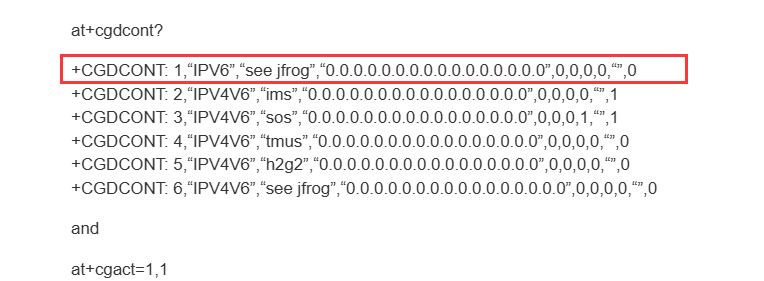
at+cgdcont?

+CGDCONT: 1,“IPV6”,“see jfrog”,“0.0.0.0.0.0.0.0.0.0.0.0.0.0.0.0”,0,0,0,0,“”,0
+CGDCONT: 2,“IPV4V6”,“ims”,“0.0.0.0.0.0.0.0.0.0.0.0.0.0.0.0”,0,0,0,0,“”,1
+CGDCONT: 3,“IPV4V6”,“sos”,“0.0.0.0.0.0.0.0.0.0.0.0.0.0.0.0”,0,0,0,1,“”,1
+CGDCONT: 4,“IPV4V6”,“tmus”,“0.0.0.0.0.0.0.0.0.0.0.0.0.0.0.0”,0,0,0,0,“”,0
+CGDCONT: 5,“IPV4V6”,“h2g2”,“0.0.0.0.0.0.0.0.0.0.0.0.0.0.0.0”,0,0,0,0,“”,0
+CGDCONT: 6,“IPV4V6”,“see jfrog”,“0.0.0.0.0.0.0.0.0.0.0.0.0.0.0.0”,0,0,0,0,“”,0

and

at+cgact=1,1

+CME ERROR: 30

The one thing that I cannot get past and I believe is the root cause of all this trouble, and the one thing that Quectel support engineers have completely ignored and failed to comment on is: CME ERROR: 30.

Until I get past CME ERROR: 30 I doubt this will ever work. I really would like to hear from Quectel about that. And I wish that I won the lottery, too… :slight_smile: but I guess I can always dream.

Dear @jzb
If device didn’t register on the network, when execute the AT commands above, it showed error, it is normal behavior.
AT+QICSGP=1,3,“fast.t-mobile.com

Dear Silvia,

You are telling us that it is “normal” for the RM530N-GL to “not register on the network.”

I am now confused: I am sure that I recall reading somewhere that the RM530N-GL will register on the network.

Why didn’t the RM530N-GL register on the network? How can I find out the reason?

@jzb
1.If you buy the following adapter , you can use your existing RM520N-GL module in either usb or PCIe mode.
2.If you have a spare pc laying around,with one PCIe gen 3 slot avaliable install Debian Trixie 13 default install
3. After install all you need to add post install is libmbim-utils,libqmi-utils,modemmanager,modemmanager-gui.
4. Add a new connection in the convienent nm-connection-editor for Brodband, and next through it seletcting…T-Mobile as operator.
6. put your adapter with your RM520N-GL placed into it.

no compiling ,configuring,editing,

You will have a working RM520N-GL…assured!
https://www.aliexpress.us/item/3256805166731124.html?src=google&pdp_npi=4%40dis!USD!24.00!22.80!!!!!%40!12000032718705613!ppc!!!&src=google&albch=shopping&acnt=708-803-3821&isdl=y&slnk=&plac=&mtctp=&albbt=Google_7_shopping&aff_platform=google&aff_short_key=UneMJZVf&gclsrc=aw.ds&albagn=888888&ds_e_adid=&ds_e_matchtype=&ds_e_device=c&ds_e_network=x&ds_e_product_group_id=&ds_e_product_id=en3256805166731124&ds_e_product_merchant_id=661191120&ds_e_product_country=US&ds_e_product_language=en&ds_e_product_channel=online&ds_e_product_store_id=&ds_url_v=2&albcp=20268592310&albag=&isSmbAutoCall=false&needSmbHouyi=false&gad_source=1&gclid=Cj0KCQjw1um-BhDtARIsABjU5x6zAFEy8yC-lk677HB0GtZ0lXr0xhGZxYDvjJ4LTZd9bFLwINHUlwQaAr9sEALw_wcB&gatewayAdapt=glo2usa

Good Luck

Correction: Meant to say RM530N-GL rather than RM520N-GL in above post.
Apologizes

Thanks for the sales pitch, but it doesn’t address my “registration denied” and/or CME Error: 30 issue.

Dear @jzb
As mentioned before, please change the APN via AT+QICSGP=1,3,“fast.t-mobile.com” or AT+CGDCONT=1,“IPV4V6”, “fast.t-mobile.com” .

Thank you, but as I have said before I’ve already done this and there is no difference. By the way, your community guidelines prevent a user such as myself from posting the “fast…com” for t-mobile because it got flagged as an advertisement spam. Then your admin’s re-enabled my post but by then I changed it to T-Mobile and “see jfrog” which should have been clear that it was as you said.

So yes, it is ALREADY as you say, and I get the-by-now-usual

CME ERROR:30

and registration rejected to the

at+cgact=1,1

CME ERROR: 30

command. Do you have any more suggestions, preferable ones that I haven’t tried yet. And note that I have tried every permutation of PDP’s that I could think of, even leaving it “” (empty). No difference. T-Mobile just hates this RM530N-GL and keeps rejecting it.

I’ve even tried forcing AT+COPS=1,2,“310260” and still CME ERROR: 30, though it thinks about that for about 30 seconds first.

My next plan is to get in my car with my RPi5, RM530N-GL, inverter and antennas, and drive to the base of the T-Mobile cell tower vicinity, and try this all again. I really don’t believe this is a signal strength issue, but I know I have to prove it to others.

In the meantime, do you have any other suggestions?

Dear @jzb
Currently, no good suggestion for this.
As mentioned, it is rejected by network.

So, my issue is still not solved, but I would like to know the following:

where can I find the documentation for some of the commands above for the RM530N-GL, such as:

AT+QICSGP
AT+CGPIAF
AT+CGCONTRDP
AT+QMBNCFG

Is there a reason these are not documented in the

Quectel_RG520N&RG52xF&RG530F&RM520N&RM530N_Series_AT_Commands_Manual_V1.0.0_Preliminary_20220812.pdf

manual? Are these secret commands that I can only find out if I join a secret club? Or is there some entertainment value in throwing commands at poor users who are struggling to get your product working with T-Mobile? My frustration has not subsided…this is still not working.

Any luck getting this to work on tmobile?

Yes, it works [mostly] fine. Some subtle (occasional) hangs on the data transfers (can’t quite isolate whether it is the signal strength, the card, or something else), but all of the above works. I guess I may as well share that what I believe solved my above issues is a “fresh” SIM card. Don’t use a SIM that has already been used on another device. Maybe there is some “magic” that T-Mobile tech. support could do to “re-fresh” a previously-associated SIM, but that I don’t know…brand new SIM fixed my connection issues.