Cannot find the ttyUSB* in android 13 automotive OS

Based on the Quectel_WCDMA&LTE_Linux_USB_Driver_User_Guide_V1.9_Preliminary_20190325 userguide i added the all dependencies in my android os, when i checked the lsusb i cant see the EC20 VID and PID

127|mek_8q:/ # lsusb
Bus 001 Device 001: ID 1d6b:0002
Bus 001 Device 002: ID 2c7c:0901

and i tryed to manually added the VID and PID,but it’s not working

echo 05c6 9215 > /sys/bus/usb-serial/drivers/option1/new_id

i refered this command from the following link (https://bacnh.com/quectel-linux-usb-drivers-troubleshooting)

mek_8q:/ # dmesg | grep -i usb
[ 0.555561] usbcore: registered new interface driver usbfs
[ 0.561566] usbcore: registered new interface driver hub
[ 0.567527] usbcore: registered new device driver usb
[ 1.453552] usbcore: registered new interface driver rtl8150
[ 1.459631] usbcore: registered new interface driver r8152
[ 1.465814] usbcore: registered new interface driver asix
[ 1.471873] usbcore: registered new interface driver ax88179_178a
[ 1.478684] usbcore: registered new interface driver cdc_ether
[ 1.485159] usbcore: registered new interface driver cdc_eem
[ 1.491527] usbcore: registered new interface driver cdc_ncm
[ 1.497846] usbcore: registered new interface driver aqc111
[ 1.504101] usbcore: registered new interface driver r8153_ecm
[ 1.513690] ehci_hcd: USB 2.0 ‘Enhanced’ Host Controller (EHCI) Driver
[ 1.534077] usbcore: registered new interface driver cdc_acm
[ 1.540133] cdc_acm: USB Abstract Control Model driver for USB modems and ISDN adapters
[ 1.549194] usbcore: registered new interface driver uas
[ 1.554946] usbcore: registered new interface driver usb-storage
[ 1.561983] usbcore: registered new interface driver xpad
[ 1.568048] usbcore: registered new interface driver uvcvideo
[ 1.658197] usbcore: registered new interface driver usbhid
[ 1.664143] usbhid: USB HID core driver
[ 1.682218] usbcore: registered new interface driver snd-usb-audio
[ 2.663110] mxs_phy 5b100000.usbphy: supply phy-3p0 not found, using dummy regulator
[ 3.612938] i2c 1-0050: Fixing up cyclic dependency with 5b130000.usb
[ 151.633608] ci_hdrc ci_hdrc.0: new USB bus registered, assigned bus number 1
[ 151.656080] ci_hdrc ci_hdrc.0: USB 2.0 started, EHCI 1.00
[ 151.662644] usb usb1: New USB device found, idVendor=1d6b, idProduct=0002, bcdDevice= 5.15
[ 151.671765] usb usb1: New USB device strings: Mfr=3, Product=2, SerialNumber=1
[ 151.685188] usb usb1: Product: EHCI Host Controller
[ 151.690933] usb usb1: Manufacturer: Linux 5.15.74-dirty ehci_hcd
[ 151.699723] usb usb1: SerialNumber: ci_hdrc.0

this is my dmesg log
Please check whether the option driver is loaded.
From the log you provided, the option is not loaded.
Please also check

ls /sys/bus/usb/drivers/

Please check the android kernel source code.

1 Like

Hi Biao Wang

Thank you for your reply, I already added the VID and PID in option.c and other file based on the linux documentation of Quectel ttyUSB is detecting in Linux OS but not in android.

mek_8q:/ # ls /sys/bus/usb/drivers/
aqc111 cdc_eem ftdi_sio qmi_wwan snd-usb-audio usbfs
asix cdc_ether hub r8152 uas usbhid
ax88179_178a cdc_ncm option r8153_ecm usb uvcvideo
cdc_acm cdc_wdm qcserial rtl8150 usb-storage xpad

mek_8q:/ # lsmod | grep option
option 57344 0
usb_wwan 28672 2 qcserial,option
usbserial 73728 4 ftdi_sio,qcserial,option,usb_wwan

CONFIG_USB_SERIAL_OPTION=m
CONFIG_USB_SERIAL_QUALCOMM=m
CONFIG_USB_SERIAL_WWAN=m
CONFIG_USB_SERIAL=m
CONFIG_USB_NET_QMI_WWAN=m
CONFIG_PPP_ASYNC=m
CONFIG_PPP_SYNC_TTY=m
CONFIG_USB_WDM=m
CONFIG_USB_SERIAL_FTDI_SIO=m
CONFIG_USB_SERIAL_CONSOLE=m
CONFIG_USB_SERIAL_GENERIC=m

this is my defconfig file where i have been added the dependencies

So I guess that you do not modify the option.c in the Linux kernel.
You need to add the USB VID and PID into the option id_table.

1 Like

Hi Biao Wang

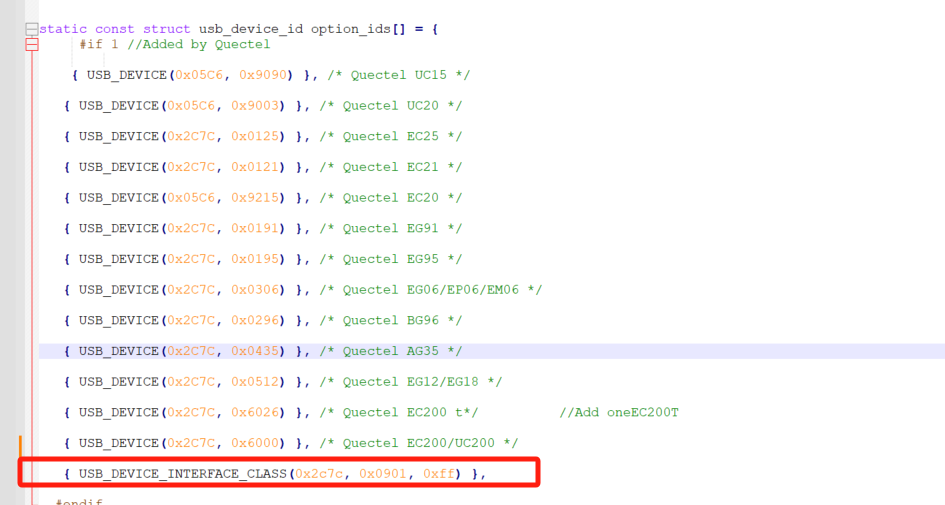
I will attach my option.c file, I added the following lines under the usb_device_id options_ids.

static const struct usb_device_id option_ids = {
#if 1 //Added by Quectel

{ USB_DEVICE(0x05C6, 0x9090) }, /* Quectel UC15 */

{ USB_DEVICE(0x05C6, 0x9003) }, /* Quectel UC20 */

{ USB_DEVICE(0x2C7C, 0x0125) }, /* Quectel EC25 */

{ USB_DEVICE(0x2C7C, 0x0121) }, /* Quectel EC21 */

{ USB_DEVICE(0x05C6, 0x9215) }, /* Quectel EC20 */

{ USB_DEVICE(0x2C7C, 0x0191) }, /* Quectel EG91 */

{ USB_DEVICE(0x2C7C, 0x0195) }, /* Quectel EG95 */

{ USB_DEVICE(0x2C7C, 0x0306) }, /* Quectel EG06/EP06/EM06 */

{ USB_DEVICE(0x2C7C, 0x0296) }, /* Quectel BG96 */

{ USB_DEVICE(0x2C7C, 0x0435) }, /* Quectel AG35 */

{ USB_DEVICE(0x2C7C, 0x0512) }, /* Quectel EG12/EG18 */

{ USB_DEVICE(0x2C7C, 0x6026) }, /* Quectel EC200 t*/ //Add oneEC200T

{ USB_DEVICE(0x2C7C, 0x6000) }, /* Quectel EC200/UC200 */

#endif
{ USB_DEVICE(OPTION_VENDOR_ID, OPTION_PRODUCT_COLT) },
{ USB_DEVICE(OPTION_VENDOR_ID, OPTION_PRODUCT_RICOLA) },
{ USB_DEVICE(OPTION_VENDOR_ID, OPTION_PRODUCT_RICOLA_LIGHT) },
{ USB_DEVICE(OPTION_VENDOR_ID, OPTION_PRODUCT_RICOLA_QUAD) },
{ USB_DEVICE(OPTION_VENDOR_ID, OPTION_PRODUCT_RICOLA_QUAD_LIGHT) },…

Thank you.
option.c (133.4 KB)

It seems that you do not add the
{ USB_DEVICE(0x2C7C, 0x0901) },

1 Like

Hi Biao Wang

I can’t find the following VID and PID in option.c and other dependencies files{ USB_DEVICE(0x2C7C, 0x0901) }

Note: I had done this same process in Linux OS (kernel version 6.1) in that i can find the ttyUSB* ports

Is there any problem with nxp android OS ?

Thank you

1 Like

{ USB_DEVICE_INTERFACE_CLASS(0x2c7c, 0x0901, 0xff) },

1 Like

Hi Biao Wang

Thanks,I will add the { USB_DEVICE_INTERFACE_CLASS(0x2c7c, 0x0901, 0xff) }, in my option.c file and i will reply if i found the ttyUSB* port or not.

Just for test, you could try

echo 2C7C 0901 FF > /sys/bus/usb-serial/drivers/option1/new_id

Then you can see the ttyUSBx.

1 Like

Hi Biao Wang

Thank you for your both methods i can detect the ttyUSB* ports in dev partition

[  146.698499][  T202] usb 1-1: new high-speed USB device number 2 using ci_hdrc
[  146.863641][  T202] usb 1-1: config 1 interface 0 altsetting 0 endpoint 0x81 has an invalid bInterval 32, changing to 9
[  146.883519][  T202] usb 1-1: New USB device found, idVendor=2c7c, idProduct=0901, bcdDevice= 3.18
[  146.894484][  T202] usb 1-1: New USB device strings: Mfr=1, Product=2, SerialNumber=3
[  146.911175][  T202] usb 1-1: Product: Android
[  146.922551][  T202] usb 1-1: Manufacturer: Android
[  146.956537][  T202] cdc_ether 1-1:1.0 usb0: register 'cdc_ether' at usb-ci_hdrc.0-1, CDC Ethernet Device, 02:4b:b3:b9:eb:e5
[  146.988349][  T202] option 1-1:1.2: GSM modem (1-port) converter detected
[  147.007122][  T202] usb 1-1: GSM modem (1-port) converter now attached to ttyUSB0
[  147.022964][  T202] option 1-1:1.3: GSM modem (1-port) converter detected
[  147.031466][  T202] usb 1-1: GSM modem (1-port) converter now attached to ttyUSB1
[  147.050823][  T202] option 1-1:1.4: GSM modem (1-port) converter detected
[  147.059528][  T202] usb 1-1: GSM modem (1-port) converter now attached to ttyUSB2
[  147.075302][  T202] option 1-1:1.5: GSM modem (1-port) converter detected
[  147.095208][  T202] usb 1-1: GSM modem (1-port) converter now attached to ttyUSB3
[  147.126955][  T202] option 1-1:1.6: GSM modem (1-port) converter detected
[  147.136050][  T202] usb 1-1: GSM modem (1-port) converter now attached to ttyUSB4
[  147.163162][  T202] option 1-1:1.7: GSM modem (1-port) converter detected
[  147.184145][  T202] usb 1-1: GSM modem (1-port) converter now attached to ttyUSB5
[  147.219592][  T202] option 1-1:1.8: GSM modem (1-port) converter detected
[  147.243248][  T202] usb 1-1: GSM modem (1-port) converter now attached to ttyUSB6