Build a rover and base RTK system with LC29HEA

Hi Quectel community,

I am a student in engineer school and I need to build an autonomus geolocation system with a base and a rover. I need it to be working without a computer and without an NTRIP if it is possible.

Since I am new to Quectel forum I can’t write more than one link, so for further details of my interogations, I give you this link : https://ma2thbaco.github.io/Geolocation/

Thank you for reading this message.
Best regards

Hello Sir,
It’s feasible. When you directly connect UART between LC29HEA base and LC29HEA rover, the rover can get RTK fix in open sky without computer or NTRIP server. In your application, you’re using Lora wireless transmission to replace UART physical connection.
Your application is a typical self-built base station. Your Lora module could just broadcast correction data from LC29HEA base station to rovers nearby.
Limit of self-built base station is the distance between base and rover should be within 10km.

Data stream in RTK for reference:
Upward: Rover reports its approximate position via GGA message to RTK server.
For self-built base station, rover position report can be optional as distance between rover and self-built base generally is within 10km.
Downward: RTK server (via NTRIP ) provide corresponding correction data to rover to get RTK fixed.
Base station: output its accurate position and correction data via UART.

Hi,

Thank you for your response. I bought the material I mentioned on the page given in my previous message (by the way the page is not available any more because I use my github website for something else, here is a new link : https://geolocationrosar.netlify.app/) : 2 LC29HEA modules, 2 antennas for LC29HEA, 2 esp32 c3 super mini and 2 LLCC68 modules to make connection between base and rover. For the LLCC68 PCBs, the one I bought have to small pins so I have to find another PCB to solder it on which I don’t want to do so I might use the SX1278 LoRa modules I have if I can make it work with them.

I received all that about two weeks ago and since then I could make the LC29HEA work fine in GPS mode with QGNSS or the esp32 and print the NMEA messages in the Serial monitor. With QGNSS, using the centipede network, I could’nt have RTK fixed, only RTK float but I think it is because the nearest centipede station is 20km away from where I live. But that is not what I want to do anyway. I have a code to give commande to my lc29hea :

import serial
from math import sin, cos, sqrt, radians

def calculate_checksum(data: str) -> str:
    """
    Calculate NMEA checksum for given data (excluding $ and *).
    """
    checksum = 0
    for char in data:
        checksum ^= ord(char)
    return f"{checksum:02X}"
def send_command():
    """
    Sends commands to the GPS module and displays responses.
    """
    baud_rate = 460800
    try:
        ser = serial.Serial("COM4", baud_rate, timeout=1)
    except Exception as e:
        print(f"Error opening serial port: {e}")
        return

    print("Type GPS commands to send. Press Ctrl+C to exit.")
    while True:
        try:
            user_input = input("> ").strip()
            if not user_input.startswith("$"):
                print("Error: Command must start with '$'")
                continue

            # Prepare and send the command
            command = user_input[1:]  # Remove leading $
            checksum = calculate_checksum(command)
            full_command = f"${command}*{checksum}\r\n"
            print(f"Debug: Command to send: {full_command.strip()}")  # Debug log
            ser.write(full_command.encode('utf-8'))
            print(f"Sent: {full_command.strip()}")

            # Read and display the response from the GPS
            while True:
                response = ser.readline().decode('utf-8', errors='ignore').strip()
                if response:
                    # Print only relevant responses
                    if response.startswith("$P"):
                        print(f"Received: {response}")
                        break

                else:
                    print("No response received. Retrying...")
        except KeyboardInterrupt:
            print("\nExiting...")
            break
        except Exception as e:
            print(f"Error: {e}")


if __name__ == "__main__":
    send_command()

I tried to set the rover in base mode with survey mode first with the following command : $PQTMRESTOREPAR (reset); $PQTMCFGRCVRMODE,W,2 (base mode); $PQTMCFGRCVRMODE, R (verifying base mode); $PQTMCFGSVIN,W,1,300,20,0,0,0 (start survey-in mode with 300 second set up and 20 meter precision to avoid failing) but it did not work after waiting more than the 5 minutes I had set for the set up process :

Type GPS commands to send. Press Ctrl+C to exit.
> $PQTMRESTOREPAR
Sent: $PQTMRESTOREPAR*13
Received: $PQTMRESTOREPAR,OK*3B

> $PQTMCFGGRVMODE,W,2
Sent: $PQTMCFGGRVMODE,W,2*29
Received: $PQTMCFGGRVMODE,OK*64

> $PQTMCFGGRVMODE,R
Sent: $PQTMCFGGRVMODE,R*32
Received: $PQTMCFGGRVMODE,2*7A

> $PQTMCFGSVIN,W,1,300,20,0,0,0
Sent: $PQTMCFGSVIN,W,1,300,20,0,0,0*13
Received: $PQTMCFGSVIN,OK*70

> $PQTMCFGSVIN,R
Sent: $PQTMCFGSVIN,R*26
Received: $PQTMCFGSVIN,1,300,20,0.0000,0.0000,0.0000*4B

> $PQTMCFGSVIN,R
Sent: $PQTMCFGSVIN,R*26
Received: $PQTMCFGSVIN,OK,1,300,20,0.0000,0.0000,0.0000*70

I tried with a one hour set up but it didn’t work either. When I tried to set up the fixed mode it seemed to work well thow.

Type GPS commands to send. Press Ctrl+C to exit.
> $PQTMRESTOREPAR
Sent: $PQTMRESTOREPAR*13
Received: $PQTMRESTOREPAR,OK*3B

> $PQTMCFGGRVMODE,W,2
Sent: $PQTMCFGGRVMODE,W,2*29
Received: $PQTMCFGGRVMODE,OK*64

> $PQTMCFGGRVMODE,R
Sent: $PQTMCFGGRVMODE,R*32
Received: $PQTMCFGGRVMODE,OK,2*7A

> $PQTMCFGSVIN,W,2,0,0,43.30142453,5.3817863,40
Sent: $PQTMCFGSVIN,W,2,0,0,43.30142453,5.3817863,40*11
Received: $PQTMCFGSVIN,OK*70

> $PQTMCFGSVIN,R
Sent: $PQTMCFGSVIN,R*26
Received: $PQTMCFGSVIN,OK,2,0,0,0,43.3014,5.3817,40.0000*4F

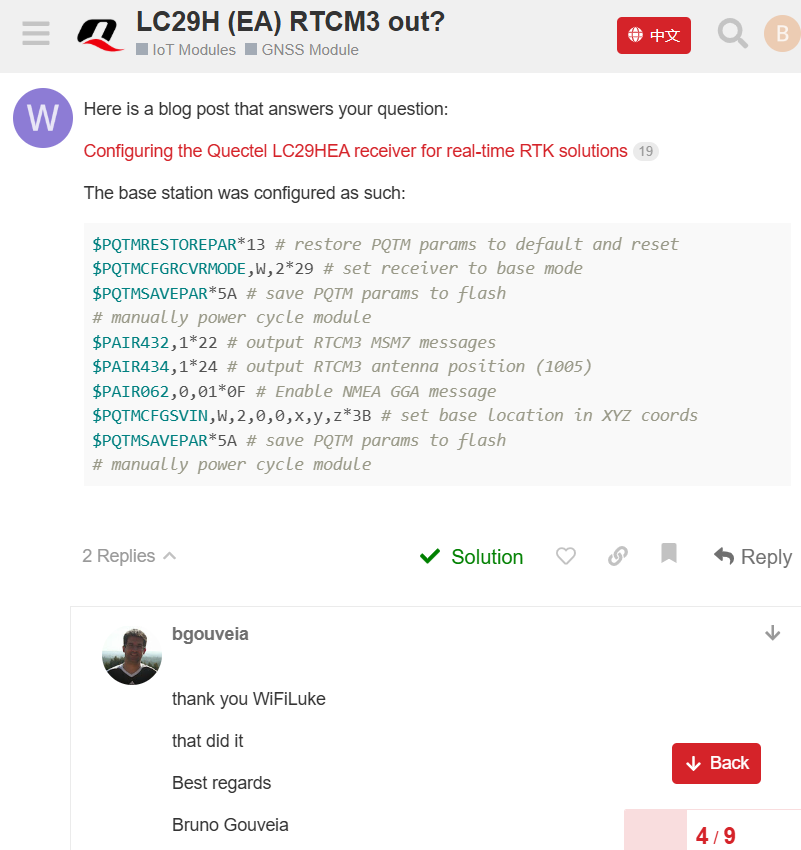
Now that I have my LC29HEA in base mode I need to have the rtk correction so I can send them to the seconde LC29HEA with LoRa. I have read that I need to ouput the RTCM messages which contain the RTK correction. At first I thought the LC29HEA could not read them because GithubCopilot told me that LC29HEA can only input RTCM messages and I should get a LC29HDA to output RTCM messages. But the protocole specification doesn’t mention that LC29HEA doesn’t support the $PAIR432 command unlike for other command. I also found this discussion :

It seem to work for them. I followed the instruction but it did not work for me :

Type GPS commands to send. Press Ctrl+C to exit.
> $PQTMRESTOREPAR
Sent: $PQTMRESTOREPAR*13
Received: $PQTMRESTOREPAR,OK*3B

> $PQTMCFGGRVMODE,W,2
Sent: $PQTMCFGGRVMODE,W,2*29
Received: $PQTMCFGGRVMODE,OK*64

> $PQTMSAVEPAR
Sent: $PQTMSAVEPAR*5A
Received: $PQTMSAVEPAR,OK*72

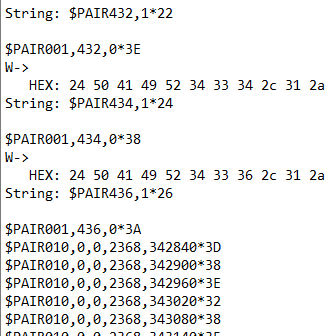
> $PAIR432,1
Sent: $PAIR432,1*22
Received: $PAIR010,0,0,2366,591201*34

> $PAIR432,R
Sent: $PAIR432,R*41
Received: $PAIR010,0,0,2366,591261*32

According to the protocole specification I should get $PAIR001,432,03E. But in these example I get $PAIR010,0,02366,59120134. After retrying later I simply get nothing after more than 20min.

So do you know how I could finally have those RTCM messages ? Should I change the firmware or something ? Should I take a LC29HDA (but it seem to work with a LC29HEA for other users above)?
Also do you know why the survey-in mode doesn’t work ?

After being able to read the RTCM messages, I have read that I need to give them to the rover lc29hea with serial port (RxD I suppose) and the firmware should give me rtk fixed automaticaly on TxD.
Hi Bacoma,

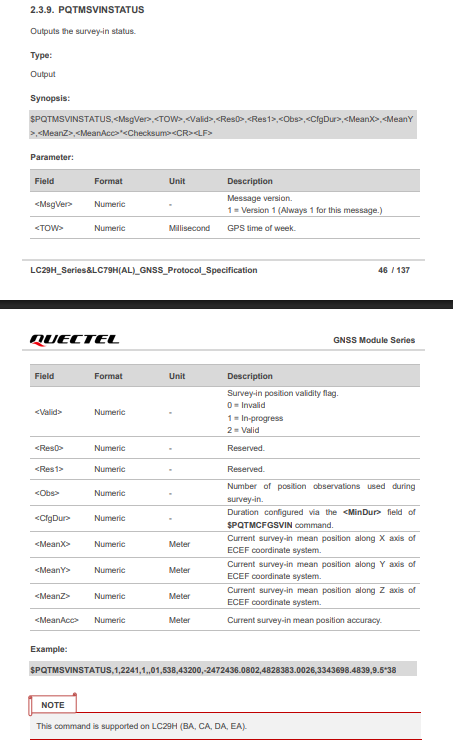
You can use the command $PQTMCFGMSGRATE,W,PQTMSVINSTATUS,1,1*58 to check the survey-in status. Could you try disabling all PTCM messages and then enabling them again? It is normal for the module to report $PAIR010 message after you enable the RTCM messages.


BR,
June

Hi,

Thank you for the response. Survey-in does not seem to work. I can’t check it with your commande. The error code says it is not supported.

> $PQTMRESTOREPAR
Sent: $PQTMRESTOREPAR*13
Received: $PQTMRESTOREPAR,OK*3B
> $PQTMCFGRCVRMODE,W,2
Sent: $PQTMCFGRCVRMODE,W,2*29
Received: $PAIR010,0,1,2368,601248*3C
> $PQTMSAVEPAR
Sent: $PQTMSAVEPAR*5A
Received: $PQTMSAVEPAR,OK*72
> $PQTMCFGSVIN,W,1,300,20,0,0,0
Sent: $PQTMCFGSVIN,W,1,300,20,0,0,0*13
Received: $PQTMCFGSVIN,OK*70
> $PQTMCFGMSGRATE,W,PQTMSVINSTATUS,1,1
Sent: $PQTMCFGMSGRATE,W,PQTMSVINSTATUS,1,1*58
Received: $PQTMCFGMSGRATE,ERROR,1*68
> $PQTMSVINSTATUS                     
Sent: $PQTMSVINSTATUS*0E
Received: $PQTMSVINSTATUS,ERROR,3*65

Also I tried disabling all NMEA messages.

z票
!!8>
zځ
!z
>
z礕
!Q=>
z
!8
>
{&
!m&>
{H祏
!

Is what I still get in my terminal and I don’t understand where it comes from.
On QGNSS it appears as :

[17:56:26.174 Uart Rx:0010 B] Æày¤穵
[17:56:26.486 Uart Rx:0007 B] !þ›rØ
[17:56:27.201 Uart Rx:0008 B] Ó

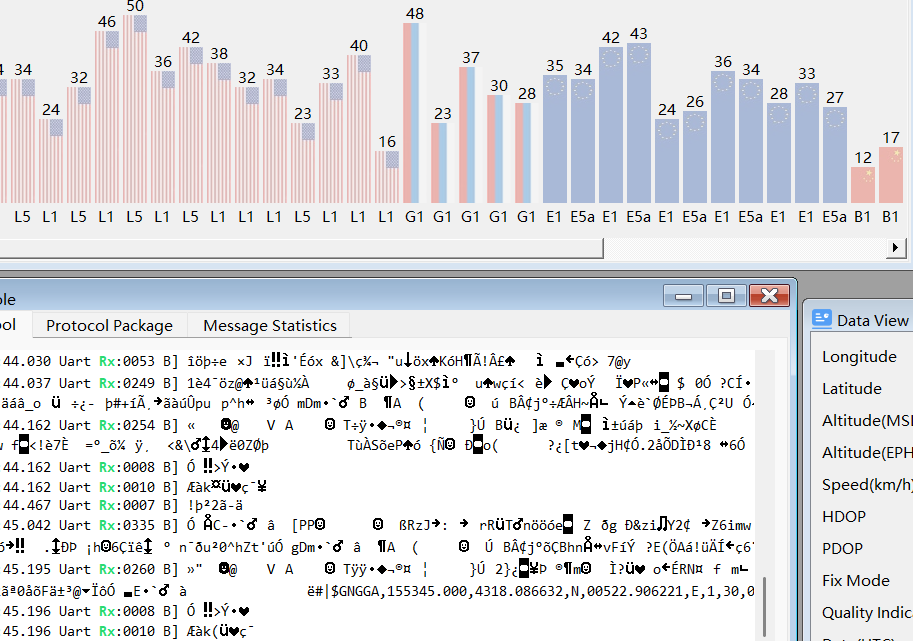
But more interresting, I think I do receive the RTCM messages (both MSM4 and MSM7) because when I activate it I receive much more caracter but I still can’t read them. I tried every baudrate, it was the same for all, just different nonsense writting and only 460800 seem to get the satelite.

So do you have any idea to read those RTCM messages correctly ? Or maybe I can simply send it to the rx of the rover and it will decode it by itself ?

Thank you for the support

Ok I answered my question trying it. It took some times because I cannot often work on it.
Now I am trying to send the rtcm message with the lora Modul SX1278 and try to get the “5” which indicates the RTK fixed mode.

Here is the code for the base :

#include <SPI.h>
#include <LoRa.h>
#include <SoftwareSerial.h>

SoftwareSerial LC29HEASerial(3, 4); // RX = D3, TX = D4 

void setup() {
  Serial.begin(115200);
  LC29HEASerial.begin(115200);
  while (!Serial);

  Serial.println("RTCM LoRa Sender Started");

  if (!LoRa.begin(433E6)) {
    Serial.println("LoRa init failed");
    while (1);
  }
}

void loop() {
  if (LC29HEASerial.available()) {
    LoRa.beginPacket();

    while (LC29HEASerial.available()) {
      byte b = LC29HEASerial.read();
      LoRa.write(b);
      LC29HEASerial.write(b);

     
      if (b < 0x10) Serial.print("0");
      Serial.print(b, HEX);
      Serial.print(" ");
    }

    LoRa.endPacket();
    Serial.println();
  }
}


Here is the code for the rover

#include <SPI.h>
#include <LoRa.h>
#include <SoftwareSerial.h>

// D3 = TX vers LC29HEA, D4 = RX 
SoftwareSerial GNSSSerial(4, 3); // RX, TX 

void setup() {
  Serial.begin(115200);
  GNSSSerial.begin(115200);
  while (!Serial);

  Serial.println("LoRa Receiver");

  if (!LoRa.begin(433E6)) {
    Serial.println("Starting LoRa failed!");
    while (1);
  }
}

void loop() {
  while (GNSSSerial.available()) {
    char c = GNSSSerial.read();
    Serial.write(c); 
  }
  int packetSize = LoRa.parsePacket();
  if (packetSize) {
    Serial.print("RTCM Packet (");
    Serial.print(packetSize);
    Serial.println(" bytes):");

    while (LoRa.available()) {
      byte b = LoRa.read();
      if (b < 0x10) Serial.print("0"); 
      Serial.print(b, HEX);
      Serial.print(" ");
      GNSSSerial.write(b);
    }

    Serial.print("\nRSSI: ");
    Serial.println(LoRa.packetRssi());
    Serial.println(); //
  }
}

The rtk fixed mode is on when I connect rx from rover lc29hea to tx from base lc29hea. But it is not on when I connect I tx from rover arduino to rx from rover lc29hea (the path which uses LoRa) neither when I connect tx from base arduino to rx from rover lc29hea (path in using serial through base arduino)

From the result above, I understand that the issue might not be LoRa but the going through arduino uno.
Does some one have an idea how to solve this ? Or simply how to transmit RTCM messages with LoRa.

Hi Bacoma,

Sorry I’m not familiar with Arduino.
As far as I know, LORA can transmit less than 300bytes data in 1second(correct me if I was wrong). While the GNSS dual band base station generate more than 1kb data in 1second.

For LC29HEA, it supports the maximum differential age < 5seconds. Otherwise the accuracy of RTK is not guaranteed.

I would suggest you to try sending RTCM from base to rover through LORA like this:
(1) The data generated by the base station in the 1st second, it was transmitted by LORA in 5 seconds.
(2) The data generated by the base station in the 6th second, it was transmitted by LORA in 5 seconds.

Which means LORA takes 5seconds to update the latest base RTCM data. No matter LORA finishes updating all the RTCM or not, after 5seconds, it needs to go to a new round for trasmitting the latest data.

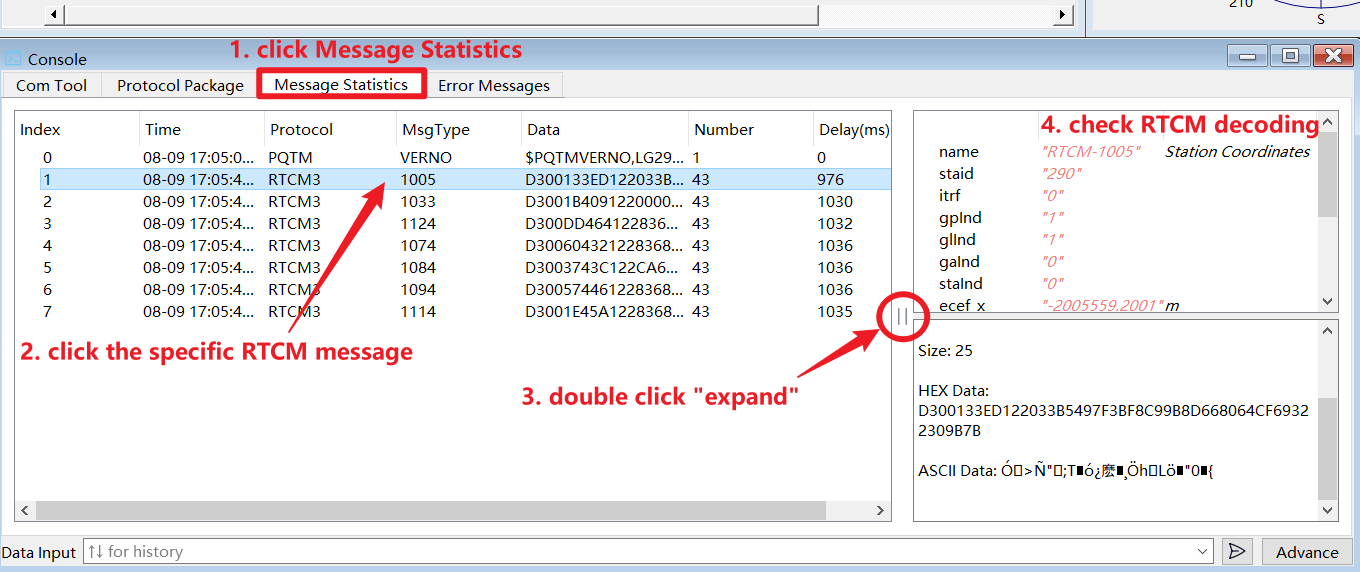
By the way, if you want to decode RTCM data, you can use QGNSS tool. Download link: QGNSS_V2.2_EN | Quectel

Best regards

1 Like