The above is what happens every time my laptop wakes up from sleep. According to task manager, 290 MB was written to the disk.
I only found this bug because my SSD is wearing out significantly faster than it should be. Like many other WWAN card users, I use this laptop on the move, opening and closing it many times a day. With this bug, every time I do that a whopping 290 MB gets written to the disk. If this is done 20 times a day, that adds up to 5.8 GB.
Card model: EM120R-GL, on a ThinkPad X13 Gen 2, latest drivers according to Lenovo, QService 5.0.0.15
Dear @jh7m4hpkqvttydxh ,
Thank you for the detailed report and the ProcMon capture.
From the log, QService.exe repeatedly writes the firmware package (approximately 290 MB, e.g. EM120RGL…zip) to C:\Windows\Firmware\QuectelFirmware on every system resume. This repeated full file write on each wake is not expected behavior and can increase SSD wear in frequent sleep/wake usage.
As an initial workaround, please stop the Quectel QService service and set it to Manual/Disabled, then verify whether WWAN connectivity remains normal. If your Lenovo bundle requires QService,
To Proceed further please share your Windows build, sleep mode (Modern Standby/S3), and the module firmware version (AT+QGMR).
Best regards,
Aghelan
Thank you for the suggestion. I have already been using my computer with QService disabled since my first report. WWAN remains functional.
I also reproduced the issue one more time, just now. The currently installed QService version on my computer was somehow reverted to 5.0.0.15 by Lenovo.
Windows build 26200.7623, same computer as before, ThinkPad X13 Gen 2, Intel 11th gen.
Windows reports:
The following sleep states are available on this system:
    Standby (S0 Low Power Idle) Network Connected
I don’t know how to get the firmware version.
Dear @jh7m4hpkqvttydxh ,
Thank you for confirming.
Since WWAN works normally with QService disabled, please keep Quectel QService set to Disabled—this is the definitive workaround to stop the repeated disk writes during Modern Standby (S0 Low Power Idle).
Regarding the firmware version: you can obtain it directly by querying the module from the AT command port.
Option 1: via Device Manager (COM port)
-
Open Device Manager → Ports (COM & LPT)
-
Look for a port such as Quectel USB AT Port / Quectel Modem / LTE AT Port
-
Open any serial terminal (PuTTY / TeraTerm) to that COM port (115200, 8N1) and run:
Option 2: if you don’t see any AT COM port
Your current Lenovo driver composition is likely MBIM-only (data works but AT is not exposed). In that case, you won’t be able to read the firmware version from Windows unless Lenovo/Quectel provides a package/configuration that exposes the AT port. Please share a screenshot of your Device Manager entries under:
Separately, since you observed QService being reverted to 5.0.0.15, this is coming from the Lenovo driver bundle/Windows Update re-installation. If you want to keep a newer QService version, please ensure the system is not rolling back the WWAN driver package (e.g., reinstall the intended Lenovo WWAN package and prevent automatic driver rollback for the WWAN device).
Best regards,
Aghelan
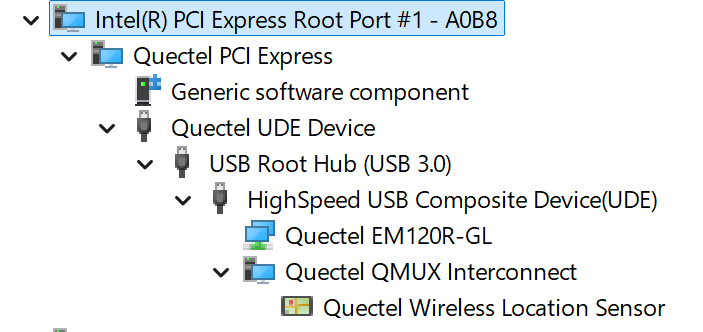
There is no COM/LPT in Device Manager. This image shows everything related to Quectel.
Dear @jh7m4hpkqvttydxh ,
Thank you for confirming the behavior.
In order to stop the repeated ~290 MB disk write on every wake is to disable or remove QService, because the file write operation is performed by QService.exe during resume (Modern Standby / S0 Low Power Idle). Reinstalling the same driver bundle will not eliminate the behavior unless Lenovo provides an updated package where QService behavior is changed.
Kindly follow as below:
-
Disable QService permanently
-
Press Win + R, enter services.msc
-
Locate Quectel QService
-
Click Stop
-
Set Startup type to Disabled
-
Reboot the system and verify that sleep → wake no longer triggers the firmware-package write.
Alternative method:
-
Uninstall the QService component
-
Go to Settings → Apps → Installed apps
-
Uninstall Quectel QService / Quectel Wireless (name may vary in the Lenovo package)
-
Reboot.
Important note (to prevent it returning)
You observed QService reverting to 5.0.0.15. This typically happens when Lenovo/Windows Update re-applies the WWAN driver bundle. To keep the fix effective, please ensure the system is not automatically reinstalling/rolling back the WWAN driver package (via your Windows driver update policy / Lenovo update utilities).
Best regards,
Aghelan