Booting fail with RM550V-GL

Hello,
I have a RM550V-GL.
SN: E1Y24…
IMEI: 863920070001107

It worked. I flashed a new firmware some time ago, when I remember correctly,
I selected first an “AB” version, instead of “AA” (my module has “AA” printed on).
QFirehose told me version does not fit and aborted.
I took a firmware with “AA” and I think, when I remembered correctly, then the problem started, but already some time ago, when it happened.

Since then, AT/DM/QMI is shown, but only a few seconds. They are not useable,
e.g. I am not able to send AT commands to AT port.
After a few second, the device enumerates again on Windows and only DM is shown.
I tried QPST, but also no real progress with it.

I tried to use USB-BOOT, but see no reaction. It behaves like when not using it.

Meanwhile I connected UART-TX/RX, so I am able to see output from the module. I will attach the output in next message. With USB-BOOT, I still see that Linux Kernel is loaded, which I assume it will not when entering the ROM bootloader.
(With and without USB-Boot, I power via USB only. Do I need a permanent power supply to get USB-BOOT working?)

RM550V-GL-output-serial-console.txt (72.6 KB)

Your module is failing to boot (fully) then enters Sahara dump mode waiting for QPST or QXDM to capture the dump.

Need to enter EDL and reflash. I have a special firmware that’s a mix of RM550VGLAA and RM551GLAA in an effort to bring firmware improvements that were implemented on the 551 over to the 550 you can flash. I’ll post again later with more info on this.

Thank you for your answer. I seem not to be able to enter EDL. I always see Linux Kernel loading on Debug UART output.
Therefore I think I need details, what I can do to enter EDL.
USB-Boot pin and the one above are already short circuited (full time, not good?).
Then I connect USB cable and it starts Linux Kernel.
I have no power connected beside USB power.
(But I think I already tried it also with external power supply and no difference)

I seem to be doing something wrong that the module is not entering EDL…

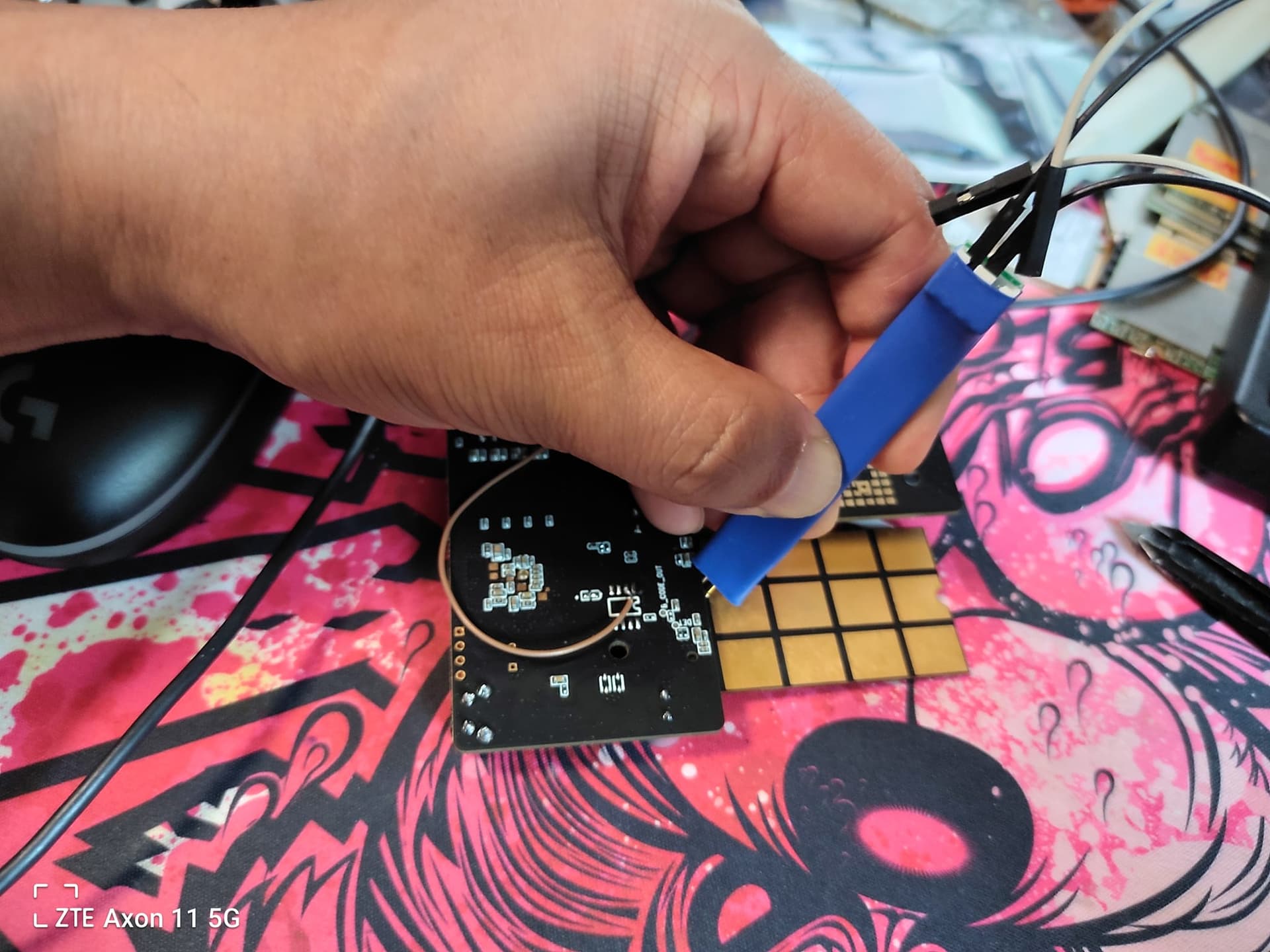
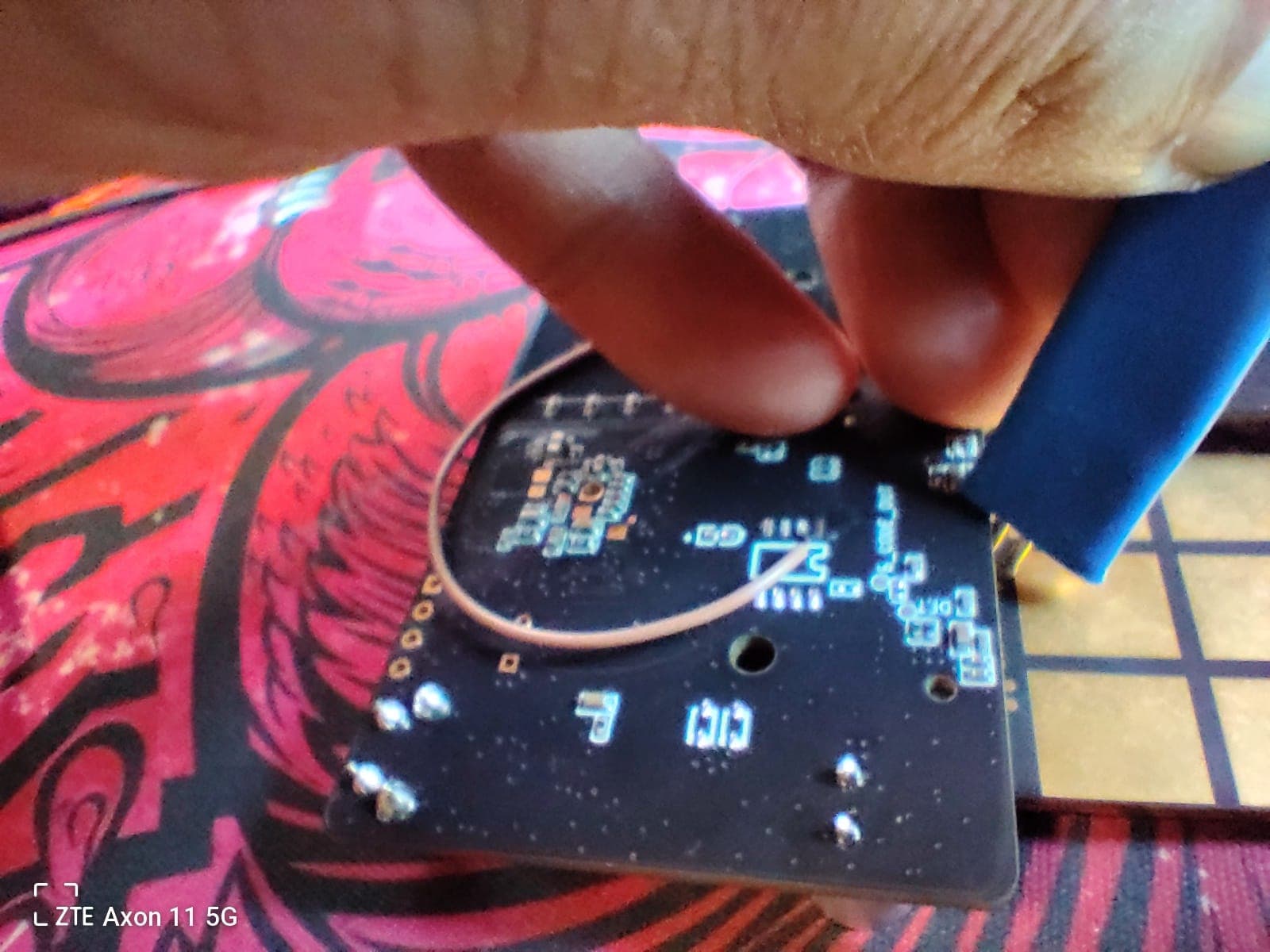
This is how I do it.

Do that with no power, then plug USB only. EDL port should instantly appear in device manager on Windows.

If you are using a laptop plug the laptop charger in. Mine won’t do it unless I have it plugged in. Probably related to ground.

You said yours is AA? Here’s that blended firmware if you want it. Release notes included detail what I did.

This could be a good hint, why it is not working to go to EDL on my side.
On my notebook it does not make a difference, if I connect laptop charger or not.
But it seem to influence something via USB on your side,
which enables to be able to go to EDL.
My environment does not offer the same condition.

I just measured the 2 pins you (and me) are connecting.

When I measured correctly:
USB-Boot pin is by default to 0V.
The “other” pin is by default 1.8V.
When I connect the both pins, the resulting voltage is 0.9V.
Perhaps this is too less for detecting a HIGH on USB-Boot and entering EDL…?

Would it be possible to measure the same on your side?

Where have you found out, that connecting exactly these 2 pins bring you to EDL?
Is there some description of the debug pins?
Could it be that the “other” pin is e.g. something which says “USB condition is there”
and on my side “USB condition is not there”, and therefore the pin is not originally planned to be used with USB-Boot?
Perhaps the voltage for USB-Boot must come from a different pin?

But all only speculation…

Thanks for the firmware! But I am not yet in position to flash a new firmware.

PS: You are using the same hardware than me. Does the reset button do something on your side with the RM500V-GL?

PS2: There is a yellow debug connector on the baseboard. Voltage level seems to be 5V (or was it 3.3V, I can’t remember). Is it connected, have you connected it somewhere to the module itself? Or is it connected to some M.2 pins? But there is not UART on it?

Is there perhaps a schematic of the baseboard, so I can answer such questions by myself?

PS3: Can I somehow read out the dump of Sahara, when not booting?
What to select, where to go, in QPST to read out the dump?

PS4: Have you connected a Debug UART? Only outgoing data (which the module transmit)? Or also incoming data? It sayed in the log, there is a debug console, so tried connecting RX and TX, and the following was printed:

root@(none):/#

Unfortunately I have not yet a 1.8V USB<->Seriell adapter, so I can only look at one side.
I must order one!

PS5: Have you connected Ethernet when going to EDL?

You are using the rework.network 5G2PHY board? No I do not think the reset button does anything for the 550 or 551.

For me all I do is insert the module into the m.2 slot, rotate the board over, take a paper clip and then I bend the ends so they curve. I hold it to the contacts not insulated so the voltage probably passes through my hand :rofl:
Not sure if that’s making a difference either.
I just plug in USB and instantly EDL appears. I have also noticed I have to apply a little bit of pressure and center it on the contacts as much as I can. I think maybe the actual contacts are under the first layer. I haven’t had a need to utilize UART yet, I honestly don’t even know where Tx and Rx are at either. I don’t believe a schematic is publicly available for the 5G2PHY board, however @lei_ming is the creator of the board.

I have this and bought it here:

Uart TX and RX can be seen here:

Ethernet doesn’t make a difference when trying to manually enter EDL.

If you plug it in with QPST open when the modem goes down to the DM port only QPST should automatically capture the dump and then the module reboots. The cycle will continue again until unplugged or QPST is closed. I believe those logs are saved to app data but there should be a log files directory link from within QPST somewhere.

Have you been able to get Ethernet working on the RM550V-GL with the firmware you were on? The PCIe/mode command wouldn’t work for me on stock 550V firmware which is why I made that mix-mod firmware. I was able to get Ethernet working by flashing that.

Yeah that’s this one
Same thing

thanks for your detail explaination, I just make a shot


@lei_ming Many thanks for the pictures! What is the brown wire you have soldered to the PCB?

I was meanwhile able to connect to DEBUG UART RX/TX (needed to buy a 1.8V level USB ↔ Seriell converter) and can also send characters to the module, when during booting I press “Newline”, I see a login and prompt, no password needed on this device (perhaps due to early version of the firmware?):

Please press Enter to activate this console.


BusyBox v1.35.0 (2024-04-19 01:33:15 UTC) built-in shell (ash)

  _______                     ________        __
 |       |.-----.-----.-----.|  |  |  |.----.|  |_
 |   -   ||  _  |  -__|     ||  |  |  ||   _||   _|
 |_______||   __|_____|__|__||________||__|  |____|
          |__| W I R E L E S S   F R E E D O M
 -----------------------------------------------------
 OpenWrt 22.03.5, r20134-5f15225c1e
 -----------------------------------------------------
=== WARNING! =====================================
There is no root password defined on this device!
Use the "passwd" command to set up a new password
in order to prevent unauthorized SSH logins.
--------------------------------------------------
root@(none):/#
root@(none):/#

After around 30s I get:

[   31.276653][ T5290] qbi: Wakelock support is enabled
[   31.331740][ T5290] qbi:android_mbim node is up for I/O
[   32.191600][ T5990] /etc/init.d/start_quectel_slic_daemon start
Format: Log Type - Time(microsec) - Message - Optional Info
Log Type: B - Since Boot(Power On Reset),  D - Delta,  S - Statistic
S - QC_IMAGE_VERSION_STRING=BOOT.MXF.2.3-00432-PINNACLES-1
S - IMAGE_VARIANT_STRING=SocPinnaclesLE
S - OEM_IMAGE_VERSION_STRING=ip-10-195-201-16
S - Boot Interface: NAND
S - Secure Boot: Off
S - Boot Config @ 0x221c8600 = 0x00000009
S - JTAG ID @ 0x221c8744 = 0x001f50e1
S - OEM ID @ 0x221c8700 = 0x00000000
S - Serial Number @ 0x221c8610 = 0x0000044391e4b69a
S - OEM Config Row 0 @ 0x221c2108 = 0x0000000000000000
S - OEM Config Row 1 @ 0x221c2110 = 0x0000000000000000
S - Feature Config Row 0 @ 0x221c2128 = 0x241b850000018000
S - Feature Config Row 1 @ 0x221c2130 = 0x59995500a096a504
S - OEM LCS:PROD
S - Core 0 Frequency, 1516 MHz
S - PBL Patch Ver: 7
S - PBL freq: 600 MHZ
S - -------------------------
PBL Timestamps (in usecs)
-------------------------
APBL start: 340
APBL Boot Media Detect Start: 6850
APBL Boot Media Detect End: 7013
APBL SHELF Load+Auth Start: 7015
        APBL ELF MD Load Start: 10348
        APBL ELF MD Load End: 11118
        APBL ELF Seg Load Start: 11118
        APBL ELF Seg Load End: 59943
                APBL SEQ Valid Set: 59963
                APBL SEQ SA ACK Rcvd: 61975
        APBL ELF MD Load Start: 62370
        APBL ELF MD Load End: 66278
        APBL ELF Auth Start: 66281
        APBL ELF Auth End: 76151
        APBL ELF Seg Load Start: 76153
        APBL ELF Seg Load End: 118965
        APBL ELF Seg Verify Start: 118965
        APBL ELF Seg Verify End: 124168
        APBL ELF MD Load Start: 124525
        APBL ELF MD Load End: 128765
        APBL ELF Auth Start: 128766
        APBL ELF Auth End: 138658
        APBL ELF Seg Load Start: 138660
        APBL ELF Seg Load End: 340688
        APBL ELF Seg Verify Start: 340690
        APBL ELF Seg Verify End: 346425
APBL SHELF Load+Auth End: 346471
                APBL TME PBL Exit: 346473
                APBL XBL_SC Exit Check: 347116
                APBL XBL_SC Exit Ack: 356183
APBL Exit: 356185
B -    357765 - SBL1, Start
B -    546346 - SBL1 BUILD @ 10:32:47 on Mar 13 2024
B -    553270 - usb: usb_eud_serial  , 0x91e4b69a
D -       702 - sbl1_hw_init
B -    581116 - RBOOT: media open fail
B -    581147 - RBOOT : recoveryinfo unavailable
D -         0 - init_edl_pcie
D -         0 - blacklist disable
B -    591944 - OEM_MISC -  Image Load, Start
D -      2623 - Auth Metadata
D -     33489 - OEM_MISC -  Image Loaded, Delta - (5592 Bytes)
B -    625829 - QTI_MISC -  Image Load, Start
D -      9974 - Auth Metadata
D -     20130 - QTI_MISC -  Image Loaded, Delta - (4624 Bytes)
B -    646600 - APDP -  Image Load, Start
D -      2592 - Auth Metadata
D -     16866 - APDP -  Image Loaded, Delta - (4440 Bytes)
D -         0 - boot_dload_dump_security_regions
D -         0 - EUD Init
D -         0 - blacklist enable
B -    678411 - Debug Policy: processed
B -    678686 - Debug Policy: no debug policy applied
D -      6710 - DP_Milestone
D -      3447 - Auth Metadata
D -      8815 - Open XBL Config 1st
B -    696284 - XBL Config -  Image Load, Start
B -    703696 - DTB  Found: [pre-ddr][89026101000000][0]
D -      4361 - boot_pre_ddr_dtb_load
D -      2471 - tsens_init_if
D -        61 - boot_check_device_temp
B -    719647 - PMIC A:2.1 B:2.0
B -    722087 - PM: Reset by PSHOLD
B -    722697 - PM: Reset Type: Warm Reset
B -    726022 - PM: Reset Type: Warm Reset
B -    729956 - PM: Warm reset count:0x3
B -    733891 - PM: Reset by PSHOLD
B -    737642 - PM: Reset Type: Warm Reset
B -    740936 - PM: Reset Type: Warm Reset
B -    744871 - PM: Warm reset count:0x2
B -    748805 - PM: Reset by PSHOLD
B -    752557 - PM: Reset Type: Warm Reset
B -    755881 - PM: Reset Type: Warm Reset
B -    759816 - PM: Warm reset count:0x1
B -    773998 - PM: SET_VAL:Skip
B -    774151 - PM: PSI: b0x04_v0x25
B -    780922 - PM: OEM_PSI Start
B -    781684 - PM: OEM_PSI Done
B -    785558 - PM: Device Init # SPMI Transn: 1029
D -     71736 - pm_device_init, Delta
B -    791871 - pm_driver_init, Start
B -    801448 - PM: Driver Init # SPMI Transn: 484
D -      6131 - pm_driver_init, Delta
D -     90707 - sbl1_pmic_init
D -      1403 - media_init:2
D -         0 - media_init:3
D -       183 - boot_wdog_disable_check
D -        30 - Closing XBL Config 1st
D -       153 - init-logstomedia
D -         0 - shrm_load_cancel
B -    828136 - SHRM -  Image Load, Start
B -    843264 - CDT image has been loaded from : NAND
D -     12139 - boot_cdt_init
B -    848205 - CDT -  Image Load, Start
B -    850980 - CDT Version:3,Platform ID:34,Major ID:1,Minor ID:0,Subtype:4
D -      3935 - sbl1_hw_platform_pre_ddr
B -    861686 - Pre_DDR_clock_init, Start
D -        31 - Pre_DDR_clock_init, Delta
D -      7625 - sbl1_ddr_set_params
D -      3386 - Auth Metadata
D -      7900 - Open XBL Config 2nd
B -    881663 - PM: CHG Init # SPMI Transn: 2 Error Flag 0
B -    884957 - vsense_init, Start
D -         0 - vsense_init, Delta
D -     38979 - sbl1_hw_pre_ddr_init
D -       213 - boot_fedl_check
D -         0 - boot_dload_handle_forced_dload_timeout
B -    926986 - sbl1_ddr_init, Start
B -    932019 - Mem ID = 0
B -    935374 - LP4/5 DDR detection started
B -    937875 - LP4 DDR detected
B -    941901 -  Varient : LE , byte swap : FALSE
B -    944951 - PASS1 Cookie =  0xcafe1111
B -    949495 - HAL_DDR_SDI_Recover() start:  DBG PDC Tr = 0x1, First Pass expire = 0x0, First Pass complete = 0x1 , BIMC Alt ARES  = 0x0 , PASS2 Cookie = 0xcafecab0
B -    953460 - SHRM run state = 0x10
B -    968466 - HAL_DDR_SDI_Recover() end : DBG PDC Tr = 0x1, First Pass expire = 0x0, First Pass complete = 0x1 , BIMC Alt ARES  = 0x0 , PASS2 Cookie = 0xcafebabe
B -    972004 - SHRM run state = 0x10
B -    986736 - ddr_init status = 0  DDR recover normal pass2
D -     58347 - sbl1_ddr_init, Delta
D -     68991 - sbl1_ddr_init
B -    999332 - XBL Config -  Image Load, Start
D -        30 - Closing XBL Config 2nd
B -   1006500 - DDR -  Image Load, Start
D -         0 - store-logstomedia
B -   1014003 - do_ddr_training, Start
D -         0 - do_ddr_training, Delta
D -      6710 - xbl_trng_ddi_seq
D -         0 - store-logstomedia
D -       183 - sbl1_check_and_set_turbo_clk
D -      3385 - Auth Metadata
D -      7899 - Open XBL Config 3rd
D -       458 - xbl_map_smem
D -        31 - boot_smem_debug_init
D -         0 - boot_smem_init
D -      1068 - boot_ddr_share_data_to_aop
D -        31 - boot_populate_ddr_details_shared_table
D -         0 - boot_update_ram_partition_table
B -   1059997 - Pimem init cmd, entry
D -        61 - Pimem init cmd, exit
B -   1069513 - External heap init, Start
B -   1071282 - External heap init, End
D -     19001 - sbl1_post_ddr_init
D -         0 - sbl1_hw_init_secondary
B -   1082231 - XBL Config -  Image Load, Start
B -   1090466 - DTB  Found: [post-ddr][89026101000000][2204010000000000]
D -      4697 - boot_post_ddr_dtb_load
D -         0 - Closing XBL Config 3rd
B -   1100684 - usb: ser_str_cookie_pid - 91e4b69a
D -      3568 - boot_usb_update_serial
B -   1109071 - usb: ldr , 0x2e1
B -   1112487 - usb: qusb_dci_eud_init
D -      6619 - boot_usb_handle_charger
D -        61 - sbl1_hw_platform_smem
B -   1122766 - TCSR reg value 0x10
D -      3477 - ramdump_load_cancel
B -   1129659 - RamDump -  Image Load, Start
D -      3142 - Auth Metadata
D -     77958 - RamDump -  Image Loaded, Delta - (758632 Bytes)
B -   1207647 - boot_dload_entry
B -   1213656 - SBL1, End
D -    858697 - SBL1, Delta
S - Flash Throughput, 9805 KB/s  (843268 Bytes,  86132 us)
S - DDR Frequency, 200 MHz
B -   1270752 - RAMDUMP BUILD @ 15:55:24 on Apr 12 2024
B -   1282281 - PM: Driver Init # SPMI Transn: 484
B -   1284660 - Couldn't read battery voltage, setting threshlod TRUE
B -   1286947 - Display Init Failed
B -   1293261 - RamDump DisplayInfo fail, Errcode:0x1019
B -   1296890 - OCIMEM.BIN
B -   1301740 - CODERAM.BIN
B -   1304241 - DATARAM.BIN
B -   1306864 - MSGRAM0.BIN
B -   1309456 - MSGRAM1.BIN
B -   1312049 - MSGRAM2.BIN
B -   1314641 - MSGRAM3.BIN
B -   1317234 - MSGRAM4.BIN
B -   1319826 - MSGRAM5.BIN
B -   1322449 - MSGRAM6.BIN
B -   1325042 - MSGRAM7.BIN
B -   1327634 - SHRM_MEM.BIN
B -   1330227 - DCC_SRAM.BIN
B -   1332911 - DCC_CFG.BIN
B -   1335595 - CD_STRCT.BIN
B -   1338218 - CD_BTDDR.BIN
B -   1340902 - CD_BTIMM.BIN
B -   1343586 - CD_SHIMM.BIN
B -   1346270 - CPUCPFW.BIN
B -   1348954 - FSM_STS.BIN
B -   1351546 - FSM_CTRL.BIN
B -   1354139 - RST_STAT.BIN
B -   1356823 - PMIC_PON.BIN
B -   1359537 - PMON_HIS.BIN
B -   1362221 - PBUS_LOG.BIN
B -   1364905 - IPA_IU.BIN
B -   1367589 - IPA_SRAM.BIN
B -   1370090 - IPA_HRAM.BIN
B -   1372774 - IPA_MBOX.BIN
B -   1375458 - IPA_GSI.BIN
B -   1378142 - IPA_SEQ.BIN
B -   1380765 - sbl_pmic_dump.bin
B -   1383358 - DDRCS0_0.BIN
B -   1386469 - XBL_LOG.BIN
B -   1389153 - SMEMINFO.BIN
B -   1391776 - SMEM_VER.BIN
B -   1394460 - load.cmm
B -   1421574 - Boot device check, skipping [0]
B -   1421574 - Boot device check, skipping [1]
B -   1425966 - Boot device check, skipping [2]
B -   1430328 - Boot device check, skipping [3]
B -   1434964 - get rd_format_if.init failed
B -   1439081 - Boot device check, skipping [5]
B -   1443199 - Boot device check, skipping [6]
B -   1447560 - Boot device check, skipping [7]
B -   1452196 - HFAT Dump Init
B -   1456436 - SD Dump Init
B -   1711080 - SD Card not present
B -   1711111 - rd_media_if.media_hw_init
B -   1714435 - usb: init start
B -   1718461 - usb: qusb_platform , 0x22
B -   1723829 - usb: usb3phy: PRIM success
B -   1726269 - usb: ID:0x108, value: 0x2190
B -   1728984 - usb: timer_start , 0x4c4b40
B -   1733132 - usb: ID:0xe0, value: 0x1
B -   1737127 - usb: VBUS High!
B -   1741123 - usb: SUPER , 0x122
B -   1951878 - usb: ID:0x20d, value: 0x0
B -   1974143 - usb: ENUM success
B -   1974143 - Sahara Init
B -   1977315 - Sahara Open
B -   2002416 - usb: clear_ep_halt , 0x11
B -   2002660 - usb: resubmit urb  , 0x11
B -   2006656 - usb: clear_ep_halt , 0x10

Entering some common commands seems to work, but I have only a few seconds on booting to enter command before it stalls:

root@OpenWrt:/#
root@OpenWrt:/#
root@OpenWrt:/#
root@OpenWrt:/#
root@OpenWrt:/# ls
bin       etc       mnt       rom       system    usrdata
cache     firmware  overlay   root      systemrw  var
data      lib       persist   sbin      tmp       www
dev       lib64     proc      sys       usr
root@OpenWrt:/# mount
ubi0:rootfs on / type ubifs (ro,relatime,bulk_read,assert=read-only,ubi=0,vol=0)
sysfs on /sys type sysfs (rw,relatime)
proc on /proc type proc (rw,nosuid,nodev,noexec,noatime)
cgroup2 on /sys/fs/cgroup type cgroup2 (rw,nosuid,nodev,noexec,relatime,nsdelegate)
tmpfs on /tmp type tmpfs (rw,nosuid,nodev,noatime)
tmpfs on /dev type tmpfs (rw,nosuid,noexec,noatime,size=512k,mode=755)
devpts on /dev/pts type devpts (rw,nosuid,noexec,noatime,gid=5,mode=620,ptmxmode=000)
/dev/ubi1_0 on /firmware type ubifs (ro,relatime,bulk_read,assert=read-only,ubi=1,vol=0)
ubi0:persist on /persist type ubifs (rw,relatime,bulk_read,assert=read-only,ubi=0,vol=4)
ubi0:cachefs on /cache type ubifs (rw,relatime,bulk_read,assert=read-only,ubi=0,vol=2)
ubi0:systemrw on /overlay type ubifs (rw,relatime,bulk_read,assert=read-only,ubi=0,vol=3)
/dev/ubi0_1 on /data type ubifs (rw,relatime,bulk_read,assert=read-only,ubi=0,vol=1)
overlay on /etc type overlay (rw,relatime,lowerdir=/etc,upperdir=/overlay/etc-upper,workdir=/overlay/.etc-work)
none on /sys/kernel/config type configfs (rw,relatime)
adb on /dev/usb-ffs/adb type functionfs (rw,relatime)
diag on /dev/ffs-diag type functionfs (rw,relatime)
debugfs on /sys/kernel/debug type debugfs (rw,noatime)
bpffs on /sys/fs/bpf type bpf (rw,nosuid,nodev,noexec,noatime,mode=700)
pstore on /sys/fs/pstore type pstore (rw,noatime)
tracefs on /sys/kernel/debug/tracing type tracefs (rw,noatime)
binder on /dev/binderfs type binder (rw,relatime,max=1048576)
root@OpenWrt:/# top
Mem: 362432K used, 213680K free, 44K shrd, 0K buff, 173144K cached
CPU:   0% usr  28% sys   0% nic  68% idle   0% io   2% irq   0% sirq
Load average: 1.01 0.24 0.08 3/362 5161
  PID  PPID USER     STAT   VSZ %VSZ %CPU COMMAND
 3670     1 root     R     2904   1%  24% {S15init-mss.ini} /bin/sh /etc/rc.comm
 5159   456 root     R     2784   0%   2% top
 2037  2034 radio    S    20984   4%   0% /usr/bin/QCMAP_ConnectionManager /etc/
 1749  1724 system   S    13684   2%   0% /usr/bin/qwesd
 3260     1 root     S    12788   2%   0% /usr/bin/QCMAP_Ref_Daemon
 1834     1 system   S    11712   2%   0% /usr/bin/qseecomd
 1884     1 system   S     8380   1%   0% /usr/bin/ssgtzd
 1788  1784 system   S     8200   1%   0% /usr/bin/diag-router
 2885     1 radio    S     7644   1%   0% /usr/bin/ipacmdiag
 2620  2616 root     S     7596   1%   0% /usr/bin/port-bridge at_mdm0 at_usb0 0
 2622  2617 root     S     7596   1%   0% /usr/bin/port-bridge smd7 at_usb2 1
 2106     1 adb      S     4588   1%   0% /sbin/adbd
 1945  1941 system   S     3784   1%   0% /usr/bin/time_daemon
 3666     1 system   S     3320   1%   0% /usr/bin/servicemanager
 3571     1 ubi      S     3228   1%   0% /usr/sbin/fs-scrub-daemon
 1414     1 root     S     2844   0%   0% /usr/sbin/msm-irqbalance -f /etc/msm_i
  456     1 root     S     2748   0%   0% /bin/ash --login
 5161  5160 root     R     2748   0%   0% /bin/pidof /usr/bin/diag-router
 5160     1 root     S     2740   0%   0% {diag-script} /bin/sh /etc/initscripts
^C724     1 root     S     2604   0%   0% {/usr/bin/qwesd} /sbin/ujail -t 5 -n /
root@OpenWrt:/#

Is there something to enter, which could bring me to EDL?
E.g. a

reboot edl

or so…?

I assume I can execute at least one or two AT commands.
Perhaps there a command to go to EDL?

Perhaps some process to kill, which gives me more time to investigate,
what to do in this state, to avoid it stalls after a few seconds…?

@silvia @Jonathan.wang @herbert.pan-Q

I think I was once in EDL, here is the output, in case there is info inside which could help:
(I connected an external 1.8V voltage to USB-Boot pin, first nothing happened,
but when disconnecting/reconnecting USB something seems to have changed)

0       2.339466 Hypervisor cold boot, version: gunyah-1c53dbafc prod (Wed Feb 21 22:35:56 2024 UTC)
0       2.357655 Failed to register KP

[RM]Resource Manager version: 8c37db7a (Thu Feb 22 21:41:42 2024 UTC)
[RM]HLOS is RAS handler
[RM]Init completed, disabling UART
0       2.387128 Hypervisor UART is disabled!


UEFI Start     [ 2392]
 - 0x087501000 [ 2394] Sec.efi
ASLR          : ON
DEP           : ON (RTB)
Timer Delta   : +1 mS
RAM Entry 0   : Base 0x0080000000  Size 0x0000500000
RAM Entry 1   : Base 0x0081400000  Size 0x00000E0000
RAM Entry 2   : Base 0x0081778000  Size 0x0000008000
RAM Entry 3   : Base 0x0082180000  Size 0x003DAC0000
RAM Entry 4   : Base 0x0080600000  Size 0x0000D80000
RAM Available : 1006 MB (0x003EE28000)
RAM Installed : 1024 MB (0x0040000000)
Minidump      : ON
Init 1 aux cores of 3
Init CPU core 1
Continue booting UEFI on Core 0
  > Scheduler up on Core 1
UEFI Ver      : 6.0.240412.BOOT.MXF.2.3-00432-PINNACLES-1
Build Info    : 64b Apr 12 2024 15:56:22
Boot Device   : NAND
PROD Mode     : TRUE
Retail        : TRUE
IsArmV8Smc() return TRUE
tz_armv8_smc_call failed, TzStatus = 0xFFFFFFFE,  SmcId = 0x3200010A
QseeResponse->result = 0xFFFFFEE5
Status = 0x7
LoadImageFromPartitionUsingGuid Failed: 14
Unable to load cmnlib using label Status:14
LoadImageFromPartitionUsingGuid Failed: 14
Able to load cmnlib64 using label Status:0
RecoveryState : 0x1 - RecoveryInfo Partition Fail
HW Wdog Setting from PCD : Disabled
GetBootSet : ImageSet to Boot: 0x0
UsbConfigLib_pmic_npa_create_sync_client: USB (/mccin/s_sUsbConfigLib_pmic_npa_create_sync_client: USB (/mccin/s_sUsbConfigLibOpenProtocols: PMI version (0x51)
platform: : 340004
ChipId = 0x261 plat_type.platform=0x22Unknown ChipId 0x261UsbConfigLib_pmic_npa_create_sync_client: USB (/mccin/s_sUsbConfigLib_pmic_npa_create_sync_client: USB (/mccin/s_sUsbConfigLibOpenProtocols: PMI version (0x51)
UsbConfigIsAutoChipinfoID: UsbConfigIsAutoChipinfoID: ChipId = 0x261
UsbConfigPortsQueryConnectionChange: GetTypeCPortStatus returned ERROR (0x3), switching platform to UNKNOWN
ButtonsDxeTest: Keypress SDAM data payload 0
GetBootSet : ImageSet to Boot: 0x0
WaitParallelThreads InIt [ 2778]
Var Store          : WARNING, not persistent
UEFI Ver           : 6.0.240412.BOOT.MXF.2.3-00432-PINNACLES-1
Platform           : IDP
Subtype            : 4
Boot Device        : Nand
Chip Name          : SDX_PINNACLES_L
Chip Ver           : 1.0
Chip ECID          : 0x044391E4B69A
-----------------------------
UEFI Total : 391 ms
POST Time      [ 2783] OS Loader
[2787]Loader Build Info: Apr 19 2024 03:23:53
VB: Non-secure device: Security State: (0xFDF3F)
VB: RWDeviceState: Succeed using devinfo!
[2872]is_unlocked:1, is_unlock_critical:1
[2874]recoveryinfo partition not found
[2874]GetBootPartitionEntry: No boot partition entry for slot _b, invalid index
[2874]GetActiveSlot: No boot partition entry for slot _b
[2876]Total DDR Size: 0x000000003EE28000
[2876]BootMode:0, BootReason:0
[2876]Fastboot=0, Recovery:0
[2876]SilentBoot Mode:11
[2878]Fastboot command: ▒▒▒▒▒▒▒▒▒▒▒▒▒▒▒▒▒▒▒▒▒▒▒▒▒▒▒▒▒▒▒
[2908]Loading Image recovery Done : 30 ms, Image size : 4096 Bytes
[2908]Booting Into Mission Mode
[2938]Loading Image boot Done : 29 ms, Image size : 4096 Bytes
[6136]Loading Image boot Done : 3198 ms, Image size : 40980480 Bytes
[6136]No dtbo partition is found, Skip dtbo
VB: DeviceInit: Device is unlocked! Skipping verification!
[6185]VB: LoadImageAndAuthForLE complete!
GetBootSet : ImageSet to Boot: 0x0
LoadImageFromPartitionUsingGuid Failed: 14
Keymaster failed to load! Status = 0xE
LoadSecureApps: Load app from partition(keymaster): Status = 0x0, AppId = 1
QseeResponse->result = 0xFFFFFFFF
Status = 0x7
[6289]KeyMasterSetRotForLE success
[6289]System Path -  rootfstype=ubifs rootflags=bulk_read root=ubi0:rootfs ubi.mtd=36
[6290]Hyp version: 1
[6290]Silent Mode value: 11
[6291]ImageName=boot
[6291]Memory Base Address: 0x80000000
[6310]Kernel Load Address: 0xA8000000
[6310]Kernel Size Actual: 0x2444000
[6310]Second Size Actual: 0x0
[6310]Ramdisk Load Address: 0xAFFFF000
[6310]Ramdisk Size Actual: 0x0
[6310]Ramdisk Offset: 0x2445000
[6310]Device Tree Load Address: 0xAFDFE000
[6310]ImageName=dtbo
[6310]BootLinux: failed to get dtbo image
[6314]Best match DTB tags 609/04010022/0x00000304/10000/2014A/20051/0/0/(offset)0x853F74B6/(size)0x000361EB
[6314]Using pmic info 0x2014A/0x20051/0x0/0x0 for device 0x2014A/0x20051/0x0/0x0
[6314]Memory Base Address: 0x80000000
[6370]Apply Overlay total time: 55 ms
tz_armv8_smc_call failed, TzStatus = 0xFFFFFFFF,  SmcId = 0x2001901
[6371]ScmSipSysCall() failed, Status = (0x3)
[6372]No verity command line found
[6372]Failed to get LEVerityCmdLine: Not Found
[6372]Unknown Boot Device type detected
[6372]Failed to get Boot Device: Not Found
[6372]recovery mode: 0
[6372]quec_flash_open writesize=4096, blocksize=262144, blocknum=8
 Enable Pmic GPIO Protocol not present
[6379]Unable to get Panel Config, Not Found
[6379]Unable to get hw fence Config, Not Found
[6379]Unable to get GPU Preempt Config, Not Found
[6379]Offlining Memory Not Supported
[6379]Cmdline: ro rootwait console=ttyMSM0,115200,n8 androidboot.hardware=qcom msm_rtb.filter=0x237 androidboot.console=ttyMSM0 lpm_levels.sleep_disabled=1 firmware_class.path=/lib/firmware/updates,/firmware/image service_locator.enable=1 net.ifnames=0 atlantic[6379]Final RAM Partitions
[6379]Add Base: 0x0000000081480000 Available Length: 0x0000000000060000
[6379]Add Base: 0x0000000082180000 Available Length: 0x0000000005880000
[6379]Add Base: 0x0000000087BC0000 Available Length: 0x0000000000040000
[6380]Add Base: 0x0000000087D90000 Available Length: 0x0000000000070000
[6380]Add Base: 0x0000000087F85000 Available Length: 0x000000000057B000
[6380]Add Base: 0x000000009F400000 Available Length: 0x0000000020840000
[6380]Add Base: 0x0000000080A00000 Available Length: 0x0000000000980000
[6389]Unable to get splash buffer info, Not Found
[6389]Unable to get splash buffer info, Not Found
[6391]PartialGoods Value: 0x0
[6391]Update Device Tree total time: 12 ms
[6391]
Shutting Down UEFI Boot Services: 6391 ms
Start EBS        [ 6391]
BDS: LogFs sync skipped, No Media
App Log Flush : 114 ms
ScmArmV8ExitBootServicesHandler, Status = 0x0.
ExitBootServicesScmDxeV8EventHandler TZ SMC call t=45ms
Exit EBS        [ 6537] UEFI End
[    0.000000][    T0] Booting Linux on physical CPU 0x0000000000 [0x412fd050]
[    0.000000][    T0] Linux version 5.15.137-debug (build-user@build-host) (Android (8508608, based on r450784e) clang version 14.0.7 (https://android.googlesource.com/toolchain/llvm-project 4c603efb0cca074e9238af8b4106c30add4418f6), LLD 14.0.7) #1 SMP PREEMPT Fri Apr 19 01:33:15 UTC 2024
[    0.000000][    T0] Machine model: Qualcomm Technologies, Inc. SDXPINN IDP M2
[    0.000000][    T0] Stack Depot is disabled
...Linux Kernel is starting like in above log...

Dear @capiman
After flash wrong firmware, it was booting failed, right?
Did you try to upgrade the correct firmware?

Hello @silvia,
many thanks for your reply.
I have a AA version of RM550V-GL.
Unfortunately I chose and programmed an AB version of a firmware.
QFirehose told me, it is a wrong version. So I though, all ok.
I can’t exactly remember what I had done next, but I think I directly took a “AA” version firmware, and flashed again. If I rebooted and if it came up in between, I cannot say anymore. If the flashing “AA” failed or run through, I also cannot say anymore.
But final result was, that the module was not coming up again anymore.

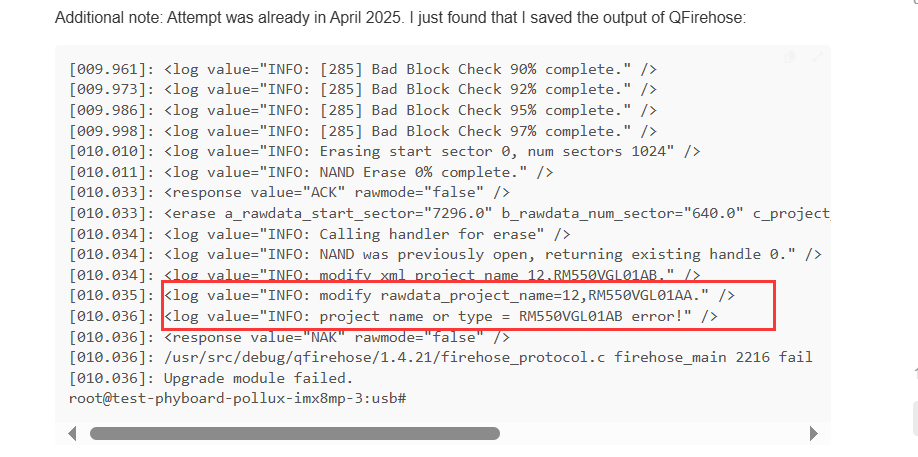
Additional note: Attempt was already in April 2025. I just found that I saved the output of QFirehose:

[009.961]: <log value="INFO: [285] Bad Block Check 90% complete." />
[009.973]: <log value="INFO: [285] Bad Block Check 92% complete." />
[009.986]: <log value="INFO: [285] Bad Block Check 95% complete." />
[009.998]: <log value="INFO: [285] Bad Block Check 97% complete." />
[010.010]: <log value="INFO: Erasing start sector 0, num sectors 1024" />
[010.011]: <log value="INFO: NAND Erase 0% complete." />
[010.033]: <response value="ACK" rawmode="false" />
[010.033]: <erase a_rawdata_start_sector="7296.0" b_rawdata_num_sector="640.0" c_project_name="RM550VGL01AB_VB" d_project_type="STD" vendor="quectel"/>
[010.034]: <log value="INFO: Calling handler for erase" />
[010.034]: <log value="INFO: NAND was previously open, returning existing handle 0." />
[010.034]: <log value="INFO: modify xml_project_name 12,RM550VGL01AB." />
[010.035]: <log value="INFO: modify rawdata_project_name=12,RM550VGL01AA." />
[010.036]: <log value="INFO: project name or type = RM550VGL01AB error!" />
[010.036]: <response value="NAK" rawmode="false" />
[010.036]: /usr/src/debug/qfirehose/1.4.21/firehose_protocol.c firehose_main 2216 fail
[010.036]: Upgrade module failed.
root@test-phyboard-pollux-imx8mp-3:usb#

Sometime after it failed, perhaps directly or after rebooting:

Bus 002 Device 014: ID 05c6:9008 Qualcomm CDMA Technologies MSM QUSB_BULK_CID:0443_SN:91E4B69A

What is the difference between “AA” and “AB”? Different hardware?

Why is QFirehose not checking model nr before erasing? Or is this not possible?
Or already doing this?

Any update on this? Any update on this?

Dear @capiman
AA and AB are different module, they use different firmware.
Qfirehose don’t erase NR except you update via Qfirehose -e .