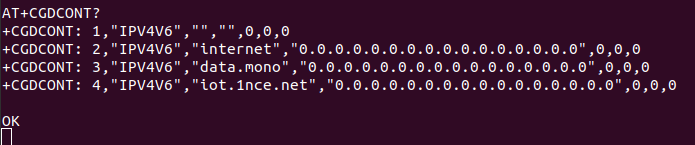
I’ve been working for two days to connect ESP32 using a BG95-M3 modem and a monogoto sim card and today the modem stopped accepting the APN command
AT+CGDCONT=1,“IP”,“data.mono”
ERROR
but this one works AT+CGDCONT=1,“IP”,“mono”
OK
Below is the log from the modem
ATI
Quectel
BG95-M3
Revision: BG95M3LAR02A03OK
AT+GSN
869616064576336OK
AT+CPIN?
+CPIN: READYOK
AT+COPS?
+COPS: 0,0,“vodafone ES”,8OK
AT+QNWINFO
+QNWINFO: “eMTC”,“21401”,“LTE BAND 20”,6300OK
AT+QNWINFO
+QNWINFO: “eMTC”,“21401”,“LTE BAND 20”,6300OK
AT+QNWINFO
+QNWINFO: “eMTC”,“21401”,“LTE BAND 20”,6300OK
AT+QCSQ
+QCSQ: “eMTC”,-69,-99,83,-16OK
AT+CGDCONT=1,“IP”,“data.mono”
ERROR
AT+CGDCONT=1,“IP”,“mono”
OK
AT+CGDCONT=1,“IP”,“data.mono”
ERROR
Firmware version:
BG95M3LAR02A03_01.017.01.017
I tried AT+QPRTPARA=1 and AT+QPRTPARA=3 but I still have APN error
What can this error be related to, yesterday the modem accepted this command ?
Hi
According to the query result of AT+QCSQ instruction, the SINR of your current network is very poor. Is your test network environment yesterday the same as today? In addition, AT+CEREG? What is the result of the command?
BR
Tabor
today I updated modem to new FW but still I can’t command
AT+CGDCONT=1,“IP”,“data.mono”
return ERROR
I tried diferent SIM card with APN internet and after few sending command AT+CGDCONT=1,“IP”,“internet” where respond was OK I also now have ERROR message when I send AT+CGDCONT=1,“IP”,“internet”
I think modem add APN data.mono and internet to some ban list.
How I can check it or clear this list ?
Command AT+QPRTPARA=3 not help