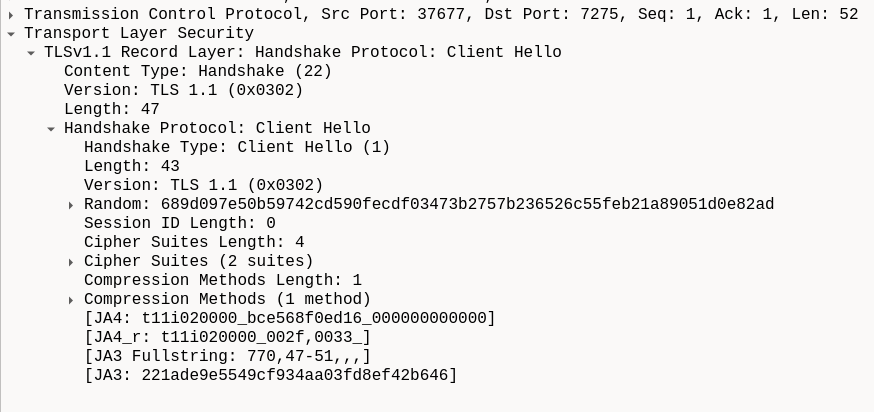
I wrote simple python script for testing SUPL.
load_supl_ssl_test.py (2.1 KB)
Here is test without SSL. You see that there are non-empty GSV messages after start.
$ sudo python3 load_supl_ssl_test.py
open serial port
Check modem talk to us
AT
[b'\r\n', b'OK\r\n']
AT+QGPSEND
[b'\r\n', b'+CME ERROR: 505\r\n']
AT+QGPSXTRA=0
[b'\r\n', b'OK\r\n']
AT+QGPSDEL=3
[b'\r\n', b'OK\r\n']
AT+QGPSDEL=0
[b'\r\n', b'OK\r\n']
AT+QGPSXTRADATA?
[b'\r\n', b'+CME ERROR: 509\r\n']
AT+QFDEL="RAM:data.bin"
[b'\r\n', b'OK\r\n']
upload file to the modem
AT+QFUPL="RAM:data.bin",889
[b'\r\n', b'CONNECT\r\n']
[b'+QFUPL: 889,6b94\r\n', b'\r\n', b'OK\r\n']
set supl ca to file we uploaded
AT+QGPSSUPLCA="RAM:data.bin"
[b'\r\n', b'OK\r\n']
write configuration
AT+QGPSCFG="plane",0
[b'\r\n', b'OK\r\n']
AT+QGPSSUPLURL="supl.google.com:7276"
[b'\r\n', b'OK\r\n']
read configuration
AT+QGPSCFG="suplver"
[b'\r\n', b'+QGPSCFG: "suplver",2\r\n', b'\r\n', b'OK\r\n']
AT+QGPSCFG="plane"
[b'\r\n', b'+QGPSCFG: "plane",0\r\n', b'\r\n', b'OK\r\n']
AT+QGPSSUPLURL?
[b'\r\n', b'+QGPSSUPLURL: "supl.google.com:7276"\r\n', b'\r\n', b'OK\r\n']
start GNSS receiver (MSB)
AT+QGPS=2
[b'\r\n', b'OK\r\n']
AT+QGPSGNMEA="GSV"
[b'\r\n', b'+QGPSGNMEA: $GPGSV,3,1,12,01,00,007,,03,09,026,,06,31,104,,11,13,140,,1*6B\r\n', b'+QGPSGNMEA: $GPGSV,3,2,12,12,62,253,,17,21,052,,19,45,067,,22,08,087,,1*68\r\n', b'+QGPSGNMEA: $GPGSV,3,3,12,24,49,181,,25,30,265,,28,01,313,,32,29,302,,1*60\r\n', b'\r\n', b'OK\r\n']
AT+QGPSGNMEA="GSV"
[b'\r\n', b'+QGPSGNMEA: $GPGSV,3,1,12,01,00,007,,03,09,026,,06,31,104,,11,13,140,,1*6B\r\n', b'+QGPSGNMEA: $GPGSV,3,2,12,12,62,253,,17,21,052,,19,45,067,,22,08,087,,1*68\r\n', b'+QGPSGNMEA: $GPGSV,3,3,12,24,49,181,,25,30,265,,28,01,313,,32,29,302,,1*60\r\n', b'\r\n', b'OK\r\n']
AT+QGPSGNMEA="GSV"
[b'\r\n', b'+QGPSGNMEA: $GPGSV,3,1,12,01,00,007,,03,09,026,,06,31,104,,11,13,140,,1*6B\r\n', b'+QGPSGNMEA: $GPGSV,3,2,12,12,62,253,,17,21,052,,19,45,067,,22,08,087,,1*68\r\n', b'+QGPSGNMEA: $GPGSV,3,3,12,24,49,181,,25,30,265,,28,01,313,,32,29,302,,1*60\r\n', b'\r\n', b'OK\r\n']
AT+QGPSGNMEA="GSV"
[b'\r\n', b'+QGPSGNMEA: $GPGSV,3,1,12,01,00,007,,03,09,026,,06,31,104,,11,13,140,,1*6B\r\n', b'+QGPSGNMEA: $GPGSV,3,2,12,12,62,253,,17,21,052,,19,45,067,,22,08,087,,1*68\r\n', b'+QGPSGNMEA: $GPGSV,3,3,12,24,49,181,,25,30,265,,28,01,313,,32,29,302,,1*60\r\n', b'\r\n', b'OK\r\n']
AT+QGPSGNMEA="GSV"
[b'\r\n', b'+QGPSGNMEA: $GPGSV,3,1,12,01,00,007,,03,09,026,,06,31,104,,11,13,140,,1*6B\r\n', b'+QGPSGNMEA: $GPGSV,3,2,12,12,62,253,,17,21,052,,19,45,067,,22,08,087,,1*68\r\n', b'+QGPSGNMEA: $GPGSV,3,3,12,24,49,181,,25,30,265,,28,01,313,,32,29,302,,1*60\r\n', b'\r\n', b'OK\r\n']
stop GNSS receiver
AT+QGPSEND
[b'\r\n', b'OK\r\n']
AT+QGPSDEL=3
[b'\r\n', b'OK\r\n']
AT+QGPSDEL=0
[b'\r\n', b'OK\r\n']
close serial port
Here is test without SSL. GSV messages are empty.
$ sudo python3 load_supl_ssl_test.py --ssl
open serial port
Check modem talk to us
AT
[b'\r\n', b'OK\r\n']
AT+QGPSEND
[b'\r\n', b'+CME ERROR: 505\r\n']
AT+QGPSXTRA=0
[b'\r\n', b'OK\r\n']
AT+QGPSDEL=3
[b'\r\n', b'OK\r\n']
AT+QGPSDEL=0
[b'\r\n', b'OK\r\n']
AT+QGPSXTRADATA?
[b'\r\n', b'+CME ERROR: 509\r\n']
AT+QFDEL="RAM:data.bin"
[b'\r\n', b'OK\r\n']
upload file to the modem
AT+QFUPL="RAM:data.bin",889
[b'\r\n', b'CONNECT\r\n']
[b'+QFUPL: 889,6b94\r\n', b'\r\n', b'OK\r\n']
set supl ca to file we uploaded
AT+QGPSSUPLCA="RAM:data.bin"
[b'\r\n', b'OK\r\n']
write configuration
AT+QGPSCFG="plane",1
[b'\r\n', b'OK\r\n']
AT+QGPSSUPLURL="supl.google.com:7275"
[b'\r\n', b'OK\r\n']
read configuration
AT+QGPSCFG="suplver"
[b'\r\n', b'+QGPSCFG: "suplver",2\r\n', b'\r\n', b'OK\r\n']
AT+QGPSCFG="plane"
[b'\r\n', b'+QGPSCFG: "plane",1\r\n', b'\r\n', b'OK\r\n']
AT+QGPSSUPLURL?
[b'\r\n', b'+QGPSSUPLURL: "supl.google.com:7275"\r\n', b'\r\n', b'OK\r\n']
start GNSS receiver (MSB)
AT+QGPS=2
[b'\r\n', b'OK\r\n']
AT+QGPSGNMEA="GSV"
[b'\r\n', b'OK\r\n']
AT+QGPSGNMEA="GSV"
[b'\r\n', b'OK\r\n']
AT+QGPSGNMEA="GSV"
[b'\r\n', b'OK\r\n']
AT+QGPSGNMEA="GSV"
[b'\r\n', b'OK\r\n']
AT+QGPSGNMEA="GSV"
[b'\r\n', b'OK\r\n']
stop GNSS receiver
AT+QGPSEND
[b'\r\n', b'OK\r\n']
AT+QGPSDEL=3
[b'\r\n', b'OK\r\n']
AT+QGPSDEL=0
[b'\r\n', b'OK\r\n']
close serial port
This file is used for uploading as SUPL CA http://secure.globalsign.com/cacert/root-r1.crt
Is it the correct one?
@herbert.pan-Q any hints, what could be wrong here?