I haven’t thoroughly tested the newest firmware from December but there seemed to be a bunch of new AT commands added and IPPT did seem better.
2 Likes
I am another customer that purchased the RM551E to use in IPPT mode. Mine seems to be stable in routing mode, but really want passthrough. Any comments from @quectel or anyone else that has tested the latest build?
I have my RM551E in my Ethernet sled running in bridge mode and it seems stable. I do notice when I reboot my upstream router, I need to power cycle the sled to get connectivity back to the Internet.
Unless you have a reason for passthrough (static IP) I’d recommend not using it and just allowing the additional NAT. It doesn’t slow anything down and it allows your connection to come back up even after the cellular goes offline and comes back. My experience (with a Ubiquiti UDM SE router) was similar to yours and I stopped using passthrough mode (as T-Mobile already does CGNAT) and everything has worked perfectly.
1 Like
ip-passthrough works great for me. only problem is that i cannot access the router itself. i can only access the asus router which is on WAN from 5g router, but for 5g router once i enable ip-passthrough it cannot be accessed and only way is to reset it. Surprisingly the GUI of asus does show gateway IP, which is +1 of the last digit of the IP address. But it does not work,
> http://ip https://ip, only ip
, does not work. But internet works nicely. I do lose the ability to see current CA status, etc. everything including sending AT commands, but i enable IP passthrough after:
- cell lock. i can do 2 cell locks and 1 5g cell lock.
- set time to my region.
- disable all wifi.
- set my router to LTE only mode. (LTE provide better speeds during network congestion for my ISP.)
question: does setting the MTU on 5g cpe is effective after ip-passthrough or i should do it manually again on asus gui, i want to set it to 1492.
Hi all,
So this thread started with RM551E-GL units which were engineering samples. To my awareness the RM551E-GL is now a mature product, and what you buy on the market now is no longer engineering samples.
In your all experience, is the passthrough/bridge mode stable now?
Is it written on the RM551E-GL that it is an engineering sample, does it say “ES1” or “ES2” anywhere on it, how do you know that it’s not a sample?
What I want to do is this: Connect the M.2 modem to the PCI slot on my computer.
(This means the modem will be in PCI mode: AT+QCFG="data_interface",1,0, and the PCI system is set to “endpoint” mode: AT+QCFG=“pcie/mode”,0.)
I then want the modem to deliver the 5G Internet to the computer so it looks like a PCI Ethernet controller.
I read online that AT+QETH="eth_driver","r8125",1 + reboot using AT+CFUN=1,1 has that effect, i.e. the Quectel now takes on the appearance of an R8125 device, so the computer will see a Realtek 8125 2.5gbps Ethernet controller, and that controller is actually the WAN on the modem.
However I also read that that command also regards that the modem operates in PCI root mode and will assume there’s an R8125 chip on the PCI bus which it should channelize the 5G traffic to. If you have any clarification here let me know.
Finally, my computer should learn which IPv4 and IPv6 address the ethernet interface should have, and it should learn IPv4 and IPv6 default gateway. Optionally also learn DNS servers.
Do you have some example script for how all this is attained?
If I understood it right, as for IPv4, the modem will run a DHCP server which will instruct the host computer which IPv4 number to take i.e. the modem hands the host computer the IP number assigned by the telco this way. And I guess IPv4 default gateway setting and probably IPv4 DNS servers are handed through DHCP the same way.
Does the modem run a DHCP server on IPv6 too or how does the host computer configure the IPv6 IP?
Last, where is the AT commands documentation for this modem as PDF.
And @iamromulan : You mentioned Mac address can’t be FF:FF:FF… - is it still so now with the not-engineering-sample RM551E-GL?
Thanks!
FYI: this is why people install tailscale or similar… so they still have a way to access the modem after enabling ip passthrough. Also, in a lot of cases there is no real benefit to using ip passthrough as you’re likely still behind CGNAT, in which case being behind the nat of the modem is inconsequential.
1 Like
Your goal is to connect it to your computer directly using PCIe instead of USB.
Ok, you need either a laptop with a cellular modem m.2 slot thats presented as a PCIe device (Many Lenovo models come to mind) or on a desktop you need this https://a.aliexpress.com/_mOZU3Sn
The modem can only be utilized in TE modes as a PCIe Endpoint device. It will not emulate or present itself as any other hardware.
The Eth driver command only applies to previous modem generations like the RM520, as Ethernet driver selection is automatic now on the RM551. Nonetheless, this has nothing to do with PCIE EP mode. It’s only applicable to PCIe RC mode. It’s essentially so the modem knows what driver to use with its PCIE EP device connected to it (since the modem in RC mode is expecting an EP device to use for itself), in this case an Ethernet chipset.
So you’ll have to pick between wanting to use it in PCIe EP mode and an AP mode, can’t have both.
Also you’ll need the right driver for the way you are using it. (Besides PCIe RC since it’s hostless)
Hi @iamromulan , thanks for writing.
I think I will connect the modem as both PCI (i.e. End Point) and USB at the same time.
Your goal is to connect it to your computer directly using PCIe instead of USB.
Agreed. However I’ll believe it, that it’s connected successfully via PCI, when I see it.
The modem can only be utilized in TE modes as a PCIe Endpoint device. It will not emulate or present itself as any other hardware.
What is TE abbreviation for?
Is AP abbreviation for “Access Point” as in a WIFI (and/or cable ethernet) access point?
In TE modes the IP address(es) is always passed through to the host.
Can you confirm if the RM551E-Gl modem operates DHCP server on both IPv4 and IPv6?
If you have a minute feel free to look at this post too Connect M.2 5G modem to PCI and USB at the same time is supported right? And how configure. (RM551E-GL, RM520N-GL etc.) , asking related question there.
If you have any insights about how the modem appears on Linux and which drivers are needed in Linux for the networking device, please let me know.
Also, do you keep a USB serial connection to the modem via USB for AT commands, at the same time as it’s connected via PCI (for networking)?
Many thanks
Why do you need both? I’d understand 2 different devices, one via USB one via PCIe but both to the same device could cause race condition issues. Only way to connect via PCIe is if the m.2 slot is set up that way or you use that special card I linked.
I have no idea what TE is an abbreviation for. AP is an abbreviation for “Application Processor”.
There’s a full Linux system running directly on these modems. That system is referred to as the Application Processor officially. You can access it’s command line via ADB or UART. TE and AP modes is referring to what’s in charge of the radio/connection management. In TE modes the modem is presented as a straight cellular modem/radio and the host is in charge of the connection management/RMNET interface directly. AP modes is more like USB Ethernet (or real eth via PCIe RC) the application processor is in charge and the DHCP server running on the AP hands out IPs either over USB ECM, USB RNDIS, or PCIe RC —> to an Ethernet chipset or WiFi module.
If you want to sift through my stuff you can do that here
There’s a quick start guide PDF in there as well for Linux I’d definitely give a read.
You can do everything over one or the other (USB or PCIe). AT ports show as ttyUSB devices over USB on Linux and MHI devices over PCIe.
My preference is running the module in PCIe RC mode attached to an RTL8125 → direct Ethernet port attached to the modem’s AP. Then via ADB or customizing the ubi images of the firmware install a custom web UI served by a web server that runs directly on the AP for finer control. In theory you can access the same web UI over any AP mode. ECM, RNDIS and PCIe RC. I feel like I’m getting my money’s worth and using the whole hardware this way. Plus just about anything and everything works with Ethernet.
1 Like
Hi @iamromulan , thanks for your insightful response. Also thanks a lot for the folder you sent, it’s very helpful.
By ADB and UART, you mean connecting a TTY-serial cable to particular PIN:s on the RM551E-GL PCB right?
Can you send a photo pointing out which PIN:s to connect to on the PCB, and reference to Aliexpress link where to buy a USB-tty-serial adapter with the right connectors?
To have the modem’s ethernet go directly via the PCI interface - i.e. classic host computer usecase where you have a computer that runs Linux, and the modem is connected via a PCI/M.2 port - do you prefer QMI or MBIM here? I see you mention the terms “ECM” and “RNDIS”, I don’t understand yet what those are (esp. in the context of PCI), please feel free to explain. As for QMI and MBIM they are variants of PCI drivers, that the model supports.
To install some management web server on the modem sounds cool. Which one do you like?
The OpenWRT that’s apparently installed on the RM551E-GL already, does it have a web UI?
About TE, I’m thinking it could be an abbreviation for Tethered Endpoint. @silvia what do you say..
In TE modes the modem is presented as a straight cellular modem/radio and the host is in charge of the connection management/RMNET interface directly.
I would like my computer to get the IP number directly so it can open ports reachable from the Internet on the other side of the phone operator. That means IPPM must be enabled right. Do you have some suggestion for how to do this -
How much work is “RMNET” and “connection management”, is there some Linux tool that can do it for me automatically, or is it a nothingburger?
Finally how do you get the IPv6 IP on your Linux host computer, dhclient -6 wwan0?
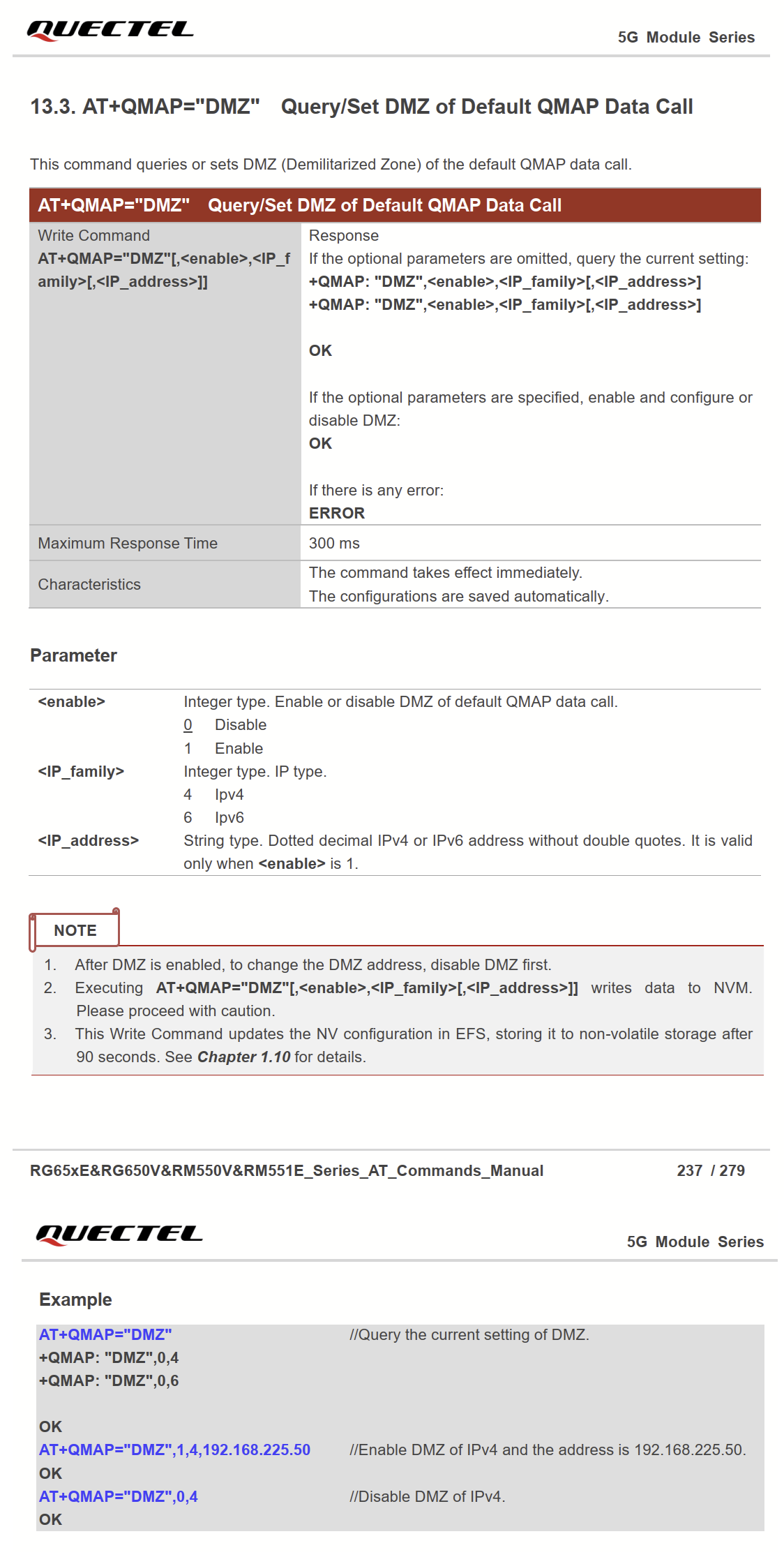
Reading through the RM551E-GL’s AT commands manual “Quectel_RG65xE_RG650V_RM550V_RM551E_Series_AT_Commands_Manual_V1.0.pdf”, I see the DMZ function.
It appears to me that through the DMZ function, all IPv4 and IPv6 connections that come in from the outside to the external connection as handled by the modem, is forwarded to a specified internal IPv4 and IPv6 IP. This might be essentially all benefits one would look for by using the passthrough (IPPI) mode. Perhaps DMZ is a lot less problematic than IPPI.
What do you say - is it a good idea and easy to set up the network connection to go via PCI (to your Linux host computer) ie via QMI or MBMI right, and have the modem work in AP/router mode, and then configure the DMZ function so incoming connections are forwarded to your Linux host computer?
Screenshot of the DMZ function manual page: