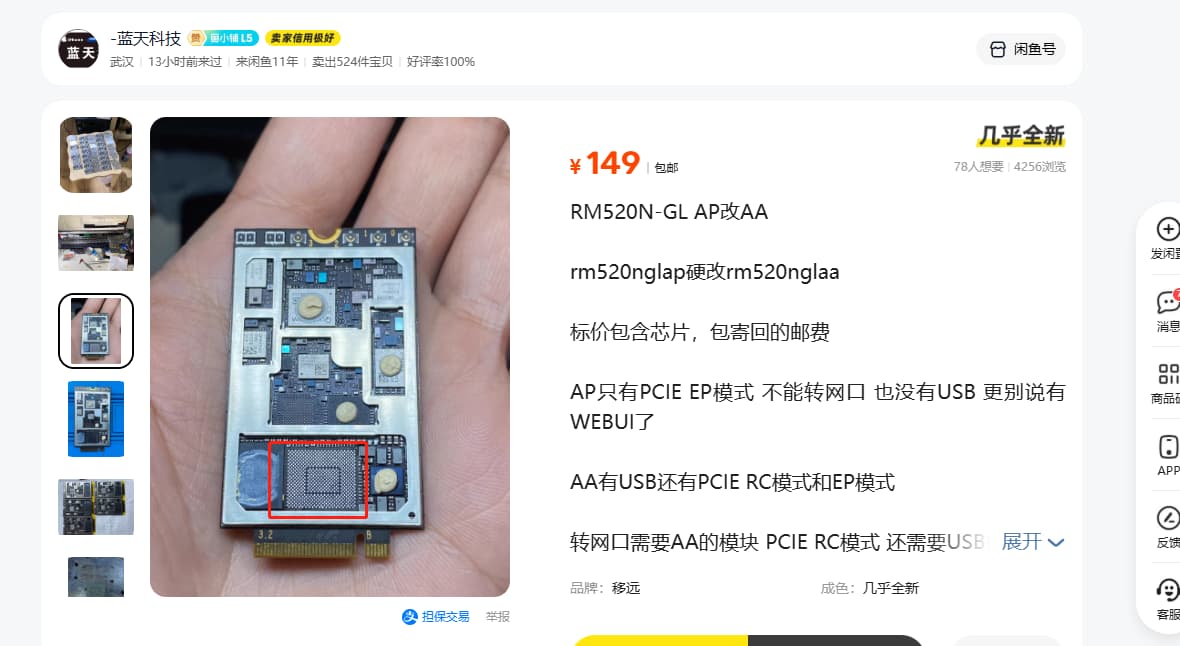
Modify RM520NGLAP to have USB

Hey, I’m still struggling with my RM520N-GL AP - it doesn’t show up on any computer. The only thing I can do is short the jumpers, which causes the QDL port to appear. The only software I can flash is the original Lenovo firmware. Then it resets and the modem isn’t visible again. Any ideas on how to enable Etch so I can use it with an adapter?

AT+QCFG=“data_interface”,0,0
AT+QETH=“eth_driver”,“r8125”,1
AT+QCFG=“pcie/mode”,1
AT+QCFG=“usbnet”,1
AT+CFUN=1,1

Such an interesting thing to change the card mode

Such a curiosity to change the card mode
Quectel RM520-GL Firmware Switching Tool for Linux Ubuntu

Installation Instructions / How To Use This Software
BEFORE INSTALLING THE PACKAGE:

  1. Check if your version of Linux is supported.

  2. Update the system BIOS to the latest version

  3. Run repository and firmware manager updates

    Ubuntu:

    $ sudo apt-get update

    $ sudo apt-get upgrade

    $reboot

    Fedora:

    $ sudo dnf update

    $ sudo dnf upgrade

    $reboot

  4. Check that the WWAN Card is getting recognized correctly

    $lspci

    --> 08:00.0 Wireless controller [xxxx]: 
    

    Some devices use a USB interface instead. Check it using the following command:

    $lsusb

    --> Bus xxx Device xxx: Wireless Device
    

    $mmcli -L

    --> displays the modem index
    

    $ mmcli -m

    --> this should return the modem manager information
    

PACKAGE INSTALLATION:

  1. Decompress the .zip file to access the .deb package.

  2. Open the terminal and navigate to the folder with the package.

  3. Use the following commands to install the package:

    $ sudo dpkg -i QFirmwareSwitch-1.3.0.15.deb

I have seen some repair pictures and found that the SDX62 chip needs to be replaced.